
// Creative Agency
AI Overviews Optimization: 7 Steps That Work in 2026

AI Overviews optimization is ordinary, well-executed SEO applied with more discipline: a site Google can crawl, pages that say something original, answers laid out clearly, and reporting that shows what appeared. Google’s own guidance says so, and it is good news for a business, because the work is concrete and it is the same work that wins classic search. At Depeche Code, our SEO and AEO plans are built around exactly that foundation.
Below are seven steps in the order we would take them, what each needs, and where each tends to go wrong.
TL;DR
- Google says there is no special markup or secret tactic for AI Overviews. Eligibility rests on the same technical and content basics as regular Search.
- Make sure Googlebot can reach your pages, they load properly, and the important information is real text on the page.
- Publish original, people-first content with clear headings. Volume alone does not raise quality.
- Since 2026, Search Console has dedicated reports for generative AI features, so you can measure impressions instead of guessing.
- Judge results by conversions and lead quality, not clicks alone.
Table of Contents
- What AI Overviews are and why they matter to a business
- 1. Confirm that Google can reach and index your pages
- 2. Check your snippet controls
- 3. Write original, people-first content
- 4. Organize each page so the answer is easy to lift
- 5. Build topics, not single keywords
- 6. Keep the technical experience fast and stable
- 7. Measure with Search Console, then judge by business results
- What does not work, and what it costs you
- Our perspective
- Getting started with Depeche Code
- FAQ
- Sources
What AI Overviews are and why they matter to a business
AI Overviews are the AI-written summaries that sometimes appear above the regular results in Google Search. According to Google Search Central, they help people get the gist of a complicated topic faster and give them links as a starting point for exploring. They appear when Google’s systems decide they add value beyond classic results.
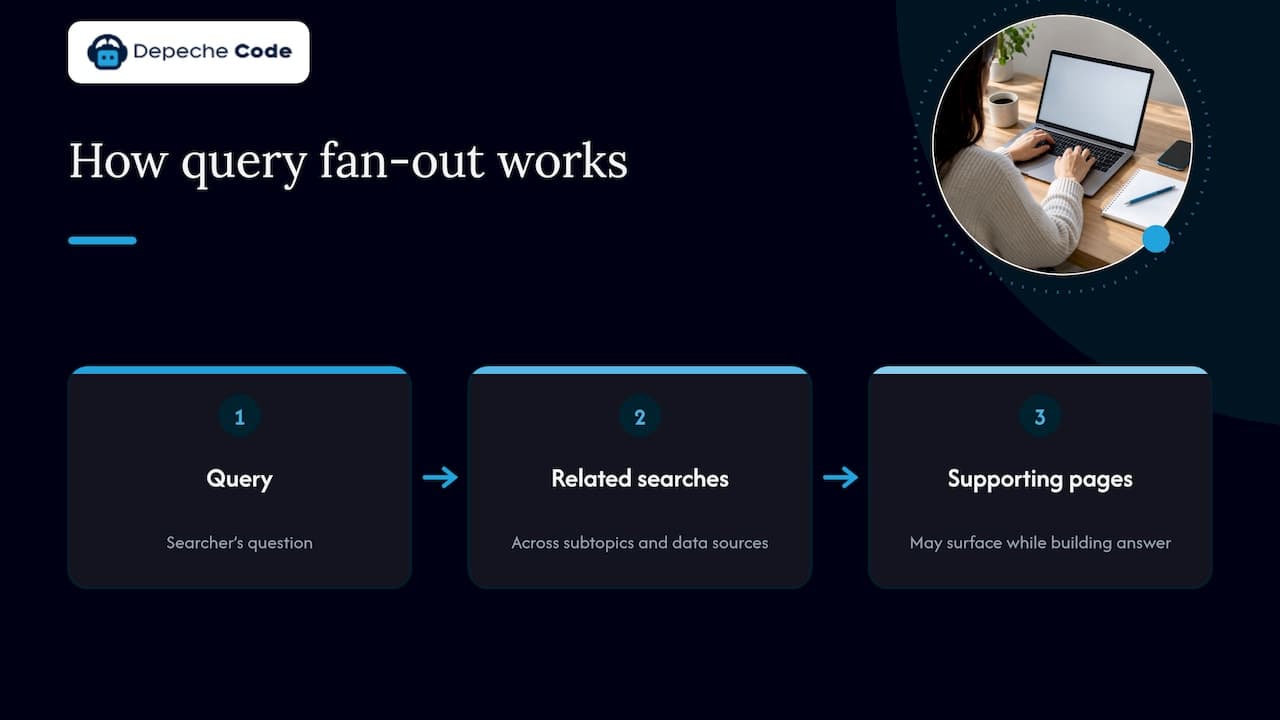
Two details matter for how you plan. First, Google notes that an AI Overview may use “query fan-out”, which means running several related searches across subtopics and data sources, and it may surface additional supporting pages while building the answer. In practice, a page can be cited for a question the searcher never typed exactly. Second, being cited is not a separate game with its own rulebook. Google’s May 2025 guidance says its AI experiences build on what it has long advised: focus on visitors and provide unique, satisfying content.
For a business owner, that means the budget question is not “do we need an AI strategy on top of SEO?” but “is our SEO foundation strong enough that Google can use our pages at all?”
1. Confirm that Google can reach and index your pages
Everything else depends on this step. Google’s guidance lists the basics: Googlebot must not be blocked, pages should return an HTTP 200 status, and they need indexable content. Google also stresses that meeting these requirements does not guarantee a page will be crawled, indexed or served, so treat them as the entry ticket.
Where it goes wrong:
- A staging-site “noindex” tag survives the launch of a new site.
- A robots.txt rule meant for one folder blocks a whole section.
- Old URLs return errors after a redesign and the pages that earned trust disappear.
The redesign case is the one we see as most avoidable, which is why our website redesign checklist for SEO preservation exists. If you are planning a rebuild, getting redirects and indexing right before launch protects every other step on this list.
2. Check your snippet controls
This is the quiet one. Google’s guidance says that controls such as nosnippet, data-nosnippet, max-snippet and noindex affect how your content can be shown, and more restrictive settings limit its use in AI experiences.
Some sites carry a restrictive snippet setting from a plugin default or an old template, and nobody remembers adding it. Review the settings on your key service and product pages. If you want those pages considered for AI features, the controls should allow it.
A related point: inclusion is the default. Google’s documentation on the generative AI control in Search Console says that excluding a site keeps its content from appearing or grounding AI responses and means no impressions or traffic from those features. It also says the control changes eligibility only and is not a ranking signal for other parts of Search.
3. Write original, people-first content
Google’s guide to optimizing for generative AI features recommends helpful, reliable content that offers original information, distinctive experience or a useful point of view, rather than generic or recycled material. That is the step where most business sites fall short, because most service pages describe the service the way every competitor does.
A practical test for any page: what does it say that only your business can say? Examples:
- Your pricing logic, timelines and what a typical project in your industry actually involves.
- Photos, results and case details from your own work.
- Answers to the questions your sales team hears every week.
The same guide notes that publishing a large number of pages does not by itself make a site higher quality or more relevant. A dozen thin posts will not beat three thorough pages, so spend effort on depth.
4. Organize each page so the answer is easy to lift
Google recommends clear organization: readable paragraphs, sections and headings, with the important information available as text rather than buried in images. In practice, this looks like:
- A heading that matches a real customer question.
- A direct answer in the first one or two sentences beneath it.
- Supporting detail, a short list or a table where comparison helps.
- Relevant, high-quality images or video where they add something.
The approach is not a trick. It is the same structure that helps a busy buyer skim your page on a phone. Google also says semantic HTML does not need to be perfect for Search, though using it where possible helps screen-reader users, which is a good reason to do it anyway.
For a lot of owners, this is where help pays off. Our SEO plans include organic, local and combined options with AEO (answer engine optimization) in the mix, so the structure of your pages is planned alongside the keywords they target.
5. Build topics, not single keywords
Because of query fan-out, a page that answers one narrow phrase is less useful than a set of pages that cover a subject properly and link to each other. Think of a local home-services company: one page for the service, supporting pages for pricing factors, timelines, permits, common problems and service areas, each answering a real question in full.
This also fits how people search. A buyer researching a website rebuild asks about cost, timing, SEO risk and platform choice. If your site answers all of it, your pages have more chances to be selected as supporting sources. Our practitioner playbook on AI search optimization goes deeper on how we approach topic coverage, and our overview of SEO trends in 2026 puts it in the wider context.
6. Keep the technical experience fast and stable
Google’s guidance asks for good page experience and for structured data that matches what is visible on the page. It also says no special schema is needed for generative AI features, so do not pay for exotic markup promising AI placement. Keep standard markup accurate and consistent with the page.
Speed and stability are where hosting and maintenance matter. Slow plugins, outdated themes and unpatched WordPress installs undermine page experience quietly. We measure our own work by Google PageSpeed and SEO scores, and we offer WordPress hosting and maintenance so that someone is responsible for updates, uptime and performance after launch. Plans start at $39 per month for dedicated hosting and $99 per month for maintenance.
7. Measure with Search Console, then judge by business results
For a long time, AI visibility was a guessing game, and third-party tools filled the gap. Google’s own guide warns that outside tools cannot see its internal ranking or AI systems, so their scores are estimates at best.
That changed in 2026. Google introduced dedicated Search Console reports for generative AI on June 3, 2026, showing impressions, which URLs appeared, countries, devices and performance over time. The reports began rolling out to a subset of sites and, per the announcement, were available worldwide as of August 31, 2026. The data is also counted in your overall performance report.
Google’s guidance also says AI-feature traffic is included in overall Search Console performance, while Google Analytics can assess conversions and time on site after the visit. It recommends looking at conversions and other signs of visit value rather than clicks alone. A few visits from people who call and book are worth more than many that bounce.
A simple monthly routine:
- Pull impressions and clicks for pages that appear in generative AI features.
- Compare them with leads, calls and form fills for the same pages.
- Update the pages with impressions but weak engagement, and expand the ones that convert.
What does not work, and what it costs you
Pulling the steps together, a few moves waste money:
| Move | What the evidence says |
|---|---|
| Special “AI schema” | Google says no special schema is needed |
| Mass-producing pages | Quantity alone does not raise quality or relevance |
| Buying a visibility score from a third-party tool | Such tools cannot access Google’s internal systems |
| Blocking snippets for no reason | Restrictive controls limit use in AI experiences |
| Chasing clicks only | Google suggests weighing conversions and visit value |
The consistent message is that the basics, done thoroughly, are the strategy.
Our perspective
We approach AI Overviews as a quality test of the whole website, not a separate channel. When a client asks how to appear in them, the honest answer is a checklist: can Google reach every important page, does each page answer a real customer question better than the next result, is the site fast, and are you measuring the right things?
That is why we bring the pieces together. Website design and redesign, WordPress hosting and maintenance, and organic and local SEO/AEO plans all touch the same outcome, and when one team handles them the handoffs disappear. We use AI under our own direction to speed up delivery, and we stand behind transparent ownership of everything we build for you, so your content and site stay yours.
Our goal for each client is a site that performs well on Google PageSpeed and SEO scores and keeps earning visibility as search changes. Small businesses and large ones alike benefit from the same discipline: useful pages, a healthy site, and measurement tied to leads.
Donovan Wells - Founder and CEO
Getting started with Depeche Code
If you would rather have a team handle the technical foundation, the content structure and the reporting, our SEO services cover organic and local plans with AEO built in, and we can pair them with a redesign or ongoing WordPress care. Pricing for SEO plans is scoped to your business, so the first step is a conversation about your site and goals.

Explore our SEO services or reach us through depechecode.io.
FAQ
Can I guarantee my business will appear in Google AI Overviews?
No. Google describes its recommendations as guidance, and says meeting the technical requirements does not guarantee crawling, indexing or serving. What you can control is eligibility and quality: an accessible site, original content and clear structure.
Do I need special schema or a new kind of SEO?
Google’s guide says no special schema or extra technical requirements are needed for generative AI features. Standard SEO foundations apply, and structured data you already use should match what visitors see on the page.
How do I see whether my pages show up in AI Overviews?
Use the generative AI reports in Google Search Console, which show impressions, URLs, countries and devices over time. Google says they were available worldwide as of August 31, 2026. Pair them with Google Analytics to see what visitors do after arriving.
Should I block AI features to protect my traffic?
Inclusion is the default, and Google says excluding your site means no impressions or traffic from those features and keeps your content from grounding AI responses. For most businesses seeking visibility, staying eligible is the better course.
Sources
- AI Features and Your Website, Google Search Central
- Top ways to ensure your content performs well in Google’s AI experiences
- Google’s Guide to Optimizing for Generative AI Features
- Search generative AI control, Search Console Help
- Introducing Search Generative AI performance reports in Search Console