
// Creative Agency
Chatbot for Customer Support: 7 Must-Haves in 2026

A chatbot for customer support is software that answers customer questions in a chat window or messaging channel, collects the details of a request, and passes the conversation to a person when it should. It works when it is trained on your real content, limited to jobs it can do well, and built with an easy way to reach a human. This guide gives you seven must-haves to check before you launch, then a testing plan, a look at what it costs and a short FAQ.
TL;DR
- A support chatbot is best at repetitive, high-volume questions: order status, hours, policies, appointment changes and first-step troubleshooting.
- 87% of customers surveyed by Gartner say a path to a human agent is essential when a company uses generative AI for service. Build that path first.
- Test before you launch: run your most common questions through the bot, then release it to a small share of traffic.
- Treat the chat widget as part of your website for accessibility and privacy.
- Our AI chatbot plans start at $49 per month, plus a $299 one-off setup and integration fee.
Table of Contents
- What a support chatbot actually does
- 7 must-haves for a customer support chatbot in 2026
- What results to expect
- How to launch without embarrassing yourself
- Chatbots beyond support: leads and engagement
- A quick checklist before you choose
- Our perspective
- What a managed chatbot costs with us
- FAQ
- Sources
What a support chatbot actually does
At its core, a support chatbot does two things. It works out what the customer is asking, and it returns a useful response. IBM describes the range as running from rule-based systems to AI assistants that understand context and learn from interactions.
In practice, a modern bot follows a short loop:
- Understand the intent. “Where’s my package?” and “my order hasn’t shown up” mean the same thing.
- Find the answer. It pulls from your help center, product pages, policies or a connected business system.
- Keep the context. It remembers what the customer said two messages ago, so nobody has to repeat themselves.
- Act or hand off. It either completes a simple task, such as checking a status, or routes the conversation to a person with the details already collected.
That last step is what separates a helpful bot from a frustrating one. The rest of this guide is built around it.
7 must-haves for a customer support chatbot in 2026
1. A clear job description
The most common reason chatbots disappoint is that they are asked to do everything on day one. Start with the requests that arrive most often in your inbox, phone log or ticket queue. Typical first jobs for a small or midsize business include:
- Answering frequently asked questions about pricing, hours, shipping, returns and service areas
- Checking the status of an order, case or booking
- Collecting a name, email and issue summary before a person takes over
- Guiding customers through basic troubleshooting or account setup
- Rescheduling appointments
- Giving after-hours answers and logging the rest for the morning
Pick three to five of these. A bot that does four things reliably earns more trust than one that attempts forty and fumbles half of them.
2. One source of truth for answers
A bot is only as accurate as the content behind it. Before launch, gather the pages and documents it should draw from: your website, help articles, product details and policies. Then clean them up. Contradictory return policies on two pages will become contradictory answers in the chat.
Assign an owner for this content. When a price, hours or policy changes, the bot’s knowledge has to change the same day.
3. A fast, obvious way to reach a person
This is the must-have customers care about most. In a Gartner survey of 3,566 customers run in February and March 2026, 87% said it is essential for companies using generative AI in service to offer a way to reach a human. Gartner’s analyst also advised against making AI a mandatory first step for every issue, and suggested it works best when it gathers information and resolves only when confidence is high, with a clear route to a person.
Define your handoff rules before launch. Three kinds of triggers cover most situations:
- Explicit: the customer asks for a person. The bot should hand off immediately, without a quiz first.
- Sentiment-based: the customer’s tone turns frustrated or angry.
- Capability-based: the question falls outside what the bot knows or is allowed to do, or the same fix has failed twice.
This three-way split comes from Capacity’s guide to AI escalation design. Whatever you choose, the handoff should pass along the full transcript so the agent picks up where the bot stopped.
The stakes are real in the US. One 2026 compilation of survey data reports that 79% of Americans strongly prefer a human over an AI agent. A visible “talk to a person” button turns that preference from a risk into a non-issue.
4. Connections to the systems your team already uses
A bot that can only recite FAQs is a search box with a personality. The useful version connects to the tools behind your support: your help desk so a ticket is created with the transcript attached, your CRM so it recognizes returning customers, and your order or booking system so it can check a status instead of telling the customer to wait for an email.
Start with the help desk or email inbox, because that is where handoffs land. Add deeper integrations once the basics are stable.
5. The right channels, not all channels
Customers reach you on your website, by text, on social media and by email. Resist the urge to launch everywhere. A sensible rule is to start with the three to five channels that carry most of your customer conversations. For many local and service businesses, that means the website chat widget plus one messaging channel.
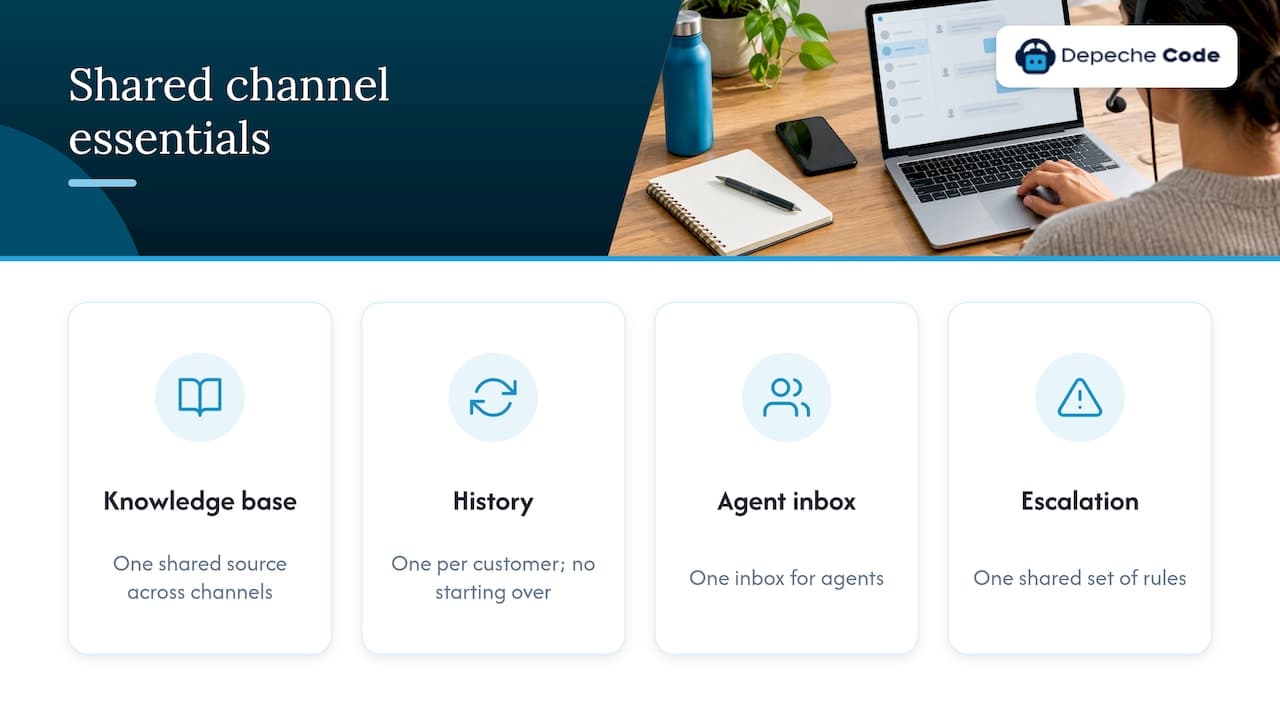
Whatever channels you add, keep four things shared: one knowledge base, one conversation history per customer, one inbox for agents and one set of escalation rules. That way a customer who starts on your site and continues by text does not start over. If you run both a website and social profiles, our guide on combining website design with chatbot features covers how the widget and the page should work together.
6. Accessibility and privacy built in
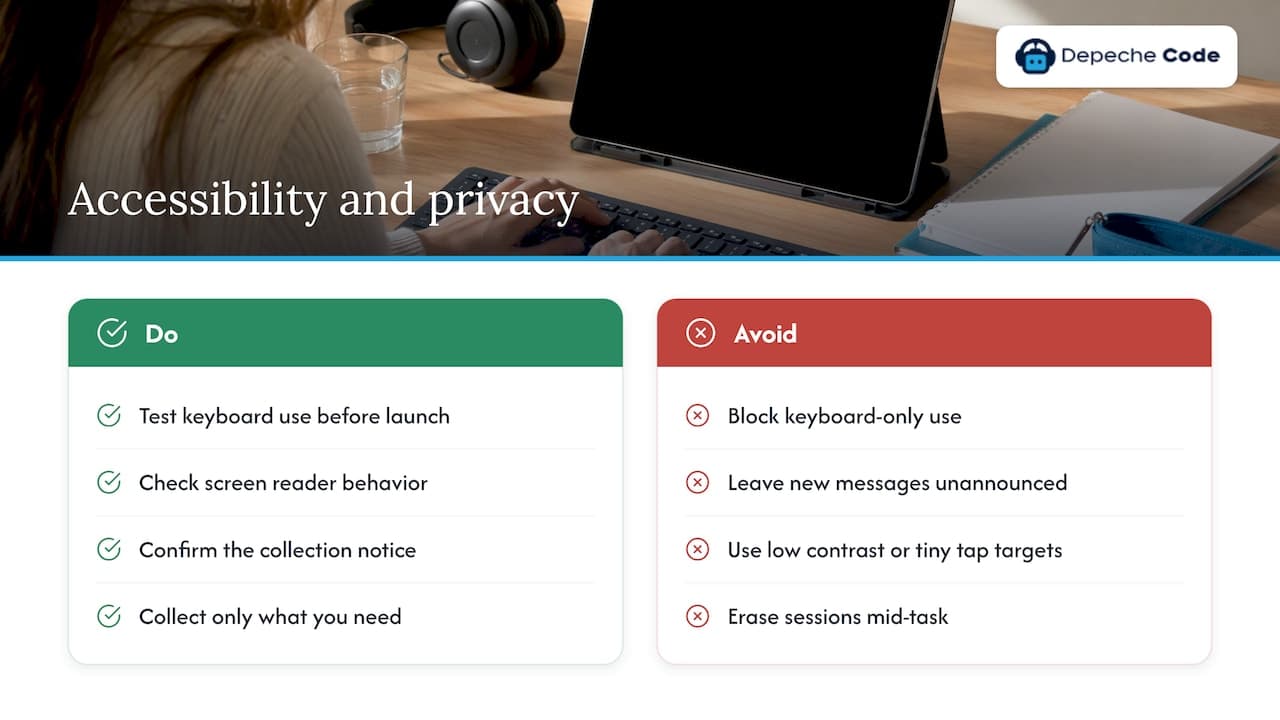
A chat widget is part of your website, so the accessibility expectations for your site apply to it. The failures that show up most often are widgets that cannot be used with a keyboard alone, new messages that screen readers never announce, low contrast or tiny tap targets, and sessions that time out and erase a conversation mid-task. The W3C publishes WCAG 2.2, the current version of the web accessibility guidelines, and it is the sensible target for anything you deploy now. Ask whoever installs your bot to check keyboard use and screen reader behavior before it goes live.
On privacy, the bot collects personal information the moment a customer types a name or email. If you serve California residents, the state attorney general’s CCPA page explains the rights consumers have over their data and is the place to start. Have your legal adviser confirm what notice your chat window needs at the point of collection, and collect only what you need to help the customer.
7. Someone who owns it after launch
A chatbot is not a one-time install. Products change, policies change and customers ask new things. Plan for a regular review of the conversations where the bot failed or handed off, then fix the content or the flow. One industry guide suggests budgeting 30 to 50% of the initial build cost per year for upkeep, which is a useful benchmark when you compare a managed service against doing it yourself and letting it drift.
Our common chatbot implementation mistakes article walks through the pitfalls that show up most after launch.
What results to expect
Vendors and surveys quote impressive numbers, so it helps to know which are solid. Many of the most-cited figures come from large enterprises with huge ticket volumes, not a business that handles a few hundred conversations a month.
A 2026 statistics roundup reports that IBM measured an average 30% operating cost reduction for enterprises using chatbots on tier-one support, and that the best implementations reach 50% or more when they update their knowledge base weekly and assign people to train the AI. The takeaway for a smaller company is the pattern behind the number: the bots that perform best are maintained by someone.
The benefits most businesses can count on are simpler:
- Faster first responses to routine questions
- Coverage outside staffed hours
- Less staff time spent on repeated information requests
- Cleaner handoffs, because the bot has already gathered the basics
Measure these in your own data. Track the share of conversations the bot resolves, how often it hands off, how long customers wait for a first reply and how customers rate the chat.
How to launch without embarrassing yourself
A practical launch follows the same order at almost any company:
- Pull your top questions. Export the last three months of emails, chats and calls and list the 50 most common requests.
- Write or tidy the answers. One approved answer per question, in your brand’s voice.
- Set the handoff rules. Decide what triggers a person, who receives it and what hours they are available. If nobody is online, the bot should say so and take a message.
- Test internally. Run all 50 questions through the bot, including awkward phrasings and typos. Fix anything wrong or vague.
- Shadow, then pilot. Many teams let the bot run quietly alongside live agents for a week or two, then open it to 10 to 20% of visitors while watching results daily.
- Expand gradually. Raise the share of traffic as the numbers hold.
- Review on a schedule. Weekly at first, monthly once things settle.
If you want the full walkthrough, our AI chatbot setup steps playbook goes through it in more detail.
Chatbots beyond support: leads and engagement
Once the bot handles support well, the same tool can do more. Because it already greets every visitor, it can ask a qualifying question, offer to book a call or capture an email when someone lingers on a pricing page. We cover the approach in our posts on using chatbots for lead generation and proactive responses that improve engagement. Keep support and sales conversations clearly separate, so a customer with a problem is never pushed a pitch.
A quick checklist before you choose
Use these questions with any provider, including us:
| Question | What a good answer looks like |
|---|---|
| What will the bot handle on day one? | A short list of specific jobs drawn from your real ticket data |
| How does a customer reach a person? | A visible option, available at any point, with the transcript passed along |
| What does it connect to? | Your help desk, email, CRM or booking tools, named specifically |
| Who updates the answers? | A named person on your side or on the provider’s side |
| How is accessibility handled? | Keyboard use, screen reader announcements and contrast are checked |
| What are the full costs? | Setup fee, monthly fee and what is included, in writing |
Our perspective
Most small and midsize businesses do not need an enterprise help desk. They need a front door that answers the same twenty questions at 9 p.m. on a Sunday, collects the details of everything else and gets the right person in the loop by Monday morning.
That is how we design a chatbot for customer support. We start with your real questions, build the bot around your content, and make the route to a human obvious. We also direct the AI work in-house, which is how we aim to deliver faster than a traditional project timeline.
We also think the chatbot should not live apart from your website. Design, copy, search visibility and chat all shape the same customer experience, so we build and manage them together and hand you full ownership of what we deliver.
A bot that is tuned, reviewed and kept current turns support from a cost you absorb into a service customers notice.
Donovan Wells - Founder and CEO
What a managed chatbot costs with us
Our chatbot plans are priced monthly. Starter starts at $49 per month, Growth at $99 and Prime at $149, with a one-off setup and integration fee of $299. We handle the setup, connect the bot to your content and tools, and support it after launch. If your website also needs a refresh so the chat has a strong page to sit on, we do that too.
If you want to see which plan fits your volume and channels, explore our AI chatbot service or get in touch through our site and tell us what your customers ask most.
FAQ
Will a chatbot replace my support team?
No. It takes the repetitive first-line questions and gathers context, so your team spends its time on the conversations that need judgment and empathy. Customers want that arrangement too: most say they expect a way to reach a person. Plan the chatbot as the first point of contact with a human behind it.
How long does it take to set up a support chatbot?
The build itself can be quick when your content is organized, but a responsible launch also includes testing and a limited pilot. Plan on gathering your top questions, tidying your answers, testing internally and releasing to a share of visitors before opening it fully. The cleaner your help content, the faster this goes.
How much does a customer support chatbot cost?
Costs vary widely by provider and by how much integration is needed. With us, plans start at $49 per month (Starter), $99 (Growth) and $149 (Prime), plus a $299 one-off setup and integration fee. Ask any provider for the setup fee, the monthly fee and what ongoing maintenance includes.
What should a chatbot never handle on its own?
Anything outside its approved content or authority: disputes, complaints from upset customers, requests involving sensitive personal data and anything where a wrong answer has real consequences. Set these as automatic handoffs. The bot should also pass a person the conversation whenever the customer asks for one.
Does a chat widget need to be accessible?
Yes. The widget is part of your website, so it should work with a keyboard alone, announce new messages to screen readers and keep readable contrast. Target WCAG 2.2 and ask your provider to confirm these checks before launch.
Sources
- IBM: A Guide to AI Customer Service Chatbots
- CMSWire: Gartner survey on customers and human access in AI service
- Capacity: AI agent escalation design
- Unthread: Chatbots vs human agents stats
- W3C: Web Content Accessibility Guidelines 2.2
- California Attorney General: CCPA
- Nexus Agent: How to deploy enterprise chatbots
- Axis Intelligence: AI customer service statistics 2026