
// Creative Agency
Google Business Messages: 5 Best Replacements in 2026

Google Business Messages no longer exists. Google discontinued the service on July 31, 2024, and the Chat button that used to sit on your listing in Search and Maps went with it. The good news for a U.S. business in 2026 is that customers can still reach you from Google, and you can do it with tools you own. The strongest setup puts an AI chat bot on your website, backs it with text messaging on your Google Business Profile, and keeps the rest of the profile sharp enough to send people to both.
This guide explains what Google Business Messages was, what changed, and the five best ways to replace it this year, ranked in the order we would set them up.
TL;DR
- Google Business Messages was shut down on July 31, 2024. Chat and call history are gone from Business Profiles.
- Customers can still find and contact you through Search and Maps using your website link, phone number, description and photos.
- US businesses with a verified profile can add text messaging or WhatsApp to their profile, where chat options are available.
- A chat bot on your own website gives you a messaging channel nobody can switch off, and it answers visitors at any hour.
- Business Messages is not the same as Google Messages, Google Chat or RCS for Business, so check which one a vendor is really talking about.
Table of Contents
- What Google Business Messages was, and why it ended
- What customers can still do from your Google listing
- The 5 best replacements for Google Business Messages in 2026
- How the five options compare
- Don’t confuse these Google messaging products
- How to set up your replacement in a week
- Where a chat bot fits and where people still matter
- Get a messaging setup that you own
- Our perspective
- FAQ
- Sources
What Google Business Messages was, and why it ended
Business Messages let people tap a Chat button on a business listing in Google Search or Maps and start a conversation. Google’s developer documentation describes it as a way to message brands from Search results and Maps on iOS and Android, with conversations able to continue for up to 30 days after the customer’s last message.
For small businesses it was simple. Per Google’s Business Profile help, multiple managers could reply, share photos and set a welcome message, and you had to answer within 24 hours or Google would deactivate chat. Larger brands connected it to a bot or a contact center through an API.
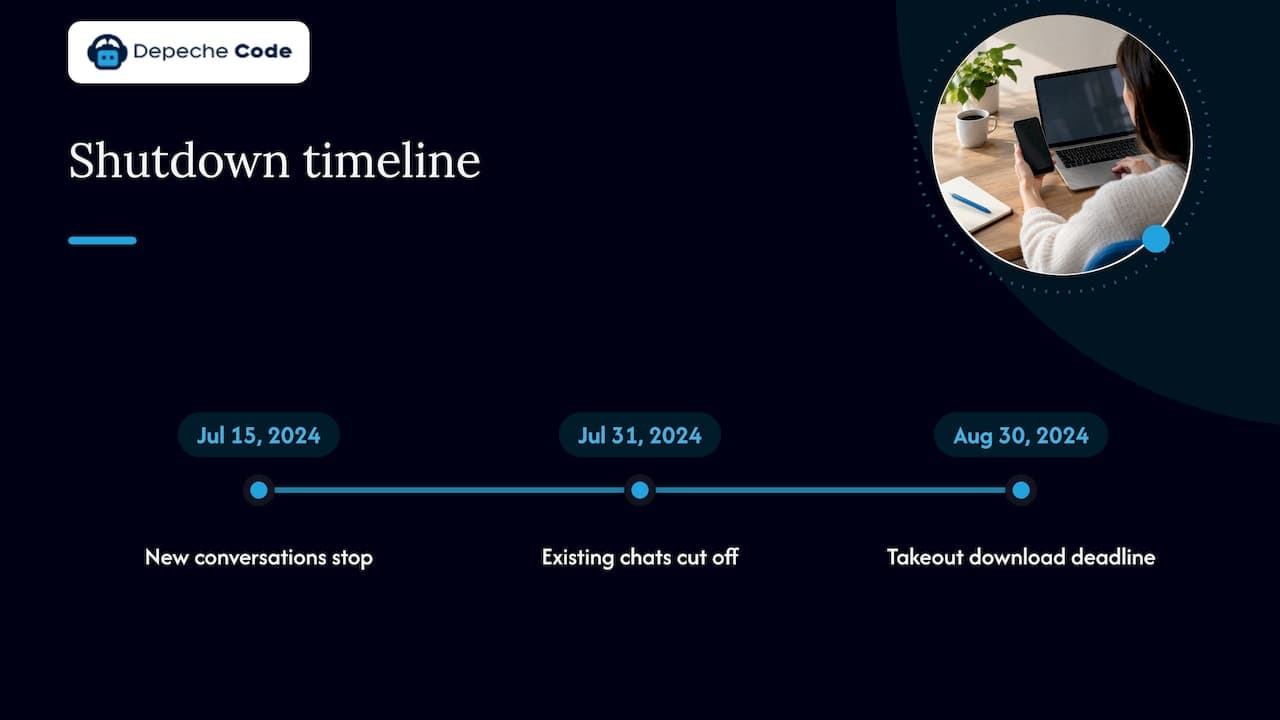
Then Google pulled it. The Verge reported in May 2024 that new conversations would stop on July 15, 2024 and existing ones would be cut off on July 31, with history downloadable through Google Takeout (Google’s data export tool) until August 30. A Google spokesperson said the company was winding down lesser-used features to focus on tools merchants value most.
Google’s own help page confirms that chat and call history are no longer available in Business Profile. If your old chat threads were not exported by the August 2024 deadline, they are not coming back. What matters now is the front door you build in their place.
What customers can still do from your Google listing
Shutting down chat did not remove your listing. Google states that customers can still find and contact a business through Search and Maps using website links, the business description, photos and other profile content, and that businesses still receive calls and see engagement figures such as web traffic and direction requests.
That tells you where to invest. The profile is now a signpost. Every tap should lead somewhere that can actually hold a conversation: a phone that gets answered, a text thread, or a website that talks back.
The 5 best replacements for Google Business Messages in 2026
1. An AI chat bot on your website
This is the closest thing to what Business Messages did, with one big difference: you own it. A chat bot on your site greets visitors who arrive from your Google listing, answers common questions and captures contact details, around the clock and without anyone needing to reply within 24 hours.
It also removes the risk that created this problem in the first place. A channel that lives inside someone else’s product can be retired with a few weeks’ notice. A chat bot on your own domain cannot.
We build and integrate these. Our AI chat bot plans start at $49 per month (Starter), with Growth from $99 per month and Prime from $149 per month, plus a one-off $299 setup and integration fee. If you want to see how a bot turns visitors into leads before you commit, our guide to using AI chat bots for lead generation walks through it, and our seven-step chatbot lead generation process covers the handoff to your sales team.
Best for: service businesses, clinics, contractors, agencies and shops that get the same ten questions every day and lose leads after hours.

2. Text messaging on your Google Business Profile
Google now lets verified businesses add a messaging option to the profile. Its help page says you can add WhatsApp or text messaging to your contact info, with chat options available only in select regions and not necessarily on every profile. Search Engine Roundtable reported in January 2025 that the text and WhatsApp option was rolling out to US-based businesses.
Two details from Google’s page are worth knowing. If you add both WhatsApp and text, only the text option is shown to customers. And different profiles can share the same WhatsApp click-to-chat link, which helps multi-location businesses.
This is not the old Chat button. It sends people to a phone number or WhatsApp thread rather than a Google-hosted inbox, so someone on your team has to be watching that number. Pair it with the website bot from option 1 so that messages outside business hours still get an immediate answer.
Best for: businesses where a human already answers texts quickly, such as salons, home services and restaurants.
3. A fully built-out Business Profile
With chat gone, the profile has to do the persuading before the customer ever contacts you. Complete categories, accurate hours, a clear description, current photos and a correct website link are what Google tells customers to rely on now.
Two habits keep it working. First, run a regular audit: our 45-minute Google Business Profile audit and monthly plan lays out what to check and how often. Second, post consistently. A weekly update gives customers a reason to click and a topic to ask about, and we explain a simple routine in our guide to Google Business Profile posts for local businesses.
Best for: every local business, as the base layer under the other four options.
4. A phone number and a website that convert
Google’s own advice at the shutdown was to point people to other channels. Its notice suggested adding website or phone number information to your profile and linking social media profiles. It also said businesses should pass the user to those channels instead. 9to5Google noted that Google’s guidance was to add a phone number to listings or use Reserve with Google.
That advice only works if the destination holds up. A slow, outdated site wastes the click you earned. If the page a customer lands on is hard to use on a phone, a redesign usually pays back faster than any new channel. We cover what to change when redesigning for better user experience, and our website design and redesign service handles the work. If you run WordPress, keeping the site fast and patched matters just as much: our hosting starts from $39 per month and maintenance from $99 per month on the WordPress hosting and maintenance page.
Best for: businesses whose profile gets plenty of views but few calls or form fills.
5. RCS Business Messaging for larger brands
RCS (Rich Communication Services) is the upgraded texting standard built into Google Messages on Android and supported iPhones. RCS Business Messaging is the layer where brands send verified, branded, interactive messages. 9to5Google’s Abner Li observed that Google appears to be consolidating around RCS Business Messaging, where for example an airline customer can check in and get a boarding pass inside the Google Messages app.
Google’s developer site describes RCS for Business as a way to bring branded, interactive experiences to the default messaging app. In practice, businesses reach it through messaging platform providers rather than a button on a profile. It suits brands with large customer lists and proactive messaging needs, such as order updates and appointment reminders. For most small and mid-size businesses, options 1 to 4 deliver the result faster.
How the five options compare
| Option | Who answers | Works after hours | Who controls it | Best fit |
|---|---|---|---|---|
| AI chat bot on your website | Bot, with handoff to your team | Yes | You | Lead capture and FAQs |
| Profile text or WhatsApp | Your staff | Only if staffed | Google profile, your number | Quick local questions |
| Complete Business Profile | Nobody, it informs | Yes | Shared with Google | Every local business |
| Phone and website | Staff and site | Site only | You | Ready-to-buy customers |
| RCS Business Messaging | Brand systems | Depends on setup | Platform provider | Large brands |
Don’t confuse these Google messaging products
Searchers often land on the wrong product, so here is the short version.
- Google Business Messages: the Search and Maps chat for business listings. Gone since July 31, 2024.
- Google Messages: the consumer texting app from Google, which supports RCS. Google’s help center covers how customers use it.
- Google Chat: the team collaboration tool inside Google Workspace, used for internal messaging. It is not a customer channel.
- RCS Business Messaging: the business layer on top of RCS, described in option 5. 9to5Google noted it is a different product from Business Messages.
If a tutorial still tells you to turn on the Chat button in your profile, it predates the shutdown.
How to set up your replacement in a week
- Day 1: check your profile. Confirm it is claimed and verified, and that your phone number and website link are correct. If you used the old chat, note that its history is no longer available from the profile.
- Day 2: look for the messaging option. In your profile’s contact settings, see whether text or WhatsApp is offered for your account. Google says availability varies by region and profile.
- Days 3 and 4: list your top questions. Pull the ten questions customers ask most by phone, email and social media. These become your bot’s answers and your profile description.
- Day 5: put a chat bot on your site. Install it on the pages your profile links to, usually the home page and your main service pages.
- Day 6: set your handoff rules. Decide who gets notified when a visitor wants a person, and how fast they should respond.
- Day 7: schedule your first profile post. Then keep a weekly rhythm.
We do steps 3 to 5 for clients as part of AI chat bot integration, so your team is not left configuring software between jobs.
Where a chat bot fits and where people still matter
A bot is excellent at repeat questions: hours, pricing ranges, service areas, booking links. It should not be asked to handle complaints or complex quotes alone. Build a clear path to a person for those moments. Our piece on the real role of chatbots in lead generation shows where to draw that line so the bot supports your team and does not stand in the way of customers.
Get a messaging setup that you own
If you want a replacement for Google Business Messages that no platform can switch off, we can build it with you. Our team integrates AI chat bots on your website, keeps your WordPress site fast and maintained, and handles local SEO so your Google listing sends the right customers to the right place.
See the full range on our services page, or explore AI chat bot plans and pricing to get started.
Our perspective
We have watched businesses build their whole customer conversation inside one platform, and then lose it with a notice of a few weeks. Google Business Messages is the clearest example. It was a convenient button, and it was never yours.
Our view is simple. Use Google to be found, and use your own website to hold the conversation. A chat bot on your domain, a fast and well-maintained site, and a profile that is accurate and active give you a setup that survives the next product shutdown.
That is why we pair AI chat bot integration with website work, WordPress maintenance and local SEO. They are one customer path, from the search result to the answer to the booked job, and we would rather build that path once and keep it running.
Donovan Wells - Founder and CEO
FAQ
Is Google Business Messages still available?
No. Google discontinued it on July 31, 2024, and chat and call history are no longer available in Business Profile. Customers can still contact you through the website link, phone number and other details on your listing.
Can customers still message me through my Google Business Profile?
Often yes, in a different form. Verified businesses can add text messaging or WhatsApp to their contact info, though chat options are available only in select regions and may not appear for every profile. If you add both, only the text option is shown.
What is the difference between Google Business Messages and RCS Business Messaging?
Business Messages was the Search and Maps chat button, and it has ended. RCS Business Messaging is a separate service that lets brands send verified, branded messages in the Google Messages app. Businesses usually reach it through messaging platform providers.
What is the simplest replacement for a small business?
A website chat bot combined with an accurate Business Profile. The profile brings people in, and the bot answers questions and collects contact details at any hour. Our chat bot plans start at $49 per month, plus a one-off $299 setup and integration fee.
Sources
- Update on Google Business Messages, Google for Developers
- How Business Messages works, Google for Developers
- Changes to Google Business Profile chat and call history, Google Business Profile Help
- Chat with customers from your Business Profile, Google Business Profile Help
- Google Business Messages in Maps and Search shutting down, 9to5Google
- Google Maps business messaging service shut down, The Verge
- Google Business Profiles launching chat with text and WhatsApp, Search Engine Roundtable
- RCS for Business, Google for Developers
- Google Messages Help