
// Creative Agency
Push Notification Strategy: 9 Best Practices for 2026
A good push notification strategy comes down to four decisions: earn the opt-in, send only what is relevant to that person, keep frequency low, and measure opt-outs as closely as clicks. Push works when each message is timely, personal and useful. It backfires when it is a broadcast. Below are nine practices, the benchmarks behind them, and how push fits with appointment reminders and booking chatbots.
TL;DR
- Ask for permission at a moment when you can state a specific benefit. Opt-in rates are falling on Android and sit near 49% to 56% on iOS.
- Triggered, behavior-based messages beat generic blasts. One benchmark measured 14.4% average open rates for contextual pushes against 4.19% for generic campaigns.
- Keep marketing pushes to roughly one to three per user per week, and never count transactional alerts against that budget.
- Track delivery, open, conversion and opt-out rate, and change one variable per test.
- Reminders and follow-ups for appointments are among the highest-value uses of automated messaging, especially when paired with a booking chatbot.
Table of Contents
- What a push notification strategy actually covers
- 1. Earn the opt-in before you ask for it
- 2. Segment by behavior, not just demographics
- 3. Trigger messages from actions
- 4. Set a frequency budget
- 5. Time messages to the person
- 6. Write for the lock screen
- 7. Respect privacy and platform rules
- 8. Measure what matters
- 9. Connect push to the rest of your channels
- Push, reminders and booking chatbots
- Our perspective
- Getting help building it
- A simple 30-day launch plan
- FAQ
- Sources
What a push notification strategy actually covers
A strategy is not a list of clever headlines. It is a set of rules that answer five questions: who may be messaged, what triggers a message, what each message says, how often a person hears from you, and how you know it worked.
The case for doing it carefully is solid. A peer-reviewed study of more than 200 campaigns on a U.S. mobile-offer marketplace found that push notifications significantly increase same-day click-throughs, while also naming attentional saturation at high frequencies as a boundary condition. In plain terms: push moves people, and too much of it wears the channel out.
Commercial benchmarks point the same way. Airship’s 2025 report found customers who opted in to push make 13% more purchases than opted-out customers, with top-performing apps reaching a 39% lift.
Push strategy also depends on the app or site behind it. If you are still deciding whether to build one, our overview of mobile app development for business owners covers the groundwork.
1. Earn the opt-in before you ask for it
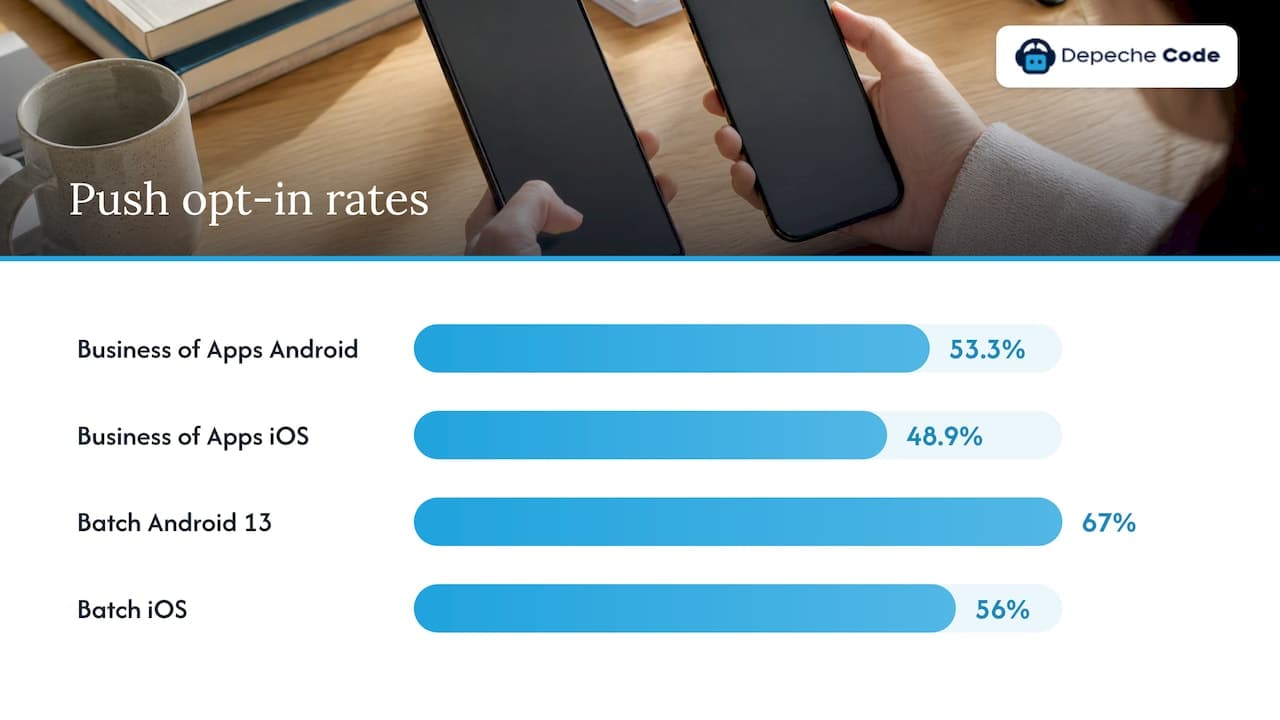
You cannot message anyone who has not agreed, so opt-in is where strategy starts. The numbers are not generous. Business of Apps reports that Android opt-in rates dropped from 81% to 53.3% in 2025, while iOS held at 48.9%. Batch’s benchmark, covering 800 billion messages, found Android opt-in fell from 85% to 67% after Android 13 adopted a consent model like Apple’s, with iOS moving from 58% to 56%.
Because the system prompt typically appears only once, use a pre-permission screen first. A useful test for that screen comes from a MessageFlow guide: a specific promise, value for the user, and context that matches the moment. “Get notified about offers” fails all three. “We’ll text you when your order ships or your appointment time changes” passes.
Good moments to ask:
- Right after a booking or purchase, when order and appointment updates are an obvious benefit.
- After a user saves an item, follows a topic or sets a preference.
- Never on first launch, before the person has seen any value.
If a person declines your custom screen, you have lost nothing. The one-time system prompt is still available.
2. Segment by behavior, not just demographics
Segmentation is the biggest lever in most benchmarks. Airship reports that brands using segmentation see purchase lifts from push between 4% and 72%, and direct open rate lifts between 18% and 65%. The same report says zero-party data, meaning what customers tell you directly, drove a 91% lift in attributed purchases.
Start with segments you can build in an afternoon:
- New users in their first seven days.
- Users with an abandoned cart or an unfinished booking.
- Lapsed users who have not opened the app in 30 days.
- Users who stated a category or location preference.
The same logic applies to your website. Our guide to website personalization strategy walks through the data you need, and the same data feeds your push segments.
3. Trigger messages from actions
The gap between triggered and broadcast messages is large. Batch found contextual pushes, sent automatically after an action or a predefined time, average a 14.4% open rate versus 4.19% for generic campaigns.
The triggers worth building first:
- Order confirmed, shipped, delivered.
- Cart left with items for a set period.
- Appointment booked, rescheduled, or coming up.
- Price or availability change on something the user saved.
- Onboarding step left unfinished.
Triggered messages are also easier to defend. They respond to something the user did, which fits what people say they want. A Localytics survey reported by Mobile World Live found 49% of users said notifications based on their stated preferences made them use an app more. The same survey found 58% felt nervous, harassed or annoyed by messages that obviously tracked their in-app behavior. The lesson: personalize, but keep the message about the user’s benefit, not about your surveillance.
4. Set a frequency budget
Frequency is where programs lose people. Sources differ on exact thresholds, so treat the numbers as a range rather than a law:
| Source | Finding |
|---|---|
| MessageFlow | High-performing apps send 1 to 3 marketing pushes per user per week; more than 6 weekly makes users 3.4x more likely to uninstall within 30 days |
| Klaviyo Help Center | 2 to 4 weekly notifications lead about 43% of users to turn push off; 5 or more leads about 60% to quit the app |
| AppMaker citing Airship | 46% of users opt out after two to five messages in one week |
The practical rule: set a weekly cap for marketing pushes, apply it per person across all campaigns, and exempt transactional alerts such as receipts, security codes and appointment confirmations. Attitudes may be softening. Mobile World Live reported that the share saying 2 to 5 notifications would make them quit an app fell from 31% in 2015 to 22.3% in 2018. That is older data, so use it as a reason to test, not to raise volume.
5. Time messages to the person
Timing matters less than relevance, but it is cheap to get right. Business of Apps data shows open rates fall through the day from 5.1% at 8am to 3.2% by 11pm. Monday has the highest open rate and Sunday the lowest, a gap of 0.5 points.
Those are averages across many apps. Use them as a starting hypothesis and then test your own audience. Send in the recipient’s local time zone, not yours, and tie time-sensitive messages to the moment they matter: a delivery window, an appointment, a limited offer.
6. Write for the lock screen
You have a handful of words before the user swipes. The best practices that repeat across sources are plain:
- Lead with the benefit or the fact, not the brand.
- Make the action obvious: one tap, one destination.
- Use the person’s name or context only when it adds meaning.
- Land the user on the exact screen the message promised, never the home page.
Rich media helps. Airship found rich push brings a 22% average lift in direct open rates, and that tailoring messages was the single biggest driver of open rates, a 37% average increase.
Weak: “Don’t miss our big sale!” Stronger: “The jacket you saved is back in your size. 12 left.”
A shorter version of the same principle appears in our notes on mobile app UX that drives engagement: the notification is only the first screen of an experience.
7. Respect privacy and platform rules
Push is a trust channel. Apple’s guidelines, as summarized in Klaviyo’s help center, prohibit sensitive personal or confidential information in push notifications and require explicit in-app opt-in for promotional messages. That has a practical effect on appointment messaging: a lock screen can be read by anyone nearby, so write “Your appointment is tomorrow at 2 PM” rather than naming a diagnosis, balance or case detail.
Other habits that protect trust:
- Put an easy way to adjust categories and frequency in your settings screen, so people can reduce volume without switching everything off.
- Keep promotional and transactional messages in separate categories.
- Check the platform and consent rules for your industry (health, finance, children) with your legal adviser before launch.
8. Measure what matters
Most teams watch opens and ignore opt-outs. Track at least these four, using the definitions Klaviyo publishes for its three core KPIs: delivery rate, open rate and conversion rate, each as a share of notifications sent or received.
| Metric | Benchmark reported | Source |
|---|---|---|
| Delivery rate | 85% to 95% healthy; below 80% may signal token problems | Tencent Push guide |
| Direct open rate | 4% to 6% for generic pushes, 14%+ for contextual | Pugpig docs |
| Monthly opt-out rate | Below 1% excellent; above 3% a warning | Tencent Push guide |
| iOS CTR | 1.71% average across industries; 3.05% in e-commerce | Pushwoosh data |
Benchmarks vary by vendor, platform and industry, so your own trend line matters more than any one figure. Pugpig suggests flagging an opt-out rate above 1% to 2% on a single send as an early sign something did not land.
For testing, change one variable at a time, aim for 95% confidence, keep a holdout group that receives no push, and write down what you learn. The holdout is the only honest way to see whether push adds behavior or just takes credit for it.
9. Connect push to the rest of your channels
Push is one touchpoint. A reader who gets an offer by push may open email, visit your website or talk to a chatbot. Keep one view of the customer so the same person is not told three different things. Teams that use a CRM can trigger push from the same records that drive email and sales follow-up. Our Depeche CRM page explains how we approach that.
Push, reminders and booking chatbots
If you take appointments, the strongest push use cases are not promotions. They are confirmations, reminders and follow-ups. The evidence for reminders is among the best in this whole topic.
In a randomized study at Kaiser Permanente Washington, an extra text reminder sent three days ahead reduced primary care no-shows by 7%, and by 11% for mental health visits. Another randomized trial in a UK psychosis community service found automated reminders at seven days and one day before visits significantly increased attendance, with an odds ratio of 3.54. Both studies tested text messages, not app push, so treat them as evidence that timely automated reminders work, not as a push guarantee. Results in a dental office, salon or consulting practice will differ.
This is where a scheduling chatbot earns its place. An appointment booking chatbot can answer “do you have anything Thursday?”, capture the service and time, and hand that booking to your calendar or CRM. Once a slot exists, your messaging rules take over:
- Confirmation immediately after booking, by push or text.
- Reminder several days ahead, with a one-tap way to reschedule.
- Short reminder the day before or morning of.
- Follow-up after the visit, asking for feedback or offering the next booking.
Every one of those is a transactional message and sits outside your marketing frequency cap. Keep the content generic enough for a lock screen, as covered in the privacy section. For more on how a chatbot can reach out at the right moment, see our article on proactive AI chatbot responses.
Our perspective
We build websites, apps and AI chatbots for businesses, and we see the same pattern in push projects: the technology is the easy part. What decides results is whether the business has decided what it is allowed to say to a customer and when.
Our view is that push should be designed together with the rest of the customer journey. The app, the website and the chatbot should share the same data, so a booking made in chat can trigger a reminder in the app, and a reminder can lead straight to a rescheduling flow. That is why we direct our in-house AI tooling at delivering these connected pieces faster, and why we hand over ownership of every deliverable.
If you are planning an app, plan the notification rules before the first screen is designed. It is far cheaper than retrofitting them after launch.
Donovan Wells - Founder and CEO
Getting help building it
If you would rather have a team set this up, we build mobile apps with the notification flows described above in mind. Our mobile app development service covers planning, build and ongoing support. For booking and customer questions, our AI chatbot plans start from $49 per month, with a one-off $299 setup and integration fee. Details are on our AI chatbot services page.
If you want to talk through your situation first, start from our services overview.
A simple 30-day launch plan
- Week 1: list your transactional messages (confirmations, reminders, shipping) and your three most valuable behavioral triggers.
- Week 2: design the pre-permission screen and write the first six messages, each with a clear destination screen.
- Week 3: set the weekly cap, build two or three segments, and set up a holdout group.
- Week 4: launch to a portion of users, review delivery, open, conversion and opt-out rates, and change one variable.
Repeat monthly. After a quarter you will know your own benchmarks, which are the only ones that count.
FAQ
What is the push notification method?
It is a way of sending short messages directly to a user’s phone or browser from an app or website, after the user has agreed to receive them. Messages are delivered through the device platform’s notification service and appear on the lock screen or notification tray. Businesses use them for alerts, reminders and promotions.
What makes a good push notification?
A good one is timely, relevant to that person and clear about the next step. Tailored content is the most consistently reported driver of open rates, and triggered messages outperform generic sends. Keep the wording specific and link to the exact screen the message promises.
How often should I send push notifications?
Sources suggest about one to three marketing pushes per user per week for high performers, with opt-outs rising noticeably beyond that. Transactional alerts such as confirmations and reminders do not count toward that cap. Test within your own audience and watch the opt-out rate closely.
Can a chatbot handle appointment scheduling?
Yes. A chatbot can collect the service, date and contact details and pass the booking to your calendar or CRM. Confirmation and reminder messages can then go out automatically by push or text. Look for a setup that lets customers reschedule in the same conversation.
Sources
- Campaigns That Click: Unleashing the Power of Push Notifications (Information Systems Research)
- Mobile App Push Notification Benchmarks for 2025 (Airship)
- Push Notifications Statistics 2026 (Business of Apps)
- Push notification benchmark (Batch)
- Push Notifications for Mobile Apps: The Complete Guide (MessageFlow)
- Basics: push notification best practices (Klaviyo Help Center)
- How to Write Push Notifications That Convert (AppMaker)
- Consumers warming to push notifications (Mobile World Live)
- Understanding push notification consent (Klaviyo Help Center)
- Understanding mobile push notification performance (Klaviyo Help Center)
- Push Notification Marketing: Ultimate Guide 2026 (Tencent)
- Maximise engagement with push notifications (Pugpig docs)
- iOS push notifications: APNs setup, types and best practices (Pushwoosh)
- Pragmatic Randomized Study of Targeted Text Message Reminders (PMC)
- Effectiveness of automated appointment reminders in a psychosis service (PMC)