
// Creative Agency
Website Personalization Strategy: 7 Steps That Work in 2026

A website personalization strategy is a plan for showing each visitor the content, offers and navigation most relevant to them, based on signals such as location, device, behavior and what you already know about them. The plan has seven parts: set one goal, collect first-party data, build a few segments, pick the right content types, launch small, measure against a holdout group and respect privacy rules. This guide walks through each one for a U.S. business.
TL;DR
- Personalization means your system decides what a visitor sees. Customization means the visitor configures the site. Most businesses need the first.
- Start with one goal, two or three segments and one page, usually the homepage or a key landing page.
- Use first-party and zero-party data. Tell visitors what you collect, as California law requires at the point of collection.
- Measure with a holdout group that never sees the personalized version, so you know the true lift.
- Fix site structure and content first. Personalization amplifies a good site and cannot rescue a confusing one.
Table of Contents
- What website personalization is, and how it differs from customization
- The 4 D’s of personalization, and the fifth element
- Step 1: Fix the foundation before you personalize
- Step 2: Choose one measurable goal
- Step 3: Collect the right data, and only the right data
- Step 4: Build two or three segments, not twenty
- Step 5: Pick the content types that fit your goal
- Step 6: Learn from real examples
- Step 7: Launch small, test properly and keep privacy in view
- A quick plan for the first 30 days
- Our perspective
- How we can help
- FAQ
- Sources
What website personalization is, and how it differs from customization
Website personalization adapts what a visitor sees using real-time and historical data. HubSpot’s 2026 guide describes signals such as location, device, behavior and CRM attributes, with automation or AI choosing the experience to serve.
Customization is a different thing. According to Nielsen Norman Group, personalization is done by the system, which identifies users and delivers matching content. Customization is done by the user, who configures layout, content or functionality. Personalization costs the visitor no effort, while customization has higher interaction costs because people must set things up themselves. Contentful adds that the two are not mutually exclusive and can complement each other in mature products.
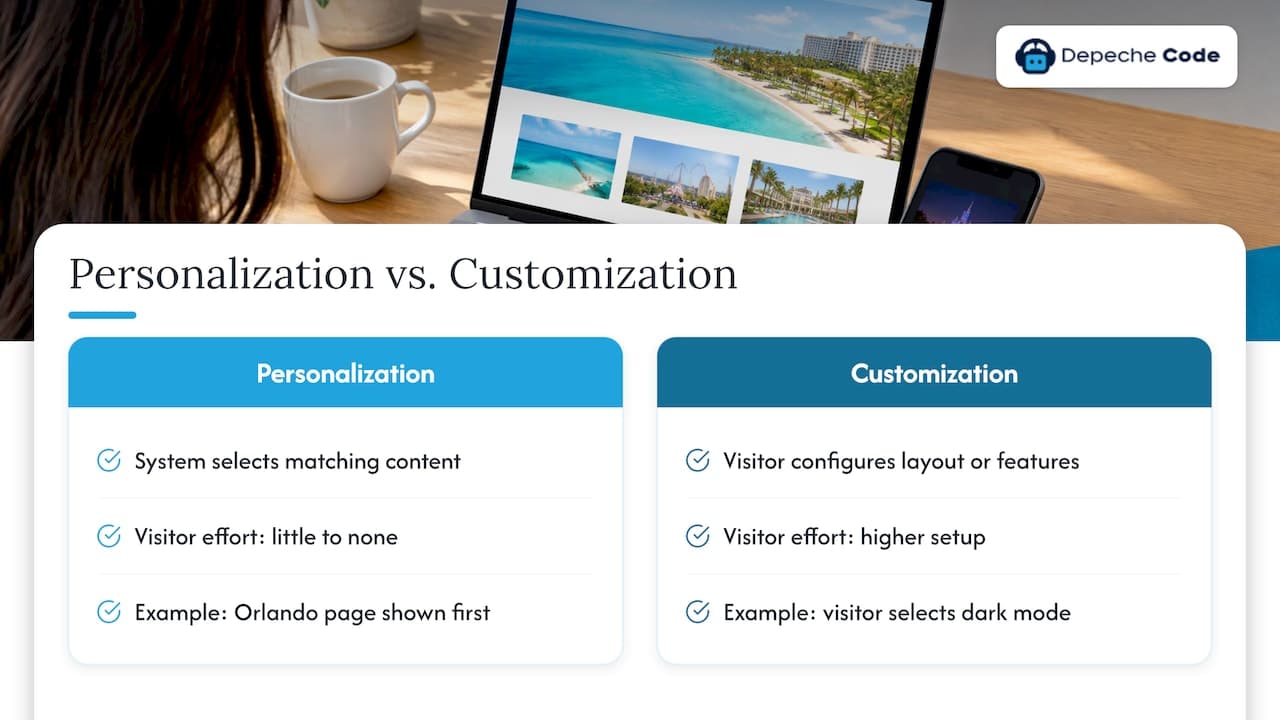
The practical takeaway: when a visitor from Florida sees your Orlando service page first, or a returning customer sees a reorder button instead of an introductory offer, that is personalization. When a visitor picks dark mode, that is customization.
The 4 D’s of personalization, and the fifth element
If you have wondered what the “4 D’s” are, they come from McKinsey. Its technology blueprint for personalization at scale says personalization depends on orchestrating four things: Data, Decisioning, Design and Distribution. Distribution connects the other three to the marketing technology that delivers experiences to people.
In plain terms for a website:
- Data: what you know about the visitor.
- Decisioning: the rules or models that choose which experience fits.
- Design: the banners, copy, layouts and offers that can change.
- Distribution: the tools that actually put the right version on the page.
In 2025, McKinsey’s Eli Stein and Kelsey Robinson added measurement as a fifth critical element. That fits the rest of this guide: a strategy without measurement is guesswork.
Step 1: Fix the foundation before you personalize
Personalization is not a repair job. Nielsen Norman Group’s Amy Schade warns that if users struggle to find information, the answer may be to fix the site structure or the content itself rather than add personalization.
Before anything else, check three basics:
- Can a first-time visitor tell what you do within a few seconds?
- Is navigation logical and the site fast on mobile?
- Do your key pages have a clear next step?
If any answer is no, start there. Our guide on how user experience drives website conversions covers the fixes that tend to pay off first, and if the problem is deeper, our website design and redesign service is built for exactly that.
Step 2: Choose one measurable goal
Every personalization effort should answer one question: what do we want more visitors to do? Pick a single outcome for the first quarter. Common choices for service businesses:
- More quote or consultation requests from the homepage
- Higher completion of a lead form
- More sign-ins or registrations
- Larger orders for an online store
Shopify suggests tracking metrics such as conversion rate, average order value, revenue per visitor and cart abandonment. A lead-gen company can swap the last two for cost per lead and lead-to-customer rate.
Write the goal down with a baseline. “Raise homepage form submissions from our current rate” is useful only if you recorded the current rate.
Step 3: Collect the right data, and only the right data
HubSpot describes the data side as collection through cookies, user accounts and analytics tools, followed by real-time analysis and delivery based on rules you set. Two data types matter most today:
- First-party data: information you collect directly from visitor interactions, such as pages viewed, purchases or form fills.
- Zero-party data: information a customer intentionally shares, such as a quiz answer or a stated preference. Both definitions come from Shopify.
HubSpot also recommends prioritizing these two types, through preference centers, lead qualification forms and explicit opt-ins, as third-party cookies fade and privacy regulations tighten.
A simple starting inventory for a small business:
| Signal | Where it comes from | Example use |
|---|---|---|
| Location | IP or browser | Show the local office or service area |
| Device | Browser | Simplify the layout for phones |
| New vs. returning | Cookie or login | Different homepage hero |
| Traffic source | Campaign tags | Match the landing page to the ad |
| Pages viewed | Analytics | Recommend related content |
| Stated need | Quiz or form | Route to the right service |
If you run a CRM, connect it to your site so known contacts see relevant content. We cover the practical side in our SMB CRM website playbook.
Step 4: Build two or three segments, not twenty
Segmentation is where most strategies collapse under their own weight. Adobe’s guide to web personalization names six main types: geolocation, behavioral, contact-data-based, industry-based, account-based and predictive. You do not need all six.
Pick the two or three that match your business:
- A local service business: location plus new vs. returning visitors.
- A B2B company: industry or company-based segments, plus returning leads from your CRM.
- An online store: behavior (recently viewed, cart contents) plus traffic source.
For each segment, write one sentence: “Visitors who [signal] want [outcome], so we will show [change].” If you cannot finish the sentence, the segment is not ready.
Step 5: Pick the content types that fit your goal
Dynamic content on a website comes in several forms. Usercentrics lists six:
- Dynamic content that adjusts text, images and layout automatically
- Recommendations based on visitor preferences
- Overlays and pop-ups with targeted messages
- Adaptive navigation that hides inessential features
- Search results personalized to predicted intent
- Offers tailored to user data
Match the type to the goal. A lead-generation site usually gets the most from the first and third: a hero banner and call to action that change by segment, and a targeted prompt for returning visitors. A retailer leans on recommendations and tailored offers. Shopify gives the example of swapping hero banners for B2B lead-generation offers or adjusting language for overseas visitors.
Conversational tools are another route. An AI chatbot can tailor answers and next steps to what a visitor asks, which we explain in the role of AI chatbots in personalizing user experiences.
Step 6: Learn from real examples
Published case studies are vendor and publisher reports, so treat the numbers as what those companies reported, not as promises for your site. They do show where personalization tends to be applied.
- Grainger (B2B): testing sign-in and registration on a hero banner takeover produced a 7 percent increase in sign-ins and a 17 percent increase in registration completions. A “recently viewed” homepage algorithm raised recommendation engagement by 12 percent and doubled revenue from that zone.
- Room & Board (retail): with AI-driven personalization, it reported 80 percent higher conversion for engaged furniture shoppers, 109 percent longer time on site and 10 percent higher average order value from January to April 2020.
- ThirdLove (e-commerce): personalized landing pages for paid social traffic lifted average revenue per user by 23%, and separate homepages for new and returning visitors produced a 3% conversion uplift.
- Nextbase (e-commerce): showing complementary products instead of items a segment already owned raised conversion from 2.86% to 6.34%, a 122% increase.
The pattern is consistent: small, targeted changes to one high-traffic element, tested against a baseline.
Step 7: Launch small, test properly and keep privacy in view
Test against a holdout
Shopify recommends A/B testing each segment by splitting it into a group that sees the generic version and a group that sees the tailored one. It also suggests holdout groups that never receive personalization, so you can measure total lift over a longer period.
A simple rollout:
- Personalize one element on one page for one segment.
- Run it long enough to gather a meaningful number of conversions, not a few days.
- Compare against the generic version.
- Keep what wins, retire what does not, then add the next segment.
HubSpot notes that systems refine their predictions through continuous optimization, so plan on a review cycle rather than a one-time launch. Our website engagement guide for 2026 pairs well with this step.
Handle privacy as part of the design
Personalization runs on personal information, so privacy belongs in the plan from day one. Under the California Consumer Privacy Act, a business that controls collection must, at or before the point of collection, tell consumers which categories of personal information it collects, why, whether it is sold or shared, and how long it keeps each category. California is one state among several with privacy laws, and the rules differ, so a business serving customers nationwide should have its privacy notice and consent setup reviewed by a qualified attorney.
Three habits that keep you on safe ground:
- Collect only fields that power a live personalization rule.
- Audit your forms, tags and retention periods on a regular schedule and remove what you do not use.
- Update your privacy notice whenever you add a new data source.
A quick plan for the first 30 days
| Week | Task |
|---|---|
| 1 | Audit site structure, speed and key pages. Record baseline conversion rates. |
| 2 | Choose one goal. Inventory the data you already have. Draft two or three segments. |
| 3 | Build the personalized version of one element. Update privacy notice if needed. |
| 4 | Launch with a holdout group. Set the review date. |
Our perspective
We see the same mistake often: a business buys a personalization tool before it has a site worth personalizing. The order matters. Start with a fast, clear website, then add layers of relevance on top.
At Depeche Code we build websites, run SEO, manage WordPress hosting and maintenance, and integrate AI chatbots, so we see personalization as a connected system rather than a single plugin. The pages people land on, the content they find and the conversations they have should all feel like they came from one business that understands them.
Our approach is to keep it practical: one goal, a few segments, and honest measurement. We use in-house directed AI to move projects along faster, and we hand over full ownership of what we build. For most small and mid-sized businesses, that beats a sprawling enterprise program that never launches.
Donovan Wells - Founder and CEO
How we can help
If you want personalization without assembling it yourself, we can build the pieces on one site. A redesign gives you the clean structure personalization needs. Our SEO plans bring in the right visitors. Our AI chatbot plans start at $49 per month for Starter, $99 per month for Growth and $149 per month for Prime, with a one-off setup and integration fee of $299, and the chatbot can tailor conversations to what each visitor is looking for.
See everything we offer on our services page, or look at the AI chatbot options if conversational personalization is your first step.
FAQ
What is a personalization strategy?
It is a documented plan for tailoring a website to different visitors. It states your goal, the data you will use, the segments you will target, the content that changes, and how you will measure results. A good strategy starts small and expands based on test results.
How do you personalize your website?
Collect first-party or zero-party data, group visitors into a few segments, and change one high-impact element, such as a hero banner or call to action, for each group. Then test against a generic version and keep the winner. Interactive elements can help; see our list of interactive website features.
What is an example of website personalization?
A returning visitor sees a different homepage hero than a first-time visitor. Grainger’s “recently viewed” homepage zone is a documented case, with the company reporting 12 percent higher engagement with recommendations and doubled revenue from that zone.
Is dynamic content the same as personalization?
Not exactly. Dynamic content is content that changes automatically based on rules or data. Personalization is the strategy of using that capability to match content to individual visitors, so dynamic content is the tool and personalization is the purpose.
Do I need AI for website personalization?
No. Simple rules, such as showing local information by location or a different banner to returning visitors, work without it. AI becomes useful when you have enough traffic and data to predict preferences and run many variations at once.
Sources
- Customization vs. Personalization in the User Experience, Nielsen Norman Group
- Website personalization: Examples and best practices, HubSpot
- Customization vs. personalization, Contentful
- A technology blueprint for personalization at scale, McKinsey
- The next frontier of personalized marketing, McKinsey
- Website Personalization: Strategies and Examples (2026), Shopify
- The Definitive Guide to Web Personalization, Adobe
- How to Achieve Privacy-Led Web Personalization, Usercentrics
- Optimization and Personalization at a B2B Powerhouse: Grainger, Adobe Blog
- With AI Personalization, Room & Board Sees 80% Higher Conversion Rate, MyTotalRetail
- ThirdLove Boosts Sales Through Site Personalization, AdExchanger
- Creating better shopping experiences with Nextbase, Shogun
- California Civil Code Section 1798.100, Justia