TL;DR:
- User experience significantly impacts website engagement and conversion rates.
- Improving core UX elements reduces bounce rates and increases customer trust.
- Small businesses should focus on ongoing UX optimization rather than relying solely on aesthetics.
Most business owners assume a visually polished website is enough to win customers online. It is not. While good looks create a first impression, it is the overall experience of using your site that determines whether visitors stay, engage, and ultimately buy. Many small and medium-sized businesses pour budget into modern design, only to watch potential customers leave within seconds. Forrester Research found that a positive UX can raise conversion rates by up to 400%. That gap between a pretty site and a high-performing one comes down to user experience, and this guide will show you exactly how to close it.
Table of Contents
- What is user experience and why does it matter?
- Core elements of effective user experience design
- How user experience impacts customer engagement and conversions
- Practical steps to enhance user experience on your website
- What most businesses get wrong about user experience
- Accelerate business growth with expert web experience solutions
- Frequently asked questions
Key Takeaways
| Point | Details |
|---|---|
| UX fuels conversions | Excellent user experience is proven to increase sales and engagement for businesses of all sizes. |
| Core elements matter most | Navigation, speed, clarity, and accessibility are foundational to a positive website user experience. |
| Even minor improvements add up | Small, ongoing UX tweaks can yield major business gains over time. |
| UX is not just design | Successful web experiences require a focus on user needs and not just visual appeal. |
What is user experience and why does it matter?
User experience, commonly called UX, refers to the overall feeling a visitor gets when interacting with your website. It covers how easy it is to find information, how fast pages load, how clear the next step is, and how satisfied someone feels after completing a task. UX is not the same as visual design. Visual design is what your site looks like. UX is how your site works and feels.
Think of it this way: a beautiful restaurant with terrible service will lose customers fast. Your website works the same way. Visitors who struggle to find what they need, or who hit a confusing checkout process, will leave and likely never return. That is a direct hit to your revenue.
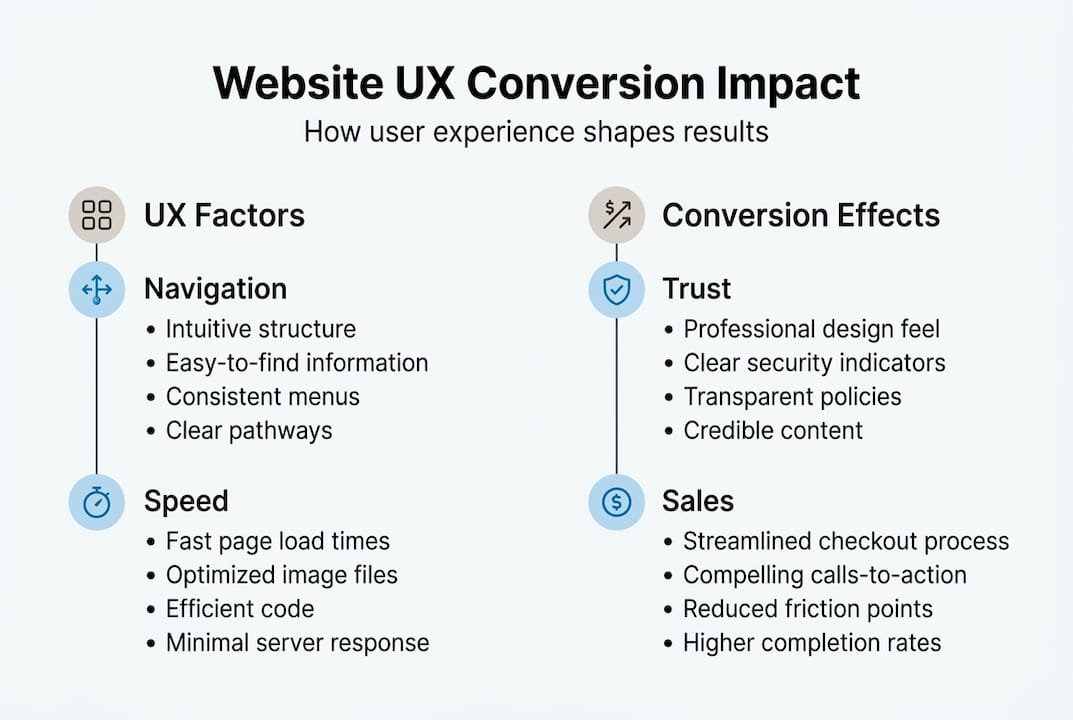
For small and medium-sized businesses, strong UX delivers benefits that go far beyond aesthetics. It builds trust, encourages longer visits, reduces bounce rates (the percentage of visitors who leave after viewing just one page), and increases the likelihood of repeat customers. When your site is easy and pleasant to use, visitors are more willing to engage, share, and buy.
Understanding solid website design principles helps you see how UX and visual design work together rather than compete. The goal is a site that looks professional and functions effortlessly.
“A well-designed user interface could raise your website’s conversion rate by up to 400%.” — Forrester Research
Here are the core components that make up a strong user experience:
- Navigation: Can visitors find what they need in three clicks or fewer?
- Page speed: Does your site load in under three seconds?
- Mobile responsiveness: Does the site work as well on a phone as on a desktop?
- Accessibility: Can people with disabilities use your site without barriers?
- Content clarity: Is your messaging direct, readable, and free of jargon?
- Visual hierarchy: Does the layout guide the eye toward the most important actions?
Each of these elements plays a direct role in whether a visitor converts into a customer or clicks away.
Core elements of effective user experience design
Knowing why UX matters leads to the practical question: which elements should you focus on first? The answer depends on your current site, but certain fundamentals apply to almost every business website.
| UX element | What it affects | Business outcome |
|---|---|---|
| Navigation clarity | Ease of finding information | Lower bounce rate, more page views |
| Page load speed | First impression, patience | Higher engagement, fewer exits |
| Mobile responsiveness | Usability on phones and tablets | Broader audience reach |
| Accessibility | Inclusive usability | Legal compliance, wider reach |
| Clear calls to action | Direction toward next step | Higher conversion rate |
| Readable content | Comprehension and trust | Longer visits, more inquiries |
Accessible and responsive websites serve a broader audience and improve engagement across all user groups. An accessibility guide built for business owners can help you identify quick wins, and a solid responsive design explanation will show you why mobile performance is non-negotiable in 2026.
Here is a simple process to start improving UX on your site:
- Audit your current site. Walk through it as a first-time visitor. Note anything confusing, slow, or unclear.
- Prioritize the biggest friction points. Focus on issues that affect the most visitors first.
- Make targeted changes. Update button placement, simplify menus, or compress images for faster loading.
- Test with real users. Ask someone unfamiliar with your business to complete a task on your site and observe where they struggle.
- Measure the results. Track bounce rate, time on page, and conversion rate before and after changes.
Practical examples matter here. A clear “Get a free quote” button placed above the fold (the visible area before scrolling) consistently outperforms a buried contact link. A fast-loading product page keeps shoppers engaged. Readable fonts and short paragraphs reduce cognitive load, which means visitors spend less mental energy reading and more energy deciding to act.
Pro Tip: Changing a single button color or moving a call-to-action higher on the page can produce a measurable lift in clicks within days. Start small, measure, and build from there.
How user experience impacts customer engagement and conversions
After learning the building blocks of strong UX, it is vital to see how these choices produce measurable business results. The data is clear and the stakes are high.

88% of visitors are less likely to return to a site after a bad experience. That means nearly nine out of ten people who have a frustrating visit will not give you a second chance. For a small business competing for every lead, that number should feel urgent.
Here is what a real UX improvement cycle can look like in practice:
| Metric | Before UX improvements | After UX improvements |
|---|---|---|
| Average bounce rate | 72% | 48% |
| Average session duration | 1 min 10 sec | 2 min 45 sec |
| Conversion rate | 1.2% | 3.1% |
| Mobile traffic conversion | 0.8% | 2.4% |
These are realistic shifts businesses see after addressing core UX issues. The gains compound over time as more visitors convert and return.
Common UX pitfalls that cost businesses conversions include:
- Slow load times: Every extra second of load time reduces conversions significantly.
- Unclear navigation: Visitors who cannot find what they want within seconds will leave.
- Broken or confusing forms: A form with too many fields or unclear labels kills lead generation.
- Poor mobile experience: More than half of web traffic now comes from mobile devices.
- Lack of trust signals: Missing reviews, certifications, or contact information raises doubt.
If your site suffers from any of these, site redesign tips can guide your next steps. For a structured approach, the redesign dos and don’ts resource covers what to keep, what to cut, and what to prioritize.
Stat callout: Fixing a single high-friction page, such as a checkout or contact form, can increase conversions on that page by 20 to 40 percent without any additional marketing spend.
Practical steps to enhance user experience on your website
Knowing the value of UX is only useful if you know how to put it into practice. The good news is that meaningful improvements do not require a full rebuild. Consistent, focused effort over time delivers strong results.
Here is a repeatable process you can follow:
- Audit your site for UX strengths and weaknesses. Use free tools like Google PageSpeed Insights to check load times and Google Search Console to find pages with high exit rates.
- Prioritize by impact. Fix issues that affect the most visitors or the most critical conversion paths first.
- Run basic user tests. Ask two or three real people (not colleagues who know your site well) to find a product, fill out a form, or locate your contact information. Watch without guiding them.
- Implement changes incrementally. Tackle one or two improvements at a time so you can clearly see what is working.
- Iterate based on data. Review your analytics monthly. If a change improved bounce rate, build on it. If it did not, try a different approach.
Iterative improvements and user testing deliver the best long-term UX results, according to the Nielsen Norman Group, one of the most respected voices in usability research.
Pro Tip: Recruit actual customers for feedback sessions rather than team members. Colleagues already know how your site works, so their feedback will miss the friction that real users feel.
Small, regular updates beat infrequent overhauls. A business that improves one page per month will have a dramatically better site after a year than one that waits for a big redesign. When changes go beyond your internal capacity, working with website design services that specialize in UX can accelerate results significantly.
What most businesses get wrong about user experience
Here is a perspective that most UX articles skip: the biggest mistake small businesses make is not ignoring UX entirely. It is assuming their current UX is “good enough.”
Good enough is not a strategy. It is a slow leak. Visitors leave, conversions stagnate, and the business assumes the problem is traffic or pricing, never realizing the site itself is the barrier.
We have also seen businesses chase every new design trend, adding animations, parallax scrolling, and video backgrounds, while their navigation remains confusing and their contact form still has eight required fields. Flashy features do not fix broken fundamentals.
The businesses that consistently win online are not always the ones with the biggest budgets or the most cutting-edge designs. They are the ones that relentlessly focus on meeting user needs clearly and quickly. A small business with a fast, clear, trustworthy site can absolutely outperform a larger competitor with a bloated, trend-chasing one. Understanding the need for professional web design is really about understanding that your site is your hardest-working salesperson, and it needs to perform, not just impress.
Accelerate business growth with expert web experience solutions
You now have a clear picture of how user experience shapes every business result your website produces. The next step is acting on it.

At Depeche Code, we help small and medium-sized businesses build websites that do more than look good. Our team focuses on user-centered website design & development that drives real engagement and measurable conversions. Whether you need a full redesign or targeted UX improvements, we bring the strategy and technical skill to get results. We also offer free website development options for qualifying businesses, so there is no reason to wait. Reach out today and let us help you turn your website into your most effective business tool.
Frequently asked questions
What is the difference between user experience and user interface in web design?
User experience (UX) covers the overall ease of use and satisfaction a visitor feels, while user interface (UI) refers to the specific visual elements and interactive components on the screen. UX and UI serve distinct but complementary roles in making a website effective.
How can I quickly check if my website has UX issues?
Test your site on a phone and a desktop, then ask someone unfamiliar with your business to complete a simple task and observe where they get stuck. Simple usability testing can reveal major issues in under an hour.
Does improving UX really increase my sales?
Yes. Strong UX builds trust, reduces friction, and guides visitors toward action, all of which directly lift conversion rates. A positive UX can raise conversion rates by up to 400%, according to Forrester Research.
What are common mistakes that hurt website UX for businesses?
Slow load times, confusing navigation, and poor mobile performance are the most common culprits. 88% of consumers say they will not return to a site after a bad experience.
Do small businesses really need to invest in UX?
Absolutely. Even modest UX improvements build credibility and increase conversions without requiring a large budget. Accessible and user-friendly designs help small businesses retain existing customers and attract new ones more effectively than most paid advertising.
Recommended
Related Articles

Depeche Code
April 15, 2026