
TL;DR:
- Most entrepreneurs face technical and operational hurdles that delay their online store launch despite knowing what to sell.
- Proper planning, platform selection, and early configuration of payments and shipping are essential for a smooth launch.
Most entrepreneurs who want to sell online know what they want to sell. What stops them is everything else. The technical setup, the platform choices, the payment accounts, the shipping rules — it adds up fast and feels impossible to untangle. This ecommerce website setup guide exists to fix that. You will get a clear, step-by-step e-commerce setup from planning through launch, without needing a computer science degree or a big agency budget. Every section moves you forward with practical steps you can act on today.
Table of Contents
- Key takeaways
- Prerequisites for building your ecommerce website
- Choosing the right ecommerce platform
- Building and designing your ecommerce store
- Configuring payments, shipping, taxes, and checkout
- Launching your store and getting your first customers
- What I’ve learned about ecommerce setup after seeing it done both ways
- Ready to launch your ecommerce store with expert support?
- FAQ
Key takeaways
| Point | Details |
|---|---|
| Plan before you build | Define your audience, business structure, and domain name before touching any platform. |
| Match platform to your skills | Hosted platforms reduce maintenance overhead; self-hosted options give more control but add technical work. |
| Set up operations first | Configure payments and shipping before loading all your products to avoid costly rework later. |
| Test the full purchase path | Run end-to-end checkout tests before going live to catch errors that kill conversions. |
| Marketing starts at launch | Have your SEO basics, email capture, and social channels ready before your store goes public. |
Prerequisites for building your ecommerce website
Before you log in to any platform, you need answers to a few questions that will shape every decision downstream.
Who are you selling to, and is there demand? Spend time researching your audience before writing a single product description. Look at what competitors are charging, what customers complain about in reviews, and where demand is growing. A simple business plan does not need to be formal. It just needs to capture your target customer, your product lineup, your pricing logic, and your primary sales channel.
Your legal foundation matters more than most guides admit. To process payments through any major gateway, you almost always need a registered business entity and a federal Employer Identification Number. Business registration is a step many new ecommerce entrepreneurs underestimate, and payment providers will block your onboarding without it. Get your EIN from the IRS (it takes about 15 minutes online), then register your business name with your state.
Here is a quick checklist to complete before touching your platform:
- Validate your product idea with real customer research
- Write a one-page business plan covering audience, pricing, and fulfillment model
- Register your business entity (LLC, sole proprietor, or corporation)
- Obtain your EIN from the IRS
- Choose a business name and check trademark availability
- Research shipping carriers and decide on a basic fulfillment strategy
Pro Tip: Secure your domain name the same day you finalize your business name. Domain availability changes fast, and a mismatch between your brand name and your URL creates long-term confusion for customers.
Choosing the right ecommerce platform
The platform you choose controls how much time you spend on technical maintenance versus selling. Getting this decision right early saves you from an expensive migration later.
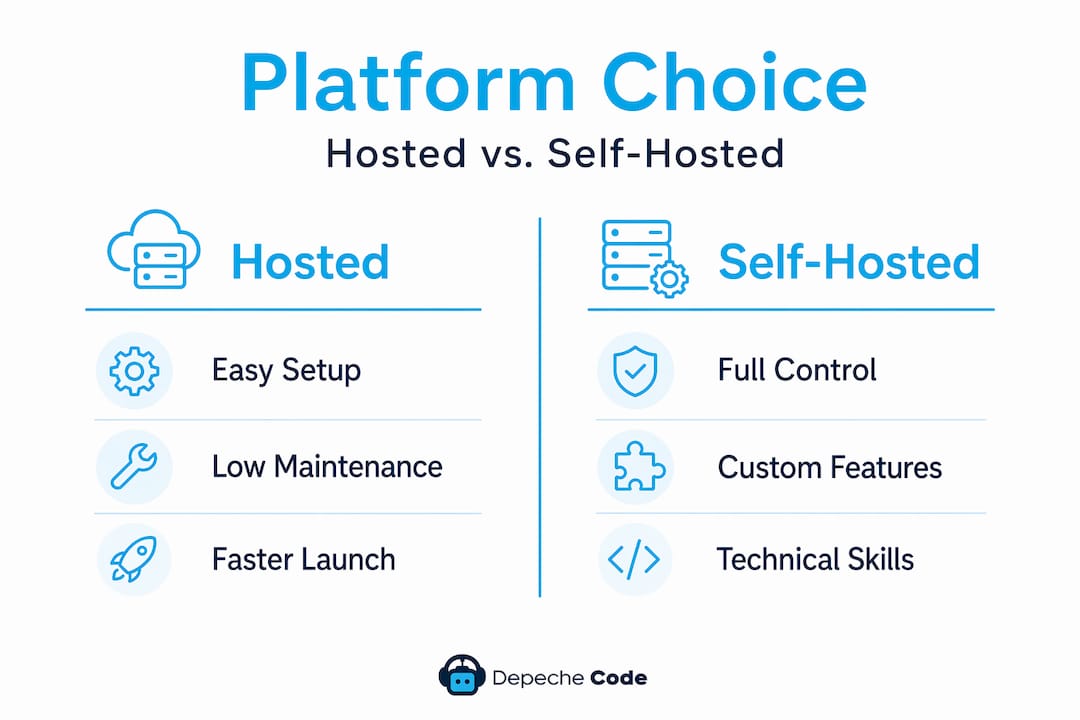
The core choice comes down to hosted versus self-hosted. All-in-one solutions significantly reduce backend maintenance workload, while self-hosted solutions increase your responsibility for security patches, plugin updates, and server management. Neither is universally better. The right choice depends on your technical skills and how much time you can afford to spend on infrastructure.
Here is how the most popular options compare:
| Platform | Type | Starting Cost | Best For |
|---|---|---|---|
| Shopify | Hosted | $39/month | Fast launch, minimal tech skills |
| BigCommerce | Hosted | $39/month | Scaling with advanced features |
| Wix eCommerce | Hosted | $27/month | Design-focused small stores |
| WooCommerce | Self-hosted | Free (hosting extra) | Full control, WordPress users |
The basic Shopify plan at $39/month includes everything you need for a functional store launch, including hosting, a payment processor, and an SSL certificate. That bundled model means you can have a working storefront in hours rather than weeks.
A few additional factors to weigh:
- Domain costs: Many platforms offer a free domain for the first year, but renewal fees can surprise you. Budget $15 to $20 per year for domain renewal after year one.
- Transaction fees: Some platforms charge a percentage on top of payment processor fees unless you use their native payment tool.
- Scalability: If you plan to list thousands of SKUs or sell internationally, verify the platform handles that volume without expensive add-ons.
Pro Tip: If you are not comfortable managing server environments, avoid self-hosted platforms for your first store. The time you spend on technical upkeep is time you are not spending on product or marketing.
For more on getting website hosting right from the start, Depechecode covers the key considerations for ecommerce stores specifically.
Building and designing your ecommerce store
Once your platform is live and your domain is connected, the build phase begins. The goal here is not perfection. It is a store that looks credible, loads fast, and makes buying easy.
Follow these steps in order to keep the build organized:
- Choose a theme or template that fits your product category. Most platforms offer free and paid themes. Pick one built for ecommerce, not just general websites, so navigation and product pages are already optimized.
- Set up your branding basics. Upload your logo, set your brand colors, and add a favicon. These small details signal professionalism before a customer reads a single word.
- Add your products. Write clear, specific descriptions that answer the questions a customer would ask in a store. Use high-quality images shot from multiple angles. Set up variants (size, color, material) accurately from the start.
- Create your essential pages. Every store needs a homepage, an About page, a Contact page, an FAQ page, and policy pages covering returns, shipping, and privacy. Missing any of these reduces buyer trust immediately.
- Optimize navigation. Keep your main menu simple. Customers should reach any product category in two clicks or fewer.
- Apply basic on-site SEO. Write unique page titles and meta descriptions for your homepage and main category pages. Use descriptive, keyword-rich alt text on product images. This is the foundation of long-term discoverability.
Pro Tip: Test your store on a mobile device before you consider any page “done.” Over 60% of ecommerce traffic comes from phones. If your product images load slowly or your Add to Cart button is hard to tap, you are losing sales before they start.
Design for trust as much as aesthetics. Customer reviews, clear return policies, and visible contact information convert browsers into buyers more reliably than any color scheme.

Configuring payments, shipping, taxes, and checkout
This section is where most new store owners create problems that cost them later. Setting up checkout, shipping rules, and payment methods early prevents costly workarounds and protects customer trust. Do not load 200 products and then try to configure your payment gateway. Do it in this order instead.
Here is a breakdown of the operational setup priorities:
- Payment gateways: Connect Stripe, PayPal, or your platform’s native processor first. Link your business bank account, not a personal one. Verify your account is fully activated before launch.
- Tax settings: Most platforms now offer automated tax calculation. Enable it and specify the states or countries where you have nexus. Getting this wrong creates compliance headaches.
- Shipping zones and rates: Define where you ship before anything else. Decide between flat-rate, live carrier rates, or free shipping thresholds. Setting shipping zones early avoids expensive reconfiguration once orders start flowing.
- Checkout flow: Enable guest checkout. Reduce the number of form fields to the minimum required. Add express payment options like Shop Pay or Apple Pay where available.
Pro Tip: Place a real test order through your own store using a real card before you launch. Run the full path from product page to order confirmation email. This single step catches more critical errors than any checklist.
Here is a quick reference for checkout optimization priorities:
| Checkout Element | Why It Matters |
|---|---|
| Guest checkout | Reduces friction for first-time buyers |
| Express pay options | Shortens time-to-purchase on mobile |
| Progress indicator | Reduces cart abandonment at multi-step checkout |
| Clear return policy link | Increases purchase confidence |
Testing the entire customer journey end-to-end before launch catches integration failures that hurt conversions far more than visual design issues ever will.
Launching your store and getting your first customers
Going live is not just clicking a button. It is a sequence that, done right, sets you up for early traction instead of crickets.
- Remove your password page or maintenance mode. Most platforms put new stores behind a password by default. Double-check this is off before announcing anything.
- Submit your sitemap to Google Search Console. This tells Google your store exists and speeds up indexing. It takes five minutes and is frequently skipped.
- Announce on your existing channels. Email your personal list, post on social media, and tell people in your network. Your first customers are almost always people who already know you.
- Set up Google Analytics and platform analytics. You cannot improve what you cannot measure. Track sessions, add-to-cart rate, and conversion rate from day one.
- Launch a simple email capture. A discount code in exchange for an email address builds a list you own. Social media reach is rented. Your email list is yours.
- Start your SEO and content plan. A local business sales funnel helps you think through how organic traffic, paid ads, and email work together to move customers from discovery to purchase.
Common launch mistakes include going live without testing your confirmation emails, forgetting to set your store’s currency, and skipping the product page SEO entirely. Avoid all three with a pre-launch store launch checklist reviewed the day before you go public.
After launch, watch your data weekly. Double down on whatever traffic source converts best. Ignore vanity metrics like raw page views and focus on revenue per visitor.
What I’ve learned about ecommerce setup after seeing it done both ways
I have worked with dozens of entrepreneurs on ecommerce buildouts, and I keep seeing the same pattern. The business owner spends weeks obsessing over their theme colors and logo placement, then launches with broken checkout emails and no idea how their shipping rates work. The store looks great and sells nothing.
In my experience, operational readiness matters more than design quality in the first 90 days. Customers will forgive a plain-looking store if it is easy to buy from and orders arrive on time. They will not forgive a confusing checkout or a missing order confirmation.
My honest take on platform choice: if you are not a developer, start hosted and stay hosted. The self-hosted path feels empowering until you are spending Saturday night troubleshooting a plugin conflict that broke your cart. That is not a hypothetical. I have watched it happen repeatedly.
The entrepreneurs who succeed fastest treat their store like a product. They launch early, test constantly, and improve based on what customers actually do, not what they assume customers want. The tech is just the container. What you put in it and how you market it is what drives sales. No amount of technical perfection compensates for weak product-market fit or zero marketing effort.
— Donovan
Ready to launch your ecommerce store with expert support?
Building your own store is absolutely possible, and this guide gives you the roadmap. But if you want to skip the trial-and-error and get a professionally built, conversion-focused store faster, Depechecode can handle the heavy lifting.
Depechecode is a full-service digital agency based in Orlando that builds custom ecommerce websites tailored to your business goals. From website design and development to post-launch SEO, the team handles every technical layer so you can focus on your products and customers. Whether you need a fully custom build or want guidance on your existing setup, Depechecode offers affordable SEO plans designed to grow your store’s organic traffic from day one. Contact Depechecode today for a personalized consultation on your ecommerce launch.
FAQ
How long does it take to set up an ecommerce website?
A basic hosted store can be live in one to three days with a clear product list and branding ready. A custom-built store with advanced features typically takes two to six weeks depending on complexity.
What is the most affordable way to start an online store?
Hosted platforms like Shopify offer complete starter packages for around $39 per month, which covers hosting, a payment processor, and an SSL certificate, making them one of the lowest-cost entry points for a functional store.
Do I need a business license to set up an ecommerce site?
You need a registered business entity and an EIN to process payments through major gateways. Operating without legal registration blocks payment provider onboarding and creates tax compliance risks.
What should I test before launching my ecommerce store?
Run a real end-to-end test purchase, confirm order confirmation emails send correctly, verify shipping rates calculate accurately, and check that your store displays correctly on mobile devices before going live.
How does ecommerce SEO differ from regular website SEO?
Ecommerce SEO focuses heavily on product page optimization, category page structure, and technical factors like site speed and crawlability. Getting product titles, descriptions, and image alt text right from launch gives you an organic traffic foundation that compounds over time.