

TL;DR:
- Proper website architecture organizes content logically to enhance usability and search engine ranking. Failing to plan leads to confusing sites, buried content, and poor indexing, while visual tools help align structure early. Focus on visitor intent, keep hierarchy shallow, enforce internal linking, and use design tools to visualize before development begins.
Website architecture is the framework that organizes and connects your website’s pages to optimize usability and search engine performance. If you skip this step, you end up with a site that confuses visitors, buries important content, and signals disorder to Google. Knowing how to plan website architecture before writing a single line of code separates sites that convert from sites that frustrate. Tools like Figma, Lucidchart, and Miro make the planning process visual and collaborative, so both business owners and developers can align on structure from day one.
How to plan website architecture: the core framework
Website architecture planning, also called information architecture (IA), is the discipline of organizing, labeling, and structuring web content so users and search engines can find what they need. The goal is a logical hierarchy that mirrors how your visitors think, not how your internal departments are organized.
The three foundational principles are:
- Hierarchy: Pages flow from broad to specific. Homepage leads to category pages, which lead to individual content or product pages.
- Internal linking: Every page connects to related pages, distributing authority and guiding users deeper into the site.
- Crawlability: Search engine bots follow the same paths users do. A clear structure means faster, more complete indexing.
Start every project by mapping your content inventory. List every page you plan to create, then group them by topic and user intent. This exercise alone reveals redundancies and gaps before development begins.
What are the main types of website architecture?

Choosing the right model is the first real decision in website structure planning. Four models cover nearly every use case.
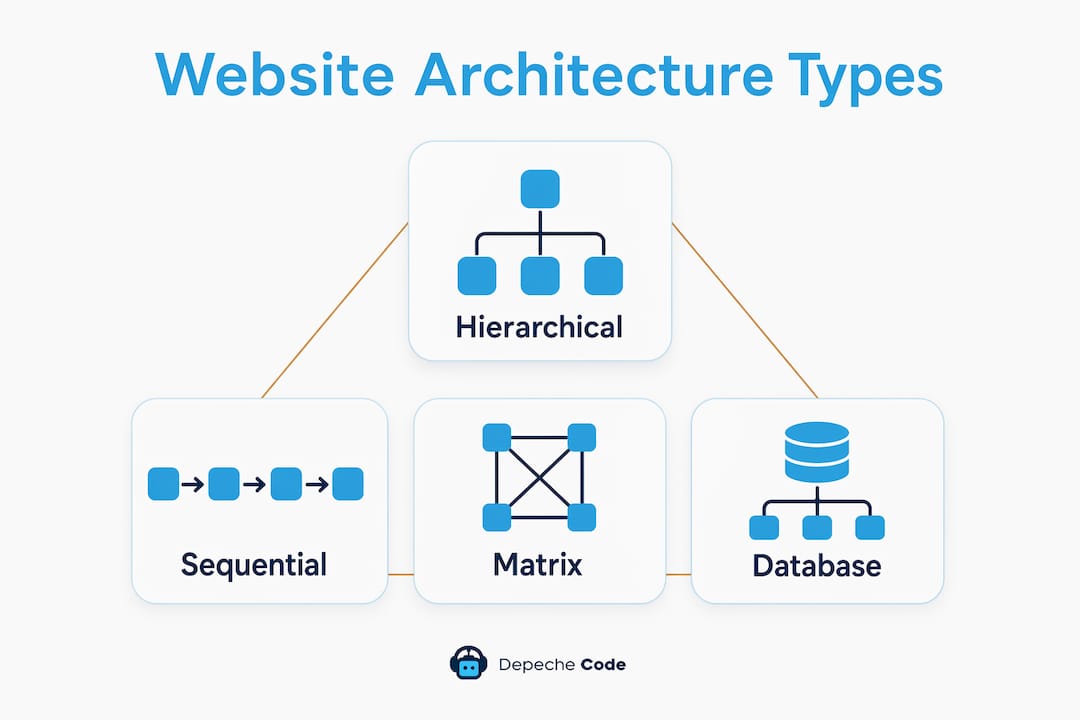
Hierarchical (Tree) Structure
The hierarchical tree structure is the most common for business websites, organizing content from homepage to categories to subcategories. It mirrors natural broad-to-specific thinking. Most service businesses, e-commerce stores, and corporate sites use this model because it scales cleanly.
Sequential Structure
Sequential architecture guides users through a fixed path, step by step. Checkout flows, onboarding wizards, and course modules use this model. There is no branching. Users move forward or backward only.
Matrix Structure
Matrix architecture lets users choose their own path through cross-linked content. Wikipedia is the clearest example. This works for large knowledge bases but requires disciplined internal linking to prevent users from getting lost.
Database Structure
Database-driven sites generate pages dynamically from content stored in a database. News sites, job boards, and large e-commerce catalogs use this model. The architecture lives in templates and taxonomy rather than manually created pages.
| Structure Type | Best For | Key Risk |
|---|---|---|
| Hierarchical | Business sites, service pages | Too many levels deep |
| Sequential | Checkout, onboarding | No flexibility for users |
| Matrix | Wikis, knowledge bases | Navigation confusion |
| Database | Catalogs, news, job boards | Thin or duplicate content |
Pro Tip: Most business sites perform best with a hybrid model: hierarchical core pages combined with hub-and-spoke clusters for blog and resource content. This hybrid architecture approach maximizes both usability and topical authority.
How do you organize website content for SEO and users?
Content organization is where website architecture planning directly affects your search rankings. The rule is simple: structure around visitor intent, not your internal org chart. A law firm should not organize pages by partner names. It should organize by practice area and client problem.
Group content by topic and intent. Create broad category pages (pillars) that cover a main topic, then build cluster pages that go deep on subtopics. Link every cluster page back to its pillar. Content pillars and clusters build topical authority by signaling to Google that your site owns a subject area.
Use clean, descriptive URLs. A URL like /services/web-design/e-commerce tells both users and search engines exactly where they are. Sites using clean hierarchical URLs see up to 30% better crawl efficiency over those using dynamic query strings. That efficiency translates directly into faster indexing of new pages.
Avoid orphan pages. An orphan page has no inbound links from the rest of your site. It is invisible to users and nearly invisible to search engines. Every page you create must be linked from at least one other page.
Pro Tip: Build a simple spreadsheet listing every planned page. Add a column for “linked from” and “links to.” Fill it in before development starts. This forces you to think about connections, not just content.
Key content organization rules to follow:
- Keep your hierarchy to three levels maximum for most sites (Homepage, Category, Page)
- Write category page titles that match the words your customers actually use
- Place your highest-value pages at the shallowest level of the hierarchy
- Review Google Search Console after launch to find pages with zero internal links
How to design navigation menus and internal links
Navigation design is the user-facing expression of your site architecture. Get it wrong and users leave. Get it right and they find what they need without thinking.
Limit your top-level menu to 5–7 items. The Baymard Institute found that people struggle to process more than 7 options at a time in menus. Limiting items to 5–7 reduces cognitive overload and improves orientation for first-time visitors. If you have more categories, use dropdown menus or a mega menu rather than expanding the top level.
Enforce the three-click rule. Every important page should be reachable in three clicks or fewer from the homepage. This keeps your hierarchy shallow and your users oriented. Test this manually by clicking through your planned structure before building anything.
Use three types of internal links strategically:
- Navigational links: Menu items, footer links, and breadcrumbs that define the site’s skeleton
- Contextual links: In-body links within content that connect related topics naturally
- Hub links: Links from a central pillar page out to all its cluster pages
Internal links serve three functions: they help users discover related content, distribute ranking power across pages, and signal page importance to search engines. A page with many internal links pointing to it tells Google that page matters.
Add breadcrumbs. Breadcrumbs improve navigation clarity for users and help search engines understand site structure. They are especially valuable on deep e-commerce or resource sites where users may land on a subcategory page from search.
Build a linking matrix. Create a spreadsheet with every key page listed. For each page, document which pages link to it and which pages it links out to. This linking matrix spreadsheet prevents orphan pages and keeps link equity flowing to your most important pages.
Pro Tip: Keep navigation labels literal and predictable. “Services” beats “What We Do.” “Pricing” beats “Investment.” Users scan menus in under two seconds. Clever labels slow them down.
What tools help you visualize website architecture?
Planning on paper is fine for small sites. Anything beyond 20 pages needs a dedicated tool.
Visual sitemap tools let you drag and drop pages into a hierarchy and share the result with clients or teammates. The best options in 2026 are:
- Lucidchart: Flexible diagramming with real-time collaboration and template libraries
- Figma: Preferred by design teams for combining sitemaps with wireframes in one file
- Miro: Whiteboard-style tool ideal for early brainstorming sessions with non-technical stakeholders
- Slickplan: Purpose-built for website sitemaps with content planning features built in
- Octopus.do: Fast, visual sitemap builder with shareable links for client review
Sketching a rough site map using tools like Figma, Lucidchart, or Miro helps you visualize structure and user flow before a single page is built. This step catches structural problems that are expensive to fix after development.
User flow diagrams map the paths visitors take from entry point to conversion. Draw the three or four most common journeys: a visitor landing on a blog post, a visitor arriving on the homepage, a visitor coming from a paid ad. Each flow should reach its goal in three clicks or fewer.
Wireframes translate your sitemap into low-fidelity page layouts. They show where navigation menus, content blocks, and calls to action will sit. Wireframes are not about visual design. They are about confirming that your architecture decisions work at the page level.
| Tool | Best Use Case | Collaboration |
|---|---|---|
| Lucidchart | Detailed sitemaps and flowcharts | Real-time, team-based |
| Figma | Sitemaps plus wireframes | Real-time, design-focused |
| Miro | Brainstorming and early planning | Whiteboard, stakeholder-friendly |
| Slickplan | Dedicated sitemap building | Client review and approval |
| Octopus.do | Quick visual sitemaps | Shareable link |
Common pitfalls when planning site architecture
Most architecture mistakes are predictable. Knowing them in advance saves weeks of rework.
Too many levels deep. When users must click five or six times to reach a product page, most of them leave. Keep your hierarchy to three levels for the majority of content. If you have a large catalog, use filters and search rather than adding more hierarchy levels.
Organizing by internal departments. A manufacturing company that structures its site around its Sales, Engineering, and Operations teams is building for itself, not its customers. Visitors do not care about your org chart. They care about their problem and your solution.
Unclear navigation labels. Vague labels like “Solutions” or “Resources” force users to guess. Every menu item should tell the user exactly what they will find. Test your labels with someone unfamiliar with your business. If they cannot predict what is behind a link, rename it.
Ignoring mobile navigation. A seven-item desktop menu becomes a usability problem on a 375-pixel screen. Plan your navigation for mobile first, then expand for desktop. Responsive design architecture requires that your menu structure works at every screen size, not just the one you designed on.
Skipping the audit after launch. Architecture is not a one-time decision. Use Google Search Console to find pages with no internal links, pages with high impressions but low clicks, and pages that are not being crawled. Fix these issues quarterly.
Pro Tip: Run a simple crawl with Screaming Frog SEO Spider after launch. It identifies orphan pages, broken internal links, and pages buried too deep in the hierarchy. Fix every issue before you start any SEO campaign.
Key takeaways
Effective website architecture combines a clear hierarchical structure, shallow navigation depth, and a deliberate internal linking strategy to serve both users and search engines.
| Point | Details |
|---|---|
| Choose the right structure type | Most business sites perform best with a hierarchical model combined with content clusters. |
| Organize around visitor intent | Group pages by customer questions and goals, not internal departments. |
| Enforce the three-click rule | Every important page must be reachable in three clicks or fewer from the homepage. |
| Limit menu items to 5–7 | Fewer top-level options reduce cognitive overload and improve user orientation. |
| Build a linking matrix | Document inbound and outbound links for every key page to prevent orphan pages. |
What i have learned planning architecture for real client sites
Most business owners treat website architecture as a technical detail they can hand off to a developer. That is the wrong frame. Architecture is a business decision. The pages you put at the top of your hierarchy signal what your business prioritizes. The labels you choose signal how well you understand your customers.
The most common mistake I see in client projects is a site organized around the business owner’s mental model rather than the visitor’s. A five-service agency that buries its most profitable service three clicks deep because the owner thinks of it as a “specialty” is leaving money on the table. The fix is simple: ask which service generates the most revenue, then make it the easiest page to reach.
The second mistake is building a complex architecture upfront for content that does not exist yet. I have seen clients plan 200-page sites before writing a single word. Start with the 20 pages you can build well, get them right, and expand from there. A clean 20-page site outperforms a chaotic 200-page site every time.
Early visualization pays off more than any other step. Spending two hours in Figma or Miro before development starts saves 20 hours of restructuring later. Show the sitemap to someone who has never seen your business. Watch where they get confused. That confusion is your architecture problem, not a user problem.
— Donovan
Build a site that works from the ground up
Planning your architecture is only half the equation. The other half is building it correctly so that your structure actually delivers the user experience and SEO performance you designed for.

Depechecode is a full-service digital agency in Orlando that specializes in professional website design and development for businesses that want their site to perform, not just look good. The team builds sites with clean hierarchies, SEO-friendly URL structures, and navigation designed around how your customers think. If you want a site built right from the first page to the last, Depechecode has the expertise to make it happen. Explore the SEO plans that complement a well-structured site and turn your architecture into measurable search visibility.
FAQ
What is website architecture planning?
Website architecture planning is the process of organizing a site’s pages into a logical hierarchy before development begins. It covers structure type, URL design, navigation, and internal linking.
How many levels deep should a website hierarchy be?
Most business sites should stay at three levels deep: homepage, category, and individual page. Deeper hierarchies make important content harder to find and harder to crawl.
What is the three-click rule in site navigation?
The three-click rule states that every important page should be reachable in three clicks or fewer from the homepage. It keeps navigation shallow and users oriented.
What tools are best for creating a site map?
Lucidchart, Figma, Miro, Slickplan, and Octopus.do are the leading tools for visualizing site structure before development. Each supports collaboration and export for client review.
How do orphan pages hurt SEO?
Orphan pages have no inbound internal links, making them invisible to both users and search engine crawlers. Fix them by adding contextual links from related pages or including them in your navigation.