
TL;DR:
- Effective website hosting management involves understanding your hosting type, inventorying assets, and automating routine tasks to ensure reliability and security. Regular monitoring of key signals such as latency, errors, traffic, and saturation helps identify issues before they cause outages, while staging environments prevent deployment mistakes. Building clear documentation and automating processes significantly reduce outages caused by organizational neglect and human error.
Your website goes down at 2 a.m. on a Tuesday, and you have no idea why. Sound familiar? Knowing how to manage website hosting is the difference between a reliable, high-performing site and one that loses customers every time something breaks. Most business owners treat hosting like a light switch: flip it on and forget it. That mindset leads to slow load times, security gaps, and outages that cost real money. This guide walks you through every layer of website hosting management, from understanding your environment to automating the boring parts, so your site stays fast, secure, and online.
Table of Contents
- Key takeaways
- How to manage website hosting: understanding your environment
- Mastering your control panel and automation tools
- Monitoring performance and reliability
- Maintenance routines and troubleshooting that actually work
- My take on what actually moves the needle
- Let Depeche Code handle the hard parts
- FAQ
Key takeaways
| Point | Details |
|---|---|
| Know your hosting type | Shared, VPS, dedicated, and cloud each carry different management responsibilities you need to understand before acting. |
| Use your control panel daily | Control panels handle DNS, SSL, backups, and resource monitoring from one place, cutting management time significantly. |
| Automate repetitive tasks | Automated backups, updates, and deployments reduce human error and keep your hosting environment consistent. |
| Monitor the Four Golden Signals | Track latency, errors, traffic, and saturation to catch problems before they become outages. |
| Test changes in staging first | Validate every DNS, SSL, or script change in a staging environment before pushing it to your live site. |
How to manage website hosting: understanding your environment
Before you touch a single setting, you need to know exactly what you are managing. Hosting is not a monolithic thing. It is a collection of interconnected components, and each one requires attention.
Hosting types and what they mean for management
Your hosting type determines how much of the stack you own. Here is what that looks like in practice:
- Shared hosting: Your site lives on a server alongside hundreds of others. The provider manages the hardware, OS, and core software. You manage your files, databases, and basic settings. Low cost, low control.
- VPS (Virtual Private Server): You get a dedicated slice of a server with root access. You are responsible for configuring, patching, and monitoring your instance. The provider keeps the physical hardware running.
- Dedicated hosting: The entire server is yours. You manage everything from the OS up. This is the highest level of control and responsibility.
- Cloud hosting: Resources scale dynamically across multiple servers. Management depends heavily on whether you choose a managed or unmanaged plan.
The key distinction is whether you are working with IaaS (Infrastructure as a Service) or a managed service. With IaaS hosting, users configure, administer, and monitor systems themselves, while managed services share operational control with the provider. Knowing which model you are on tells you exactly where your responsibilities start and end.
Inventorying your website assets
Write down every component your site depends on. Most business owners skip this step and regret it later.
- Domain name: Who registered it? When does it expire? Where are the DNS records?
- DNS settings: Which nameservers are active? Are your A, CNAME, and MX records current?
- Hosting account: Which provider, what plan, and what control panel do you have access to?
- Files and databases: Where are your core files stored? What database engine are you using?
- SSL certificate: Who issued it, and when does it expire?
This inventory is your management map. Without it, troubleshooting becomes guesswork.
Mastering your control panel and automation tools

A control panel is not just a convenience. It is your primary interface for everything that keeps your site running. As of 2026, control panels manage domains, DNS, mail accounts, files, databases, SSL certificates, and performance monitoring from a single interface.
The most common panels are cPanel, Plesk, and CloudPanel. Each one covers the same core tasks, though their interfaces differ. Here is what you should be doing inside your panel on a regular basis:
- DNS management: Update A records when you change servers, add CNAME records for subdomains, and verify MX records when email behaves oddly.
- SSL certificates: Renew certificates before expiration. Many panels support Let’s Encrypt auto-renewal, which you should activate immediately.
- File management and FTP: Use your panel’s file manager or set up SFTP for secure file transfers. Plain FTP sends credentials in clear text.
- Database management: Back up your databases separately from your files. They contain your content and user data.
- Resource monitoring: Check CPU and memory usage regularly. Spikes often signal a problem before users notice anything.
Pro Tip: Set up email or SMS alerts inside your control panel for CPU usage above 80% and disk usage above 90%. You want to know about resource saturation before it kills performance, not after.
Automation: where the real reliability gains happen
Manual processes break. People forget, make typos, and skip steps when they are in a hurry. Automation eliminates that category of failure entirely.
Infrastructure as code tools like Terraform enable repeatable deployment and reduce configuration drift, which is one of the most common causes of hosting instability. When your server configuration exists as code in a version-controlled repository, every change is tracked, reversible, and reproducible.
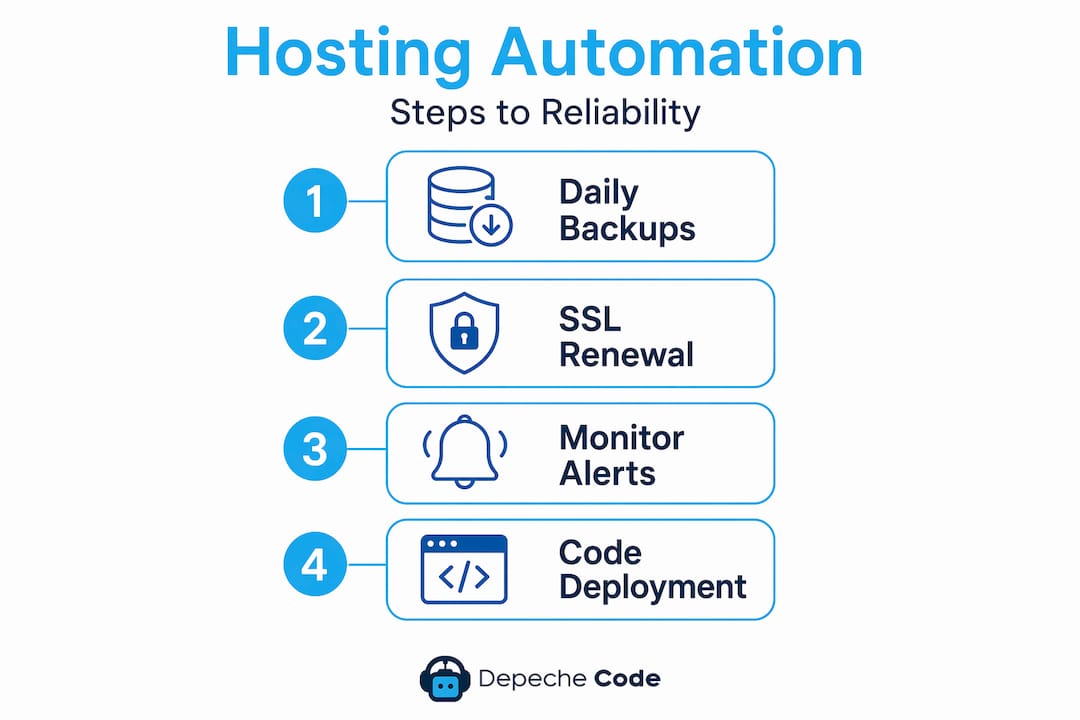
At a minimum, every business should have automated daily backups stored off-server, automated SSL certificate renewal, and automated core software updates for CMS platforms like WordPress. These three automations alone will prevent the majority of common hosting failures most business owners face.
Monitoring performance and reliability
You cannot fix what you cannot see. Effective website performance management focuses on the Four Golden Signals: latency, errors, traffic, and saturation. These four metrics tell you virtually everything you need to know about the health of your hosting environment.
Here is what each signal means for your website:
- Latency: How long does it take your server to respond to a request? Anything above 200ms for a server response is worth investigating. High latency often points to database bottlenecks or resource saturation.
- Errors: What percentage of requests are failing? Even a 1% error rate means one in every hundred visitors hits a broken page. Track HTTP 5xx errors specifically, as those originate from your server.
- Traffic: How much traffic is hitting your server right now compared to your baseline? Sudden spikes can indicate a marketing campaign going live or a DDoS attack. Both require different responses.
- Saturation: How close is your server to its capacity limits? CPU, memory, disk I/O, and bandwidth all have ceilings. When any of them approach 100%, performance degrades fast.
Properly defined SLIs and SLOs allow business-aligned reliability management rather than ad-hoc threshold monitoring.
Setting up practical monitoring without the noise
The biggest monitoring mistake is setting too many alerts and then ignoring them all. Alert noise reduces response effectiveness, and using burn-rate alerts with multi-window evaluation cuts alert fatigue while improving incident detection. In plain terms: alert on meaningful patterns, not individual data points.
A practical setup for most business websites includes uptime monitoring (check every minute from at least two locations), a core web vitals dashboard, and a single weekly performance report. Tools like UptimeRobot for uptime and Google Search Console for performance data cover these bases without requiring a dedicated ops team.
The goal is to define what “normal” looks like for your site, then alert only when something deviates from that baseline by a meaningful margin. Effective hosting management depends on continuous observability and learning cycles, not one-time setups.
Maintenance routines and troubleshooting that actually work
Hosting is not a set-and-forget system. Hosting requires continuous active management, and the businesses that understand this have far fewer emergencies than those that do not.
Here is a maintenance routine that covers the essentials:
- Weekly: Review resource usage reports. Check for failed backup jobs. Scan error logs for recurring 404s or 500s.
- Monthly: Verify SSL certificate expiration dates. Test your backup restore process on a staging environment. Review user account access and remove any that are no longer needed.
- Quarterly: Audit your hosting plan against your current traffic levels. A site that has grown significantly may need an upgrade to a higher tier.
- Annually: Review your domain registration expiration. Audit your DNS records for anything outdated. Evaluate whether your current hosting provider still meets your needs.
Pro Tip: Never test a backup restore on your live server. Always use a staging environment. Many businesses discover their backups are corrupted only when they desperately need them, and that is the worst possible time to find out.
Using staging environments to prevent disasters
Staging environments are essential for validating hosting changes, including DNS, SSL, and backup restores, to prevent production failures. Think of staging as a rehearsal. Every DNS change, every plugin update, every new SSL configuration gets tested there first.
Most managed WordPress hosts include a one-click staging environment. If yours does not, you can create a subdomain-based staging site manually. The setup takes a few hours once. The time it saves you over the years is incalculable.
Many hosting incidents are due to deployment and configuration errors. A staging environment is the single most effective guardrail against that category of problem.
My take on what actually moves the needle
I have reviewed hosting setups for dozens of businesses over the years, and the pattern is almost always the same. The problems are not technical. They are organizational.
What I see most often is this: nobody knows who owns what. The developer set up the server two years ago and has since moved on. The business owner does not know the DNS provider. The hosting account credentials are in someone’s personal email. When something breaks, the scramble to find access wastes hours before anyone even looks at the actual problem.
The first thing I tell every client is to build a hosting document. One page. Every credential, every provider, every expiration date, every point of contact. It sounds almost embarrassingly simple, but it prevents more outages than any monitoring tool I have ever recommended.
The second thing I emphasize is automation. I have seen businesses with genuinely solid infrastructure lose data because someone forgot to check whether the backup job was running. Automated processes do not forget. They do not get busy. They run at 2 a.m. without complaint, and they create a log you can actually audit.
Finally, I want to challenge the idea that monitoring is a technical function. Reviewing a weekly uptime report and understanding what your server’s normal resource usage looks like is a business skill. The owners who treat it that way respond to problems faster and spend less money fixing them.
— Donovan
Let Depeche Code handle the hard parts
Managing hosting well takes time, skill, and ongoing attention that most business owners would rather spend on their actual business. Depechecode specializes in exactly this. From professional website development built with performance and reliability in mind, to ongoing technical website support that keeps your hosting environment healthy, Depechecode handles the infrastructure so you do not have to.

Based in Orlando and serving businesses of all sizes, Depechecode brings together website development, hosting management, SEO, and ongoing maintenance under one roof. You get a team that knows your site inside and out, automated processes already in place, and a single point of contact when something needs attention. If you are ready to stop worrying about server uptime and start focusing on growth, Depechecode is the partner that makes that possible.
FAQ
What is the best way to manage web hosting services?
Start with a clear inventory of all your hosting assets, including domain, DNS, SSL, and backups. Then use your control panel for daily management and automate repetitive tasks like backups and updates to reduce human error.
How do I choose the right hosting type for my business?
Match your hosting type to your traffic volume, technical capacity, and budget. Shared hosting works for small sites, VPS suits growing businesses needing more control, and dedicated or cloud hosting fits high-traffic or resource-intensive sites.
How often should I back up my website?
Daily automated backups stored off-server are the standard for most business websites. Test your restore process monthly on a staging environment to confirm backups are actually usable when you need them.
What are the Four Golden Signals in hosting performance?
The Four Golden Signals are latency, errors, traffic, and saturation. Tracking these metrics gives you a complete picture of hosting health and allows you to catch problems before they affect users.
Why should I use a staging environment?
A staging environment lets you test DNS changes, software updates, and SSL configurations before they go live. This prevents configuration errors from taking down your production site, which is one of the most common causes of hosting-related outages.