
// Creative Agency
Server-Side Tracking: What It Is and How to Set It Up in 2026

Server-side tracking means your website sends visitor events to a server you control, and that server passes them on to analytics and ad platforms, instead of every vendor’s script running in the visitor’s browser. Done well, it gives you cleaner data, a lighter page and tighter control over what each platform receives. It only works as well as the site underneath it: a fast, well-maintained site with a consent banner that actually blocks tags is the foundation, and the server container sits on top.
This guide covers what it is, how data moves, the benefits worth paying for, the US privacy rules that still apply, and a setup sequence you can hand to a developer or agency.
TL;DR
- Server-side tracking (Google calls it server-side tagging) moves tag processing from the visitor’s browser to a server container you control.
- The main gains are fewer scripts on the page, control over what data leaves your domain, and longer-lived first-party cookies.
- It does not remove privacy duties. In the US, opt-out signals such as Global Privacy Control must still be honored, and consent must gate tags before they fire.
- Set it up in order: audit current tags, fix consent, build the server container, map a first-party subdomain, then validate each destination.
- A fast, maintained website is the base the whole setup depends on.
Table of Contents
- What server-side tracking is
- Client-side vs. server-side tracking
- How the server-side tracking process works
- Server-side tracking benefits that matter to a business
- Is server-side tracking legal in the US?
- How to set up server-side tracking: a practical sequence
- Where server-side tracking fits in your marketing stack
- Our perspective
- Build the foundation with Depeche Code
- FAQ
- Sources
What server-side tracking is
Traditional tracking is client-side. When someone views a product or buys something, scripts for Google Analytics, Meta, TikTok and others all run in their browser and send data straight to each vendor. You see only what those scripts report, and you have little say over what they collect.
In server-side tracking, the browser sends one event to a server first. Google’s introduction to server-side tagging explains that a server container does not run in the user’s browser or phone. It runs on a server your business controls, and it uses the same tag, trigger and variable model you already know from a web container.
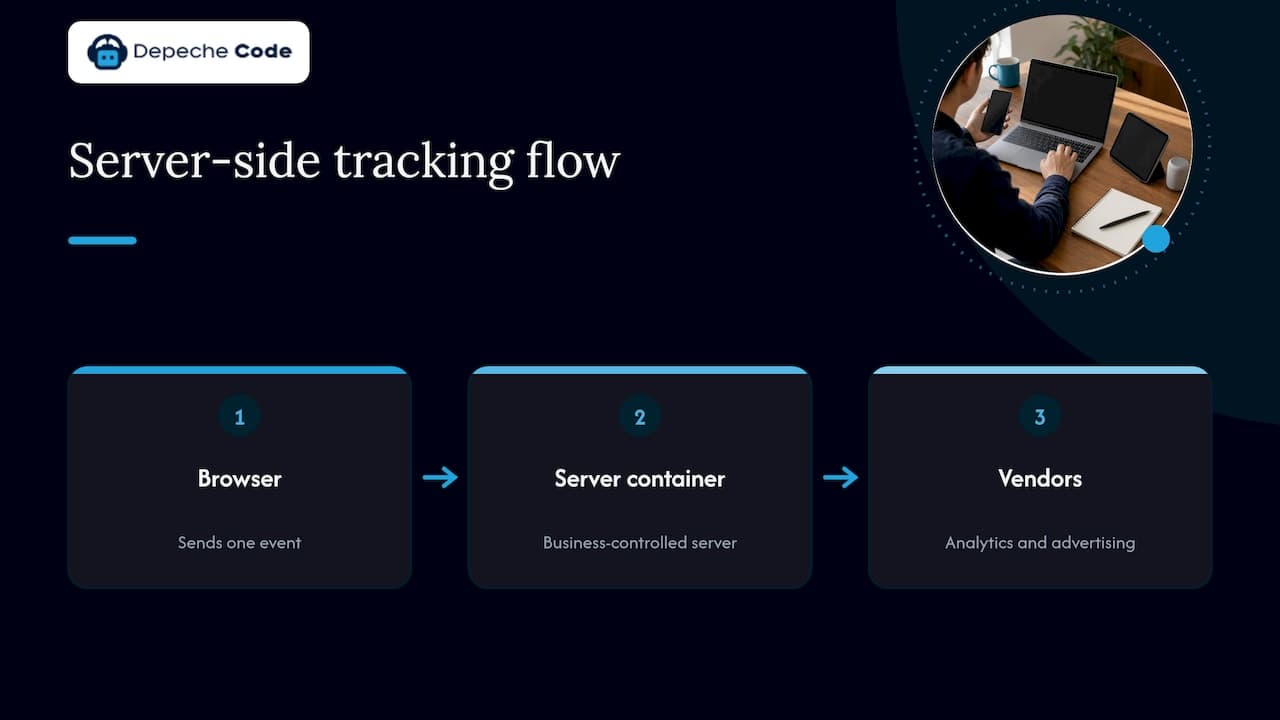
Google’s overview describes the result in plain terms: tag instrumentation moves from the site or app into a server-side container on Google Cloud or another platform. Fewer tags run in the browser, which can improve performance, and the data sits in an environment you manage.
Server-side tracking and server-side tagging are used almost interchangeably. Tagging is the Google Tag Manager term for the same architecture.
Client-side vs. server-side tracking
The difference is where processing happens and who can see the data on the way.
| Client-side | Server-side | |
|---|---|---|
| Where tags run | Visitor’s browser | Your server container |
| Who receives data first | Each vendor directly | Your server |
| Control over fields sent | Limited to what each script collects | You can filter, rename, hash or remove values |
| Scripts on the page | One per vendor | Mainly one lightweight web container |
| Cookie context | Often third-party | First-party, on your domain |
Google’s comparison of the two approaches says that in client-side tagging, event data goes from the browser or device straight to Google products or ad partners. In server-side tagging, a web container sends events to a server container, where processing rules can screen, validate and modify the data, including removing personally identifiable information, before it reaches any endpoint. In a first-party context, your site’s data and cookies stay within your domain, so vendors cannot access third-party cookies.
How the server-side tracking process works
A purchase makes the flow concrete.
- The browser fires an event. Your web container captures the order value, products and other details and sends them over HTTPS to your server container.
- A client claims the request. Inside the server container, a “client” is the component that receives incoming requests and turns them into event data. Google notes that the GA4 and Measurement Protocol clients are included by default.
- Tags, triggers and variables run. The same logic you use in a web container decides which destinations get the event, and what each one is allowed to see.
- Tags forward the data. Server-side tags send the event to analytics and advertising platforms through their server APIs.
- The server responds. The container packages a response back to the requester, and you can check each destination’s reply to confirm the event was accepted.
A detail that matters for cookies: Google’s overview says the tagging server gets a default URL on run.app. To improve cookie privacy and durability, point a subdomain of your own website at the tagging server so it can read and write HttpOnly cookies, which scripts on the page cannot see.
Server-side tracking benefits that matter to a business
Skip the hype and focus on the gains you can verify on your own site.
Fewer scripts and a lighter page
Every third-party tag in the browser costs load time. When the heavy lifting moves to a server, the page carries less code. Google lists reduced client-side tagging and the resulting performance gain as a core reason to adopt the approach. Faster pages help conversions and search performance, which is why site speed and tracking belong in the same conversation.
Control over what leaves your domain
The server container is a checkpoint. You can strip an IP address, drop a field, hash an email before it goes to an ad platform, or stop sending an event to a vendor that does not need it. With client-side scripts, you accept whatever each vendor’s code collects.
More durable first-party cookies
When the server answers from a subdomain of your own site, it can set cookies in a first-party context. That gives measurement more stability than cookies set by third-party scripts alone.
Cleaner, enrichable data
Because the server sits between your site and the vendors, you can merge in backend data, such as confirmed order status, before forwarding. Reports then reflect what happened, not just what a browser script managed to send.
One implementation for many destinations
Instead of maintaining separate browser code for each advertising platform, you manage the logic once in the server container and fan the event out to analytics, Google Ads, Meta and others.
Is server-side tracking legal in the US?
Tracking is generally allowed in the US, but it is regulated by state privacy laws, wiretap and invasion-of-privacy statutes, and federal consumer protection rules. Moving collection to a server does not exempt you. It changes where the data flows, and it makes those flows harder for visitors and regulators to see, which raises the stakes on getting consent and opt-outs right.
Three points deserve attention.
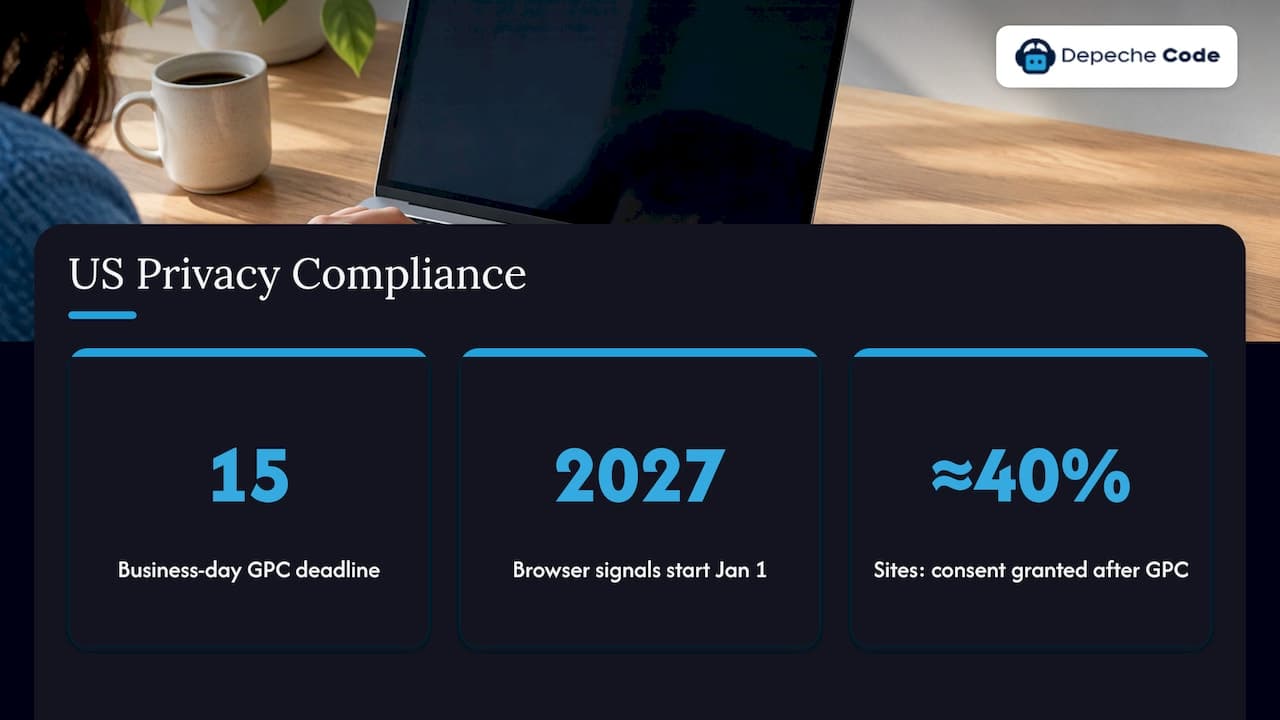
Opt-out signals must be honored. The California Privacy Protection Agency’s August 2026 overview of opt-out preference signals states that a business receiving a valid signal, such as Global Privacy Control (GPC), must stop selling and sharing personal information tied to that browser or device. It must comply as soon as feasibly possible and no later than 15 business days, and it must show that the signal was honored. The same material notes active enforcement, with settlements involving Sephora, Healthline Media, Walt Disney, Tractor Supply and PlayOn Sports.
Rules are tightening. According to the agency’s 2025 annual report, California enacted AB 566 in October 2025, requiring browsers to offer opt-out preference signals beginning January 1, 2027. California, Connecticut and Colorado regulators also joined a sweep aimed at businesses that fail to honor GPC.
Banners must actually block tags. Attorneys at Baker Donelson describe a “millisecond problem” in their September 2026 alert on website tracking litigation: if ad tech starts transmitting the instant a page loads, before a visitor clicks Accept, the banner offers far less protection than companies assume. The same alert reports that tracking lawsuits have spread beyond California, and that in a study of the 250 most-visited sites, about 40 percent of California-tested sites still reported consent as granted after the browser sent an opt-out signal.
For Google tags, consent mode with server-side Tag Manager passes the visitor’s consent choices from your consent management platform to the Google tag, which adds consent parameters to the request sent to your server container. Consent-aware Google tags then adjust what they send. With analytics storage denied in basic mode, Google tags are fully blocked and no Analytics cookies are set or read.
This is general information, not legal advice. If you handle health, financial or children’s data, or you are unsure which state laws apply to you, have a privacy attorney review your setup.
Our own guides cover the practical side for site owners: how to enforce GPC before pixels fire, a CCPA compliance checklist for websites, and blocking trackers and logging consent if you also serve visitors in the EU.
How to set up server-side tracking: a practical sequence
1. Audit what you track today
List every tag on the site: analytics, ad pixels, heatmaps, chat widgets, call tracking. Note which ones drive decisions and which nobody checks. Moving a tag you do not need to a server just makes it harder to find later. If you are unsure what is worth measuring, our guide to what small businesses should track in 2026 gives you a short list to start from.
2. Fix consent first
Before building anything new, make sure the banner gates tags, not just displays a message. Confirm that a GPC signal from the browser suppresses sale and sharing. Server-side tagging inherits whatever consent state you send it, so a broken banner produces a broken server setup.
3. Create the web and server containers
In Google Tag Manager, you keep your web container and add a server container hosted on Google Cloud or another platform. Plan for hosting cost and uptime: the server is now part of your measurement path, so it needs monitoring like any other production system.
4. Map a first-party subdomain
Point a subdomain of your own site, for example one dedicated to measurement, at the tagging server. This is what lets the server set durable first-party cookies. Have your developer or host handle the DNS records and SSL certificate.
5. Route events through the server
Configure your web container to send events to the server container. Inside the server, confirm the GA4 client claims the requests, then add the tags for each destination, such as GA4, Google Ads and Meta.
6. Transform and minimize data
Decide which fields each destination actually needs. Hash emails, drop what is unnecessary, and keep a written record of what is sent where. That record helps if a regulator or customer ever asks.
7. Validate every destination
Use preview mode to watch a test purchase move through the container, then check each platform’s response and its own diagnostics. Run the test with consent granted, with consent denied, and with a GPC signal on. Repeat after any site update.
8. Monitor and maintain
Server-side tracking is not set-and-forget. Plugin updates, theme changes and redesigns can break the web container that feeds your server. Treat tracking checks as part of regular site maintenance.
Where server-side tracking fits in your marketing stack
Tracking supports decisions, so tie it to outcomes. For most businesses, that means form submissions, calls, purchases and booked appointments, reported consistently across your analytics and ad platforms. If you sell to other businesses, five groups of B2B website metrics can help you decide which events deserve server-side treatment. Local businesses that rely on phone calls should also look at call tracking for local SEO, since calls are often the conversion that matters most.
A good rule: start with your highest-value conversion, get it flowing cleanly through the server, and expand from there.
Our perspective
We build and maintain websites for businesses, and we see tracking as part of the website, not a bolt-on. A server container is only as dependable as the pages that feed it.
That is why we care about what our clients can measure and own. We deliver faster projects with in-house directed AI, we hand over transparent ownership of every deliverable, and we measure technical performance with Google PageSpeed and SEO scores. A lean, fast page is the same goal server-side tracking pursues: fewer scripts, less drag, cleaner signals.
Our advice is to get the foundations right in this order: a quick site, a consent setup that blocks tags until a visitor agrees and honors opt-out signals, and a clear list of conversions worth measuring. Then add the server layer. Businesses that do it in that order spend less time repairing broken reports later.
Donovan Wells - Founder and CEO
Build the foundation with Depeche Code
Server-side tracking pays off on a site that loads quickly, stays updated and is built around the conversions you care about. Depeche Code is an Orlando-based digital agency that handles website development and redesign, SEO, WordPress hosting and maintenance, AI chat bots and social media management. Our WordPress Dedicated Hosting starts from $39 per month, and WordPress Maintenance starts from $99 per month, so the site that feeds your tracking stays current.

If you are planning a new site or a redesign, it is the cheapest moment to build tracking in properly. Talk to Depeche Code about your website and measurement setup.
FAQ
What is server-side tracking?
Server-side tracking sends visitor events from your site to a server you control, which then forwards them to analytics and ad platforms. Vendor scripts no longer run directly in the browser. You decide which data each platform receives.
What is the difference between server-side tagging and server-side tracking?
They describe the same approach. Server-side tagging is the term used in Google Tag Manager for running tags in a server container instead of the browser. Server-side tracking is the broader phrase marketers use for the outcome.
Is server-side tracking legal in the US?
Yes, tracking is generally permitted, but it must follow state privacy laws and honor opt-out signals such as Global Privacy Control, as California regulators make clear. Consent and transparency duties still apply when processing happens on a server. For your specific situation, check with a privacy attorney.
What are the main benefits of server-side tracking?
You load fewer scripts on the page, control which fields reach each vendor, and can set first-party cookies from your own subdomain. You can also enrich events with backend data before sending them. These gains depend on a clean consent setup and a well-built site.
Do I need server-side tracking for a small business website?
It makes most sense when you run paid ads, rely on conversion data to spend budget, or want tighter control over personal data. Start by auditing your tags and fixing consent, then add a server container for your most valuable conversions.
Sources
- An introduction to server-side tagging, Google Tag Manager
- Server-side tagging overview, Google Tag Manager
- Client-side tagging vs. server-side tagging, Tag Manager Help
- Implement consent mode with server-side Tag Manager
- California Privacy Protection Agency, opt-out preference signals overview, August 2026
- California Privacy Protection Agency, 2025 Annual Report
- Baker Donelson, Website Tracking Technologies Face Growing Litigation and Regulatory Scrutiny