
TL;DR:
- A minimum viable website consists of just three or four essential pages that validate demand and gather user signals. Building a lean, launchable site speeds up feedback, reduces costs, and improves prioritization based on real user behavior. Focus on clear messaging, simple design, and core analytics before adding complex features or full branding.
A minimum viable website (MVW) is the smallest, launchable site that communicates your core value proposition and captures real user signals to confirm demand. That’s it. Not a polished brand experience, not a full product, just enough to answer one question: does anyone actually want this?
Your immediate next step: build a one-page pitch with a clear headline, two or three supporting bullets, and a signup or contact form. That alone qualifies as an MVW.
The baseline that most practitioners land on is 3–4 essential pages:
- Homepage with your value proposition and a primary call-to-action (CTA)
- About/Team page for credibility
- Contact or Signup page for lead capture
- Service or Product detail page when your offer needs more explanation
This article walks you through why that approach works, what to include, how to build and launch fast, and how to measure what you learn so you can decide what to build next.
Table of Contents
- Why a minimum viable website beats building the full site first
- What every MVW actually needs: a practical checklist
- What to postpone until after validation
- How to plan, build, and launch your MVW step by step
- What does an MVW actually cost, and how long does it take?
- How to measure success and decide what to build next
- What to do after validation (or after it fails)
- MVW templates and platform options that actually work
- Key Takeaways
- When DIY works and when you should hire an agency
- Depechecode builds MVWs that validate fast
- Useful sources and further reading
- FAQ
Why a minimum viable website beats building the full site first
Speed is the obvious argument, but it’s not the only one. Launching a lean site first forces you to articulate your value proposition before you spend money on design, copy, and features that may not matter to your actual customers.

The intent-based difference between an MVW and a full build is fundamental: MVWs prioritize rapid learning, while full builds prioritize polish, depth, and scalability. Chasing polish before you have validated demand is one of the most common and expensive mistakes early-stage founders make.
The concrete benefits of going lean first:
- Faster time to feedback. A focused site can go live in days, not months.
- Lower upfront cost. You spend on what matters, not on features users may never use.
- Earlier lead capture. A signup form on a live page generates real email addresses, not hypothetical interest.
- Clearer prioritization. Early user behavior tells you what to build next, rather than guessing.
- Investor and partner visibility. A live URL signals seriousness, even at an early stage.
On the brand concern: yes, a lean site looks simpler than a polished one. The answer is not to delay launch but to make the copy sharp and the design clean. A well-written one-page site with a strong headline consistently outperforms a bloated site with weak messaging.
What every MVW actually needs: a practical checklist
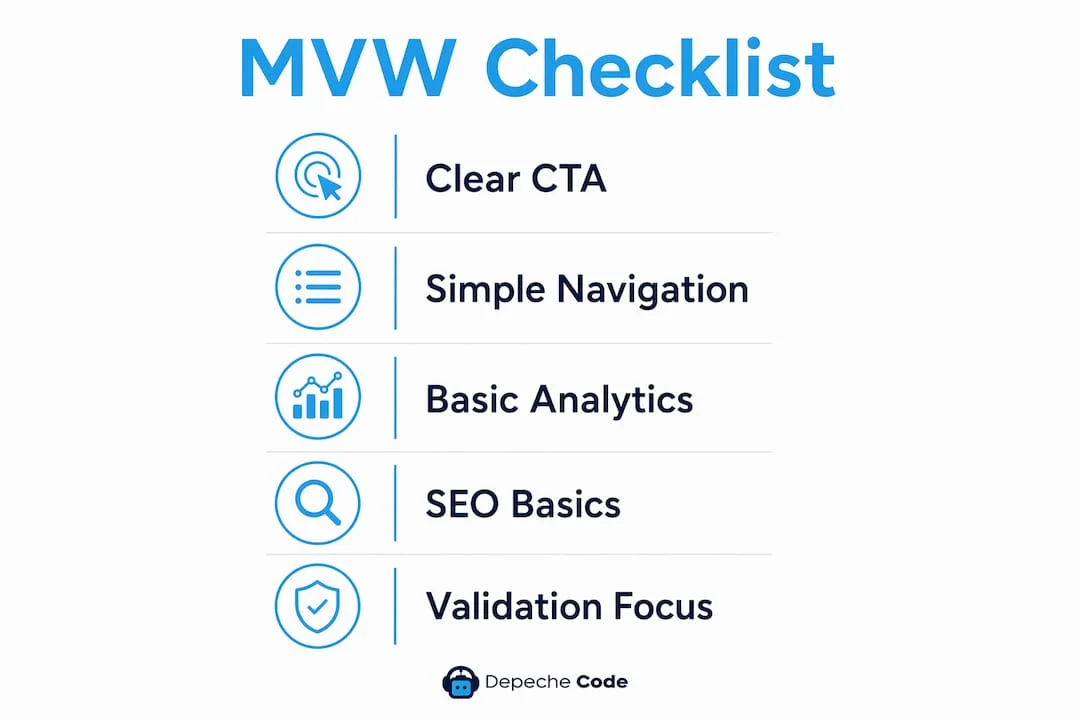
The core feature list for a viable site is shorter than most people expect: a clear CTA, simple navigation, basic analytics, responsive design, and minimal but functional design. Here’s how that breaks down into pages and technical requirements.

Pages
| Page | Must-have content | Goal |
|---|---|---|
| Homepage | Headline, 1–2 supporting bullets, hero CTA, social proof or founder credibility | Communicate value, drive action |
| About/Team | Who you are, why you’re credible, brief story | Build trust |
| Contact/Signup | Form, email, phone (optional), response expectation | Capture leads |
| Service/Product detail | What you offer, how it works, pricing signal or CTA | Reduce friction to conversion |
Technical must-haves
- SSL certificate. Non-negotiable. Browsers flag non-HTTPS sites, and users notice.
- Responsive/mobile design. Most traffic arrives on phones. A site that breaks on mobile fails the validation test before it starts.
- Basic speed optimization. Compress images, use a fast host, and avoid heavy scripts on page load.
- Form handling. At minimum, a working contact or signup form with email delivery confirmation.
- Analytics. Google Analytics 4 (GA4) or an equivalent like Plausible. Install it before you launch, not after.
SEO and discovery basics
Write a unique title tag and meta description for each page. Add a sitemap.xml and a robots.txt file. Target one primary phrase per page and use it naturally in the headline and first paragraph. That’s enough to get indexed and start building organic signals.
Pro Tip: Use a template with modular copy blocks. Write your headline first, then your CTA, then fill in the supporting copy. This order forces clarity and cuts the time to a publishable draft in half.
What to postpone until after validation
Overbuilding before validation wastes development cost, delays learning, and loads the site with features that don’t move the needle on product-market fit. Here’s what to skip for now:
Skip these entirely at launch:
- Heavy custom design with multiple layout variants and brand system documentation
- Complex e-commerce checkout flows (a “buy now” button linking to a Stripe payment link is enough to test purchase intent)
- Advanced personalization or dynamic content based on user segments
- Full CMS content architecture with categories, tags, and editorial workflows
- Extensive localization or multi-language support
- Enterprise CRM integrations, complex payment processors, or membership portals
- Chatbots, live chat, and advanced automation unless the validation question specifically requires them
The short rule: if a feature doesn’t directly help you answer your validation question, it goes on the backlog. Every hour spent on a feature that doesn’t affect the core signal is an hour that delays learning.
How to plan, build, and launch your MVW step by step
The one-week launch timeline is practical for a focused MVW. Here’s the sequence that actually works:
- Define your single validation question. “Will small business owners pay $99/month for this service?” is a validation question. “Will people like our website?” is not.
- Choose your platform. No-code hosted builders (Squarespace, Webflow, Wix) are fastest to launch. WordPress with a starter theme gives more control but adds setup time. Static HTML is the leanest option if you have technical help.
- Map the user journey. Identify the single path from landing to conversion and build only that path. Everything else is a distraction.
- Prioritize with a simple rule. For each feature you’re considering, ask: does this directly help the user reach the conversion point? If no, it waits. This is the spirit of the MoSCoW method (Must-have, Should-have, Could-have, Won’t-have) applied ruthlessly.
- Draft value-prop copy first. Write your headline, subheadline, and CTA before you touch design. Copy drives conversion; design supports it.
- Set up GA4 and your form before publishing. Confirm both work on a staging URL. A broken form on launch day means lost leads with no recovery.
- Test on mobile. Open the site on an actual phone, not just a browser simulator.
- Soft-launch to advisors. Share the URL with five to ten trusted people before publicizing it. Their feedback catches obvious gaps without burning your first impression on cold traffic.
- Publish and start driving traffic. Email your list, post on LinkedIn, run a small paid test, or reach out directly. The site doesn’t validate anything sitting idle.
Pro Tip: AI-assisted tools can speed up first-draft copy and image selection, but review everything for brand fit, accessibility, and mobile quality before publishing. AI drafts are starting points, not finished copy.
For a fuller walkthrough of the launch planning process, Depechecode’s guide covers the sequencing in detail.
What does an MVW actually cost, and how long does it take?
U.S.-focused estimates, based on typical market rates in 2026:
| Tier | Who it fits | Typical cost | Timeline |
|---|---|---|---|
| DIY | Founder with time, low budget | — for hosting + domain + template | 1–7 days |
| Freelance | Small team, some budget, needs custom copy or design | — | 1–3 weeks |
| Agency | Business with brand stakes, integrations, or speed requirements | — | 1–4 weeks |
Timeline expectations by launch speed:
- Rapid (1–3 days): One-page landing page, hosted builder, template copy, GA4 installed. Enough to capture signups.
- Short (1–2 weeks): 3–4 page site, custom copy, basic SEO, form tested, soft-launch to advisors.
- Cautious (3–4 weeks): Full MVW with brand-aligned design, copywriting, analytics, and a round of advisor feedback before public launch.
The DIY path is genuinely viable for simple lead-gen tests. The tradeoff is time: every hour you spend configuring a builder is an hour not spent talking to potential customers.
How to measure success and decide what to build next
Treat the MVW as an experiment. Define your hypotheses up front: who is the user, what action do you expect them to take, and how many conversions would confirm demand? Then instrument the site to prove or disprove those hypotheses.
Primary metrics to track:
- Conversion rate on your primary CTA (signups, form submissions, clicks to a payment link)
- Traffic sources (organic, direct, referral, paid) to understand where interested users come from
- Time on page and bounce rate as proxies for message-market fit
- Micro-conversions (scroll depth, video plays, secondary CTA clicks) to identify where users drop off
Qualitative feedback methods:
- Short on-site surveys (Hotjar or a simple Typeform embed) triggered after a user spends 30+ seconds on a page
- Scheduled 15-minute calls with early signups
- Email follow-ups to leads asking one open-ended question: “What made you sign up?”
Experiment checklist:
- Test your headline against one alternative (A/B test the hero copy, not the color scheme).
- Test your CTA text (“Get started” vs. “Request a quote” vs. “See pricing”).
- Test traffic sources: compare conversion rates from email outreach, LinkedIn posts, and paid traffic to find your best acquisition channel.
Decision rules (heuristics, not hard thresholds): If your conversion rate is growing week over week and qualitative feedback is consistent, iterate and scale. If traffic is arriving but nobody converts, the problem is messaging or offer, not the site itself. If traffic is low and conversion is low, the distribution strategy needs work before the site does. Combine quantitative and qualitative signals before making a pivot decision.
Measure both acquisition and activation: a lead captured through a form is a different signal than a pre-order. Choose metrics that map directly to your validation question.
What to do after validation (or after it fails)
If the idea validates:
- Prioritize features that directly improve conversion on the existing path before adding new pages.
- Scale the acquisition channel that showed the best conversion rate.
- Plan the roadmap for the full site or product based on what users actually asked for, not what you assumed they’d want.
If it doesn’t validate:
- Run follow-up experiments before declaring failure. Change one variable at a time: the headline, the offer, the price, or the audience segment.
- Adjust the value proposition based on qualitative feedback, not assumptions.
- If multiple experiments fail, document what you learned and sunset the idea. That’s a valid outcome.
Timed review schedule:
- 1-week check: Is GA4 tracking correctly? Are forms delivering leads? Is mobile rendering clean?
- 30-day check: What are your top traffic sources? What’s the conversion rate? What do early users say?
- 90-day check: Is the trend line moving? Have you run at least two copy experiments? Do the results support scaling or pivoting?
Immediate post-launch priorities:
- Confirm SSL is active and HTTPS is enforced across all pages.
- Submit your sitemap to Google Search Console.
- Set up SEO options early so organic traffic compounds over time.
- Run a performance audit (Google PageSpeed Insights) and fix the top two issues.
- Set up a basic security plugin or firewall if you’re on WordPress (Wordfence and NinjaFirewall are both available via the WordPress plugin directory).
MVW templates and platform options that actually work
Historical examples show that simple directories and landing pages have been used to test demand long before companies built full product features. The pattern holds: start with the simplest version that communicates the offer.
Three MVW templates to copy
Template 1: One-page pitch (lead gen)
Use when: you’re testing demand for a service or early-access product.
Pages: Single scrolling page with headline, problem statement, solution, social proof (even a founder photo counts), and a signup form.
Template 2: Founder-led service site
Use when: you’re a consultant, agency, or freelancer validating a new service offering.
Pages: Homepage (what you do + CTA), About (your background and credibility), Services (what’s included, who it’s for), Contact form. For portfolio-specific features, this structure maps directly to what early clients look for.
Template 3: Product signup flow
Use when: you’re building a SaaS or digital product and want pre-launch signups or pre-orders.
Pages: Landing page with product promise and waitlist form, a simple FAQ section, and a “how it works” explainer (three steps maximum).
Platform comparison
| Platform | Best for | Speed to launch | Control |
|---|---|---|---|
| Squarespace / Wix | Non-technical founders, clean templates | 1–3 days | Low |
| Webflow | Designers who want pixel control without code | 3–7 days | High |
| WordPress + starter theme | Teams who need flexibility and plugin ecosystem | 3–7 days | High |
| Static HTML / GitHub Pages | Developers testing a concept fast | 1–2 days | Full |
For small business website essentials, the 3–4 page baseline applies regardless of platform.
Key Takeaways
A minimum viable website is the fastest path from idea to validated demand: 3–4 focused pages, working analytics, and a clear conversion path are all you need to start learning.
| Point | Details |
|---|---|
| 3–4 pages is the baseline | Homepage, About/Team, Contact/Signup, and an optional Service page cover most validation goals. |
| Launch in days, not months | A DIY MVW can go live in 1–7 days for under $20/month in hosting costs. |
| Analytics before launch | Install GA4 and test your forms before publishing, not after. |
| Measure the right signals | Track conversion rate and qualitative feedback together; one without the other misleads. |
| Depechecode for managed builds | Depechecode handles the full MVW build, from planning and copy to analytics setup and handoff. |
When DIY works and when you should hire an agency
Most founders underestimate how much time a DIY build actually takes. Configuring a builder, writing copy, setting up analytics, testing mobile, and fixing form delivery issues can consume a full week even on a “simple” site. That’s a week not spent talking to customers.
DIY makes sense when your validation question is simple (does anyone sign up?), your offer is easy to explain in one sentence, and you have the time to configure tools without frustration. A founder-built landing page with a Mailchimp form is a legitimate MVW.
Hire an agency when any of these apply: you have brand stakes (investors or enterprise clients will see the site), the offer requires explanation or trust-building, you need integrations from day one, or speed to market has a real cost. An agency compresses the build timeline and removes the configuration tax from your plate.
| Dimension | DIY | Freelancer | Agency |
|---|---|---|---|
| Speed | 1–7 days | 1–3 weeks | 1–4 weeks |
| Control | Full | High | Collaborative |
| Risk | Your time | Scope creep | Managed |
Depechecode’s typical MVW engagement covers the launch plan, design, copy review, analytics setup, and a clean handoff so your team can manage the site going forward. The proof points to look for in any agency: a clear scope document, a defined launch checklist, and analytics installed before the site goes live, not as an afterthought.
Depechecode builds MVWs that validate fast

Depechecode is the alternative to spending weeks configuring a builder yourself. The agency’s MVW engagements are scoped to launch in weeks, not months, and include everything that typically gets skipped on DIY builds: a structured launch plan, brand-aligned design, working forms, GA4 setup, and a handoff your team can actually use.
For businesses that want a managed build without a large upfront commitment, Depechecode’s free website development offer is the lowest-friction entry point. For teams that need a full MVW with custom design and analytics from day one, the website design and development service covers the complete scope.
Request a quote or book a discovery call to get a clear timeline and cost estimate for your specific validation goal.
Useful sources and further reading
Primary sources used in this article:
- Minimum Viable Product (Wikipedia): MVP theory and validated learning framework; start here for the conceptual foundation.
- How to Publish a Powerful Minimum Viable Website in 7 Days (Pamela Wilson): Practical 7-day launch workflow with copy-first methodology.
- MVP Website: Key Features, Best Practices (Net Solutions): Feature checklist and pitfall analysis for MVW builds.
- Nine MVP Examples That Will Inspire Your Own (Antler): Real-world examples of companies that started with minimal web presence.
- How to Build a Website in 9 Steps (GoDaddy): U.S.-focused cost and hosting guidance for beginners.
- How to Use AI to Create a Website (Microsoft Copilot): Platform trade-offs and AI-assisted content workflows.
WordPress plugin resources:
| Plugin | Purpose | Where to find it |
|---|---|---|
| Wordfence | Security firewall for WordPress MVWs | wordpress.org/plugins/wordfence |
| NinjaFirewall | Lightweight alternative firewall | wordpress.org/plugins/ninjafirewall |
| WebP Converter for Media | Image optimization for page speed | wordpress.org/plugins/webp-converter-for-media |
FAQ
Can a website be an MVP?
Yes. A website can function as a minimum viable product when it tests a core hypothesis, such as whether users will sign up, request a quote, or pre-order a product. Simple landing pages and directories have historically served as MVPs for companies that later built full products.
What’s the difference between an MVP and an MMP?
An MVP (minimum viable product) is built to learn, with the smallest feature set that generates validated feedback. An MMP (minimum marketable product) is built to sell, with enough polish and features to satisfy paying customers at scale. An MVW is typically closer to an MVP in intent.
What’s the difference between an MVP and a proof of concept?
A proof of concept (PoC) tests whether something is technically feasible, usually internally. An MVP tests whether real users want it, using a live product or site. An MVW is an MVP in web form: it’s live, public, and designed to capture real user behavior.
What are some real MVW examples?
A one-page landing page with a waitlist form, a founder-led service site with three pages and a contact form, and a simple product directory with a signup CTA are all real MVW formats. Early-stage companies have used each of these to validate demand before committing to a full build.
How many pages does a minimum viable website need?
The standard baseline is 3–4 pages: a homepage, an about or team page, and a contact or signup page, with a service or product detail page added when needed. A single page suffices for a basic lead-generation test.