

Over 60% of website visits now originate from mobile devices, yet a surprising number of business websites still deliver a frustrating, broken experience on phones and tablets. Responsive web design is not simply about shrinking a page to fit a smaller screen. It is about building a site that adapts intelligently to any device, delivering a seamless experience that keeps visitors engaged and drives real revenue. If your site forces users to pinch, zoom, or scroll sideways, you are losing customers before they even read your first sentence. This article gives you a clear, practical understanding of how responsive design works and what it means for your bottom line.
Table of Contents
- Why responsive design matters: Business impact and user experience
- The key principles of responsive web design
- Mobile-first vs. desktop-first: Choosing the right methodology
- Real-world challenges: Navigating responsive design edge cases
- Responsive design in practice: Steps for business owners
- Connect with experts for seamless responsive design
- Frequently asked questions
Key Takeaways
| Point | Details |
|---|---|
| Mobile-first matters | Building for mobile screens first ensures your site performs well for the majority of today’s users. |
| Fluid mechanics drive flexibility | Relative units, flexible media and breakpoints empower websites to scale and adapt for any device. |
| Responsive boosts SEO | Google’s mobile-first indexing and Core Web Vitals reward responsive sites with higher search rankings. |
| Edge cases must be addressed | Managing navigation, performance, and data presentation prevents user frustration and revenue loss. |
| Professional guidance saves time | Partnering with experienced designers streamlines responsive site implementation and maximizes ROI. |
Why responsive design matters: Business impact and user experience
Responsive web design (RWD) is a development approach where a website automatically adjusts its layout, images, and content to fit any screen size, from a large desktop monitor to a small smartphone. Think of it like water filling a container. The content is the water, and the screen is the container. The site always fits perfectly, no matter the shape.
The business case for RWD is hard to argue with. Responsive design enhances UX, boosts SEO, raises conversions, and reduces development costs all at once. Instead of building and maintaining separate sites for desktop and mobile users, you manage one codebase. That saves time, money, and headaches.
Here is what a well-executed responsive site delivers for your business:
- Consistent brand experience across every device your customers use
- Lower bounce rates because users are not frustrated by broken layouts
- Higher conversion rates since checkout and contact forms work smoothly on mobile
- Reduced maintenance costs from managing a single site instead of two
- Better search rankings because Google rewards mobile-friendly sites
That last point is critical. Mobile-first indexing is Google’s current standard, meaning Google primarily uses the mobile version of your site to determine your search ranking. If your mobile experience is poor, your rankings suffer, regardless of how polished your desktop site looks.
“A responsive website is not a luxury for modern businesses. It is the baseline expectation every visitor brings before they even read your headline.”
For businesses exploring a site overhaul, reviewing website redesign tips can help you understand what to prioritize. You can also see how leading web design firms in Boston approach responsive builds to get a sense of industry standards.
The key principles of responsive web design
Responsive design is built on a few core technical ideas. You do not need to be a developer to understand them, but knowing what they are helps you ask the right questions when working with a design team.
The core mechanics include fluid grids, flexible media, breakpoints, and the viewport meta tag. Here is what each one does:
- Fluid grids: Instead of fixed pixel widths, layouts use relative units like percentages. A column that is 50% wide stays proportional on any screen.
- Flexible images: Images scale within their containers using CSS rules like "max-width: 100%`, so they never overflow their boundaries.
- Media queries: These are CSS rules that apply different styles at specific screen widths, called breakpoints. At 768px wide, the layout might shift from two columns to one.
- Viewport meta tag: This small piece of HTML code tells the browser to match the page width to the device screen, preventing the default zoom-out behavior on mobile.
- Modern layout tools: CSS Grid and Flexbox give developers precise control over how elements arrange themselves. The
clamp()function scales font sizes fluidly. Thesrcsetattribute serves different image sizes based on screen resolution.
| Concept | What it does | Why it matters |
|---|---|---|
| Fluid grids | Uses % instead of px for widths | Scales layouts proportionally |
| Media queries | Applies styles at set breakpoints | Customizes layout per screen size |
| Flexible images | Images resize within containers | Prevents overflow and distortion |
| Viewport meta tag | Matches page width to device | Stops unwanted zoom-out on mobile |
| CSS Grid / Flexbox | Controls element arrangement | Enables complex, adaptive layouts |
Pro Tip: Do not set breakpoints based on specific devices like iPhone or Galaxy models. Set them based on where your content naturally breaks. Open your site in a browser, slowly resize the window, and add a breakpoint wherever the layout starts to look awkward. This approach is far more future-proof.
Be aware that responsive design challenges are real and require careful planning. Working with a skilled website design redesign company ensures these mechanics are implemented correctly from the start.
Mobile-first vs. desktop-first: Choosing the right methodology
There are two main strategies for building a responsive site, and choosing the right one shapes everything from performance to user retention.
Mobile-first means you design and code for the smallest screen first, then progressively enhance the layout for larger screens. Desktop-first works in reverse, starting with a full desktop layout and using graceful degradation to strip features down for smaller screens.

| Factor | Mobile-first | Desktop-first |
|---|---|---|
| Starting point | Small screen, minimal content | Large screen, full features |
| Enhancement method | Progressive (add as screen grows) | Graceful degradation (remove as screen shrinks) |
| Performance | Faster on mobile by default | Can be slower on mobile |
| SEO alignment | Strong, matches Google’s indexing | Weaker mobile SEO baseline |
| Best for | Most business websites today | Complex internal tools or dashboards |
Here is a practical framework for deciding which approach fits your business:
- Check your analytics. If more than 50% of your traffic is mobile, mobile-first is non-negotiable.
- Consider your content. Simple service pages and e-commerce sites thrive with mobile-first. Complex data dashboards may still favor desktop-first.
- Think about load speed. Mobile-first forces you to prioritize performance from the beginning, which benefits all users.
- Align with your SEO goals. Since Google uses mobile-first indexing, a mobile-first build gives you a structural SEO advantage.
- Plan your breakpoints around content, not devices. This keeps your design flexible as new screen sizes emerge.
Pro Tip: If you are unsure which approach to take, start with mobile-first. It is easier to add complexity for larger screens than to strip it away for smaller ones. Most businesses that switch from desktop-first to mobile-first see immediate improvements in mobile engagement.
Reviewing website redesign dos and don’ts before you start can save you from costly mistakes during the planning phase.
Real-world challenges: Navigating responsive design edge cases
Even with the right strategy, responsive design comes with real-world complications that catch many businesses off guard. Knowing what to expect helps you plan and budget accurately.
Common edge cases include navigation menus, fixed pixels, browser inconsistencies, performance issues, complex tables, ultra-wide screens, and multilingual text expansion. Each one can break your layout if not addressed.
- Navigation menus often collapse poorly on small screens. Touch targets (buttons and links) must be large enough for fingers, not just mouse cursors.
- Fixed pixel values in CSS lock elements to a specific size, breaking fluid layouts. Replace them with relative units like
em,rem, or%. - Browser inconsistencies mean a layout that looks perfect in Chrome may break in Safari or older Edge versions. Polyfills and the CSS
@supportsrule help resolve these gaps. - Complex data tables do not shrink gracefully. Convert them to card or stacked views on mobile so data stays readable.
- Multilingual sites face text expansion issues. German or Spanish translations of English text can be 30% longer, breaking button labels and navigation items.
| Challenge | Risk | Solution |
|---|---|---|
| Navigation menus | Broken UX on small screens | Hamburger menus, large touch targets |
| Fixed pixels | Layout overflow | Use relative units (%, em, rem) |
| Browser quirks | Inconsistent rendering | Polyfills, @supports rules |
| Data tables | Unreadable on mobile | Card or stack view for small screens |
| Multilingual text | Label overflow | Allow flexible container widths |
One of the highest-impact fixes you can make is optimizing your images. Responsive images cut mobile data usage by 35 to 50%, which directly improves load speed and user experience. Tracking site performance metrics regularly helps you catch regressions before they hurt your rankings.
“Performance is not a feature you add later. It is a design decision you make from the very first line of code.”
For businesses tackling a redesign, redesign expertise tips and professional design redesign services can help you navigate these challenges without trial and error.
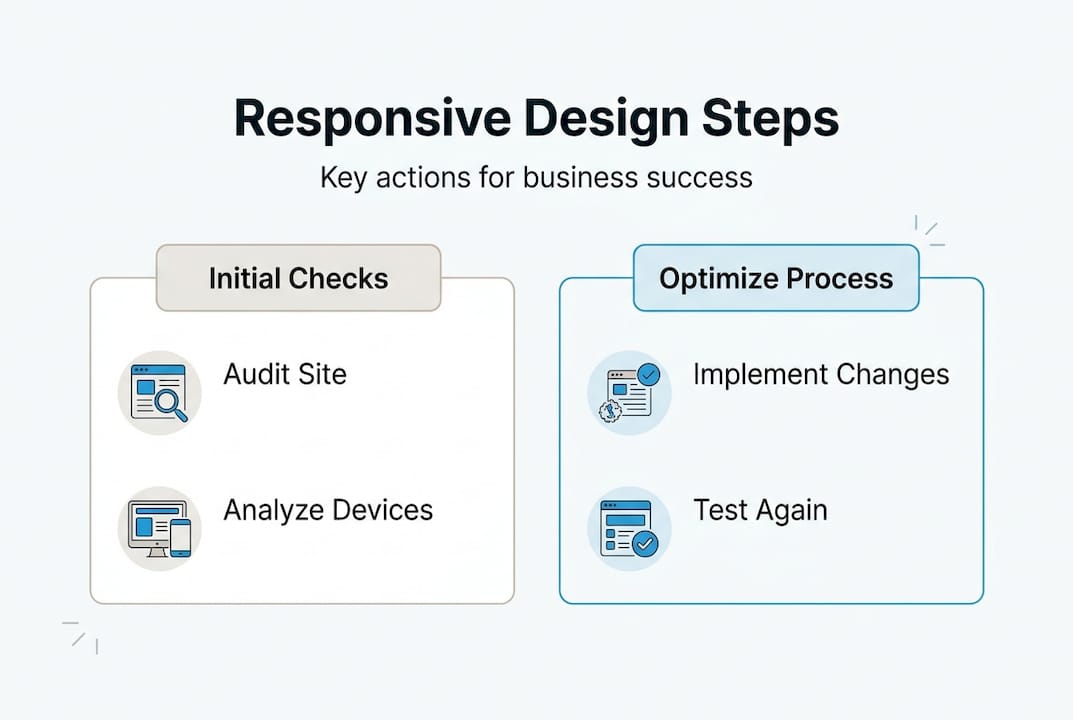
Responsive design in practice: Steps for business owners
Knowing the theory is one thing. Putting it into action is another. Here is a straightforward process you can follow to move your site toward full responsiveness.
Notably, 92% of developers now prioritize responsive design, but managing edge cases is what separates a good implementation from a great one. The steps below help you get there.
- Audit your current site. Open your site on a phone and a tablet. Look for text that is too small, buttons that are hard to tap, images that overflow, and forms that are difficult to complete. Document every issue.
- Review your analytics. Identify what percentage of your traffic is mobile and which pages have the highest mobile bounce rates. These pages are your top priority.
- Define your audience needs. A local restaurant’s site has different mobile priorities than a B2B software company. Align your responsive strategy with how your specific customers actually use your site.
- Partner with a skilled development team. Work with designers and developers who use modern tools like CSS Grid, Flexbox,
clamp(), andsrcset. Ask to see examples of responsive sites they have built. - Address navigation and performance first. These two areas have the biggest impact on user experience and SEO. Fix them before refining visual details.
- Test across real devices and browsers. Do not rely solely on browser emulators. Test on actual iPhones, Android phones, and tablets. Check Chrome, Safari, and Firefox at minimum.
- Monitor and iterate. Responsive design is not a one-time project. Screen sizes and browser behaviors evolve. Schedule quarterly reviews to catch new issues.
Pro Tip: Use Google’s free PageSpeed Insights tool to get a mobile performance score for your site. A score below 70 on mobile is a red flag that needs immediate attention before you invest in any other marketing.
| Step | Action | Expected outcome |
|---|---|---|
| Audit | Test on real devices | Clear list of issues to fix |
| Analytics review | Identify high-bounce mobile pages | Prioritized fix list |
| Partner selection | Vet developers on responsive work | Quality implementation |
| Testing | Multi-device, multi-browser checks | Consistent experience |
| Monitoring | Quarterly performance reviews | Sustained responsiveness |
For a deeper look at what makes redesigns succeed, expert redesign tips walk you through the decisions that matter most.
Connect with experts for seamless responsive design
Building a truly responsive site takes more than good intentions. It takes the right tools, the right process, and experienced hands guiding the work.

At Depeche Code, we specialize in website design and redesign that is built responsive from the ground up, not patched together after the fact. Our team combines technical precision with a clear understanding of what drives business results. We also integrate website redesign with SEO best practices so your new site ranks well from day one. And if you want to go further, our SEO services keep your site visible and competitive long after launch. Reach out to schedule a consultation and let us build something that works for every visitor, on every screen.
Frequently asked questions
Does responsive web design improve search engine ranking?
Yes. Google’s mobile-first indexing means your mobile site’s quality directly determines your search ranking, so a responsive build gives you a structural SEO advantage over non-responsive competitors.
What is the main difference between mobile-first and desktop-first design?
Mobile-first starts with the smallest screen and progressively adds features for larger screens, while desktop-first begins with a full layout and strips it down, which often results in a weaker mobile experience.
How do I know if my website is truly responsive?
Test your site on multiple real devices and look for layout breaks, unreadable text, and hard-to-tap buttons. Also check for edge case issues like navigation collapse and table rendering across different browsers.
Can a responsive design lower my website costs?
Absolutely. Maintaining a single codebase is significantly more cost-effective than building and updating separate desktop and mobile sites, reducing both development time and ongoing maintenance expenses.