A beautiful website that fails to convert visitors is just expensive digital art. Many business owners invest in sleek visuals only to watch their bounce rates climb and leads stagnate. True high-quality website design prioritizes user-centric principles including visual hierarchy, grid alignment, limited typography scales, and purposeful imagery over surface-level aesthetics. This article breaks down what quality actually means in measurable terms, which principles separate effective sites from forgettable ones, and what concrete steps you can take to evaluate and improve your own site starting today.
Table of Contents
- Why website design quality matters for your business
- The core principles of high-quality website design
- User-centered methodologies: what actually works
- Advanced techniques and common pitfalls to avoid
- How to evaluate and improve your website’s design
- Take the next step with expert website design
- Frequently asked questions
Key Takeaways
| Point | Details |
|---|---|
| User-first design | The best sites prioritize real-world user needs over following trends. |
| Evidence-based improvements | Successful sites use data, testing, and feedback loops to get measurable results. |
| Consistent structure matters | Visual hierarchy, clear navigation, and limited color palettes drive trust and performance. |
| Avoid common pitfalls | Clutter, slow pages, and inaccessible features can cost you traffic and sales. |
Why website design quality matters for your business
First impressions happen fast. Visitors form an opinion about your site in roughly 50 milliseconds, and that snap judgment shapes whether they stay or leave. Poor design does not just look bad. It actively costs you money.
Bounce rate increases 32% when load time exceeds three seconds, and well-executed redesigns consistently deliver 16 to 35 percent uplifts in conversions and sales. Those are not small numbers. For a business generating $500,000 in annual online revenue, a 20 percent conversion lift means $100,000 more without spending a single extra dollar on ads.
Mobile devices now account for more than 60 percent of all web traffic globally. If your site is not optimized for smaller screens, you are turning away the majority of your potential customers before they even read your headline.
Poor design shows up in predictable ways. You will notice high bounce rates, stagnant lead volume, slow page speeds, and accessibility gaps that expose you to legal risk. Investing in improving user experience and pairing it with solid SEO for website redesigns addresses all of these at once.
Here is what high-quality design delivers in practical business terms:
- More qualified leads because clear calls to action guide visitors toward conversion
- Lower support costs because intuitive navigation reduces user confusion
- Higher search rankings because fast, structured sites earn better positions
- Stronger brand trust because consistent design signals professionalism
- Better retention because users return to sites that are easy and pleasant to use
The core principles of high-quality website design
Quality is not a feeling. It is a set of observable, testable characteristics. Once you know what to look for, you can spot the difference between a site built on intention and one built on guesswork.
Research from Nielsen Norman Group confirms that high-quality website design relies on visual hierarchy, grid alignment, limited typography scales of roughly three sizes, monochromatic or limited color palettes of about two colors, and purposeful imagery that supports the message rather than decorating it.
The table below shows how classic design habits compare to high-quality design decisions:
| Design element | Classic approach | High-quality approach |
|---|---|---|
| Typography | Multiple fonts and sizes | Max 3 sizes, 1 to 2 font families |
| Color palette | Many colors for visual interest | 2 primary colors with intentional contrast |
| Imagery | Stock photos for decoration | Purpose-driven visuals tied to content goals |
| Layout | Centered content blocks | Grid-aligned structure with clear hierarchy |
| Navigation | Long menus with many options | Simplified paths based on user intent |
| Whitespace | Filled to avoid empty space | Used deliberately to guide the eye |
Looking at high-quality website design examples from leading firms reveals a consistent pattern: every visual decision serves a function.
Here is the sequence that high-performing teams follow to build quality in from the start:
- Define business goals and user needs before opening any design tool
- Research your audience through interviews, surveys, and analytics review
- Map user journeys to identify the paths visitors actually take
- Build a design system with reusable components, colors, and type scales
- Prototype and test with real users before full development begins
- Measure and iterate using Core Web Vitals and session recordings post-launch
Pro Tip: Design systems are not just for enterprise companies. Even a small business site benefits from a documented set of colors, fonts, and button styles. Consistency builds trust faster than any single design element can.
User-centered methodologies: what actually works
Principles tell you what to aim for. Methodologies tell you how to get there. The gap between a mediocre site and a high-performing one is almost always a process gap, not a talent gap.
User-centered design (UCD) combined with iterative testing using real data, A/B testing of calls to action and headlines, and SEO integration from the start consistently outperforms projects built on assumptions. The key word is real. Real users behave differently than designers expect.
| Methodology | What it involves | Business result |
|---|---|---|
| User-centered design (UCD) | Research, personas, journey mapping | Lower bounce, higher satisfaction |
| A/B testing | Testing two versions of a page element | Higher conversion rates |
| Core Web Vitals monitoring | Measuring load, interactivity, visual stability | Better SEO rankings |
| Semantic HTML structure | Proper use of heading tags and landmarks | Improved accessibility and crawlability |
Review your website redesign dos and don’ts before starting any project, and make sure your team applies SEO redesign techniques from day one rather than bolting them on after launch.
Setting up an iterative feedback loop does not require a large budget. Follow these steps:
- Install a session recording tool like Hotjar or Microsoft Clarity to watch real user behavior
- Set up Google Search Console to track which pages lose traffic after changes
- Run a five-person usability test before any major redesign goes live
- Review Core Web Vitals monthly and flag any page scoring below 75
- Collect post-purchase or post-contact feedback to identify friction points
SEO is not a post-launch checklist item. It must be baked into the information architecture, URL structure, and heading hierarchy from the first wireframe.
Advanced techniques and common pitfalls to avoid
Once you have the fundamentals in place, the next level of quality comes from modern technical decisions and avoiding the UX traps that quietly kill conversions.

Shifting from pixel-perfect to intent-based design using CSS tools like clamp for fluid typography, container queries for responsive components, and declarative CSS over imperative scripting builds sites that adapt gracefully across every screen size. Semantic HTML comes first because it creates resilience. If the CSS fails to load, the content still makes sense.
On the pitfall side, common UX mistakes that hurt e-commerce and business sites include:
- Accordions on desktop that hide content users expect to see immediately
- Horizontal scrolling that signals broken layout and frustrates users
- Mystery navigation labels that force users to guess what a link leads to
- Popups on page load that interrupt before the user has read a single word
- Auto-advancing carousels that users cannot control and rarely engage with
- Poor color contrast that makes text unreadable for users with visual impairments
Accessibility is both a legal and a business issue. The Web Content Accessibility Guidelines (WCAG) set the standard for inclusive design, and failing to meet them exposes your business to lawsuits while also excluding a significant portion of your potential audience.
Pro Tip: Test your navigation with five people who have never seen your site. Ask them to find your pricing page or contact form without any guidance. If more than two of them hesitate or click the wrong link, your labels need work. One confusing label can cost you dozens of leads per month.
To optimize WordPress for performance, focus on image compression, caching, and eliminating render-blocking scripts before adding any new features.
How to evaluate and improve your website’s design
Knowing the principles is one thing. Applying them to your actual site is where most business owners get stuck. A structured audit removes the guesswork.
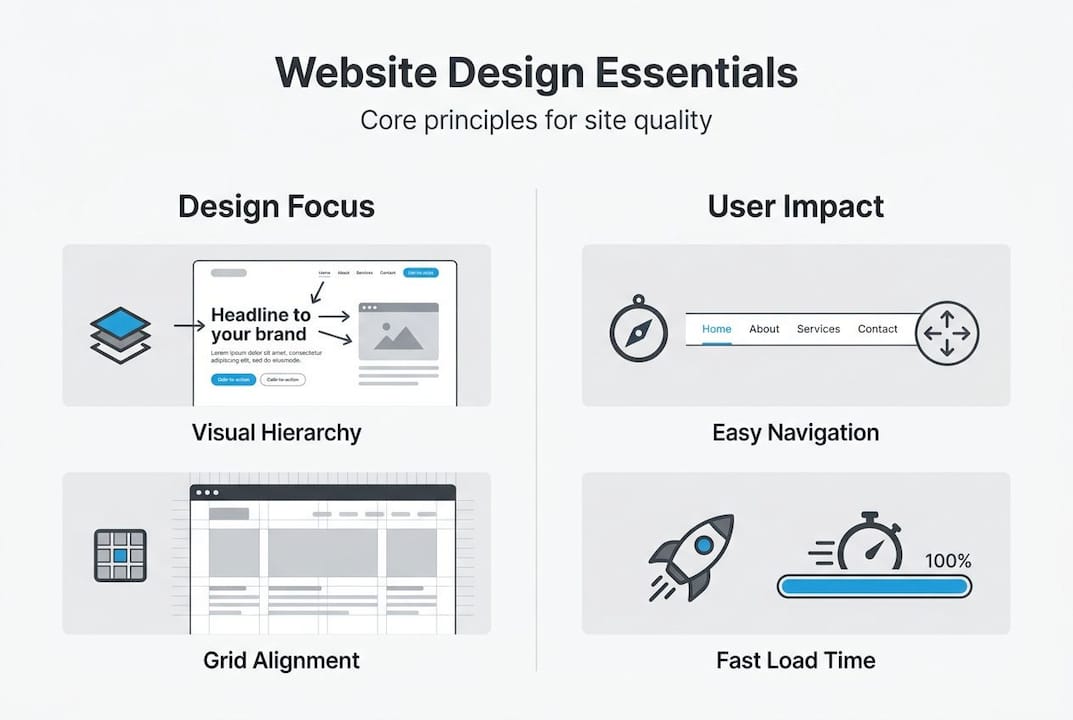
Start with your business purpose, whether that is lead generation or e-commerce, then apply a mobile-first lens, simplify your navigation, and benchmark your results against category leaders using free audit tools.
Here is a 30-day action plan you can start this week:
- Week 1: Run a full audit. Use Google PageSpeed Insights, WAVE for accessibility, and Screaming Frog for technical SEO issues. Document every finding.
- Week 2: Gather user feedback. Run a five-person usability session or send a short survey to recent customers asking what confused them.
- Week 3: Fix quick wins. Compress images, fix broken links, improve button contrast, and clarify your top navigation labels.
- Week 4: Plan bigger improvements. Prioritize the issues that most directly affect conversions and build a roadmap for the next quarter.
Small business sites most commonly struggle with three fixable problems: slow image loading, unclear calls to action, and navigation menus that reflect internal company structure rather than how customers think. Fixing these three alone can move your metrics significantly.
Take the next step with expert website design
Understanding what makes a website high quality is the first step. Acting on it is where the real business growth happens. If your audit reveals gaps that go beyond quick fixes, working with a team that specializes in results-driven design makes the process faster and more reliable.
At Depeche Code, we offer professional website redesign services built around your specific business goals, not generic templates. Our SEO expertise is integrated from the first wireframe, not added as an afterthought. Whether you need a full redesign or targeted improvements to boost your site’s SEO, we build solutions that are measurable, scalable, and designed to convert. Schedule a free consultation and let us show you exactly where your site is leaving money on the table.
Frequently asked questions
What are the main signs my website design isn’t high quality?
Slow load times, confusing navigation, high bounce rates, and poor mobile usability are the clearest signals. A bounce rate spike over 32% tied to load times above three seconds is a reliable red flag.
How do high-quality websites support better SEO?
They use semantic HTML and structured navigation to help search engines crawl and index content efficiently, while fast load times reduce bounce rates that can negatively affect rankings.
Is visual design or user experience more important?
User experience wins every time. Visuals should support clarity and business goals, not compete with them. Usability heuristics like consistency and error prevention matter more than following the latest design trends.
What website design mistakes can hurt my business?
Cluttered layouts, inaccessible content, and popups on load are among the most damaging mistakes. Neglecting mobile users is equally costly given that mobile now drives the majority of web traffic.
Recommended
- Expert Tips On Redesigning Your Website For Better User Experience • Depeche Code
- The Dos And Don’ts Of Redesigning Your Website For Better User Experience • Depeche Code
- Proven Methods For Enhancing Website Redesign With Search Engine Optimization Techniques • Depeche Code
- 7 Signs It’s Time For A Website Redesign – Is Your Website Outdated? • Depeche Code
Related Articles

Depeche Code
April 15, 2026