

TL;DR:
- Regular website maintenance in security, backups, and SEO prevents loss of traffic and data.
- Using the right tools and following a detailed checklist ensures proactive site health management.
- Engaging experts can save time, reduce risks, and keep websites optimized for growth.
Your website is either working for your business right now or quietly costing you customers. Security vulnerabilities, broken links, and outdated plugins can tank your search rankings overnight and expose sensitive customer data without a single warning sign. Studies show that 88% of users won’t return to a site after a bad experience, meaning one overlooked maintenance gap can permanently damage trust. This guide walks you through a structured, step-by-step website maintenance checklist designed to protect your traffic, eliminate security risks, and keep your online presence performing at full capacity every single month.
Table of Contents
- Assessing your website: What to check regularly
- Tools and resources: What you need before you start
- The actionable website maintenance checklist
- Verification: Measuring success and catching issues early
- Why most website maintenance checklists fail—and what actually works
- Bring expert maintenance to your website
- Frequently asked questions
Key Takeaways
| Point | Details |
|---|---|
| Routine checks matter | Consistently checking security, updates, and performance prevents costly downtime. |
| Use the right tools | Proper monitoring and backup tools streamline maintenance and reduce manual effort. |
| Prioritize critical tasks | Tasks like backups, security scans, and software updates should never be overlooked. |
| Adapt for your business | Customizing your maintenance routine ensures it fits your goals and tech stack. |
Assessing your website: What to check regularly
Now that you understand the importance of regular website upkeep, let’s identify what areas deserve your focus. Not all website maintenance tasks carry equal weight, and knowing the difference between urgent and routine checks is what separates proactive business owners from reactive ones.
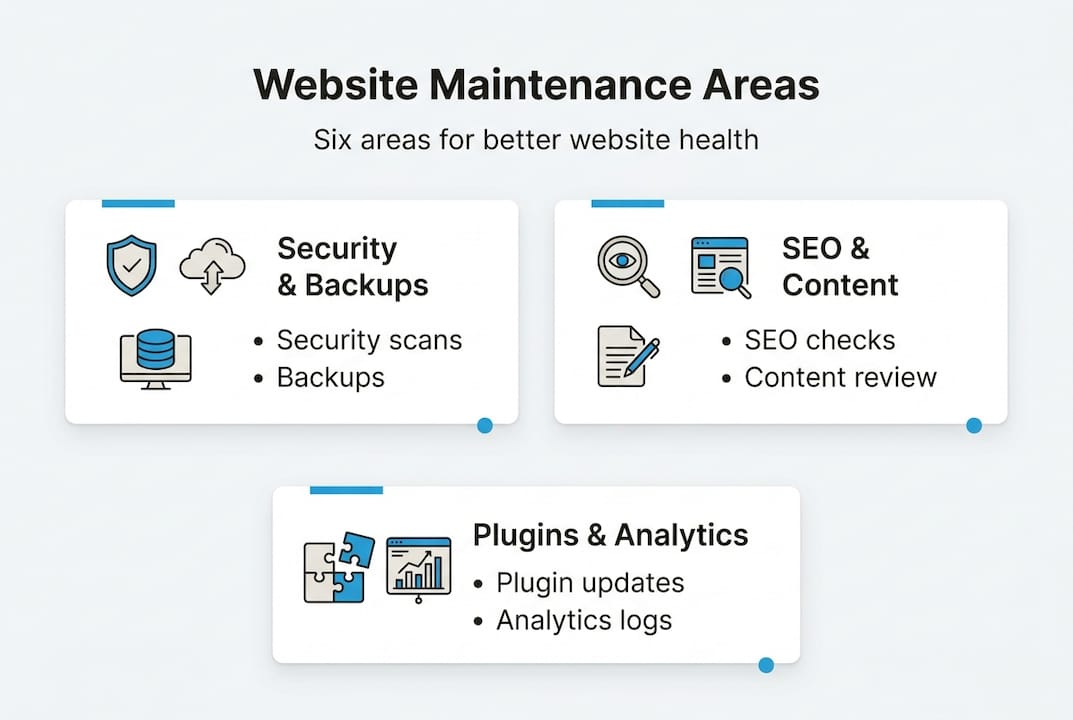
Website maintenance breaks down into six core areas: security, backups, plugins and themes, SEO, content, and analytics. Each one has its own rhythm, and mixing up the frequency is where most businesses fall short.
| Maintenance area | Recommended frequency | Priority level |
|---|---|---|
| Security scans | Weekly | Critical |
| Full backups | Weekly | Critical |
| Plugin and theme updates | Weekly | High |
| SEO audit and link check | Quarterly | High |
| Content review and refresh | Monthly | Medium |
| Analytics and traffic review | Monthly | Medium |
| SSL certificate check | Monthly | High |
| Broken link scan | Monthly | Medium |
As noted in the SEO Checklist, quarterly technical, on-page, and link audits are recommended for effective SEO maintenance. That cadence exists because search algorithms shift and content ages faster than most teams realize.
Before diving into tools and tasks, identify your highest-risk areas immediately:
- Outdated plugins and themes are the number one entry point for malware attacks on WordPress sites
- Expired or misconfigured SSL certificates instantly flag your site as “Not Secure” in browsers, destroying visitor trust
- Ignored backups mean one failed update can wipe weeks of content and sales data
- Stale content with outdated information erodes authority and hurts your SEO rankings
- Broken internal links create poor user experiences and signal neglect to search crawlers
If your site needs a structural refresh before your maintenance routine kicks in, reviewing a solid redesign checklist first will give you a much cleaner baseline to work from.
Pro Tip: Add recurring calendar reminders for each maintenance frequency tier. Weekly tasks every Monday morning, monthly tasks on the first of the month, and quarterly tasks at the start of each business quarter. Consistency beats intensity every time.
For businesses running WordPress specifically, purpose-built WordPress maintenance plans can automate much of this schedule and reduce the manual effort significantly.
Tools and resources: What you need before you start
Once you’ve pinpointed what to monitor, the next step is ensuring you have the right tools in place. Trying to maintain a website without the right tools is like trying to run a kitchen without knives. You can do it, but you’ll slow yourself down and miss critical details.
Here’s a quick comparison of the essential tool categories every business website owner needs:
| Tool category | Free option | Paid option | What it prevents |
|---|---|---|---|
| Backup solutions | UpdraftPlus (free tier) | BlogVault, ManageWP | Data loss from failed updates |
| Security scanners | Wordfence (free) | Sucuri, MalCare | Malware, injections, brute force |
| Uptime monitors | UptimeRobot | Pingdom, StatusCake | Undetected outages |
| SEO tools | Google Search Console | SEMrush, Ahrefs | Ranking drops, indexing errors |
| Update managers | WordPress dashboard | MainWP, InfiniteWP | Version conflicts, vulnerabilities |
Each tool category addresses a specific business risk. A backup solution protects the investment you’ve made in content and functionality. A security scanner catches threats before they escalate into costly cleanups. Uptime monitors tell you immediately when your site goes down, even at 2 a.m., so you can act before customers even notice.
Regular use of Google Search Console, for example, helps you spot indexing issues and manual actions from Google promptly. A manual action from Google can suppress your entire site from search results, and many businesses don’t discover it until their traffic has already collapsed.
Before you start any maintenance cycle, gather this core checklist of access credentials and information:
- Hosting control panel login (cPanel, Kinsta, WP Engine, etc.)
- Domain registrar login for DNS and renewal management
- Current plugin and theme version numbers
- Database backup location and restore procedures
- WordPress or CMS admin credentials with two-factor authentication enabled
- Google Search Console and Google Analytics access verified
With this information on hand, you’ll cut your maintenance time in half and avoid the panicked scramble that happens when something breaks and you can’t find a password. For a deeper breakdown of managing WordPress sites specifically, the complete WordPress maintenance guide covers everything from server-level care to front-end checks.
The actionable website maintenance checklist
With your tools ready, you’re set to execute a proven maintenance routine. Follow this checklist for comprehensive coverage.
Daily tasks:
- Check uptime monitoring alerts for any reported outages
- Review spam filter logs and flag suspicious login attempts
Weekly tasks:
- Run a full malware and security scan using your security plugin
- Perform a complete site backup and confirm the backup file integrity
- Update all plugins, themes, and your CMS core to the latest stable versions
- Test all contact forms, checkout flows, and lead capture forms manually
- Verify that your SSL certificate is active and not flagged in browsers
Monthly tasks:
- Audit site speed using Google PageSpeed Insights and address flagged issues
- Scan for broken links across all key pages and fix or redirect them
- Review Google Analytics for unusual traffic drops or behavior changes
- Check all images for broken sources and compress any new uploads
- Update any outdated content, pricing information, or business details
- Confirm backups are stored in at least two separate locations
Quarterly tasks:
- Conduct a full SEO audit covering technical health, on-page optimization, and backlinks
- Review your annual maintenance plan to verify it covers evolving business needs
- Audit user accounts and remove any inactive or unauthorized logins
- Test your site’s mobile experience across multiple device sizes
As the SEO Checklist confirms, refreshing content and auditing links quarterly keeps sites competitive and avoids content decay that silently drains organic traffic.
“One missed backup can mean days of downtime, lost revenue, and an expensive emergency recovery bill. The backup you skip is always the one you end up needing.”
Pro Tip: Delegate weekly security scans and backups to a trusted team member or a managed maintenance service. You don’t need to be the one doing every task. You need to be the one confirming every task was done.
Verification: Measuring success and catching issues early
Performing your checklist is just the beginning; ongoing verification ensures your effort delivers real results. Completing tasks without verifying outcomes is no different from skipping the tasks entirely.
Track these key metrics and warning signs after every maintenance cycle:
- Organic traffic trends: A sudden dip in Google Analytics often signals an indexing issue or penalization
- Core Web Vitals scores: Watch for regressions in Largest Contentful Paint or Cumulative Layout Shift after updates
- Uptime percentage: Aim for 99.9% or higher. Anything below 99% is a business problem, not just a technical one
- Broken page count: Even one 404 error on a linked page can cost you conversions and rankings
- Backup confirmation logs: Verify the last successful backup timestamp, not just that the plugin ran
- Security scan history: Review logs for blocked threats, not just clean scans
Downtime is far more expensive than most businesses realize. One hour of downtime can cost small and mid-sized businesses over $100,000 in losses, factoring in lost sales, recovery labor, and reputation damage.

As highlighted in the SEO Checklist, monitoring crawls and indexing via tools like Search Console is critical to catching problems before they compound. Set up automated email alerts in Google Search Console so any manual action or coverage drop reaches your inbox within 24 hours.
Pairing your maintenance verification with dedicated SEO service plans gives you a clearer picture of how technical health improvements translate into real ranking and revenue gains. For a broader look at how all of this connects to long-term growth, measuring SEO ROI explains exactly what metrics matter most over time.
Why most website maintenance checklists fail—and what actually works
Here’s the uncomfortable truth: most generic website maintenance checklists are written for hypothetical websites, not real ones. They assume a clean WordPress install with five plugins, no custom code, and a team that has 10 hours a week to spare. That’s almost never the reality.
After auditing dozens of business websites, the pattern we see repeatedly is not neglect. It’s rigidity. Business owners follow a checklist until their tech stack changes, a new plugin gets added, or their traffic doubles and the old routine just doesn’t scale. The checklist stays the same while the site quietly drifts out of alignment.
The smarter approach is treating your checklist as a living document. Revisit it every quarter alongside your SEO and content audits. If your business launched a new product page, that page needs to be folded into your monitoring routine immediately, not six months later.
For real-world maintenance advice that goes beyond generic task lists, reviewing lessons from sites that have actually experienced failures and recoveries is far more instructive than any theoretical guide. The sites that stay healthy long-term are the ones maintained by people who understand why each task exists, not just that it appears on a list.
Bring expert maintenance to your website
If you’d rather focus on growing your business than remembering every website task, here’s a simple solution.
At Depeche Code, we handle the full scope of website care so you don’t have to track every update, scan, and audit yourself. From website design and development to ongoing performance monitoring, our team builds and maintains sites that stay fast, secure, and search-optimized without the constant manual effort.

We also offer tailored search engine optimization plans that work alongside your maintenance routine to drive measurable ranking improvements. Whether you need a one-time audit or a fully managed monthly plan, Depeche Code delivers the expertise and responsiveness that keeps your site performing at its best, every single day.
Frequently asked questions
How often should I perform website maintenance tasks?
Key maintenance tasks should be scheduled weekly, monthly, and quarterly based on your site’s needs. As confirmed in the SEO Checklist, quarterly technical audits are especially important for sustained SEO performance.
What’s the first thing I should check if my website has issues?
Start by reviewing your most recent backup status, uptime logs, and any plugin or core updates applied in the past 48 hours, since recent changes are usually the source of new problems.
Which tools are best for monitoring website health?
A combination of an uptime monitor like UptimeRobot, a security scanner like Wordfence or Sucuri, and Google Search Console gives you comprehensive coverage across availability, security, and organic search performance.
Do I need a professional service to manage website maintenance?
Many routine tasks can be handled in-house with the right tools, but professional services bring specialized expertise, faster response times, and accountability that are especially valuable for high-traffic or revenue-critical websites.