

The ADA requires most U.S. business and government websites to be accessible to people with disabilities, and the practical technical benchmark is WCAG 2.1 Level AA, the standard the Department of Justice (DOJ) has formally adopted for public entities. State and local governments face staggered deadlines depending on population size, with earlier compliance required for larger populations. Private businesses open to the public carry ADA obligations too, enforced through DOJ guidance and federal court rulings rather than a fixed deadline.
TL;DR:
- Private businesses offering public services are at immediate legal risk for non-compliance, with no grace period, and should prioritize WCAG 2.1 AA standards.
- Public entities serving over 50,000 people must meet deadlines by April 2027, while smaller ones have until April 2028, with exceptions for certain archived or preexisting content.
- Core accessibility fixes include adding alt text, ensuring full keyboard access, maintaining visible focus indicators, and providing captions for videos, prioritized by legal and user impact.
- Automated scans catch basic issues but must be combined with manual testing and real user feedback to ensure true accessibility.
- Building accessibility requirements into vendor contracts and ongoing internal practices reduces long-term legal and operational risks.
Table of Contents
- What Is the Legal Basis for ADA Website Compliance?
- Who Has to Comply With ADA Website Rules?
- What Are the Core WCAG Requirements Developers Need to Fix First?
- Are There Any Exceptions to ADA Website Compliance?
- How Do You Test a Website for ADA Compliance?
- What Accessibility Language Belongs in Vendor Contracts?
- How Do You Build a Remediation Roadmap After an Audit?
- How Do You Maintain ADA Compliance After Initial Remediation?
- Why Most Compliance Advice Misses the Real Risk
- Get Expert Help Making Your Website ADA Compliant
- Sources
- FAQ
What Is the Legal Basis for ADA Website Compliance?
The Americans with Disabilities Act was written in 1990, long before anyone built a shopping cart page or a government benefits portal. Courts and regulators have spent three decades applying its language to the web, and 2024 finally brings clarity for one half of that equation.
In April 2024, DOJ published a final rule revising Title II regulations to require state and local governments to make their web content and mobile apps accessible according to WCAG 2.1 Level AA. The rule appeared in the Federal Register and took effect June 24, 2024, with compliance dates tied to population size. This is the first time DOJ has named a specific technical standard in a binding regulation rather than leaving the question to case-by-case interpretation.
Title III covers a different population: private businesses that operate “places of public accommodation,” which courts have increasingly read to include retail sites, restaurant ordering platforms, banking portals, and similar commercial websites. DOJ has not issued a parallel final rule for Title III entities, but its own guidance on web accessibility confirms that the ADA applies to these businesses and that WCAG and Section 508 serve as the primary technical references courts and plaintiffs’ attorneys point to.
The interaction between these layers matters for anyone trying to build a defensible compliance program; understanding web accessibility’s benefits for inclusion and SEO impact can help prioritize improvements effectively.
- Federal Register rule — binding law for Title II public entities, with a named standard and named dates.
- DOJ guidance documents — interpretive, not binding regulation, but heavily cited in enforcement letters and settlement agreements.
- Case law — the primary enforcement mechanism for Title III businesses, since no equivalent regulation yet exists for them.
Because Title III relies on litigation rather than a published rule, ambiguity remains for private businesses. That ambiguity is exactly why WCAG 2.1 AA functions as the de facto national standard even where it is not yet legally mandated.
Who Has to Comply With ADA Website Rules?
Not every organization faces the same clock, and knowing which bucket you fall into changes what “compliant” actually requires.
A “public entity” under Title II covers any state or local government body: city halls, public school districts, transit authorities, courts, and public universities. DOJ’s rule ties their deadline directly to population:
- Public entities serving 50,000 or more people must comply by April 26, 2027.
- Public entities under 50,000 residents, along with special district governments, get until April 26, 2028.
- Both dates come straight from DOJ’s fact sheet on the Title II web rule, which also lays out the population-counting method entities should use.
Title III businesses, meanwhile, do not get a countdown clock. Any privately owned website functioning as a place of public accommodation, think e-commerce stores, healthcare provider portals, hotel booking sites, or financial services platforms, already carries legal exposure today. That exposure comes from lawsuits and DOJ guidance rather than a regulation with a compliance date, which paradoxically makes it riskier: there’s no grace period to plan around.
A frequently missed detail: responsibility does not transfer when you outsource. If a government agency or business hires a third-party vendor to build or host its site, the entity itself, not the vendor, remains legally responsible for that content meeting accessibility requirements. DOJ’s own first-steps guidance for governments makes this explicit, recommending that WCAG requirements go directly into vendor contracts rather than being assumed as a given.
What Are the Core WCAG Requirements Developers Need to Fix First?
WCAG 2.1 Level AA is organized around four principles: content must be perceivable, operable, understandable, and robust. That framework is useful for auditors, but developers need a prioritized punch list, not a philosophy lecture. Here’s where to start, ranked by how often these issues actually trigger complaints and lawsuits.
- Alt text for non-text content. Every meaningful image needs a description; decorative images need empty alt attributes so screen readers skip them. DOJ names this as a baseline requirement for good reason: it’s the single most common failure on business sites.
- Full keyboard accessibility. Every interactive element, menus, modals, date pickers, custom dropdowns, must work without a mouse. This trips up more custom-built components than any other requirement.
- Visible focus indicators. Keyboard users need to see where they are on the page. Removing the default focus outline in CSS without replacing it is one of the most common (and easiest to fix) violations.
- Form labels and error messages. Every input needs a programmatically associated label, and error messages need to identify which field failed and why, not just flash red.
- Captions and transcripts. Video needs synchronized captions; audio-only content needs transcripts. This applies to marketing videos as much as training content.
- Color contrast ratios. WCAG AA requires a 4.5:1 contrast ratio for normal text and 3:1 for large text. Brand color palettes frequently fail this on first pass.
- Zoom and reflow behavior. Content must remain usable when a user zooms to 200% or resizes the browser window, without content getting clipped or requiring horizontal scrolling.
- Semantic HTML and ARIA. Use native HTML elements (
<button>,<nav>,<table>) before reaching for ARIA attributes. Overused or incorrect ARIA often makes a page less accessible than no ARIA at all.
Automated scanners catch contrast ratios, missing alt attributes, and malformed HTML reliably. They cannot judge whether alt text is meaningful, whether a tab order makes logical sense, or whether a multi-step checkout flow actually works with a screen reader. That gap is exactly why DOJ’s own guidance stresses pairing automated scans with manual and user testing.
Pro Tip: Run your color contrast checks against your actual production CSS, not your design mockups. Design tools routinely round colors differently than browsers render them, and a “compliant” Figma file can still fail in Chrome.
Because WCAG itself keeps evolving, with WCAG 2.2 already published by the W3C and further updates expected, building components that meet AA today with some headroom for tomorrow’s success criteria saves a full redesign cycle later.
Are There Any Exceptions to ADA Website Compliance?
DOJ’s Title II rule includes a short list of limited exceptions, and misunderstanding them is one of the fastest ways to build a false sense of security.
- Archived web content. Material that was created before the compliance date, is retained only for reference, and is not actively used for services or programs can be exempted, as long as it’s clearly organized as an archive.
- Preexisting conventional electronic documents. Older PDFs and similar files posted before the compliance date don’t require retroactive fixes unless someone needs them for a current service.
- Content posted by a third party. If a public entity doesn’t control the content, such as a comment posted by a member of the public, it may fall outside direct responsibility, though the platform hosting it still needs accessible functionality.
- Password-protected or restricted conventional documents. A narrow carve-out exists for certain restricted-access files not intended for public use.
None of these exceptions cover new content, ongoing services, or anything actively used to deliver a government program. They’re narrow by design.
There’s also a mechanism called equivalent facilitation. An entity can use an approach other than strict WCAG conformance if it can demonstrate the alternative provides equal or greater accessibility and usability, but that alternative has to be validated, not assumed. A phone number posted as a substitute for an inaccessible web form typically fails this test, because a phone line rarely offers the same range of content and availability as the website itself.
The two dates that matter most: public entities with 50,000+ residents comply by April 26, 2027; those under 50,000, plus special districts, comply by April 26, 2028. Both come directly from the Federal Register rule DOJ published in April 2024.
How Do You Test a Website for ADA Compliance?
A credible accessibility audit follows a sequence, not a single scan. Skipping steps is how organizations end up with a “clean” report that still gets challenged in court.
- Inventory the site. Map every page type, template, and user flow, including checkout, account creation, and any embedded third-party widgets.
- Run automated tools first. Scanners catch the low-hanging fruit fast, missing alt text, contrast failures, malformed markup, and let your team triage volume before spending expensive manual hours.
- Conduct manual expert review. A trained reviewer walks through keyboard navigation, focus order, heading structure, and ARIA usage that automated tools can’t judge contextually.
- Test with assistive technology. Run key flows with screen readers like JAWS or VoiceOver and with keyboard-only navigation to catch what a sighted reviewer might miss.
- Bring in user testers with disabilities. Nothing replaces watching someone who actually relies on assistive technology attempt your checkout flow or your online form.
DOJ’s guidance is direct about why step 2 alone isn’t enough: automated tools are useful but insufficient on their own, and manual and user testing catch what scripts don’t. A scan can report zero errors on a page with a completely illogical tab order or a “click here” link that means nothing out of context, because those are judgment calls, not code patterns a script can flag.
A proper audit should hand you a deliverable, not just a pass/fail score: an issue log with specific WCAG success criteria cited, severity ratings (critical, serious, moderate), screenshots or screen recordings showing the failure, and concrete remediation steps a developer can act on without guessing.
Pro Tip: Ask any auditor, internal or outsourced, to date-stamp and archive every test result. If a complaint ever arrives, being able to show a documented testing history matters as much as the fixes themselves.
What Accessibility Language Belongs in Vendor Contracts?
Every accessibility failure traced back to a third-party vendor still lands on the entity that hired them. That’s precisely why procurement language deserves more attention than it typically gets.
Contracts and RFPs for any new website, redesign, or app build should specify:
- A named conformance target — spell out WCAG 2.1 Level AA (or whatever current version applies) explicitly, not “accessible” as a vague adjective.
- Acceptance testing requirements — the vendor must supply test results, not just a verbal assurance, before final sign-off and payment.
- Remediation timelines and SLAs — define how quickly the vendor must fix any issue discovered after launch, with specific business-day windows for critical versus minor issues.
- Documentation deliverables — issue logs, VPAT (Voluntary Product Accessibility Template) reports where applicable, and testing methodology notes.
- Ongoing obligations — accessibility doesn’t end at launch; the contract should address who is responsible for testing new features added after go-live.
DOJ’s own first-steps resource for governments recommends requiring vendor testing artifacts and warranties that specify conformance and acceptance criteria up front, rather than discovering gaps after the invoice is paid. For public entities specifically, this contract language should live in the RFP itself, not get negotiated after a vendor is already selected, since accessibility requirements can affect vendor pricing and technical approach from day one.
How Do You Build a Remediation Roadmap After an Audit?
An audit that produces a 200-item issue log is only useful if someone turns it into a plan with dates and owners attached. Prioritization is the entire game here.
- Fix legal-exposure items first. Anything a plaintiff’s attorney would flag immediately, missing form labels on a payment page, keyboard traps on a login flow, goes to the top regardless of how many other issues exist.
- Prioritize critical user journeys. Checkout, account registration, appointment scheduling, and benefits applications matter more than a rarely visited archive page.
- Group quick wins separately from major refactors. Alt text and contrast fixes might take a developer an afternoon; rebuilding a custom dropdown component with proper keyboard support might take a sprint.
- Assign owners and timeboxes. Every item needs a named person and a deadline, not just a ticket sitting in a backlog.
- Verify fixes against the original WCAG criteria, not just “does it look fixed.” Retest with the same method that flagged the issue originally.
- Document everything for a compliance report. Keep before/after evidence, sign-off records, and testing artifacts in one place.
| Fix Category | Typical Effort | Who Owns It |
|---|---|---|
| Alt text, labels, contrast | Days | Front-end developer |
| Keyboard/focus fixes on existing components | 1 to 2 weeks | Front-end developer |
| Custom component rebuilds (dropdowns, modals, date pickers) | Several weeks | Development team + QA |
| Video captioning and transcripts | Ongoing, per asset | Content/marketing team |
| Full audit and remediation plan for a mid-size site | 1 to 3 months | Agency or dedicated internal team |
Budgeting for this work varies enormously based on how the original site was built. A site built on a modern, semantic-HTML foundation might need only targeted fixes. A site built with heavy custom JavaScript and no accessibility consideration from the start often needs a partial rebuild, which is where working with a website redesign partner familiar with WCAG from the ground up saves both time and legal risk compared to patching issue by issue.
How Do You Maintain ADA Compliance After Initial Remediation?
Fixing today’s issues doesn’t guarantee tomorrow’s compliance. New pages, new features, and new content get added constantly, and each one can reintroduce the same problems you just paid to solve.
- Assign clear ownership. Someone, not “the team” in the abstract, needs to own accessibility as an ongoing responsibility, with a written policy that says so.
- Train content creators, not just developers. A marketing team uploading videos without captions or writing “click here” links undoes technical fixes fast.
- Build accessibility checks into your deployment pipeline. Automated linting for contrast and markup issues should run before code merges, catching regressions before they reach production.
- Publish an accessibility statement. State your conformance target, your testing approach, and a contact method for reporting barriers.
- Give users a real reporting channel. A dead-end contact form doesn’t count; someone needs to actually respond and track issues to resolution.
Treating accessibility as continuous product quality rather than a one-time project is the difference between staying compliant and quietly drifting out of it. DOJ’s guidance frames this directly: proactive development and maintenance reduce legal risk while improving usability for every visitor, not just those using assistive technology.
Why Most Compliance Advice Misses the Real Risk
Most accessibility content treats WCAG conformance as a technical checklist problem, and that framing undersells the actual risk. The bigger failure I see across organizations isn’t a missing alt tag. It’s treating a remediation project as a one-time fix rather than a permanent operating discipline.
Here’s the pattern: a company runs an audit, fixes the flagged items, closes the ticket, and moves on. Six months later, a new marketing campaign adds a video with no captions, a developer builds a custom filter widget with no keyboard support, and the site has quietly drifted back into non-compliance. Nobody did anything reckless. The site just wasn’t built with a system for catching regressions, so the fixes eroded the same way unmaintained code always does.
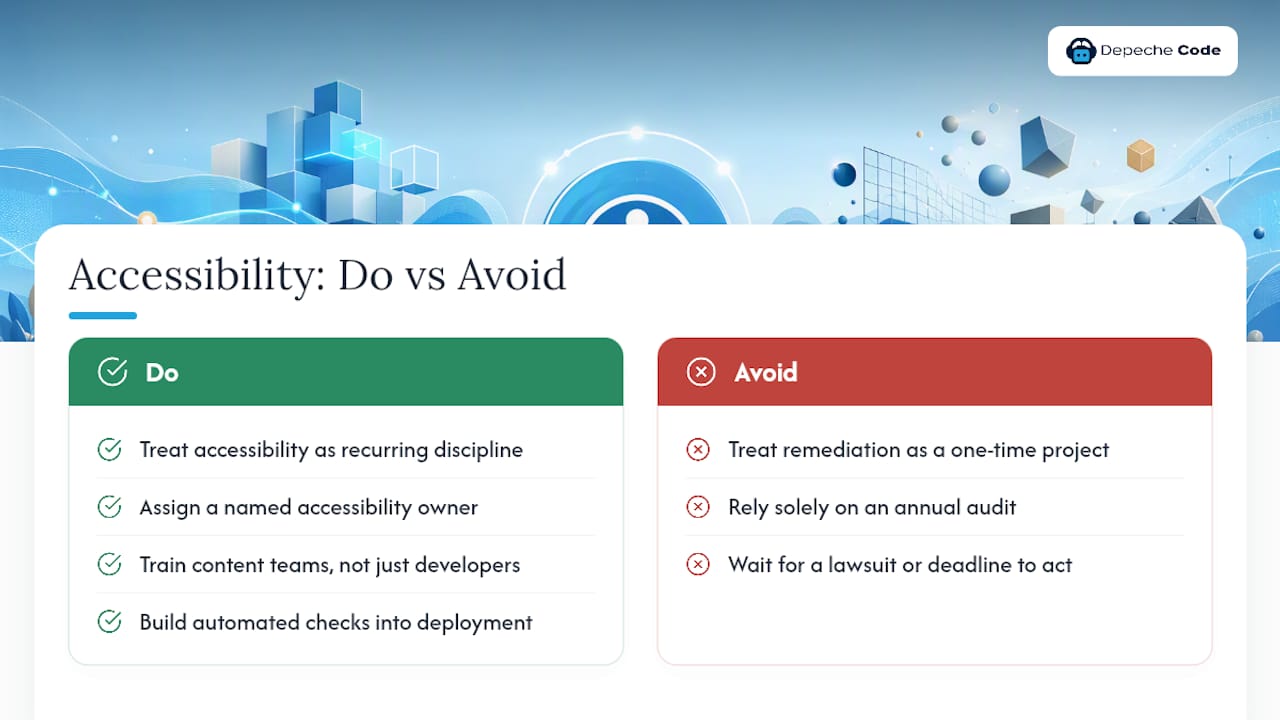
The organizations that actually stay compliant treat accessibility the way they treat security patching: as a recurring line item with an owner, not a project with an end date. That means training content teams, not just developers, and building automated checks into the deployment process instead of relying on an annual audit to catch what accumulated over the past year.
If there’s one place I’d push back on conventional advice, it’s this: don’t wait for a lawsuit or a population-based deadline to start. Title III businesses have no compliance date on the calendar, and that’s exactly why so many treat accessibility as optional until a demand letter arrives. By then, remediation happens under pressure, on someone else’s timeline, at higher cost than it would have taken proactively.
— Donovan
Get Expert Help Making Your Website ADA Compliant
Depechecode builds and rebuilds websites with WCAG 2.1 AA baked into the process, not bolted on afterward, which means you skip the expensive cycle of launching a site and then paying to fix it later. We handle the front-end structure, semantic markup, keyboard navigation, and contrast decisions that automated scanners flag and manual reviewers actually catch, backed by a track record of delivering business and government sites that hold up under real scrutiny.

If you’re a business owner staring down a Title III risk with no clear deadline, or a government IT lead counting down to the 2027 or 2028 compliance dates, waiting only shifts the work onto a tighter timeline later. Whether you need a full rebuild or a focused accessibility remediation pass on an existing site, Depechecode’s website design and development team can scope the work and give you a concrete plan. Not sure where your current site stands? Start with a conversation about your specific pages and user flows, and get a straight answer about what needs fixing and what doesn’t.
Sources
- Ada
- Federal Register: Nondiscrimination on the basis of disability; accessibility of web information and services of State
FAQ
Is ADA Compliance Mandatory for Websites?
Yes for state and local governments under the Title II rule, with dates set by population size. Private businesses open to the public carry ADA obligations too, enforced through DOJ guidance and court rulings rather than a fixed regulatory deadline.
How Do You Ensure a Website Meets ADA Requirements?
Follow WCAG 2.1 Level AA as your technical target, then run a testing sequence that combines automated scans, manual expert review, and testing with assistive technology and real users with disabilities. Document every fix and retest against the original criteria.
Are Any Websites Exempt From ADA Compliance?
DOJ’s Title II rule allows limited exceptions for archived content, preexisting conventional documents, and certain third-party content, but these exceptions don’t cover new content or active services. Most operating websites for businesses and governments fall under some level of ADA obligation.
Can You Be Sued for a Website Not Being ADA Compliant?
Yes. Title III businesses face lawsuits and DOJ enforcement action over inaccessible websites today, without needing to wait for a violation notice or a compliance deadline. Public entities missing their April 2027 or April 2028 deadlines under the Title II rule face similar enforcement exposure.