

Claim and verify your Google Business Profile today, then complete every field: category, hours, description, and services. Follow with a review request system and 10+ real photos. Businesses that hit both benchmarks, a steady stream of new reviews and a fully stocked photo library, typically see measurable movement in local visibility within weeks. Google Business Profile is the platform. A structured monthly routine, the kind Depechecode builds into every local SEO engagement, is what keeps the gains from fading.
TL;DR:
- Fix primary category, NAP consistency, and review momentum within the first four weeks to see measurable local ranking improvements.
- Upload at least 10 real photos across different categories and add new images quarterly to maintain profile activity and engagement.
- Implement a steady review request system targeting five or more new reviews monthly, and respond promptly to all reviews to boost visibility and trust.
- Regularly post weekly updates, offers, or events with unique images to signal activity and attract more customer interactions.
- Use a comprehensive local SEO strategy alongside GBP, including website location pages and citation building, to reinforce relevance and prominence signals.
Table of Contents
- What Is Google Business Profile Optimization?
- Your One-Sitting GBP Audit and Monthly Maintenance Plan
- How Do You Complete Every GBP Field Correctly?
- What Photos and Videos Should You Add to Your Profile?
- How Do You Get More Google Reviews the Right Way?
- Should You Post Updates, Offers, or Events on Google?
- When Should You Add Services, Products, or Booking Links?
- Which GBP Metrics Actually Predict Results?
- What Are the Biggest GBP Mistakes to Avoid?
- How Should You Use the Q&A Section on Your Profile?
- How Do You Use Google’s Messaging Feature to Talk to Customers?
- How Does Local SEO Support Your Google Business Profile?
- Depeche Code’s Take: What Actually Moves the Needle Fastest
- Get a Managed Google Business Profile Optimization Plan
- Sources
- FAQ
What Is Google Business Profile Optimization?
Google Business Profile optimization means completing, verifying, and actively maintaining every element of your free listing so it ranks higher on Google Search and Maps and converts more searchers into customers. That covers your profile fields, photos, reviews, posts, and the messaging tools Google gives you, all working together instead of sitting half finished.
Local ranking comes down to three factors Google states plainly: relevance, distance, and prominence. You control the first and third directly. Completing every profile section improves how Google matches your business to a search query, and prominence builds from reviews, citations, and how often people interact with your listing. Distance is the one variable you cannot touch, which is exactly why the other two deserve your full attention.
Most business owners treat their profile like a one-time form. It is not. It is closer to a storefront window that Google rewards for staying current and penalizes for going stale.
Your One-Sitting GBP Audit and Monthly Maintenance Plan
Set aside 45 minutes and work through this in order. Each step builds on the last, so skipping ahead usually means redoing work later.
- Claim and verify your profile. If you have not confirmed ownership through Google’s verification process (postcard, phone, email, or video, depending on your category), nothing else you do will fully take effect.
- Fix your primary category first. This single field carries more ranking weight than almost anything else on the profile.
- Correct your hours, including holiday hours. Wrong hours generate one-star reviews faster than almost any other mistake.
- Check name, address, and phone number against your website footer. Any mismatch here undercuts trust signals Google uses to judge legitimacy.
- Add or refresh your business description and services list with plain-language detail, not keyword stacking.
- Upload at least 10 real photos across categories: exterior, interior, team, and product or work samples.
- Turn on review requests through a direct link or QR code, and respond to every existing review, positive or negative.
- Publish one Google post covering a promotion, event, or update to signal the profile is active.
Once the audit is done, shift into a monthly rhythm: post at least once a week, add two to three new photos a month, respond to reviews within 48 hours, and check your Q&A section for unanswered or outdated entries. A simple spreadsheet with columns for views, calls, direction requests, and new reviews gives you a five-minute monthly dashboard, no separate software needed. QuickSprout’s 2026 optimization checklist frames this same sequence as the backbone of a functioning profile: name, category, address or service area, hours, services, products, attributes, photos, and booking links, all present and current.
How Do You Complete Every GBP Field Correctly?
Field completion is not busywork. It is the raw material Google’s algorithm uses to decide who shows up for which search.
Primary category selection matters more than any other single decision you make. Semrush’s guidance on local ranking factors confirms that your primary category is one of the strongest relevance signals in the entire profile, and you can add up to nine secondary categories to round out how Google understands your business. A general “restaurant” category when you run a specific concept, say, a Neapolitan pizzeria, leaves ranking potential on the table. Get specific: “Pizza Restaurant” beats “Restaurant” every time a nearby searcher types “pizza near me.”
Your business name field is not a place for extra keywords. Google’s guidelines require the name to match your real-world signage and legal branding exactly. Appending “Best Plumber in Denver” to your name might look like a shortcut, but it is one of the fastest ways to trigger a suspension.
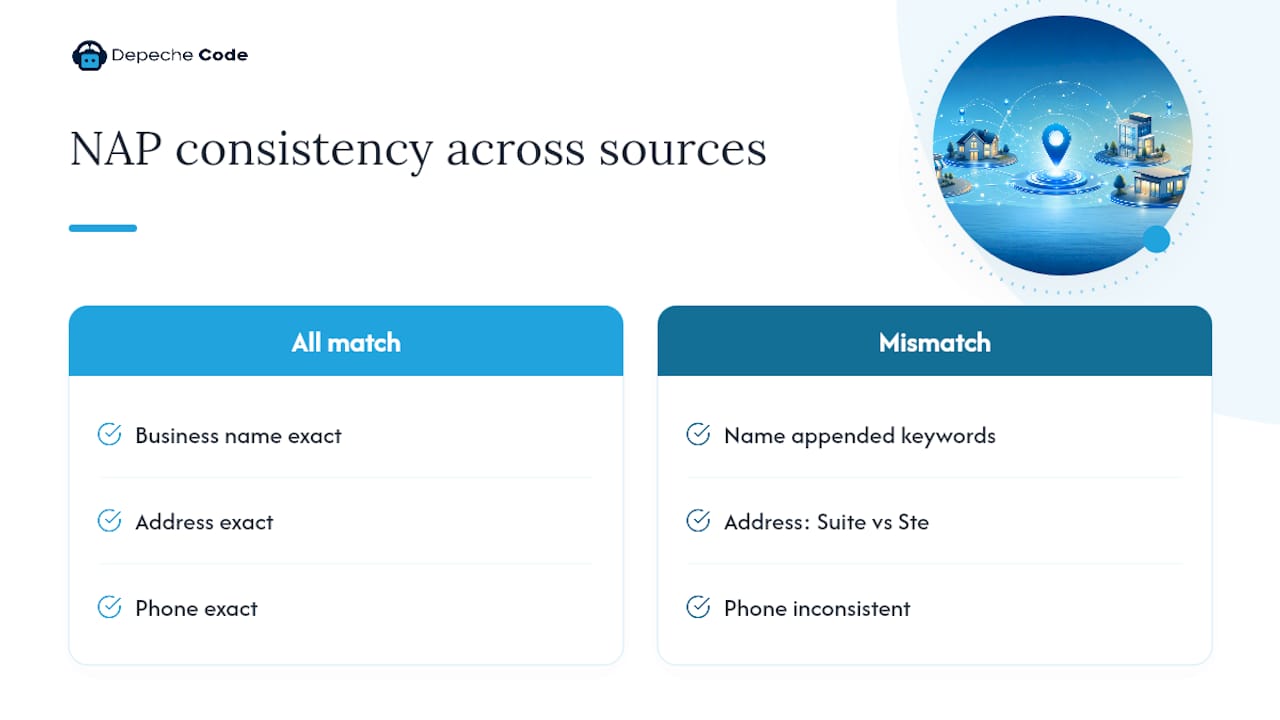
NAP consistency, your Name, Address, and Phone number, needs to match character for character across your website, your GBP listing, and your top citation sources like Yelp or industry directories. Inconsistent NAP data undermines the trust signals Google relies on to confirm your business is legitimate and current. A “Suite 200” on your website that reads “Ste. 200” on GBP looks trivial to a human, but automated matching systems treat it as a discrepancy.
Your business description deserves real thought, not filler. Structure it in three parts: what you do, who you serve, and what makes you different, worked in naturally rather than stacked like a keyword list. For example: “Riverside Auto Repair has served Tampa drivers since 2011, specializing in same-day brake and transmission service for commuters who can’t afford a week without a car.” That sentence covers service, location, specialty, and audience without reading like an ad.
Finally, fill out your services section with specific entries rather than generic placeholders. “Brake Repair,” “Transmission Diagnostics,” and “Same-Day Oil Change” each with a one-line description tell Google, and searchers, exactly what you offer.
Pro Tip: Copy your business description into a fresh document and read it out loud. If it sounds like you are talking to Google instead of a customer, rewrite it.
What Photos and Videos Should You Add to Your Profile?
Profiles with a healthy photo library get more clicks, and the type of photo matters as much as the count.
- Exterior shots help customers recognize your location from the street, especially in shopping centers or shared buildings.
- Interior photos set expectations before a customer walks in, particularly for restaurants, salons, and retail.
- Team photos build trust faster than almost any other image type, since people prefer doing business with a face they recognize.
- Work or product photos show the actual outcome you deliver, whether that’s a finished landscaping job or a plated entrée.
- Logo and cover photo should be current and match your website branding exactly.
Aim for 10 or more photos at launch, then add two to three new ones every quarter to keep the profile looking active. Avoid stock photography entirely. Google’s own guidance treats real, on-location images as the only images fit for a Business Profile, and stock photos frequently get flagged or removed. Stick to standard aspect ratios (square or 4:3 work best across both Search and Maps), keep file sizes reasonable, and skip heavy filters or text overlays.
Caption each photo with a short, descriptive phrase, and order them so the strongest image, usually your best exterior or hero shot, appears first, since that’s the one used as your default thumbnail.
How Do You Get More Google Reviews the Right Way?
Review velocity, not just your total review count, is one of the signals Google weighs most heavily. Recent, steady review activity outperforms a large stockpile of old reviews that stopped growing two years ago.
Here’s a system that works without violating Google’s policies against incentivized reviews:
- Ask at the moment of highest satisfaction, right after a successful service, delivery, or checkout, not three weeks later in a generic email blast.
- Send a direct review link, not a request to “leave us a review somewhere.” Google generates a shareable link specifically for this.
- Use a QR code at the point of sale for in-person businesses, printed on receipts or a small counter card.
- Automate the ask through a text or email trigger tied to your CRM or booking software, timed 24 to 48 hours after service.
- Track your monthly total and treat 5 or more new reviews a month as a realistic, sustainable target for most local businesses.
Responding matters as much as collecting. For a positive review, thank the customer by name, mention a specific detail from their comment, and invite them back. For a negative review, acknowledge the issue without getting defensive, apologize where warranted, and move the conversation offline: “We’d like to make this right, please call us at [number] so we can sort this out directly.”
If a review violates Google’s policies, fake, off-topic, or posted by a competitor, flag it through the “Report review” option in your dashboard rather than responding publicly, which can escalate the situation and put your own tone under scrutiny.
Pro Tip: Keep a running document of your best five-star reviews. When writing new website copy or social posts, pull real customer language straight from those reviews, it almost always beats anything a copywriter would invent.
Should You Post Updates, Offers, or Events on Google?
Each post type serves a different purpose, and mixing them up is one of the more common mistakes business owners make.
- Updates work for general news: a new hire, a seasonal menu change, or a reminder about your hours.
- Offers fit time-limited promotions, a percentage discount, a bundled service, or a referral incentive, and they display with a distinct “Offer” tag that draws extra attention.
- Events suit anything with a start and end date: a grand opening, a workshop, or a holiday sale.
Write posts with a clear call to action, “Call now,” “Book online,” or “Visit this week”, paired with a photo that is not recycled from your main gallery. Posts with unique imagery consistently pull more clicks than text-only updates.
Commit to one meaningful post a week rather than several rushed ones. Rotate through content ideas: a customer win, a behind-the-scenes photo, a seasonal tie-in, or a staff spotlight. Google’s own product guidance treats regular posting as one of the clearest signals of an active, trustworthy business. Check your Insights dashboard monthly to see which post types generate the most views and clicks, then lean into whatever is working.
When Should You Add Services, Products, or Booking Links?
Services and products are not interchangeable fields, even though they look similar in the dashboard. Services describe what you do, “Roof Inspection,” “Deep Tissue Massage”, while products describe what you sell as a tangible item, useful mainly for retail businesses listing inventory like “Cast Iron Skillet, 12-inch.”
- Write each entry with a specific name and a one-sentence description, avoiding vague labels like “Service 1.”
- Add price ranges where your pricing is stable enough to display honestly. A guessed number that turns out wrong damages trust fast.
- Enable booking, ordering, or quote request integrations if your scheduling software supports it, then test the flow yourself as a customer would.
- Turn on attributes that describe real differentiators, “wheelchair accessible,” “free Wi-Fi,” “women-led,” “accepts credit cards”, since these often appear directly in the knowledge panel search.
Skip any attribute that does not apply. A false attribute is grounds for a suspension and rarely worth the risk for a minor visibility bump.
Which GBP Metrics Actually Predict Results?
Four numbers tell you almost everything: search views, website clicks, direction requests, and phone calls. Bookings matter too if you have that integration active.
- Searches and views show how often you’re appearing, a top-of-funnel signal.
- Website clicks and calls show intent, the moment someone decides to act.
- Direction requests matter most for brick-and-mortar businesses tracking foot traffic.
Category corrections and NAP fixes tend to show measurable movement within 2 to 4 weeks in less competitive markets, while review momentum usually takes 4 to 8 weeks to build, and larger authority gains, the kind that move you from page two to a map pack spot, can take 3 to 6 months.
Cross-reference GBP clicks against your website analytics or CRM leads to confirm the traffic is actually converting, not just arriving.
What Are the Biggest GBP Mistakes to Avoid?
A few mistakes account for most of the visibility problems businesses run into, and each has a clear fix.
- Duplicate listings. Search your business name on Google Maps; if a second listing appears, request removal or merge through Google’s support process rather than letting both compete for the same searches.
- NAP inconsistencies. Audit your top ten citation sources, Yelp, Facebook, industry directories, and correct any address or phone mismatch you find.
- Keyword-stuffed business names. Revert to your legal, storefront name immediately; this is one of the fastest paths to a manual suspension.
- Incorrect hours. Cross-check holiday and seasonal hours every quarter, not just once a year.
- Lost access or suspension. Use Google’s account recovery and reinstatement request process immediately, documenting your business legitimacy with utility bills, licenses, or lease agreements if asked.
How Should You Use the Q&A Section on Your Profile?
The Q&A section sits underneath your profile description, and most business owners ignore it completely, which leaves it open for strangers, competitors, and confused customers to post questions with no good answers attached.
Seed it yourself. Write out the five or six questions you get asked most often on the phone or at checkout, “Do you take walk-ins?”, “Is there parking on-site?”, “Do you offer free estimates?”, and post them as your own questions, then answer them immediately with clear, specific detail. This does two things: it fills space that would otherwise sit empty or get hijacked by low-quality questions, and it puts high-intent information exactly where a comparison shopper is looking.

Monitor the section weekly. Anyone can post a question, and unanswered ones sit there publicly, which looks neglectful to anyone scrolling past. Set a calendar reminder if you’re prone to forgetting, since a two-week-old unanswered question does more damage to your credibility than most business owners realize.
Watch for repeat questions. If three different people ask about pricing or availability, that’s a signal to fold the answer directly into your business description or a dedicated GBP post instead of waiting for question number four.
How Do You Use Google’s Messaging Feature to Talk to Customers?
Turning on messaging lets a searcher text your business directly from the Search or Maps listing without hunting for a phone number or filling out a contact form. For a lot of local businesses, that friction removal alone increases contact rate.
Enable it in your profile dashboard under the “Messages” tab, then connect it to a phone you actually check, or better, the Google Business Profile app where notifications arrive in real time. Set a welcome message that confirms hours and sets a response expectation: “Thanks for reaching out! We typically reply within an hour during business hours.”
Speed matters more here than almost anywhere else in your profile. A message left unanswered for six hours often means a lost customer who already messaged your competitor down the street. If your team can’t monitor it consistently, an AI chatbot integration can hold the line on quick, common questions, hours, pricing, availability, while flagging anything complex for a human to pick up.

Treat every message thread the way you would a phone call: professional, prompt, and specific to what the customer actually asked, not a copy-pasted script.
How Does Local SEO Support Your Google Business Profile?
A Google Business Profile does not operate in isolation. It performs best alongside the rest of your local SEO footprint, and treating it as the whole strategy is a common and costly mistake.
Your website needs a dedicated location page (or pages, for multi-location businesses) with schema markup that reinforces the same NAP data sitting on your GBP listing. A combined approach, GBP optimization paired with structured website location pages, produces faster and more durable visibility gains than either effort alone, since Google cross-references signals across your entire online footprint, not just the profile itself.
Citation building matters too. Getting listed accurately on industry-relevant directories, chambers of commerce, and review platforms reinforces the prominence signal Google already pulls from your GBP activity. Backlinks from local news sites, community sponsorships, or partner businesses add another layer that a profile alone cannot generate.
If your website loads slowly or lacks mobile optimization, all the GBP work in the world will not fix the drop-off once someone clicks through, which is exactly the kind of gap a broader local SEO program is built to close.
Depeche Code’s Take: What Actually Moves the Needle Fastest
Most audits reveal the same three things wrong: a vague primary category, mismatched NAP data, and a review count that stalled a year ago. Fix those first, before touching photos or posts, because they carry the most ranking weight per hour invested.
Category and NAP corrections tend to shift Insights numbers within a few weeks. Review momentum takes longer to build and rewards consistency over intensity. In-house teams can absolutely run this checklist themselves with a spare afternoon and a recurring calendar reminder. Where teams tend to fall short is not the initial audit, it’s month four, when the routine quietly stops. That’s usually the point where handing maintenance to an agency starts making more sense than squeezing it between other priorities.
— Donovan Wells – Founder and CEO
Get a Managed Google Business Profile Optimization Plan
A managed service can be an alternative to hiring an in-house marketing staff just to keep your listing current, offering a flat, predictable fee that covers the audit, fixes, and monthly maintenance many business owners struggle to maintain after a few months. A typical engagement starts with a full profile audit, category, NAP, photos, reviews, benchmarked against what your local competitors are doing, followed by the priority fixes from that audit, then a recurring monthly cadence of posts, photo refreshes, and review response management.

The Local SEO Starter plan fits businesses just getting their profile organized for the first time, while Local SEO Prime suits businesses ready for a fuller local growth push, including citation building and ongoing optimization. If your website itself needs work alongside your listing, Depechecode’s website design and development team handles that under one roof instead of juggling separate vendors.
Ready to see where your profile stands? Check the SEO options and plans page and request an audit to get a clear, prioritized action list within days, not weeks.
Sources
- Tips to improve your local ranking on Google – Google Business Profile Help
- Get Listed on Google – Google Business Profile
- 7 Google Business Profile Optimization Tips to Drive Visibility – Semrush
- How to Optimize Your Google Business Profile in 2026 – QuickSprout
FAQ
How Do I Optimize My Google Business Profile?
Claim and verify your listing, choose the most specific primary category available, complete every field with accurate NAP data, add at least 10 real photos, and start a consistent review request system, then maintain it monthly with posts and fresh photos.
How Much Does Google Business Profile Optimization Cost?
Google Business Profile itself is free to claim, verify, and manage. Costs come in only if you hire help, whether a managed plan like Local SEO Starter or an in-house hour spent on the checklist each month.
How Do I Optimize Google Business Profile in 2026?
The same fundamentals apply as in past years, complete fields, correct category, active reviews, but Google increasingly rewards profiles with recent activity, so weekly posts and quarterly photo refreshes matter more than a one-time setup.
Is Google Business Profile Being Discontinued?
No. Google Business Profile remains Google’s active, supported platform for managing free business listings on Search and Maps, with ongoing feature updates including messaging, bookings, and posts.
How Often Should I Post on My Google Business Profile?
Once a week is a sustainable, effective minimum for most local businesses, rotating between updates, offers, and events to keep the profile signaling activity to Google.