

Protect your rankings by treating the redesign as a migration project, not a design project: baseline your current performance, build a four-source URL inventory, map every URL to a one-to-one redirect, gate the launch behind a staging QA checklist, and monitor daily for 30 days after launch. Skip any one of those five steps and you’re gambling with traffic that took years to earn.
TL;DR:
- Protect rankings by ensuring every URL in the inventory has a documented, tested, one-to-one redirect to prevent ranking loss.
- Conduct a thorough pre-redesign audit using four data sources to identify high-priority pages based on ranking, backlinks, traffic, and conversions.
- Run a staging gate checklist to verify no indexation or blocking errors remain before launching the new site to avoid search engine visibility issues.
- Monitor site performance and core web vitals during and after launch to prevent speed regressions that could harm ranking signals.
- Expect a four to eight-week recovery for a clean migration, while serious implementation errors may prolong ranking restoration to several months.
Table of Contents
- SEO for Website Redesign: The Checklist That Matters Most
- What Should a Pre-Redesign SEO Audit Actually Measure?
- How Do You Build a Redirect Map That Doesn’t Break Rankings?
- Should You Rewrite Ranking Content During a Redesign?
- What Belongs on the Pre-Launch Staging Gate Checklist?
- How Do Core Web Vitals and Mobile Speed Affect Redesign SEO?
- What Should You Check in the First Hours After Launch?
- How Long Does Ranking Recovery Take After a Website Redesign?
- How Depeche Code Approaches Redesign Migrations
- How Do You Communicate SEO Impact to Stakeholders During a Redesign?
- Do You Need to Reassess Keyword Strategy After a Redesign?
- How Should Competitor Analysis Shape a Redesign?
- What International SEO Issues Come Up During a Redesign?
- Can You Improve User Experience Without Hurting SEO?
- A Few Honest Notes From Watching Redesigns Go Wrong
- Get a Migration-First Redesign Without Rolling the Dice on Rankings
- Sources
- FAQ
SEO for Website Redesign: The Checklist That Matters Most
Many redesign disasters are caused by either a staging server pushed live with noindex tags still active or a URL structure change without a redirect plan. These issues can cause rapid and significant ranking losses.
Here’s the sequence that actually works, broken into five phases:
- Phase 0 — Baseline everything. Pull organic sessions by URL from analytics, ranking positions from Google Search Console, your full backlink profile, and Core Web Vitals scores. This is your before snapshot, and without it you can’t prove what the redesign changed.
- Phase 1 — Build the inventory. Cross-reference a full site crawl against Search Console, analytics, and a backlink tool to catch every URL worth protecting, including ones that get missed by any single source alone.
- Phase 2 — Map every redirect. Every ranking or linked URL gets a documented, tested, one-to-one destination. No exceptions, no “we’ll clean it up later.”
- Phase 3 — Match content and templates. Preserve the text and structure that currently rank, and confirm every new template still carries the metadata, schema, and internal links the old one had.
- Phase 4 and 5 — Gate the launch, then verify fast. Run the staging checklist before the switch, then re-crawl the live site within hours to catch anything that slipped through.
Pro Tip: Print this five-phase list and pin it to the project board. Every stakeholder, from the designer to the developer to the client, should know which phase blocks the next one.
This is the backbone the rest of this guide expands on. If you only remember one thing, remember that a migration-first approach with a documented redirect map and 30 days of monitoring prevents most of the traffic loss redesigns cause.
What Should a Pre-Redesign SEO Audit Actually Measure?
A proper audit answers one question: which pages, if broken, would hurt the business? That means pulling four numbers for every URL on the site: organic sessions, current ranking position, inbound backlinks, and conversions attributed to that page.
Search Console gives you ranking positions and click data segmented by query and page. Your analytics platform gives you sessions and conversions. A backlink tool (Ahrefs, Semrush, or similar) shows which pages have earned links from other sites, since a page can rank well and still carry backlink equity that would be wasted if the URL disappears without a redirect.
None of those sources alone tells the whole story, which is why the inventory needs four legs, not one:
- Site crawl catches every URL that currently exists, including orphaned pages nobody remembers building.
- Search Console surfaces URLs that rank or get impressions, even ones with almost no traffic.
- Analytics flags pages driving conversions that a rankings report alone would miss.
- Backlink data identifies pages other sites link to, which often includes old blog posts or resource pages with real authority.
Once you have all four data sets, apply the prioritization rule that the SEO Migration Playbook lays out: protect any URL ranking in positions 1 to 20, any URL with inbound backlinks, and any high-converting page, regardless of how much traffic it pulls. Everything else can be evaluated for consolidation or removal.
The output of this phase is two documents: a keyword-to-URL map showing which page owns which search term, and a template inventory listing every page type (product, blog post, category, landing page) and the SEO elements each one currently carries. Both become the reference point for every decision in the redesign that follows.
How Do You Build a Redirect Map That Doesn’t Break Rankings?
Every URL identified in your inventory as ranking, indexed, or linked needs a documented one-to-one redirect. Not a folder-level rule. Not a blanket redirect to the homepage. A specific old URL pointed at a specific new URL, recorded in a spreadsheet before launch, not improvised after.
Build the map in four steps:
- List the source. Every old URL from your four-source inventory goes in a row, along with its current sessions and backlink count.
- Assign the destination. Match each old URL to its closest equivalent on the new site. If the page is being consolidated with another, the destination is whichever page performs best on traffic or backlinks.
- Flag the exceptions. Some pages will have no clean equivalent. Decide deliberately whether they merge into a broader resource or redirect to the most relevant category page. Never default to the homepage.
- Document and hand off. The finished map becomes the spec developers implement, not a guess made during launch week.
The most common mistake here is mass-redirecting orphaned or low-priority URLs straight to the homepage. Search engines read that pattern as a soft 404 across the board, and it can drag down the perceived relevance of the entire migration. The second most common mistake is chaining redirects: URL A points to B, which points to C, which points to the real destination. Each hop wastes crawl budget and dilutes link equity, so update internal links to point straight to the final URL instead of relying on the redirect to do that work.
Pro Tip: Don’t just trust the spreadsheet. Crawl the live redirect map with a tool like Screaming Frog after launch, then manually click through your top 50 to 100 URLs by traffic. Automated tools catch broken chains; a human catches a redirect that technically works but lands on the wrong page.
Building and testing this map is exactly the kind of work that belongs in the planning phase, not the week before launch, since high-equity URLs need one-to-one mapping decided early, when there’s still time to fix mistakes without delaying the launch date.
Should You Rewrite Ranking Content During a Redesign?
Not without a plan. The safest rule for any page that currently ranks well: don’t shorten it, don’t strip out sections, and don’t rewrite the core copy unless you have a deliberate consolidation strategy behind the change. A redesign is a visual and structural overhaul, not an invitation to gut the content that’s earning traffic.
Where consolidation does make sense, follow a clear rule for picking the survivor: when several thin or overlapping pages get merged into one, the destination should be whichever page already has the strongest traffic or backlinks, and its content should absorb the best material from the others before the redirects go live, not after.
Templates carry their own risk. New designs routinely drop SEO elements nobody remembers to ask about because they’re invisible in a mockup. Check every template for:
- H1 tags that match the page’s target keyword, not a generic label like “Welcome” or “Our Services.”
- Metadata fields, including title tags and meta descriptions, carried over or rewritten with intent.
- Schema markup, since structured data affects both traditional rich results and the likelihood of being surfaced in AI-driven search summaries.
- Breadcrumb navigation and FAQ blocks, which often get dropped when a template is rebuilt from scratch.
- Alt text on images and canonical tags pointing to the correct production URL.
Roll changes out incrementally where possible. Testing one template category at a time against a small traffic sample catches regressions before they hit the whole site, rather than discovering a broken schema implementation only after every page has already gone live.
What Belongs on the Pre-Launch Staging Gate Checklist?
The single most catastrophic error in website migrations is shipping staging indexation directives to production. A noindex meta tag or a Disallow: / line in robots.txt left over from the staging environment can pull an entire site out of Google’s index, and it often looks completely normal to a human visitor clicking through the site.
That’s exactly why the staging gate needs to function like a formal release checklist, enforced as binary pass/fail items rather than a casual once-over:
- Confirm no
noindextags exist anywhere on production templates. - Confirm robots.txt allows crawling and isn’t still blocking the whole site.
- Confirm canonical tags point to the live production URLs, not the staging domain.
- Confirm schema markup validates cleanly and analytics tracking (GA4 or equivalent) fires on every template type.
- Confirm no resources required for rendering, images, CSS, or JavaScript, are blocked from crawlers.
Pro Tip: Assign one named person to own this checklist and give them explicit authority to delay the launch if any item fails. “We’ll fix it after launch” on a staging-directive issue is how sites disappear from search results for weeks.
How Do Core Web Vitals and Mobile Speed Affect Redesign SEO?
Set your performance targets before development starts, not after QA flags a problem. The current benchmarks: Largest Contentful Paint under 2.5 seconds, Interaction to Next Paint under 200 milliseconds, and Cumulative Layout Shift under 0.1, all measured on mobile.
Redesigns regress on these numbers constantly, usually for the same handful of reasons: unoptimized images added during the visual refresh, third-party scripts loaded before the main content renders, missing CDN configuration, and fonts that block rendering while they load. Each has a known fix: compress and serve images in modern formats, defer non-critical scripts, put static assets behind a CDN, and preload critical fonts.
Field performance and Core Web Vitals should be tested on every key template, not just the homepage, because a marketing team often polishes the homepage and neglects the product or blog templates that carry most of the organic traffic. Treat any staging failure on these metrics as a launch blocker, the same way you’d treat a broken checkout flow.
Fold performance checks into the same sprint cycle as design QA using Lighthouse or PageSpeed Insights for automated scoring, backed by testing on actual mobile devices, since emulators miss real-world network conditions. Google’s own guidance ties these metrics directly to ranking signals, which means a beautiful redesign that loads slowly on a mid-range phone is a beautiful redesign that will rank worse than the site it replaced.
What Should You Check in the First Hours After Launch?
Move fast here. The first crawl after launch is your best chance to catch a catastrophic error before it costs weeks of rankings.
- Submit the new XML sitemap to Search Console immediately after DNS propagates, and confirm it processes without errors.
- Crawl the live site and diff it against your last staging crawl, watching specifically for missing redirects and any spike in 404 errors.
- Spot-check your top 50 value URLs by hand: confirm each 301 redirect lands correctly, canonical tags point to the right production URL, schema validates, metadata is intact, and analytics events are firing.
Running a post-launch crawl against the staging baseline within the first hours catches most severe implementation errors while they’re still cheap to fix. Waiting until the weekly team meeting to check any of this is how a small redirect gap turns into a ranking collapse nobody notices until traffic reports come in.
How Long Does Ranking Recovery Take After a Website Redesign?
Set a monitoring cadence and stick to it: check daily for the first 48 hours, then again at the 2 week and 4 week marks, then rebaseline your full audit at 30, 60, and 90 days to measure against your original numbers.
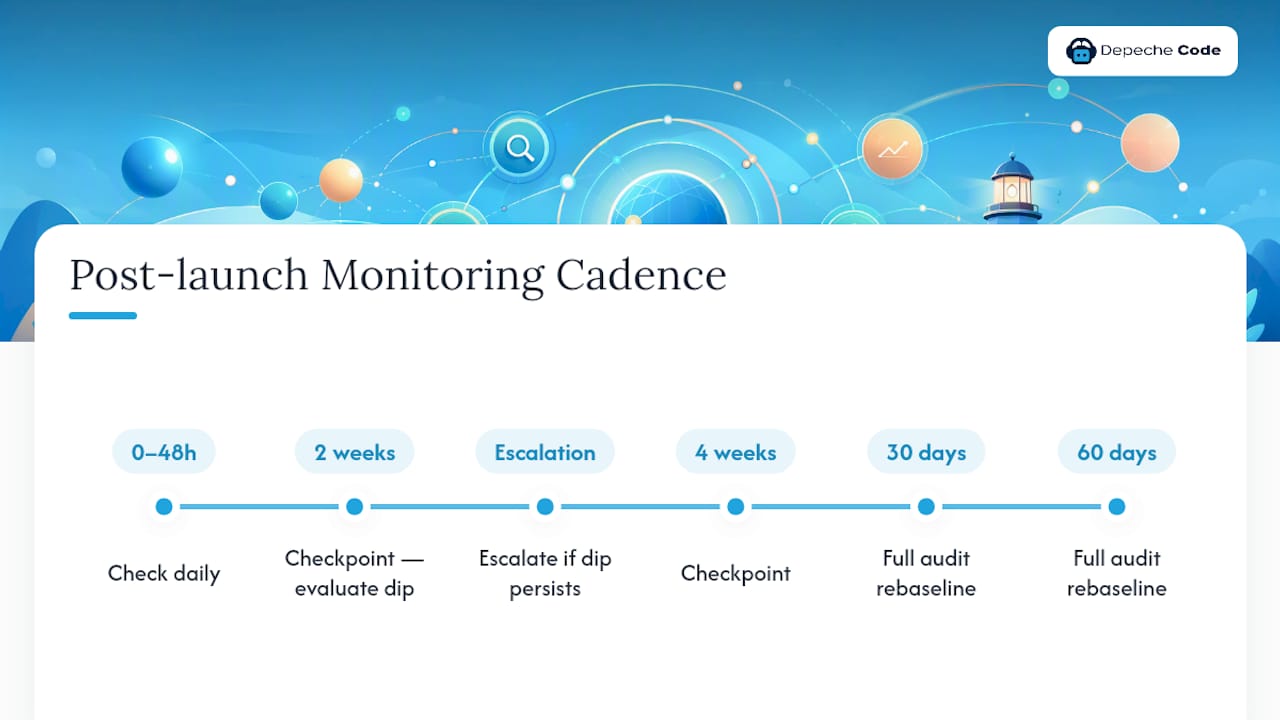
Use a clear escalation trigger rather than gut feel. A short dip in the first days after launch is normal; a decline that persists past two weeks usually points to an implementation error, not a search engine re-evaluating the site.
Recovery timelines vary with execution quality. Minor dips from a clean migration typically recover within four to eight weeks as Google recrawls and re-indexes the new structure. Severe errors, like a botched redirect map or an accidental noindex left in production, can take months to fully unwind, even after the underlying mistake is fixed, since search engines need to rediscover and revalidate every affected URL.
How Depeche Code Approaches Redesign Migrations
Some agencies treat every redesign as a migration project first, involving a multi-source audit, documented one-to-one redirect maps, staging checks before going live, and structured monitoring for several months after launch.
Whether you need an agency or can handle this in-house comes down to two things: how complex your site’s URL structure is, and how much revenue depends on the pages at risk. A five-page brochure site with no backlinks can survive a DIY approach. A site with hundreds of ranking URLs and real organic revenue usually can’t afford the learning curve.
How Do You Communicate SEO Impact to Stakeholders During a Redesign?
Set expectations before launch, not after traffic drops and someone panics in a meeting. Stakeholders who don’t work in search daily need three things spelled out plainly: what’s likely to happen, when it’s likely to happen, and what counts as a real problem versus normal fluctuation.
Share the baseline numbers from Phase 0, organic sessions, rankings, and conversions, so there’s an agreed-upon “before” everyone can point to later. Then set the expectation directly: a short dip in the days immediately following launch is normal and does not mean the migration failed. Frame recovery in the same terms used earlier in this guide, roughly four to eight weeks for a clean migration, longer for one with implementation errors.
Give stakeholders a simple reporting rhythm tied to the monitoring cadence: a quick update at 48 hours, another at two weeks, another at four weeks, and a full rebaseline comparison at 90 days.
This kind of structured update does more than manage anxiety. It protects the SEO team from getting blamed for a normal, expected dip, and it gives leadership a factual basis for any decision about additional investment or urgent fixes. Bringing this plan to the table at kickoff, alongside the audit and inventory work, keeps everyone reading the same numbers the same way when traffic data starts coming in after launch.
Do You Need to Reassess Keyword Strategy After a Redesign?
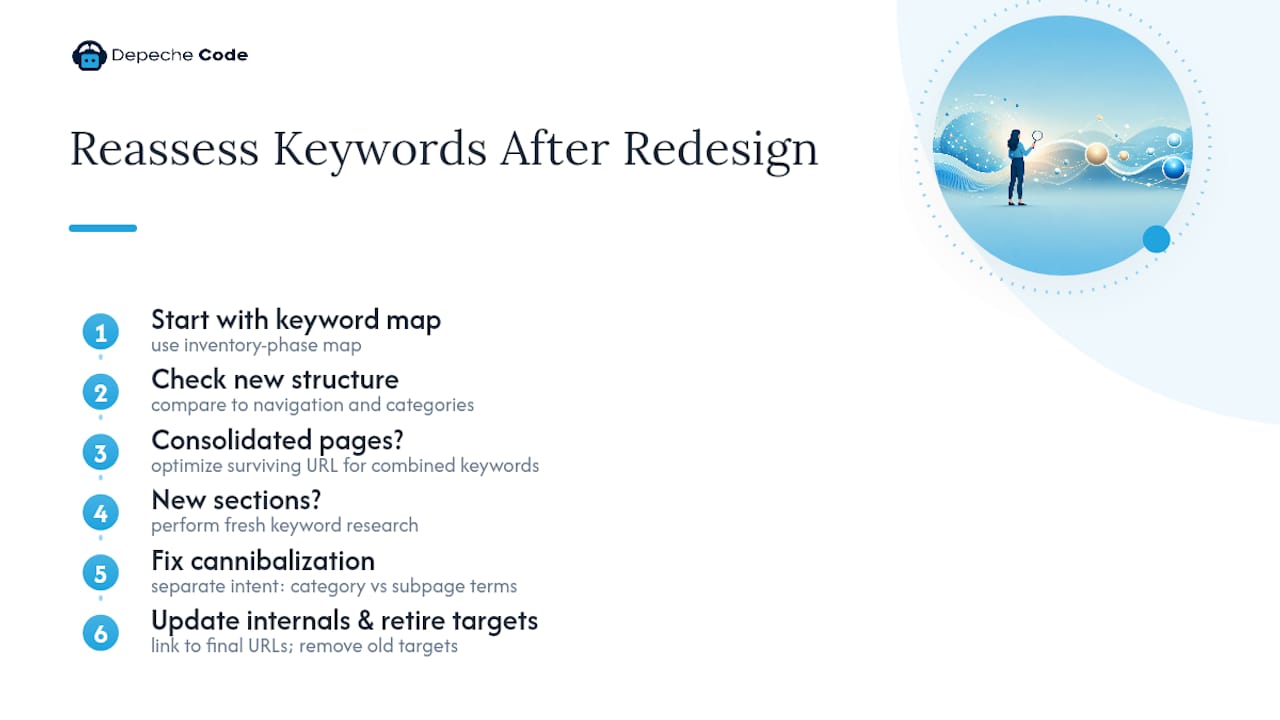
Yes, and the redesign is the right moment to do it. A new site structure changes which pages compete for which terms, and an outdated keyword-to-URL map will actively work against the new architecture if nobody updates it.
Start from the keyword-to-URL map built during the inventory phase, then check it against the new navigation and category structure. If pages were consolidated, confirm the surviving URL is optimized for the combined set of keywords those pages used to split between them, rather than favoring whichever page happened to win the redirect. If the new site introduces new sections or product lines, those need their own fresh keyword research rather than inheriting terms from unrelated pages.
Watch for keyword cannibalization introduced by the redesign itself. A common failure: the new site adds a broader category page that unintentionally targets the same terms as an existing, better-ranking subpage. Fix this by clearly separating search intent between pages, broad informational terms on the category page, specific transactional or long-tail terms on the subpages, rather than letting both compete for the same query.
Update internal linking to reinforce the new hierarchy once the keyword map is settled. Pages meant to rank for competitive terms need internal links from relevant, high-authority pages elsewhere on the site pointing to them by their final URL, not through a chain of redirects. This is also the point to retire keyword targets tied to pages that got merged or removed, so nobody on the content team keeps writing toward a URL that no longer exists.
How Should Competitor Analysis Shape a Redesign?
A redesign is a chance to close gaps competitors have been exploiting, but only if you look at the right things. Pull the ranking pages from your top three or four organic competitors for your priority keywords and note what their page structure, content depth, and internal linking look like compared to what you’re planning.
Pay attention to structural patterns, not just word count. If competitors are winning featured snippets or AI-generated summary placements because their pages use clear question-and-answer formatting or well-implemented schema, that’s a signal worth building into your new templates rather than an isolated content tweak. If a competitor’s category pages outrank yours because they link more directly to relevant subpages, that points to an internal linking gap your new site architecture should fix.
Avoid the trap of copying a competitor’s URL structure or navigation wholesale. Their site may already have the ranking equity to support choices that would hurt a site making the same change during a migration, when redirect risk is already elevated. Use competitor research to inform decisions, like which topics deserve dedicated pages versus a shared category, rather than to dictate the whole architecture.
Revisit this analysis again about 60 days after launch. By then, your new site has had time to be recrawled and re-indexed, and comparing your post-migration rankings against the same competitor set shows whether the redesign closed gaps or opened new ones.
What International SEO Issues Come Up During a Redesign?
If your site serves more than one country or language, a redesign is one of the riskiest moments for international SEO, because hreflang implementations and country-specific URL structures are easy to overlook when a team is focused on the primary market’s templates.
Before launch, confirm every regional or language variant has an updated hreflang map tied to the new URL structure, and that each variant points to the correct equivalent page rather than defaulting to a single primary version. If the redesign changes the URL pattern (moving from subdirectories to subdomains, for example, or the reverse), that change needs its own dedicated redirect map for every regional URL, on top of the primary market’s redirect work.
Check that country-specific structured data, like local business schema or region-specific pricing, carries over into the new templates. It’s common for a redesign built and tested primarily against the main market’s content to quietly drop these elements from secondary-language templates simply because nobody tested them as thoroughly.
Extend the staging gate checklist to cover at least one page from each major regional variant, not just the primary language version. And when monitoring post-launch, break your traffic and ranking reports out by country or language rather than looking only at aggregate numbers, since a problem isolated to one region can hide inside otherwise healthy global totals for weeks before anyone notices.
Can You Improve User Experience Without Hurting SEO?
Yes, and a redesign done right improves both at the same time, because the two goals overlap more than most teams expect. Faster load times, clearer navigation, and better mobile usability all help visitors and search engines alike.
The risk isn’t improving user experience. It’s improving it carelessly, in ways that break the technical foundation search engines rely on. A new mega-menu that looks great but buries important category pages three clicks deep hurts crawlability along with usability. A visually striking homepage built on heavy JavaScript rendering can slow Core Web Vitals scores even as it wins praise in a design review.
The safest path is to make user-experience changes and SEO changes visible to the same reviewers at the same time, rather than treating design QA and SEO QA as separate, sequential steps. When a designer proposes collapsing several navigation categories into one, that decision should be checked against the keyword-to-URL map before it ships, not after a ranking drop forces someone to ask why.
Prioritize changes that genuinely help both sides: clearer information hierarchy, faster page loads, more obvious calls to action, and navigation that mirrors how users actually search rather than how the org chart is structured. Every one of those improvements tends to reduce bounce rate and increase time on page, signals that reinforce rather than compete with the technical SEO work happening in parallel.
A Few Honest Notes From Watching Redesigns Go Wrong
Most redesign failures aren’t complicated. They’re staging tags that never got flipped off, redirects that got “handled later” and then forgotten, or a new template that quietly dropped the schema and metadata the old one had.
If your timeline is tight, do three things: protect your top 20 pages by traffic and backlinks above everything else, freeze analytics changes the week of launch so you can trust your before-and-after data, and assign one person, by name, to own the redirect map from start to finish. Ambiguity about ownership is what lets small mistakes turn into missed rankings.
— Donovan Wells – Founder and CEO
Get a Migration-First Redesign Without Rolling the Dice on Rankings
Some agencies run redesigns with a migration-first approach, separating migration and design phases. This approach involves comprehensive audits, documented redirect maps, staging gates before launch, and scheduled monitoring after launch, ensuring technical SEO elements like robots.txt are properly checked.

The website design and development service covers the whole migration, from the initial audit through post-launch verification, and pairs naturally with ongoing SEO plans for teams that want monitoring to continue well past the 90-day mark. If your site currently has meaningful organic traffic and backlinks worth protecting, the smart move is scoping the migration before a single design mockup gets approved. Reach out to start a project and get a redirect map built before your current rankings become a memory.
Sources
- Redirect mistakes that break migrations
- Site redesign SEO checklist
- Website Redesign SEO Guide 2026: Protect Rankings
- The role of SEO in a website redesign: How to avoid a traffic disaster
FAQ
Does Redesigning a Website Affect SEO?
Yes. Changing URLs, templates, or navigation without a redirect map and content parity plan can drop rankings, sometimes severely, while a well-planned migration usually causes only a brief, minor dip.
How Do I Redesign My Website Without Losing SEO?
Baseline your current traffic and rankings, build a four-source URL inventory, map every ranking or linked page to a one-to-one redirect, run a staging gate before launch, and monitor closely for the first 30 days.
What Is SEO for Website Design?
It means building metadata, schema, site structure, and page speed into the design and development process itself, rather than trying to fix search visibility after a template is already built.
Will I Lose Google Ranking If I Redesign or Redevelop My Website?
You risk losing rankings mainly from missing redirects, accidental noindex tags shipped to production, or content that gets shortened or removed. A migration-first process with a staging gate checklist prevents most of that risk.
How Long Does It Take to Recover Rankings After a Redesign?
A clean migration typically recovers within four to eight weeks. Migrations with serious errors, like broken redirects or lost content, can take months to fully recover even after the mistake is fixed.