

App store optimization (ASO) is the continuous process of improving an app’s organic visibility and conversion rate inside the App Store and Google Play. Three priorities drive the most impact: keyword relevance in your metadata, conversion rate across your creative assets, and fresh behavioral signals like recent ratings, install velocity, and retention. With millions of apps competing for attention across both major stores, getting these three levers right is the difference between ranking and disappearing.
Start here, within the next 24–72 hours:
- Fill your iOS keyword field completely. Apple gives you 100 characters. Many apps fail to use this space fully, leaving some characters unused. Add every relevant term that does not already appear in your title or subtitle.
- Swap your first screenshot. The first two screenshots carry the most conversion weight. If yours lack a caption or a clear value statement, replace them today.
- Trigger a review prompt at a high-value moment. Ask after a user completes a task, not at launch. Use Apple’s SKStoreReviewAPI or Google’s In-App Review API so the prompt stays compliant.
Pro Tip: When resources are limited, fix metadata first. You cannot convert impressions you never receive. Once keyword rankings bring traffic, then shift focus to creative testing.
Key Takeaways
Effective app store optimization requires keyword relevance, strong creative conversion, and consistent behavioral signals working together, not in isolation.
| Point | Details |
|---|---|
| Keyword field is free money | Fill the iOS 100-character keyword field completely every cycle; many apps leave some characters unused. |
| CVR compounds faster than ranking | Doubling your store listing conversion rate produces the same install volume as doubling impressions. |
| Behavioral signals now outweigh metadata alone | Install velocity, recent ratings, and retention keep you ranked after metadata gets you indexed. |
| Test on a 4–8 week cadence | Run one experiment per platform per cycle; shorter windows produce inconclusive results. |
| Depechecode runs ASO as a managed operation | Depechecode handles metadata, creative testing, and analytics for teams that need a continuous ASO process. |
Table of Contents
- What is app store optimization and why does it matter for your business?
- How do app stores rank your app?
- How to do keyword research for app stores
- How to write metadata that ranks and converts
- How to design creatives that convert store visitors into installs
- How to run ASO experiments that produce valid results
- How to get more reviews and use them to improve rankings
- How to localize your app listing for new markets
- Which ASO tools should your team actually use?
- What does a repeatable ASO workflow look like?
- Your complete ASO checklist for 2026
- What most developers get wrong about ASO
- Depechecode handles ASO so your team can focus on building
- Sources
- FAQ
What is app store optimization and why does it matter for your business?
ASO’s commercial value is straightforward: it reduces your cost to acquire users and compounds over time in a way paid advertising cannot. Every keyword ranking you hold delivers installs without a per-click charge. Every creative improvement raises conversion across all your existing traffic. According to AppsFlyer’s ASO guide, optimized listings commonly see materially higher installs compared with unoptimized ones, with some analyses showing significantly more downloads in the same category.
The three business goals map directly to measurable KPIs:
- Visibility: impressions, ranked keyword count, and keyword position. Find impressions in App Store Connect under Analytics > App Store Impressions, and in Google Play Console under Acquire Users > Store Performance.
- Conversion: store listing conversion rate (installs per impression) and page views to installs ratio. Both consoles report this natively; track it weekly.
- Post-install quality: Day 1, Day 7, and Day 30 retention rates, crash rate, and uninstall rate. Pull these from your analytics SDK (Firebase, Amplitude, Mixpanel) alongside the native console data.
Stat to know: AppTweak reports that a majority of app downloads begin with a store search query. That single figure explains why keyword and metadata work sits at the top of every ASO priority list.
The compounding effect is real. A ranking gain in week four keeps paying in week forty. A paid campaign stops the moment the budget runs out. Teams that treat ASO as a continuous operation, not a one-time setup, consistently lower their customer acquisition cost over a 6–12 month horizon. For a broader view of how organic channels compound ROI, the SEO for business ROI breakdown applies the same logic to search.
How do app stores rank your app?
Both the App Store and Google Play weigh a similar set of signals, but they weight them differently and index different fields. Understanding that gap changes every tactical decision you make.
Signals common to both stores:
- Keyword relevance: how well your metadata matches the search query
- Install velocity: how many installs you receive in a short window after a search
- Ratings and review volume: overall star rating and the recency of new reviews
- Engagement and retention: how often users return and how long they stay
- Crash rate and stability: a high crash rate suppresses rankings on both platforms
Platform differences that change your strategy:
On the App Store, the indexed fields are the app name (30 characters), subtitle (30 characters), and the hidden keyword field (100 characters). Your long description is not indexed for search. Write it for conversion, not discovery. On Google Play, the title (30 characters), short description (80 characters), and long description (4,000 characters) are all indexed. Keyword placement in the long description directly affects what queries your app surfaces for.
ASOhack’s 2026 algorithm analysis observes that behavioral and freshness signals now carry greater relative weight than in earlier years. Metadata gets you indexed; behavior keeps you ranked. An app that updates its keyword field but sees no install spike or new ratings rarely climbs. The two levers must move together.
Pro Tip: On iOS, never repeat a keyword that already appears in your title or subtitle inside the 100-character keyword field. Apple’s algorithm reads all three fields together, so repetition wastes characters you could spend on new terms.
On Android, the long description is your primary keyword canvas. Place your most important terms in the first 167 characters (the visible fold before “read more”), repeat each target keyword two to three times naturally across the full text, and avoid keyword stuffing that reads awkwardly to a human reviewer.
How to do keyword research for app stores
Keyword research for ASO follows a different logic than web SEO. Volume estimates are less reliable, competition scores vary by tool, and conversion intent matters more than raw search count. The goal is a prioritized backlog of terms you can test every 4–8 weeks.
Primary vs secondary keywords:
Primary keywords are high-relevance, moderate-to-high volume terms that describe your app’s core function. Secondary keywords are longer-tail, lower-competition phrases that capture specific use cases or user intents. Both belong in your metadata; primary terms go in the title and subtitle, secondary terms fill the keyword field and long description.
Step-by-step research process:
- Start with autocomplete. Type your core category term into the App Store or Google Play search bar and record every suggestion. These are real queries users are typing right now.
- Mine competitor listings. Identify the top five apps in your category and note every keyword they use in their titles and subtitles. Tools like Sensor Tower, Mobile Action, and App Radar reverse-engineer competitor keyword sets.
- Run Apple Search Ads discovery campaigns. Even a small budget on broad match reveals which queries trigger impressions and installs. This is the most reliable source of conversion-validated keywords.
- Score and prioritize. Rate each keyword on relevance (1–5), estimated difficulty (from your tool of choice), and conversion potential (informed by Search Ads data). Build a ranked backlog.
- Map keywords to fields. Assign your highest-value primary terms to the title and subtitle. Fill the iOS keyword field with secondary terms that do not repeat title or subtitle words. On Android, weave terms naturally into the long description.
Tools for keyword discovery and tracking:
- Sensor Tower: strong keyword volume estimates and competitor intelligence; widely used by mid-size to enterprise teams
- Mobile Action: keyword tracking plus creative intelligence in one dashboard; good for teams that want both in a single tool
- App Radar: keyword tracking with a clean UI; popular with indie developers and small teams for its accessible pricing
- data.ai (formerly App Annie): deep market intelligence and category benchmarking; better suited to enterprise teams tracking multiple apps across markets
- Apptenium: ASO analytics and icon generation tooling; useful for teams that want creative and keyword data in one lightweight platform
Pro Tip: Group keywords by user intent, not just topic. “Budget tracker” and “save money app” describe the same product but attract users at different decision stages. Test them separately and measure which group converts better, not just which ranks higher.
AppTweak recommends a 4–8 week update cadence for keyword sets. Shorter cycles do not give the algorithm enough time to register changes; longer cycles leave ranking opportunities untested.
How to write metadata that ranks and converts
Metadata is where keyword research becomes real. Every field has a character limit, an indexing behavior, and a conversion function. Getting the field-level details wrong wastes the research work upstream.
App Store metadata fields
- App name (30 characters): your single most important ranking field. Lead with your primary keyword, then your brand name or a secondary benefit term. Example: “Budget Tracker: Expense Manager” beats “MyFinanceApp Pro.”
- Subtitle (30 characters): indexed and visible below the app name in search results. Use a secondary keyword here that does not repeat the title. Example: “Save Money & Track Spending.”
- Keyword field (100 characters): not visible to users, fully indexed. Comma-separate terms, no spaces after commas (saves characters), no repetition of title or subtitle words. AppsFlyer’s guide recommends filling all 100 characters every update cycle.
- Promotional text (170 characters): not indexed, but visible above the description. Use it for time-sensitive messaging or feature announcements.
- Long description: not indexed on iOS. Write it entirely for conversion: lead with your strongest value proposition, use short paragraphs, and include social proof where you have it.
Google Play metadata fields
- Title (30 characters): indexed. Same logic as iOS: primary keyword first.
- Short description (80 characters): indexed and visible in search results. Pack your second-most-important keyword here.
- Long description (4,000 characters): fully indexed. AppDrift confirms that Google Play indexes this field while the App Store does not, so Android metadata strategy diverges significantly here. Place your primary keyword in the first sentence, repeat it two to three times naturally, and use secondary keywords throughout without forcing density.
Common mistakes to avoid:
- Repeating the same keyword in the iOS title, subtitle, and keyword field (wastes indexing budget)
- Writing the Android long description as a marketing brochure with no keyword variation
- Changing the app name more than once per keyword cycle (frequent title changes can temporarily suppress rankings)
- Leaving the iOS keyword field partially filled
How to design creatives that convert store visitors into installs
Sonar’s ASO research makes a compelling case: doubling your conversion rate produces the same install volume as doubling your impressions. That means creative work often delivers faster returns than chasing marginal keyword positions, especially once you already have traffic.
Icon guidelines:
- Design for the smallest display size first (the search result thumbnail, roughly 60×60 pixels on most devices). If the icon reads clearly at that size, it works everywhere.
- Limit the icon to one focal element. Two competing shapes or a logo plus text almost always lose clarity at small sizes.
- Avoid text in icons. Apple and Google both discourage it, and it rarely survives compression.
- Test color contrast. High-contrast icons stand out in category browse rows where competitors cluster around similar palettes.
Screenshot best practices:
The first two screenshots carry the most weight. Most users never scroll past them in search results, where only the first two or three are visible before the “Get” button. Treat them as a two-frame pitch.
- Lead with your single strongest benefit, not a feature list.
- Add short captions (five to seven words) in a large, readable font. Captions that state an outcome (“Pay anyone in seconds”) outperform captions that describe a feature (“Send payments”).
- Use device mockups sparingly. Full-bleed lifestyle images often outperform plain device frames in A/B tests, though this varies by category.
- Localize captions when you enter new markets. A translated caption on an English-language screenshot is better than nothing, but a fully localized creative performs better.
Preview video guidance:
Keep preview videos to 15–30 seconds. The first three seconds must show the app in action, not a brand animation. Place your strongest hook in the opening frame because autoplay on muted devices means the visual must carry the message alone. Video helps most in categories where the core experience is hard to convey in a static screenshot (games, creative tools, fitness apps). For utility apps with a clear single function, strong screenshots often outperform video.
A/B test plan for creative assets:
- Define one hypothesis per test. “Changing the icon background from blue to orange will increase tap-through rate by 10%.” One variable, one metric.
- Set a minimum sample threshold before reading results. For conversion rate tests, most practitioners recommend at least 1,000 impressions per variant before drawing conclusions.
- Run the test for a minimum of two weeks to account for day-of-week variation.
- Measure CVR uplift (installs per impression) as the primary metric. Secondary metrics: page views, scroll depth on the listing page.
- Roll out the winner, document the result, and queue the next hypothesis.
How to run ASO experiments that produce valid results
Native store experiment tools are the right starting point for most teams. Apple’s Product Page Optimization lets you test up to three treatment variants against a control, with traffic split managed by Apple. Google Play Store Listing Experiments offer similar functionality with more granular traffic allocation controls. Both are free, built into the native consoles, and produce statistically grounded results without requiring a third-party platform.
Third-party tools like SplitMetrics and Storemaven add value when you need pre-launch testing (before your app is live), faster traffic accumulation via paid traffic routing, or more detailed funnel analytics than the native consoles provide. They are worth the cost for teams running more than two or three concurrent experiments or managing multiple apps.
Step-by-step test plan:
- Write the hypothesis. “Replacing the current icon (abstract shape) with a character-based icon will increase CVR by at least 8% among users who find the app via branded search.”
- Choose the primary metric. CVR (installs per impression) for creative tests; keyword rank position for metadata tests.
- Design the variant. Change one element only. Icon swap, screenshot order change, or subtitle keyword change, each as a separate test.
- Set the minimum sample. Use the native console’s recommendation or calculate based on your current CVR and the minimum detectable effect you care about.
- Set the run window. Two to four weeks for most apps; longer for low-traffic apps where reaching the sample threshold takes more time.
- Analyze and decide. If the variant wins at statistical significance, roll it out. If it loses, document why and test the next hypothesis. If it is inconclusive, extend the run window or increase traffic.
Sample hypotheses worth testing:
- Icon: character vs abstract shape
- Screenshot 1: benefit caption vs feature caption
- Subtitle: keyword-heavy vs benefit-heavy phrasing
- Video vs no video (for apps with moderate traffic)
Pro Tip: Do not run concurrent tests on the same page element. If you are testing the icon and the first screenshot simultaneously, you cannot isolate which change drove the result. Sequence tests, or use separate custom product pages on iOS to run parallel experiments on distinct audience segments.
Search Engine Land’s ASO fundamentals frame testing as a continuous activity, not a one-time project. Teams that build a standing test queue and rotate hypotheses every 4–8 weeks consistently outperform teams that test once at launch and move on.
How to get more reviews and use them to improve rankings
Ratings and reviews influence rankings on both platforms, but the mechanism is more nuanced than raw star average. Recent ratings carry more weight than old ones. A 4.2-star app with 500 reviews in the last 90 days often outranks a 4.6-star app whose last 200 reviews are two years old. ASOhack’s 2026 analysis confirms that freshness signals, including recent rating velocity, are weighted more heavily than they were in earlier algorithm versions.
Timing and API usage:
- Ask for a review after a user completes a meaningful action: finishing a workout, sending a payment, completing a level, or saving a document. Never ask at launch or after an error.
- Use Apple’s SKStoreReviewAPI on iOS and Google’s In-App Review API on Android. Both keep the prompt native and compliant. Third-party review prompt flows that redirect users to the store page are not compliant with platform policies.
- Limit prompt frequency. Apple limits the frequency of native review prompts per user annually. Google does not publish a hard cap, but excessive prompting triggers suppression.
Responding to reviews:
Reply to negative reviews within 48 hours. Acknowledge the issue, state what you are doing about it, and invite the user to contact support. Keep replies under 100 words. For positive reviews, a short, specific thank-you (not a copy-paste template) signals to prospective users that the team is active.
Dos and don’ts:
- Do ask for reviews at high-value moments using native APIs.
- Do respond to every one-star and two-star review publicly.
- Do monitor for spam or fraudulent reviews and report them through the console.
- Do not offer rewards, discounts, or any incentive in exchange for a review. Both platforms prohibit this and will remove incentivized reviews.
- Do not use review gating (showing a satisfaction screen and only directing happy users to the store). Apple’s guidelines explicitly prohibit it.
Pro Tip: After a major update that fixes a widely reported bug, send an in-app message to users who previously left a low rating. Let them know the issue is resolved and invite them to update their review. This is compliant and often produces a measurable rating recovery within two to three weeks.
How to localize your app listing for new markets
Localization is one of the highest-ROI ASO activities for apps that already perform well in their home market. The reason is structural: most apps compete intensely in English-language markets and face far less competition in localized versions of the same category. AppTweak’s research supports prioritizing 5–10 target markets and localizing both text and creatives to maximize returns.
How to prioritize markets:
- Pull your existing impression and install data by country from App Store Connect or Google Play Console.
- Identify countries where you already receive impressions but convert poorly. These are your highest-opportunity markets.
- Score each candidate market on three factors: search volume in the category (use Sensor Tower or Mobile Action for estimates), competitive density (how many strong local apps exist), and revenue per user (average revenue per download in that market).
- Pick your first five markets. Localize fully before expanding further.
What to localize:
- Title, subtitle, and keyword field (iOS) or short and long description (Android) in the target language
- Screenshots with localized captions and, where relevant, localized UI shown in the device frame
- Preview video subtitles or voiceover
- In-app purchase names (these appear in store listings and are indexed)
Workflow for scaling localization:
- Build a translation brief that includes keyword context, not just the source text. Translators who understand which terms are high-value keywords produce better results than those working from raw copy alone.
- Run localization QA with a native speaker before publishing. Machine translation errors in titles damage credibility and rankings.
- Use App Store Connect’s localization management or Google Play Console’s translation service as the publishing workflow. Both support per-locale metadata independently.
- Schedule localized creative updates on the same 4–8 week cycle as your primary market.
Pro Tip: Never assume a translated screenshot performs as well as a purpose-built localized one. In markets like Japan, Brazil, and Germany, user expectations for visual style differ significantly from US norms. Test a localized creative variant against the translated version before committing to a full rollout.
Which ASO tools should your team actually use?
The right tool depends on your team size, budget, and primary bottleneck. A solo developer optimizing one app needs different tooling than an enterprise team managing 50 apps across 20 markets.
Tool profiles:
App Store Connect (free, iOS only): the authoritative source for impressions, CVR, keyword performance, and Product Page Optimization experiments. Every iOS ASO workflow starts here.
Google Play Console (free, Android only): equivalent native analytics for Android, including Store Listing Experiments, acquisition reports, and ratings management. Non-negotiable for any Android team.
data.ai (formerly App Annie): the market intelligence standard for enterprise teams. Strong on category benchmarking, competitive download estimates, and revenue intelligence. Pricing is enterprise-tier; not cost-effective for indie developers or small teams.
Sensor Tower: keyword research, competitor intelligence, and creative analysis in one platform. Widely used by mid-market and enterprise teams. Offers a limited free tier; paid plans are priced for professional teams.
Mobile Action: combines keyword tracking, competitor creative intelligence, and Apple Search Ads optimization in a single dashboard. A strong choice for teams that run paid and organic ASO together.
App Radar: keyword tracking and metadata management with a cleaner, more accessible UI than most enterprise tools. Popular with indie developers and small marketing teams. Offers a free tier with meaningful functionality.
Storemaven: specialized in pre-launch and post-launch creative testing via paid traffic. Best for teams that need faster test results than native experiments provide or want to test before going live.
SplitMetrics: similar positioning to Storemaven, with strong A/B testing infrastructure and detailed funnel analytics. Used by growth teams that run high-volume creative experiments.
Evaluation checklist by team type:
- Indie developer / solo: App Store Connect + Google Play Console (free) + App Radar (free tier). Add Apptenium for icon generation and lightweight analytics.
- SMB marketing team: add Mobile Action or Sensor Tower for keyword intelligence and competitor tracking.
- Enterprise / multi-app: data.ai for market intelligence, Sensor Tower for keyword depth, SplitMetrics or Storemaven for creative testing at scale.
What does a repeatable ASO workflow look like?
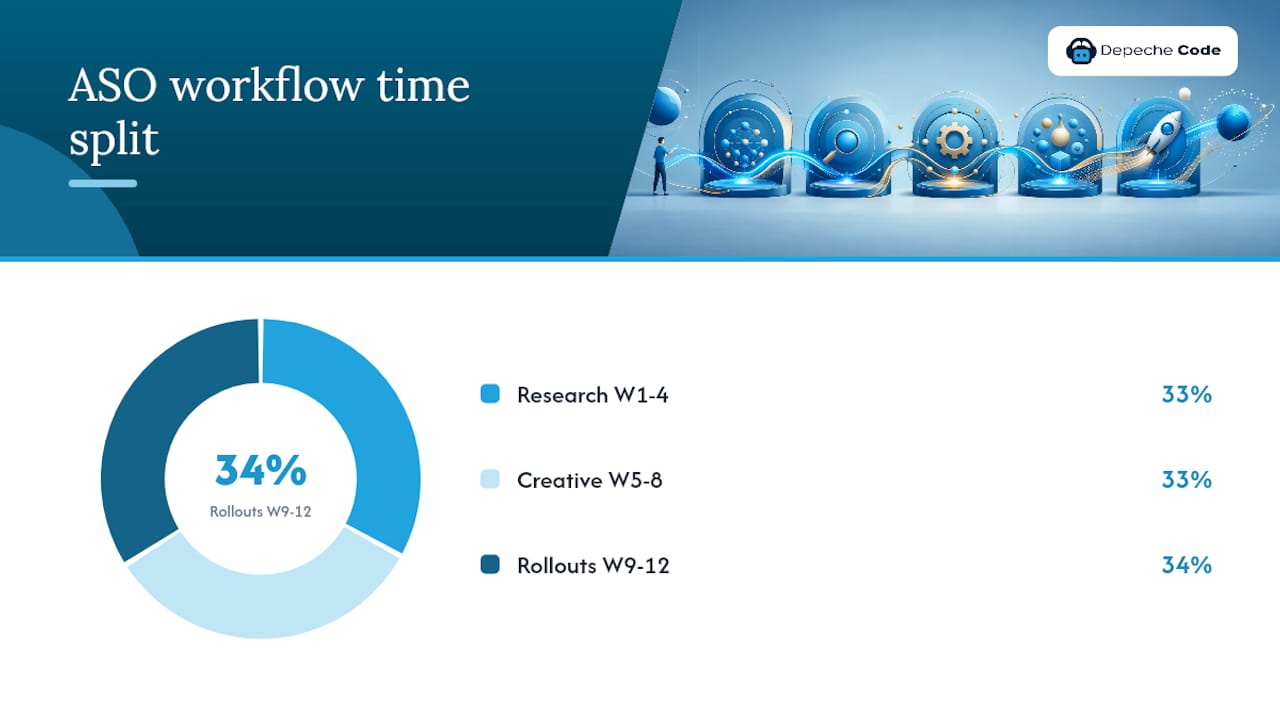
ASO without a cadence is just a series of one-off changes with no way to measure what worked. The operational model that produces consistent results treats ASO as a sprint-based process with defined roles, weekly measurement, and a 4–8 week update cycle.
90-day plan:
- Weeks 1–4 (Research and priority metadata): audit current keyword rankings and CVR baselines in both consoles. Run keyword research using your chosen tools. Update the title, subtitle, keyword field (iOS), and long description (Android) with your highest-priority terms. Set up weekly KPI tracking in a shared dashboard.
- Weeks 5–8 (Creative tests): launch your first Product Page Optimization test (iOS) or Store Listing Experiment (Android). Test one creative variable per platform. Monitor CVR daily; do not call the test early. Begin building the next hypothesis queue.
- Weeks 9–12 (Rollouts, measurement, iteration): roll out winning creative variants. Measure keyword rank changes from the week 1–4 metadata update. Identify the next keyword set to test. Document results in a shared ASO log for institutional memory.
Roles and responsibilities:
- Product manager: owns the ASO roadmap, prioritizes the keyword backlog, and coordinates release timing with ASO updates.
- Marketer / ASO specialist: runs keyword research, writes metadata copy, manages the test queue, and tracks KPIs weekly.
- Designer: produces creative variants (icons, screenshots, video) to spec and on the test cadence.
- Engineer: implements technical quality improvements (crash rate, load speed, app size) that affect behavioral signals. See mobile app hosting and maintenance for the infrastructure side of this.
- Analyst: sizes test samples, interprets results, and flags statistical significance.
Paid boosts and Apple Search Ads:
Apple Search Ads on broad match is the fastest way to validate keyword conversion before committing to a metadata change. Run a small campaign ($50–$100) targeting your candidate keywords and measure which terms produce installs at an acceptable cost per acquisition. Terms that convert well in Search Ads almost always perform well organically once you rank for them. For a broader look at how paid and organic search strategies interact, the mobile SEO strategies guide covers the overlap in detail.
The mobile app development process guide covers how release timing and update frequency interact with ASO cadence, which matters when coordinating metadata changes with engineering sprints.
Your complete ASO checklist for 2026
Use this checklist as a sprint board card or a pre-launch QA gate. Every item maps to a section above.
Research:
- [ ] Primary and secondary keywords identified and scored by relevance, difficulty, and conversion potential
- [ ] Competitor keyword sets scraped and reviewed
- [ ] Apple Search Ads discovery campaign run to validate conversion intent
Metadata:
- [ ] iOS title: primary keyword in first 30 characters
- [ ] iOS subtitle: secondary keyword, no repetition of title terms
- [ ] iOS keyword field: 100 characters used, no duplicates, comma-separated with no spaces
- [ ] Android title: primary keyword first
- [ ] Android short description: second-priority keyword included
- [ ] Android long description: primary keyword in first sentence, repeated 2–3 times naturally, secondary keywords distributed throughout
Creatives:
- [ ] Icon tested at thumbnail size (60×60 pixels equivalent)
- [ ] First two screenshots lead with strongest benefit + short caption
- [ ] Preview video opens with app in action within first three seconds
- [ ] Localized creatives prepared for priority markets
Testing:
- [ ] One active experiment running per platform (Product Page Optimization / Store Listing Experiment)
- [ ] Hypothesis documented with primary metric and minimum sample threshold
- [ ] Test run window set to minimum two weeks
Review strategy:
- [ ] Review prompt triggered at a high-value in-app moment using native API
- [ ] Response workflow in place for one-star and two-star reviews (48-hour target)
Localization:
- [ ] Top 5 markets identified by impression volume and conversion gap
- [ ] Metadata and creatives localized (not just translated) for priority markets
Metrics to track weekly:
- [ ] Impressions, CVR, and installs per platform
- [ ] Keyword rank for top 10 target terms
- [ ] Average rating and new review count (last 30 days)
- [ ] Day 7 retention rate
Pro Tip: The single KPI to watch first is store listing CVR. It reflects the combined impact of your creative and metadata work, and it is the fastest signal that something changed. Keyword rank moves slowly; CVR moves within days of a creative update.
A realistic example of what this checklist produces: an app that fills its iOS keyword field completely, rewrites its first two screenshots with benefit-led captions, and triggers review prompts at a task-completion moment can expect measurable CVR improvement within the first test cycle, with keyword ranking gains following over the subsequent 4–8 weeks as behavioral signals accumulate. These are example outcomes, not guarantees; results depend on category competition, traffic volume, and execution quality.
What most developers get wrong about ASO
The most common mistake is treating ASO as a launch task rather than an ongoing operation. A developer spends two hours filling out metadata before submitting to the store, then never touches it again. Six months later, they wonder why a newer app with a similar feature set is ranking above them. The answer is almost always that the newer app has fresher ratings, a more recent metadata update, and at least one creative test in its history.
The second mistake is changing the title too often. Every title change resets some of the behavioral signal accumulation tied to that keyword. Teams that swap titles every two weeks in search of a ranking shortcut often end up worse than where they started. Title changes should be deliberate, spaced at least 4–8 weeks apart, and paired with a plan to drive installs on the new keyword.
Keyword stuffing is the third common error. Titles like “Budget Tracker – Money Manager – Expense Planner – Finance App” read as spam to users and are increasingly penalized by both stores’ quality filters. One strong primary keyword in the title, one secondary term in the subtitle, and a clean 100-character keyword field outperform a stuffed title every time.
The fourth mistake is ignoring conversion entirely. Teams spend weeks chasing a ranking from position 8 to position 5 for a keyword while their store listing CVR sits at 2%. Fixing the screenshots and adding a caption could double that CVR, producing the same install volume as ranking first for the keyword. Sonar’s analysis makes this point clearly: conversion optimization is a multiplier, not an afterthought.
Finally, most teams underinvest in the product itself as an ASO lever. Crash rate, load speed, and app size all affect rankings. An app that crashes on launch for 5% of users will never hold a top-10 ranking regardless of how good its metadata is. The fastest ASO fix is sometimes a stability release, not a keyword update.
Depechecode handles ASO so your team can focus on building
Most development teams know what good ASO looks like but do not have the bandwidth to run it as a continuous operation. Keyword research, creative testing, review management, and localization each require consistent attention across a 4–8 week cycle, and that work competes directly with shipping product.

Depechecode is a full-service digital agency based in Orlando that operationalizes ASO for mobile app teams. The work covers metadata updates, creative production and A/B testing, review strategy, analytics setup, and the 90-day sprint cadence described in this guide. For teams that want end-to-end support from development through store optimization, the mobile app development service covers the full lifecycle. If you already have a live app and want to know exactly where your rankings and CVR are leaking, request an ASO audit and get a prioritized fix list within five business days.
Sources
- How to ASO like a PRO: The App Store Optimization guide — AppsFlyer
- What is App Store Optimization and why is ASO important — AppTweak
- Product page optimization — App Store – Apple Developer
- How the iOS App Store Search Algorithm Works in 2026 | ASOhack
- What Is App Store Optimization (ASO)? The Complete Beginner’s Guide for 2026 | AppDrift
- What Is ASO? App Store Optimization Explained | Sonar Blog
Use App Store Connect and Google Play Console as your primary sources for field character limits and experiment setup. Third-party tool blogs are useful for strategy; the native consoles are authoritative for rules.
FAQ
What does app store optimization actually do?
ASO improves where your app appears in store search results and how many visitors convert to installs. It works by aligning your metadata with high-value search queries and improving creative assets to raise your store listing conversion rate.
Is app store optimization legal?
Yes. ASO is a standard, platform-approved practice. Both Apple and Google publish official documentation on metadata fields and native experiment tools. The only prohibited tactics are incentivized reviews, review gating, and keyword stuffing that violates store content policies.
What does an app store optimization job involve?
An ASO specialist handles keyword research, metadata copywriting, creative briefing and testing, review strategy, localization coordination, and weekly KPI tracking. The role sits at the intersection of marketing, product, and data analysis.
How much does app store optimization cost?
Costs vary widely. Native tools (App Store Connect, Google Play Console) are free. Third-party tools like Sensor Tower and Mobile Action range from a few hundred to several thousand dollars per month depending on plan tier. Managed ASO services from agencies like Depechecode are priced based on scope; contact Depechecode directly for a custom audit and plan estimate.
How long does it take to see results from ASO?
Keyword ranking changes typically appear within 2–4 weeks of a metadata update. Creative CVR improvements can show up within days of a test going live. Sustained ranking gains that reflect behavioral signal accumulation usually take 6–12 weeks of consistent optimization.