

Call tracking helps SEO by proving which pages, keywords, and campaigns actually generate phone leads, and it’s safe for rankings when you use Dynamic Number Insertion and keep your real number visible in HTML, schema, and directory listings. The main danger is breaking your NAP consistency by letting a tracking number leak into Google Business Profile or citation sites. The fix takes two minutes: view your page source and confirm your real number renders in the raw HTML, not just on screen.
TL;DR:
- Proper call tracking with Dynamic Number Insertion does not hurt SEO if the real business number remains visible in HTML, schema, and citation listings.
- The main risk comes from accidentally replacing or hard-coding the real number into Google Business Profile, citations, or website HTML, causing NAP consistency issues.
- Regularly verifying your site’s source code, schema data, and citation listings ensures your real number stays correct and prevents local SEO ranking drops.
- Tracking call data can reveal which landing pages, keywords, and locations generate the most revenue, leading to more effective SEO and marketing decisions.
- For complex setups or multiple locations, using an agency or specialized service like Depechecode helps manage technical implementation and safeguard SEO.
Table of Contents
- Why Call Tracking Matters for SEO and Business Reporting
- How Call Tracking Works: DNI, Attribution, and Integrations
- SEO Risks and How to Avoid Them
- Measuring Impact: KPIs and Report Examples
- Implementation Checklist: Setup and Verification
- When to Hire an Agency vs. Handle It In-House
- The Gap Between Call Tracking Advice and What Actually Breaks Sites
- How Depechecode Handles Call Tracking Setup and SEO Protection
- Sources
- FAQ
Why Call Tracking Matters for SEO and Business Reporting
Phone calls are the blind spot in most analytics setups. A visitor lands on your service page from an organic search, reads it, then picks up the phone instead of filling out a form. Google Analytics logs a bounce. The lead vanishes from every report, and the page that actually generated revenue looks like it’s underperforming.
Call tracking closes that gap. By assigning a unique number to each visitor or session, it lets you attribute the call back to a specific landing page, keyword, or referral source, the same way you’d attribute a form submission. CallRail’s guide to call tracking describes this as standard practice for marketers who need to prove organic search actually produces business, not just clicks.
That data changes decisions in ways form-fill metrics can’t. A law firm might discover its “personal injury FAQ” page drives three times more phone calls than its main service page, despite lower traffic, and shift content investment accordingly. A home services company might see a PPC campaign generating cheap clicks but almost no qualified calls, and reallocate that spend into organic content instead. A multi-location retailer might catch that one city’s landing page converts calls at half the rate of its sisters, pointing to a local content or trust-signal problem rather than a traffic problem.
The pattern shows up again and again once businesses start measuring calls:
- Content teams stop guessing which pages “feel” important and start funding the ones that generate calls.
- Paid search budgets shift away from keywords that generate form spam but no real conversations.
- Local SEO fixes get prioritized based on which location pages underperform on call volume, not just impressions.
None of that is possible if calls stay invisible to your reporting stack.
How Call Tracking Works: DNI, Attribution, and Integrations
Dynamic Number Insertion is the mechanism that makes all of this work without breaking your site. A script swaps the phone number displayed to each visitor with a unique tracking number, while the actual, authoritative business number stays embedded in the page’s server-rendered HTML. CallScaler’s explainer on call tracking and SEO confirms that search engine crawlers still read the real number, not the swapped one, because DNI operates client-side after the page has already loaded.
Not every use case needs visitor-level precision, though. Static tracking numbers, assigned to a single campaign or offline ad, work fine for a billboard or a print flyer where you just need to know the channel. Session-level DNI is what you want for your website, since it can tie each call to the exact landing page, referral source, and even the keyword that brought that visitor in. PPC campaigns typically sit in between, using pool-based DNI tied to ad groups.
What gets captured usually includes the landing page, traffic source, device type, session path, call duration, and often a full recording or transcript. That last piece matters more than most marketers realize. CallRail’s research on call tracking and keyword research points out that transcripts reveal the actual language callers use, phrases that rarely show up in your keyword tool because people speak differently than they type.

Pro Tip: Pull ten recent call transcripts and scan them for phrases you’re not already targeting in your content. Callers often ask questions in plainer, more specific language than your landing pages use, and that gap is free keyword research.
Most platforms connect to GA4, Google Ads, and CRM systems through native integrations or APIs, pushing call events in as conversions so they sit alongside form fills and purchases in the same dashboard.
SEO Risks and How to Avoid Them
Here’s the actual risk, stated plainly: if a tracking number ends up on your Google Business Profile, in a citation on Yelp or an industry directory, or hard-coded into your website’s HTML instead of swapped by DNI, you create a NAP inconsistency. Name, Address, Phone number mismatches confuse local search algorithms about which business entity they’re looking at, and CallScaler’s analysis identifies this as the real mechanism behind “call tracking hurts SEO” complaints, not the tracking itself.
Four rules prevent nearly every problem:
- Never place a tracking number in your Google Business Profile or any citation listing. Use your real number there, always.
- Never hard-code a tracking number directly into your site’s HTML. Let DNI handle the swap dynamically.
- Keep your LocalBusiness schema markup populated with your authoritative phone number, not a tracking variant.
- Run periodic NAP audits across your top citation sources to catch drift before it compounds.
A verification checklist takes less time than most businesses assume. View the page source (right click, “view page source,” or Ctrl+U) and confirm the real number appears in the raw HTML rather than only rendering visually. Run your homepage through a structured-data testing tool to confirm your schema reflects the correct number. Spot-check your Google Business Profile and top three citation sources quarterly. If you manage multiple locations, an automated NAP monitoring tool saves hours versus manual checks.
A common broken setup: a business installs call tracking, someone copies the new dynamic number into their GBP listing “to keep things consistent,” and within weeks local pack visibility drops. The fix is simple, revert GBP to the real number, confirm schema matches, and let DNI do its job on the website alone.
Measuring Impact: KPIs and Report Examples
The KPIs worth tracking are the ones that connect a phone call back to a dollar figure, not just a count. At minimum, track organic calls (calls originating from organic search sessions), qualified-call rate (the percentage of calls that meet your definition of a real lead), calls by landing page, average call duration, close rate, and estimated revenue per call.
That last one requires a simple formula: take your average deal value, multiply by your call-to-close rate, and multiply by qualified call volume. If your average job is $1,200, your close rate on qualified calls is 25%, and organic search generated 40 qualified calls last month, that’s roughly $12,000 in estimated organic revenue you’d otherwise have no way to prove.
A basic monthly report layout looks like this:
| Report Section | What It Shows |
|---|---|
| Headline metrics | Total calls, organic calls, qualified-call rate, month-over-month trend |
| Page-level breakdown | Calls by landing page, ranked by volume and quality |
| Call-quality insights | Common caller questions, objections, and language pulled from transcripts |
| Revenue estimate | Qualified calls multiplied by close rate and average deal value |
This kind of reporting is what turns SEO from a cost center into a documented revenue driver leadership can actually evaluate. It also feeds back into content strategy: if transcripts keep surfacing a question your site doesn’t answer, that’s a new page or FAQ section waiting to be written, informed by proven SEO ROI data rather than guesswork.
Implementation Checklist: Setup and Verification
Getting call tracking live without SEO fallout follows a predictable sequence.
- Map your channels first. List every place a phone number appears: website, GBP, citations, ads, print materials, and decide which need dynamic swapping versus a static tracking number.
- Choose a DNI-capable provider and confirm it supports server-side rendering of your real number, not just a JavaScript overlay.
- Map your CRM and analytics endpoints before installing anything, so calls flow into GA4, Google Ads, and your CRM from day one instead of being reconciled later.
- Install the DNI script and verify server-rendered HTML still contains your authoritative number.
- Add or update LocalBusiness schema with the real phone number, never the tracking variant.
- Connect GA4, Google Ads conversion tracking, and your CRM so call events register as conversions.
- Test with sample calls, checking that recordings, attribution data, and CRM entries all populate correctly.
- Run a structured-data validation pass and a manual GBP and directory spot-check before calling the rollout complete.
Pro Tip: Set a recurring calendar reminder for a monthly NAP audit. Number drift is slow and easy to miss until a competitor’s listing starts outranking yours in the local pack for no obvious reason.
Ongoing operations matter as much as the initial setup. Review your call-attribution dashboard monthly, and treat any unexpected dip in local visibility as a trigger to immediately check for number drift across your top citations.
When to Hire an Agency vs. Handle It In-House
Single-location businesses with a straightforward website can often run DNI setup themselves in an afternoon. The calculus changes once you’re managing multiple locations, integrating call data across CRM and ad platforms, or need audited reporting for stakeholders. Depechecode handles DNI deployment, schema and citation audits, and custom dashboards for exactly these mid-size and multi-location cases. If you’re scoping a vendor brief yourself, our SEO partner evaluation guide outlines what deliverables to require.
The Gap Between Call Tracking Advice and What Actually Breaks Sites
Most call tracking guidance treats the technology as either a magic attribution fix or a lurking SEO threat. Neither framing holds up under scrutiny. The evidence points to something more mundane: the tool itself rarely causes damage. Human error during setup does, specifically the moment someone copies a tracking number into a GBP listing because it seems tidier than having “two numbers floating around.”
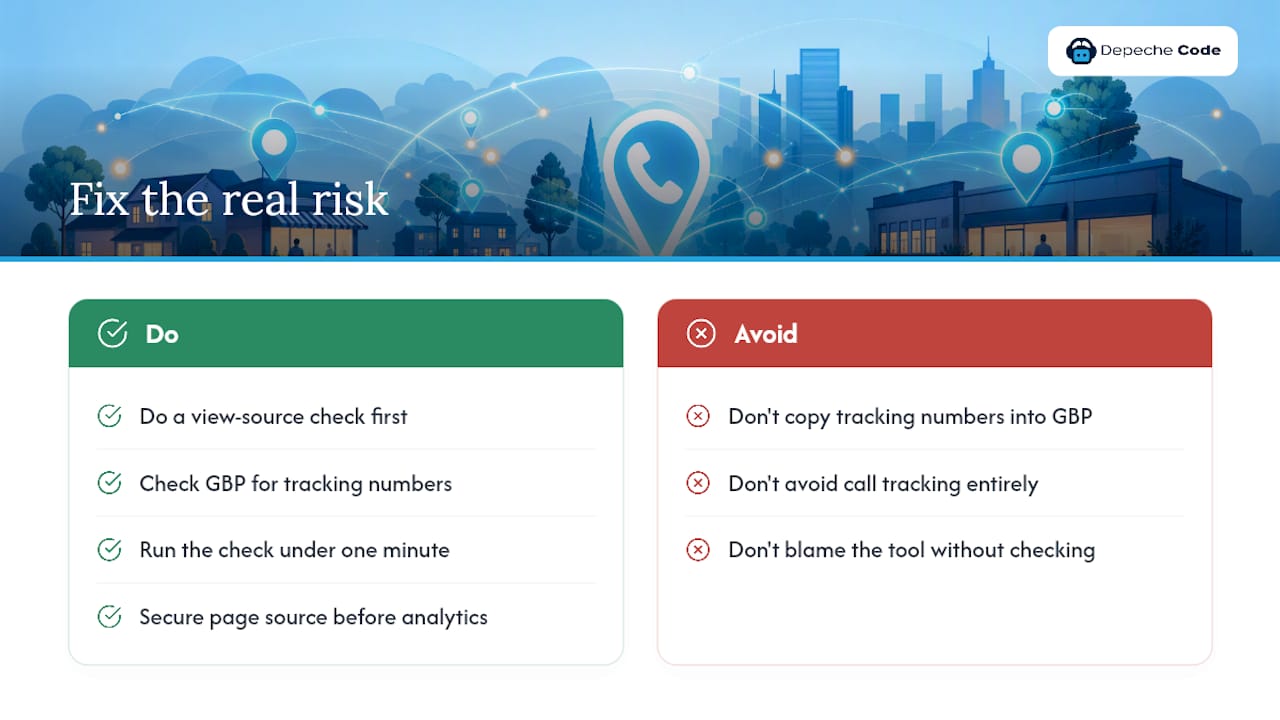
Conventional advice tends to bury this distinction under vague warnings about “call tracking risks” without naming the actual failure point. That vagueness is what leads businesses to either avoid call tracking entirely, losing valuable attribution data, or implement it carelessly and blame the tool when local rankings slip.
If you take one thing from this guide, prioritize the view-source check over every other recommendation here. It costs nothing, takes under a minute, and catches the single failure mode responsible for nearly every documented case of call tracking hurting local SEO. Everything else, the KPI dashboards, the revenue estimates, the transcript mining, only matters once that foundation is solid.
— Donovan
How Depechecode Handles Call Tracking Setup and SEO Protection
Depechecode is the alternative to trial-and-error DNI setup for businesses that can’t afford a NAP mistake costing them local rankings. We handle the deployment work directly: installing Dynamic Number Insertion, auditing your LocalBusiness schema and citation listings for consistency, wiring call events into GA4 and your CRM, and building attribution dashboards that show exactly which pages and keywords generate qualified calls.

Professional services firms, franchises, and multi-location businesses see the most value here, since they carry the highest risk from citation drift and the most complexity in connecting call data across locations and ad accounts. If you run a single-location site with simple tracking needs, our Local SEO Prime plan covers setup and monitoring without the overhead. For businesses managing several locations or a mix of organic and paid channels, our combined organic and local SEO service folds call attribution into a broader reporting structure.
Request an audit through our SEO options and plans page, and we’ll review your current setup for NAP risk before recommending anything.
Sources
For deeper measurement guidance, Baby Love Growth’s guide to tracking SEO performance covers KPI frameworks that pair well with call data. For technical integration questions between call platforms and analytics tools, the Rivetline AI blog covers connecting these systems in practice.
- Is Call Tracking Bad for SEO? Myths vs. Reality | CallScaler
- What is call tracking? A complete guide for marketers in 2026 | CallRail
- Best call tracking software (industry roundup) | Nimbata blog
- Inbound call tracking category | G2
FAQ
What Is the Best Call Tracking Software?
There’s no single best option. It depends on whether you need DNI capability, GA4 and CRM integrations, or AI transcription, and feature sets vary widely across providers, so match the platform to your specific channels and reporting needs. Checking verified user reviews before committing helps confirm real-world support quality and integration reliability.
Is SEO Dead Now With AI?
No. AI-driven search summaries have changed how results get presented, but organic ranking still drives the traffic and phone leads this guide describes, and call tracking is precisely how you prove that ongoing value to stakeholders.
What Is the 80/20 Rule in SEO?
Applied to call tracking, it means a small share of your pages, often the ones with strong intent signals or local relevance, generate most of your qualified calls. Identifying those pages through call-by-landing-page data lets you focus optimization effort where it pays off fastest.
How Much Does Call Tracking Cost?
Pricing models vary by provider, typically combining a subscription base fee with usage charges per tracked number or per answered call, and enterprise features like AI call scoring add to the cost. Get a specific quote based on your call volume and integration needs rather than assuming a flat rate applies.
Can Call Tracking Hurt My Local Rankings?
It can, but only through implementation mistakes, specifically letting a tracking number replace your real number in Google Business Profile, citations, or hard-coded HTML. Using Dynamic Number Insertion correctly and verifying your real number stays in your site’s source code and schema prevents this entirely.