

Getting CCPA website compliance right in 2026 comes down to five moves: post a conspicuous “Do Not Sell or Share My Personal Information” link, publish a privacy policy with all required disclosures, stand up a working DSAR intake method, and honor opt-out signals including Global Privacy Control with visible confirmation. Layer on the CPPA’s 2026 rule changes on dark patterns and opt-out proof, and you have a compliance program instead of a policy page nobody reads.
TL;DR:
- Posting a visible “Do Not Sell or Share My Personal Information” link on every page is essential for instant regulator and consumer verification.
- Privacy policies must detail data categories, collection sources, third-party disclosures, retention periods, and update dates to meet regulatory scrutiny.
- Building a functioning DSAR process requires multiple request channels, immediate acknowledgment, 45-day responses, and meticulous logging for compliance proof.
- Cookie banners must offer equal visual weight for acceptance and rejection options, avoid pre-checked boxes, and detect GPC signals to prevent dark patterns.
- Maintaining compliance demands quarterly vendor and tag scans, regular policy updates, staff training, and detailed recordkeeping for at least two years.
Table of Contents
- What Does CCPA Website Compliance Actually Require?
- What Are the Exact Notice Requirements for CCPA?
- What Must Your Privacy Policy Actually Say?
- How Do You Actually Process Opt-Out and DSAR Requests?
- How Should Cookie Banners Handle GPC and Avoid Dark Patterns?
- How Do You Map and Disclose Third-Party Vendors?
- What New Audit and Reporting Rules Take Effect in 2026?
- What’s a Realistic Rollout and Test Plan?
- Are Employees Covered Under CCPA Too?
- How Do You Build a Data Inventory Scoped to CCPA?
- What Training Do Employees Need for Ongoing Compliance?
- How Long Do You Need to Keep Compliance Records?
- What Are the Penalties for CCPA Violations?
- A Working Perspective on Where Sites Actually Fail
- How Depechecode Handles CCPA Compliance Fixes
- Sources
- FAQ
What Does CCPA Website Compliance Actually Require?
Most sites treat CCPA compliance as a document problem: post a privacy policy, add a cookie banner, done. That approach covers only part of the requirements. The California Privacy Protection Agency (CPPA) and the California Department of Justice, through the Attorney General’s office, now expect operational proof that your site behaves the way your policy claims it does.
Here’s a prioritized path through it, roughly in the order enforcement risk demands.
- Post the Do Not Sell/Share link. If your business sells or shares personal information, California Civil Code §1798.135 requires a conspicuous homepage link, or a single combined link that covers both opt-out of sale/sharing and limiting sensitive PI use.
- Rewrite your privacy policy. It needs categories of personal information collected, why you collected it, who you disclosed it to, retention periods, and a “last updated” date, per CPPA general notice guidance.
- Add a Notice at Collection. This is a separate, shorter notice that appears at or before the point where you gather data, not buried in the full policy.
- Build a real DSAR intake method. A working web form or dedicated email, not a dead mailbox nobody checks.
- Detect and honor Global Privacy Control (GPC). Your site needs to read the browser signal and stop selling or sharing data automatically, then show the visitor it worked.
- Configure your cookie banner to avoid dark patterns. Equal visual weight for “accept” and “reject,” no pre-checked boxes, no maze of extra clicks to opt out.
- Inventory your vendors and third-party scripts. You cannot disclose what you have not mapped.
- Set up logging and an audit trail. Timestamped records of consent and opt-out requests are now the expected evidence, not a nice-to-have.
- Schedule your first policy and vendor review. Quarterly is a reasonable cadence for a mid-size site.
Pro Tip: Run a free tag scanner (many are available at no cost) against your own homepage before you touch your policy. You’ll often find three or four trackers firing that nobody on your team knew existed, and no privacy policy fixes that problem for you.
The items at the top of this list carry the highest enforcement exposure because they’re the easiest for a regulator, or a plaintiff’s attorney, to check in thirty seconds. A missing Do Not Sell link is visible to anyone who loads your homepage. A misconfigured consent management platform (CMP) that still fires tracking pixels after a visitor opts out is visible to anyone who opens dev tools.
What Are the Exact Notice Requirements for CCPA?
Three separate notices do different jobs, and businesses routinely conflate them into one confusing footer link that satisfies none of the requirements cleanly.
The Do Not Sell or Share link. Section 1798.135 sets the bar: a homepage link, in text that says “Do Not Sell or Share My Personal Information,” or a combined alternative like “Your Privacy Choices” that clearly performs both the opt-out-of-sale/sharing function and the limit-sensitive-PI function. The link cannot be disguised, hidden three menus deep, or styled to blend invisibly into the footer text around it. Conspicuity is the operative legal standard, and gray-on-gray 8-point font in the far footer corner does not meet it.
- Place the link in the site footer on every page, not just the homepage.
- In a mobile app, the equivalent link belongs in app settings or the app’s “About” screen, labeled the same way.
- If you use the combined “Your Privacy Choices” language, the click-through page must let a visitor act on both functions without extra friction.
The Notice at Collection. This notice fires at or before the moment you gather personal information, not after. If a visitor fills out a contact form, the notice needs to be visible on that same page, typically as a short statement or link near the form itself, covering what categories of data you’re collecting and why. A newsletter signup box, a checkout page, and a job application form each need their own point-of-collection notice if they collect different categories of information. CPPA guidance treats this as distinct from your full privacy policy: it’s a summary, delivered at the right moment, not a link buried in a global footer.
The Notice of Right to Opt-Out/Limit. This is where you spell out, in plain language, that consumers have the right to opt out of the sale or sharing of their information and to limit use of sensitive personal information. It usually lives inside the privacy policy itself, but the CPPA’s guidance expects it to be easy to find within that document, not scattered across three sections.
Where the privacy link itself belongs: homepage footer, every page footer ideally, and inside mobile app settings, always using the word “privacy” in the link text. The CPPA’s 2026 regulations also incorporate WCAG 2.1 as the accessibility benchmark for these notices, meaning a notice that’s technically posted but unreadable by screen readers still fails the “reasonably accessible” test. Depechecode’s ADA website compliance playbook covers the WCAG fixes that overlap heavily with this requirement.
What Must Your Privacy Policy Actually Say?
A privacy policy that just says “we respect your privacy and may collect information to improve your experience” is functionally useless under CCPA. Regulators want specifics, organized in a way a consumer can actually parse.
Structure it around these disclosures:
- Categories of personal information collected in the last 12 months, using the CPRA’s enumerated categories (identifiers, commercial information, internet activity, geolocation, and so on) rather than vague language like “various data.”
- Categories of sources you collected that information from, whether directly from the consumer, from cookies, or from a third-party data broker.
- Business or commercial purpose for each category, stated specifically enough that a consumer understands why you have their email address or browsing history.
- Categories of third parties you disclosed personal information to, and a clear statement of whether that counts as a “sale,” a “share,” or a disclosure to a service provider for a business purpose. This distinction matters legally: a service provider processing data on your behalf under a contract is not the same as selling data to an ad network.
- Consumer rights, spelled out plainly: the right to know, delete, correct, opt out of sale/sharing, and limit use of sensitive personal information, plus the right to non-discrimination for exercising any of them.
- Identity verification process you’ll use before fulfilling a request, and what happens if you can’t verify someone.
- Retention periods for each category of data, or at minimum the criteria you use to determine how long you keep it.
- Sensitive personal information uses, since CPRA carved this category out separately from general PI, covering things like precise geolocation, health data, or government ID numbers.
- A “last updated” date at the top or bottom of the document, updated every time you make a material change.
The CPPA’s final regulations specifically clarify that you also need to disclose categories of personal information shared with service providers or contractors for a business purpose in the past 12 months, a detail plenty of boilerplate policies skip entirely. If your current policy reads like it was copied from a template in 2020, it almost certainly omits this.
How Do You Actually Process Opt-Out and DSAR Requests?
Publishing a privacy policy that promises consumer rights and having a working system to fulfill those rights are two different projects, and the second one is where most sites quietly fail.
- Offer at least two designated request methods. A web form and an email address is the common combination; some businesses add a toll-free number or dedicated portal. Each method should ask for only the minimum information needed to identify the requester, typically name and email, not a full identity dossier upfront.
- Acknowledge the request immediately. An automated confirmation with a unique ticket ID gives both you and the consumer a paper trail.
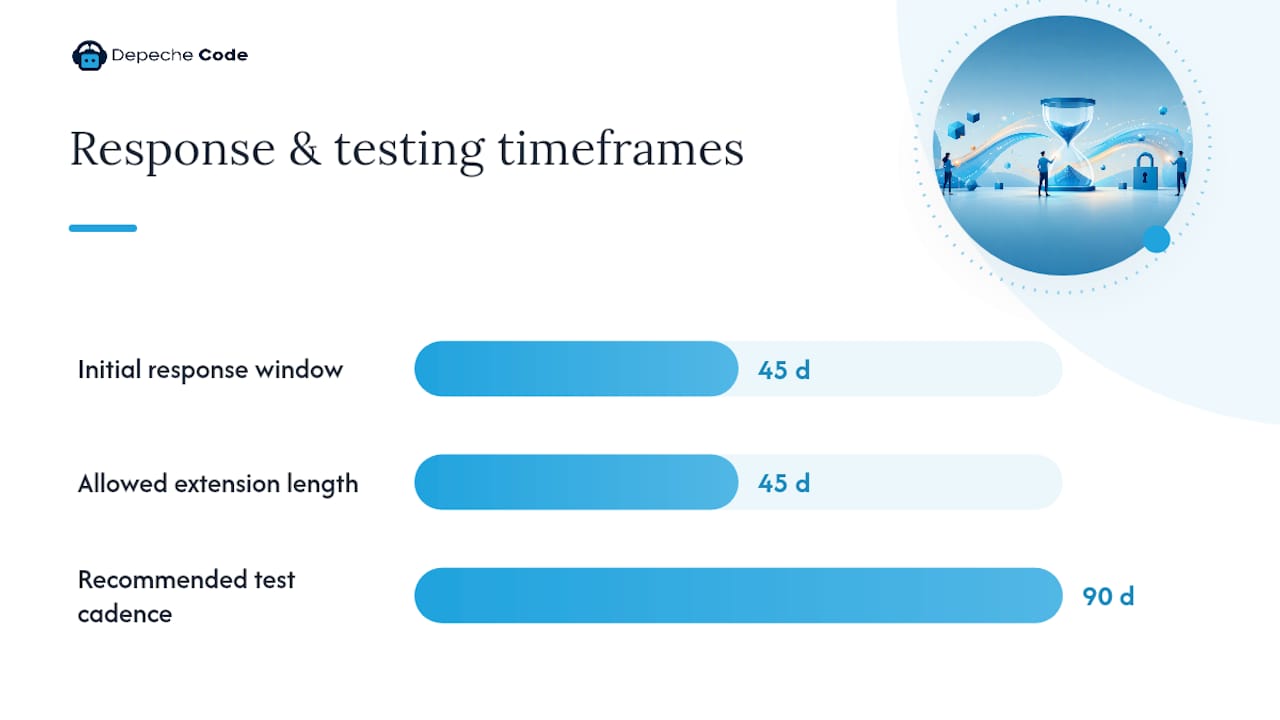
- Respond within 45 days. That’s the statutory clock. You can extend once by another 45 days if reasonably necessary, but you must notify the consumer of the extension and the reason within the original 45-day window.
- Verify identity proportionally. A request to delete sensitive account data warrants stronger verification than a simple opt-out click, which requires no verification at all under the law.
- Log everything. Regulators increasingly expect operational evidence: timestamps, ticket IDs, and a record showing the request moved from intake to resolution.
- Confirm the outcome visibly. A simple page or banner stating “Opt-Out Request Honored” tied to a logged, server-side record satisfies both the consumer’s expectation and an auditor’s checklist.
A practical acceptance test looks like this: submit a request through your own public form, confirm you receive an automated acknowledgment with a ticket ID, check that the same ticket ID appears in your backend log with a timestamp, then confirm the whole loop closes inside 45 days. If any of those four steps breaks, your DSAR process is not compliant yet, no matter what your policy claims.
For minors, the rules tighten. Businesses must have actual knowledge or willful disregard standards applied carefully, and opt-in consent (not opt-out) is required for selling or sharing personal information of consumers under 16, with parental consent needed for those under 13.
Pro Tip: Test your DSAR form from a personal email address every quarter, the same way you’d test a smoke detector. Forms silently break after a plugin update far more often than teams expect, and you won’t know until a real consumer complaint arrives.
How Should Cookie Banners Handle GPC and Avoid Dark Patterns?
The CPPA’s 2026 regulations put real teeth into what counts as a manipulative consent interface, and a lot of off-the-shelf cookie banners violate these rules by default.
Dark-pattern prohibitions require:
- Equal visual weight for “accept” and “reject” or “opt out” buttons; no giant green accept button next to a gray, barely visible decline link.
- Symmetrical steps. If accepting takes one click, opting out cannot take four clicks through nested menus.
- No pre-checked consent boxes. Every toggle defaults to off unless the consumer actively turns it on.
- No deceptive or confusing language, including double negatives like “uncheck this box if you don’t want to not receive offers.”
Handling Global Privacy Control adds a technical layer on top of the visual one. Your CMP needs to detect the GPC signal in the browser header, automatically apply an opt-out for that visitor, and, per the near-term guidance from privacy counsel, provide the consumer some confirmation that the signal was received and honored, rather than a silent, unverifiable process.
Run this technical checklist before you consider your banner finished:
- Block third-party tracking tags from firing until consent is given or GPC is checked.
- Test the actual firing order of your tags. A banner can display correctly while tags still fire in the background regardless of the visitor’s choice, which is one of the most common gaps in real-world CCPA implementations.
- Keep a consent log tied to timestamps and, where possible, session or user identifiers.
- Retest after every CMS or plugin update, since a routine update frequently resets banner configuration to factory defaults.
If you’re still working through cookie consent mechanics, Depechecode’s guide on enforcing GPC before pixels fire walks through the technical sequencing in more depth.
How Do You Map and Disclose Third-Party Vendors?
You cannot accurately disclose “categories of third parties” in your privacy policy if nobody on your team has actually listed who those third parties are. This is the step most small businesses skip, and it’s the one that undermines every other disclosure in the policy.
Start with a vendor inventory that maps three things for every tool touching customer data: the category of personal information it processes, the purpose of that processing, and any downstream recipients the vendor itself shares data with. Your analytics platform, your email marketing tool, your payment processor, your live chat widget, and your ad retargeting pixel all belong on this list, even the ones a marketing contractor installed two years ago and forgot to document.
Once mapped, classify each vendor relationship. A payment processor handling transactions under contract is typically a service provider, not a sale. An ad network receiving browsing data to build audience profiles is usually a sale or share, triggering the opt-out obligations discussed earlier. This distinction determines what you write in the privacy policy’s third-party disclosure section.
Practical controls to put in place:
- Require a data processing agreement (DPA) with every vendor that touches personal information, specifying they can’t use the data beyond the stated business purpose.
- Block vendor tags from firing until consent or GPC status is confirmed, using your CMP’s tag-blocking feature rather than trusting the vendor to respect opt-outs on their end.
- Collect annual attestations from vendors confirming they haven’t started using data for new purposes without notifying you.
- Update the privacy policy’s third-party disclosure section whenever you add or remove a vendor, not just during an annual review.
What New Audit and Reporting Rules Take Effect in 2026?
The CPPA’s 2026 rules introduce obligations that go well beyond posting notices, and they apply specifically to businesses whose processing crosses certain risk thresholds.
- Risk assessments become mandatory for processing activities the CPPA considers “significant risk,” including selling or sharing personal information, processing sensitive personal information at scale, and using automated decision-making technology for significant decisions. Businesses meeting these thresholds must complete an assessment and, per current regulatory guidance, submit an annual summary to the CPPA.
- Cybersecurity audits apply to businesses whose processing presents significant risk to consumer security, requiring an independent, qualified auditor to produce evidence-based findings rather than a self-assessment checkbox.
- Opt-out confirmation is now an expected practice rather than optional politeness, meaning the “Opt-Out Request Honored” UI pattern discussed earlier is quickly becoming close to a baseline requirement for businesses that sell or share data at any real volume.
A practical maintenance cadence for a mid-size site:
- Run a vendor and tag scan quarterly, since new marketing tools and tracking pixels get added between reviews more often than teams realize.
- Update your privacy policy and Notice at Collection at least annually, or immediately after any material change in data practices.
- Test your DSAR process end-to-end twice a year using the acceptance test described earlier.
- Have an executive or compliance owner formally sign off on the risk assessment and audit findings, creating an internal record that shows leadership reviewed and accepted the results.
What’s a Realistic Rollout and Test Plan?
Treat this as a three-phase project rather than a weekend fire drill, because rushing the vendor inventory step tends to create gaps you’ll pay for later.
Pre-implementation. Run a full tag scan of your site to see what’s actually firing before you touch anything. Build the vendor inventory in parallel. Draft your Notice at Collection language and privacy policy updates so they’re ready to publish once the technical pieces are live.
- Add the required links. Do Not Sell/Share link in the footer, privacy link in the footer and mobile app settings, Notice at Collection on every data-collection page.
- Configure your CMP. Set default toggles to off, enable GPC detection, and confirm tag-blocking actually works, not just the visual banner.
- Build the DSAR intake and logging system. Form or email, automated acknowledgment, ticket ID, and a backend log tied to that same ID.
- Publish the updated privacy policy with all required disclosures and a fresh “last updated” date.
Acceptance testing closes the loop. Walk through the opt-out flow yourself, submit a test DSAR and confirm the 45-day clock and logging work, verify the GPC signal is honored with visible confirmation, and check every privacy-related link for accessibility and dead-link errors.
Pro Tip: Assign one person to own this test plan on a recurring calendar reminder. Compliance gaps almost always creep back in after a site redesign or a new marketing tool gets bolted on without anyone rechecking the privacy stack.
Are Employees Covered Under CCPA Too?
Yes. Since 2023, California employees, job applicants, and independent contractors are covered by the same core rights as consumers, including notice and access rights, though certain HR-specific carve-outs still apply. That means your obligations don’t stop at your customer-facing website.
Employers need an internal Notice at Collection for job applicants and employees, delivered at or before you collect information like Social Security numbers, background check results, or performance data. This is separate from your public-facing privacy policy and usually lives in an HR handbook, an offer letter packet, or an internal HR portal rather than the main website footer.
Employee data handling also needs the same categorization discipline as consumer data: what categories you collect (identifiers, employment history, biometric data if you use time clocks with fingerprint scanning), why you collect them, and who you share them with, such as payroll processors or benefits administrators. HR and payroll vendors need the same service-provider contract language discussed in the vendor section above.
Practically, this means your DSAR process needs to accommodate an employee request too, even though the verification process may look different since you already have an internal identity record for that person. Small businesses often assume CCPA is purely a customer-website issue and skip this entirely, which is one of the more common gaps a compliance review turns up.
How Do You Build a Data Inventory Scoped to CCPA?
A vendor inventory tells you who touches your data. A data inventory tells you what data you actually have, and that distinction matters because CCPA obligations attach to specific categories of personal information, not to your business generally.
Start by walking through every point where your website or business collects information: contact forms, checkout flows, account registration, live chat, newsletter signups, job applications, and any offline collection that eventually lands in a digital system like a CRM. For each collection point, record the category of personal information gathered, using the CPRA’s enumerated categories rather than internal shorthand your team invented.
Map where that data flows next. Does it sit in your CRM only, or does it get exported to an email platform, a data warehouse, or an analytics dashboard? Each hop is a potential disclosure that needs to show up in your privacy policy’s third-party section, and each hop is also a place where retention needs a clear answer. “We keep it forever” is not a retention policy; it’s a liability.
This inventory becomes the backbone of your privacy policy’s accuracy. Every category listed in the policy should trace back to an actual line item in your data inventory, not to a generic template phrase. It also feeds directly into your risk assessment work, since the CPPA’s significant-risk thresholds are defined in terms of these same data categories and volumes.
What Training Do Employees Need for Ongoing Compliance?
A privacy policy is only as reliable as the people operating around it, and untrained staff are where most accidental violations originate, not malicious intent.
Customer service and marketing teams need to recognize a CCPA request when one arrives, even if it doesn’t use the exact statutory language. A customer emailing “please delete my information” or “stop selling my data” to a general support inbox is making a legally protected request, whether or not they used your official DSAR form. Staff need a clear internal process for routing that message to whoever owns compliance, with a timestamp, so the 45-day clock doesn’t quietly start running unnoticed.
IT and marketing teams responsible for adding new tools to the website need a lightweight approval step before installing a new tracking pixel or third-party widget, since that’s exactly how vendor inventories go stale. A single unapproved marketing tool added without review can undo months of careful disclosure work.
Training doesn’t need to be a formal annual seminar with a certificate. A short onboarding walkthrough for new hires, plus an annual refresher covering what changed in your policy or in the regulations, covers most businesses’ practical needs. Document that the training happened and who attended, since that record becomes useful evidence if your compliance posture is ever questioned during an audit or investigation.
How Long Do You Need to Keep Compliance Records?
Recordkeeping is where a lot of businesses assume they’re fine because they have the request logs, only to discover they never wrote down a retention duration or format standard, which becomes its own gap during a review.
Keep DSAR request records, including the request itself, verification steps taken, and the response provided, for a minimum of 24 months, which aligns with the general period regulators expect businesses to be able to demonstrate compliance history. Store these in a format that’s searchable and exportable, not scattered across individual employees’ email inboxes where they’ll vanish the moment someone leaves the company.
Consent logs from your CMP need similar treatment: timestamped records showing when a visitor consented, opted out, or triggered a GPC signal, retained long enough to reconstruct your compliance posture at any point an investigator might ask about. Risk assessments and cybersecurity audit reports should be retained in their complete form, including the underlying evidence the auditor reviewed, not just a summary conclusion.
A simple, durable approach: a dedicated compliance folder in whatever document management system you already use, organized by year, with subfolders for DSAR logs, consent records, vendor attestations, and policy version history. Every time you update your privacy policy, archive the prior version with its effective dates rather than overwriting it, since you may need to show what the policy said at the time of a specific consumer interaction.
What Are the Penalties for CCPA Violations?
Enforcement risk is what turns this from a documentation exercise into a genuine business priority, and the numbers involved are large enough to justify the implementation work.
The California Attorney General and the CPPA can both bring enforcement actions. Businesses generally get a cure period to fix a violation once notified, though the CPPA’s more recent rulemaking has narrowed reliance on automatic cure opportunities for repeat or ongoing violations. Civil penalties can reach into the thousands of dollars per violation, and per the California Department of Justice’s own guidance, intentional violations carry higher penalty exposure than unintentional ones, which is exactly why documented good-faith efforts, like your training records and audit logs, matter during an investigation.
Beyond formal enforcement, CCPA includes a limited private right of action specifically for certain data breaches involving nonencrypted, nonredacted personal information, letting affected consumers sue directly rather than waiting on regulator action. That exposure sits on top of the reputational cost of a public enforcement action or breach disclosure, which tends to outlast the fine itself in terms of business impact.
The practical incentive isn’t just avoiding a penalty. Businesses that can produce clean logs, a current vendor inventory, and documented training records when a regulator asks tend to resolve inquiries faster and with less scrutiny than those scrambling to reconstruct their compliance posture after the fact.
A Working Perspective on Where Sites Actually Fail
Most CCPA guidance online focuses on the privacy policy, because it’s the easiest artifact to write about and the easiest one for a lawyer to draft. That’s backwards. In practice, the policy is rarely where sites get caught. The gap is almost always in the plumbing behind it: a cookie banner that looks compliant but still lets a retargeting pixel fire before consent, a DSAR form that silently breaks after a WordPress update, or a GPC signal that arrives at the server and gets ignored because nobody wired up the detection logic.
The 2026 rule changes accelerate this shift toward operational proof, and that’s the right direction, even if it means more work upfront. A privacy policy is a promise. A logged, timestamped opt-out confirmation is evidence that the promise was kept. Regulators increasingly want the evidence, not just the promise, and that distinction is going to separate businesses that sail through a review from businesses that spend months reconstructing what actually happened on their site eighteen months ago.
The other underestimated piece is scope creep on the vendor side. A business installs a new marketing tool, a chat widget, a heatmap tracker, without anyone connecting that decision back to the privacy team. Six months later, the privacy policy is technically accurate for the vendors it lists and technically wrong because of the three vendors nobody documented. Fixing that requires a process, not a one-time cleanup, which is exactly why the quarterly vendor scan matters more than the initial audit.
None of this is a reason to panic. It’s a reason to build the checklist once, test it properly, and put a recurring calendar reminder on reviewing it, the same way you’d treat any other operational risk that doesn’t announce itself until it’s a problem.
— Donovan Wells – Founder and CEO
How Depechecode Handles CCPA Compliance Fixes
Reading a checklist and implementing it correctly on a live site are different problems, especially when your CMS, your CMP, and three marketing plugins all need to work together without breaking each other. A recommended approach to these fixes is to audit first, then implement, then keep monitoring, rather than a one-time policy update that goes stale when changes occur.

A typical engagement starts with a technical audit covering tag scanning, vendor inventory, and a review of your current notices against the requirements above. From there, Depechecode’s website design and development services handle the build-out: the Do Not Sell/Share link, the Notice at Collection, a working DSAR form with proper logging, and CMP configuration that actually blocks trackers instead of just displaying a banner. Ongoing WordPress hosting and maintenance keeps that configuration from silently breaking after a plugin update, which is one of the most common ways compliance quietly lapses.
If your site needs this handled rather than DIY’d, start with a full services overview at Depechecode and request an audit of your current setup.
Sources
For the legal text itself, and not a summary of it, these are worth bookmarking:
- CCPA – Effective January 1, 2026
- California Civil Code §1798.135
- What General Notices Are Required By The CCPA?
- GT Alert: Revised and new CCPA regulations set to take effect on Jan. 1, 2026 — summary of near-term action items
- California Consumer Privacy Act (CCPA) — California Department of Justice
None of this replaces advice from a qualified privacy attorney for your specific business situation, particularly if you process sensitive personal information at scale or operate across multiple states.
FAQ
Does My Website Need to Be CCPA Compliant?
If your business meets the CCPA’s applicability thresholds (generally based on revenue, data volume, or a significant share of revenue from selling personal information) and you collect personal information from California residents through your website, yes, it needs to comply. The California Department of Justice’s CCPA guidance outlines the specific thresholds businesses need to check against their own revenue and data practices.
Is CCPA Applicable to Businesses Outside California?
Yes. CCPA applies based on whether you collect personal information from California residents, not where your business is headquartered. A business based in Texas or Florida with website visitors or customers in California still needs to meet the same notice, opt-out, and DSAR requirements described above.
Is GDPR Required for US-Based Websites?
No. The GDPR is a European Union regulation and does not apply to a US-based website unless that business actively targets or serves consumers in the EU. US businesses need to comply with CCPA, and any other applicable state privacy laws, rather than GDPR, unless they have a genuine EU-facing presence.
Do I Need a Privacy Policy on My Website in the USA?
Yes, if you collect personal information from California residents or fall under other state privacy laws, a privacy policy with specific disclosures is legally required, not optional. Beyond legal requirements, a clear privacy policy also builds visitor trust, and CPPA guidance specifies exactly what that policy needs to contain.
What Does an “Opt-Out Request Honored” Confirmation Need to Show?
It needs to be a consumer-facing confirmation, a banner, toggle state, or dedicated page, tied to a logged, server-side record showing the opt-out was actually processed. This pattern, recommended in recent legal guidance on the 2026 rule changes, gives both the consumer and a regulator visible proof the request worked.