

A domain change does not have to damage your search visibility if you execute 301 redirects correctly, verify your properties and use the Change of Address tool, and prioritize reclaiming your backlinks. Skip these steps and you risk losing referral traffic and rankings for months. The first move: inventory your highest-value URLs and build a redirect map before you touch anything live.
TL;DR:
- Before launch, preserve the existing URL structure, inventory indexed pages, and test an individual redirect map on a staging sample.
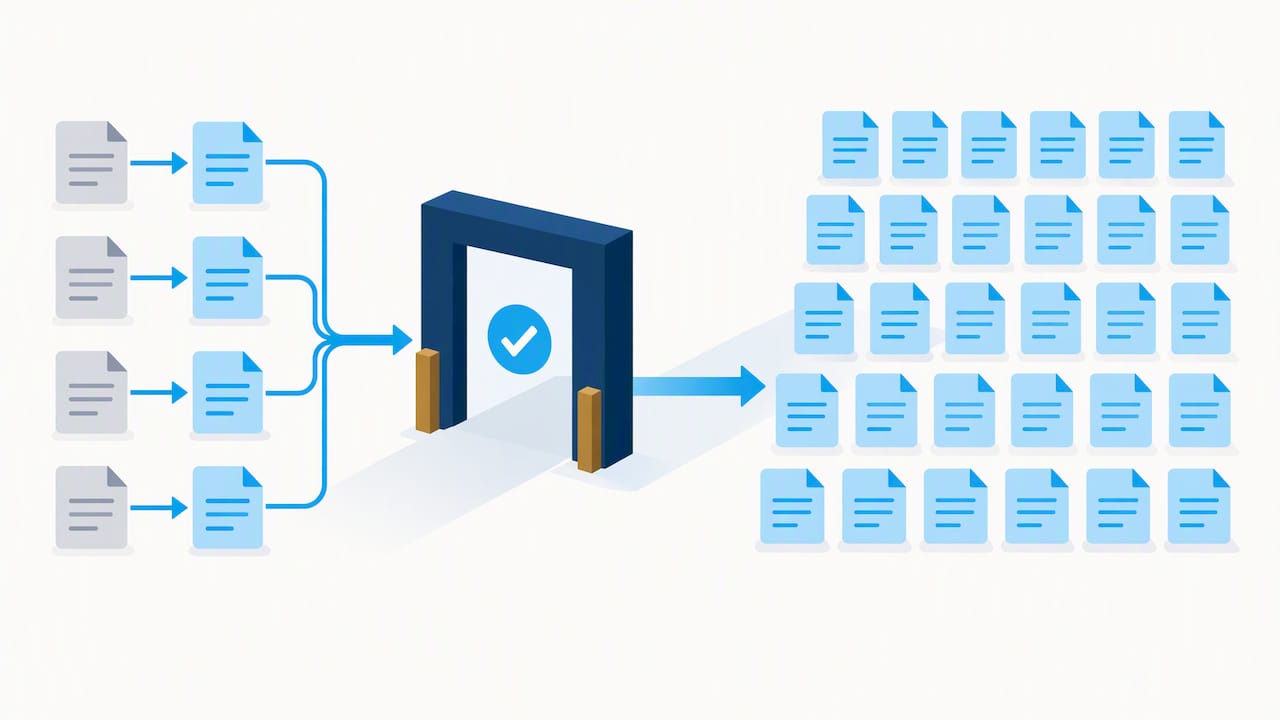
- Use server side 301 or 308 redirects that point directly to equivalent new URLs; avoid chains, client side redirects, and blanket homepage redirects.
- Verify both Search Console properties, then use Change of Address only after tested redirects go live; the tool forwards signals for roughly 180 days.
- Ask the highest traffic and authority referring sites to update links directly, while leaving redirects to handle low priority links you cannot reclaim.
- Expect fluctuations for weeks, but investigate continued ranking losses after eight to twelve weeks; check clicks, impressions, indexing, and server logs weekly.
Table of Contents
- What SEO risks come with a domain move, and how long does recovery take?
- How do you execute a domain migration without losing SEO equity?
- What is the right way to handle redirects technically?
- How do you reclaim backlinks after changing domains?
- How should you monitor a migration, and what counts as success?
- What are the most common migration mistakes, and how do you fix them?
- When does a domain change make sense, and how do we reduce the risk?
- How we help businesses move domains without losing ground
- FAQ
- Sources
What SEO risks come with a domain move, and how long does recovery take?
Every domain change triggers some disruption. Search engines need time to recrawl, reindex, and reassign trust signals to the new URLs, so a temporary dip in clicks and impressions is normal, even when you do everything right. The real danger is permanent loss, and that almost always traces back to the same causes: broken or missing redirects, backlinks that never get updated, or a rushed migration with no testing phase.
Google has acknowledged that old URLs may keep showing up in results for a while after a move. That is expected behavior, not a sign of failure, and it tends to fade as Google’s own documentation on redirects explains, since the search engine and your audience both need time to learn the new domain.
What separates a bumpy but recoverable migration from a disaster is usually one of these:
- Normal dip: rankings fluctuate for a few weeks, then stabilize as crawlers reindex the new domain.
- Migration failure: rankings keep sliding past the eight to twelve week mark with no sign of recovery.
- Backlink erosion: referring domains link to dead or redirected URLs that never get updated at the source.
- Crawl bottleneck: a slow or under provisioned server delays indexing of the new site’s pages.
- Architecture mismatch: URL structures, slugs, or site hierarchy changed at the same time as the domain, multiplying the variables search engines have to resolve.
Recovery windows vary by site size and authority, but weeks rather than days is the realistic baseline, and larger sites with thousands of URLs or heavy backlink profiles often take longer simply because there is more to recrawl and reconcile. Crawl budget, server response time, and how cleanly your redirects were implemented all affect how fast signals transfer. If you see a steady climb back toward your old numbers within a couple of months, that is a healthy migration. If the line stays flat or keeps dropping, something in the setup needs troubleshooting.
How do you execute a domain migration without losing SEO equity?
A domain change rewards preparation more than speed. Rushing the cutover is the single most common reason migrations go sideways, so treat this as a staged project with a clear sequence rather than a weekend task.
Pre-move preparation
- Vet the new domain’s history. If it was previously registered, check for toxic backlinks or past penalties that could carry over.
- Crawl and inventory your entire site. Export every indexed URL, along with its traffic and backlink data, so nothing gets missed in the handoff.
- Back up your current site in full, including the database, before making any structural changes.
- Preserve your existing URL architecture wherever possible. Changing the domain and the site structure at the same time multiplies the risk, since Google’s guidance on site moves recommends changing only one major element at a time.
Mapping the move
- Build a one-to-one URL map from every old address to its new equivalent. Do not rely on a blanket redirect to the homepage; that discards the specific relevance each page built up.
- Prioritize the mapping by traffic and backlinks first. Pages that drive the most organic visits or carry the most referring links need to be flawless before launch; low-traffic pages can follow once the critical paths are confirmed.
Implementation
- Set up server-side 301 redirects at the host level for every mapped URL. Avoid plugin-only or client-side solutions where a server-level redirect is available.
- Update internal links across the new site to point directly to the new URLs instead of routing through redirects.
- Correct canonical tags and metadata on the new domain so they reference the new URLs, not leftover references to the old domain.
Search Console and launch
- Verify both the old and new properties in Search Console before submitting anything. The Change of Address tool requires both properties to be verified, and it forwards signals for roughly 180 days once submitted.
- Submit the Change of Address only after redirects are live and tested, never before.
Post-move
- Submit sitemaps for both the old and new properties so crawlers have a clear reference for what moved where.
- Reach out to your top referring sites and ask them to update their links directly rather than relying solely on the redirect.
- Keep the redirects in place long-term. Removing them early, even after rankings look stable, risks cutting off signal transfer that is still in progress.
For a detailed walkthrough of building the URL map itself, our 301 redirect mapping and staging checklist breaks the process down page by page, and our broader step-by-step migration guide covers the planning phase in more depth.
Pro Tip: Test your redirect map on a staging subset of URLs before launching the full migration; catching a mapping error on twenty pages is far less costly than discovering it on twenty thousand.
What is the right way to handle redirects technically?
The redirect method you choose determines how much ranking signal actually transfers. Server-side permanent redirects, specifically HTTP 301 or 308 responses, are what Google’s redirect documentation recommends for a permanent move, because they tell crawlers unambiguously that the old URL has relocated for good. Client-side redirects and meta refresh tags are slower to process and less reliable for passing signal, so use them only when a server-side redirect genuinely is not possible.
A few technical habits separate a clean migration from a messy one:
- Avoid redirect chains. A URL that bounces through two or three hops before landing on its destination wastes crawl budget and can dilute the signal passed along.
- Keep redirects direct and fast. Point old URL A straight to new URL A, not to an intermediate page that then redirects again.
- Choose wildcard redirects carefully. A wildcard rule (redirecting an entire old folder pattern to its new equivalent) saves time on large sites, but explicit one-to-one mapping gives you more control for high-value pages where you cannot risk a mismatch.
- Test before and after launch. Use URL inspection in Search Console, command-line tools like curl, or a dedicated redirect checker to confirm every redirect returns the correct status code and destination.
- Review server logs. Log analysis shows you which old URLs search engines are still trying to crawl, so you can catch gaps in your redirect map that a manual spot check might miss.
Google will crawl your new domain more heavily during the transition period, according to Google’s migration guidance, which means server capacity planning matters as much as the redirect logic itself. A slow or undersized server during this window can delay indexing regardless of how clean your redirects are. Tools like the Redirection plugin for WordPress and WebPageTest are practical for implementing redirects and checking that your server can handle the increased crawl load.
How do you reclaim backlinks after changing domains?
Redirects carry link equity, but they are not a complete substitute for the real thing. Semrush’s research on domain changes notes that backlinks pointing to your old domain will not automatically update to the new one, so outreach to get those links changed at the source is worth the effort, especially for your most valuable referring pages.
Start by pulling a full backlink list using a backlink audit tool, then sort it by referral traffic and domain authority rather than sheer volume. A handful of high-traffic, high-authority links matter more than hundreds of low-value directory listings.
- Rank your outreach targets. Put your top referrers, your highest-traffic linking pages, and editorial mentions at the top of the list.
- Send a direct, specific request first. Name the exact page and the exact old URL so the site owner can make the change in one pass.
- Follow up once after a week or two of silence, then escalate to a different contact or channel if there is still no response.
- Accept the redirect as sufficient for low-priority links. Chasing every single backlink is rarely worth the time; the redirect does the job for the long tail.
- Track responses in a simple spreadsheet. Note which sites updated their links, which ignored the request, and which still show the old URL months later.
A redirect is enough to preserve most of the value for links you cannot realistically reclaim. But for the links driving meaningful referral traffic, getting the source site to point directly at your new domain removes a dependency on the redirect staying live forever, and it tends to pass signal more cleanly than an indirect hop.
How should you monitor a migration, and what counts as success?
Once the new domain is live, monitoring is what tells you whether the migration is working or quietly failing. Check Search Console weekly at minimum during the first month, looking at organic clicks and impressions for your highest-value pages and queries. A temporary dip is expected; a flat or worsening trend past the first few weeks is a signal to investigate.
Index coverage and the URL inspection tool will tell you whether the new domain’s pages are actually getting indexed, and whether the old URLs are dropping out of the index as expected. On the analytics side, watch landing page performance, referral sources, and any shifts in bounce rate or click-through rate that might point to a broken redirect or a page that lost its ranking position.
| Metric | Where to check | What to watch for |
|---|---|---|
| Organic clicks and impressions | Search Console | Gradual recovery toward pre-move levels within weeks to months |
| Index coverage | Search Console | New URLs indexed, old URLs phasing out without errors |
| Landing page traffic | Analytics platform | Referral sources and conversion paths holding steady |
| Crawl stats | Search Console / server logs | Increased crawl activity on the new domain without server strain |
A migration that is on track shows steady improvement across these metrics over several weeks. One that stalls or regresses past that point usually has a specific, fixable cause rather than a mysterious algorithmic penalty.
What are the most common migration mistakes, and how do you fix them?
Most migration problems trace back to a handful of repeat offenders: redirects that were never set up for certain URL patterns, redirect chains left in place from an earlier site change, or a Change of Address submission filed before the redirects were actually live and tested.
- Missing redirects: crawl the new site and compare it against your original URL list to spot any old URLs with no corresponding redirect.
- Redirect chains: trace any multi-hop redirect back to its source and point it directly at the final destination.
- Premature Change of Address submission: if you submitted too early, verify the redirects are correct now and resubmit; the tool can be updated.
- Sitemap mismatches: reissue sitemaps for both properties once the redirect map is confirmed accurate.
Pro Tip: If the new domain has a critical failure, such as a broken checkout or missing redirects at scale, temporarily restoring the old domain is a legitimate stopgap while you fix the issue, rather than leaving visitors and crawlers to hit dead ends.
The first 48 to 72 hours after launch are the window for fast triage: check redirect status codes, confirm both Search Console properties are verified, and scan server logs for crawl errors before assuming anything has gone fundamentally wrong.
When does a domain change make sense, and how do we reduce the risk?
We generally recommend a domain change only when the business reason is strong enough to justify the temporary disruption: a rebrand, a merger, or moving off a domain with an unrecoverable reputation problem. For anything less, the safer move is usually fixing the existing domain’s issues rather than starting over.
When a move is the right call, our process leans on staged testing, a priority-ranked URL map built around traffic and backlinks, and an outreach sequence that starts with the highest-value referring sites before working down the list. Sequencing matters more than speed. A migration that moves the top twenty percent of pages correctly, then works through the rest methodically, holds up far better than one that tries to flip everything at once.
— Donovan Wells – Founder and CEO
How we help businesses move domains without losing ground

A domain change is one of the few SEO projects where a single missed redirect can cost months of recovered ground, and we built our process around catching those gaps before they go live. Our website migration services cover the full sequence: redirect mapping, staging environments to test the move before launch, SEO preservation planning, and hosting that holds up under the heavier crawl activity a new domain attracts.
What this looks like in practice:
- Redirect mapping built from your actual traffic and backlink data, not a generic one-size template.
- Staging tests before anything goes live, so issues surface on a subset of pages instead of the whole site.
- Ongoing hosting and maintenance through our WordPress hosting and maintenance plans, starting from $39 a month, to keep the new domain fast while it absorbs extra crawl traffic.
- SEO monitoring and recovery support once the move is live, so dips get caught early instead of discovered weeks later.
If a domain change is on your roadmap, the smart first step is a migration audit rather than a guess. Reach out through our services page to request a migration plan built around your specific URL list and backlink profile.
FAQ
Does changing a website affect SEO?
Yes, changing a website, including a domain move, typically causes a temporary fluctuation in rankings and traffic while search engines reprocess the new URLs. The impact becomes permanent only when redirects are missing or broken, or when backlinks never get updated, so careful execution limits the disruption significantly.
How does a domain redirect affect SEO?
A proper server-side 301 redirect signals to search engines that a page has permanently moved, which helps transfer most of its ranking signal to the new URL, according to Google’s redirect documentation. A broken or chained redirect does the opposite, wasting crawl budget and weakening the signal passed to the destination page.
What is the 80/20 rule in SEO?
In a migration context, the principle means focusing your effort on the pages that drive most of your traffic and backlinks before worrying about the long tail of low-value pages. Prioritizing the redirect map this way gets the highest-impact URLs right first, when precision matters most.
Does domain impact SEO?
A domain itself does not carry inherent ranking power beyond the signals and history attached to it, such as backlinks, trust, and indexed content. Changing domains disrupts those accumulated signals temporarily, which is why a redirect map and the Change of Address tool exist to help transfer them to the new address.
How long should you keep redirects active after a domain change?
Redirects should stay active for at least 180 days, and preferably up to a year, based on Google’s site move guidance, since search engines and users both need time to fully shift to the new domain. Removing them too early can cut off signal transfer that is still in progress.
Sources
- Change of Address tool – Search Console Help
- Redirects and Google Search | Google Search Central
- Changing domain name SEO: Tips to keep your rankings — Semrush