

The fastest way to improve both lead volume and lead quality is to ask only what you need, then layer progressive and conditional fields for qualification. Placement, copy, and trust signals matter, but none of it counts unless the form is wired to clean measurement. Treat design, verification, and tracking as one project, not three separate tasks.
TL;DR:
- Limiting form fields to essentials and using progressive profiling significantly increases submission rates and lead quality.
- Placing forms above the fold for high-intent visitors and repeating them on long pages improves visibility and conversion chances.
- Implementing conditional logic and prefilled fields shortens perceived form length and enhances user experience for returning visitors.
- Fast, automated lead routing through webhooks or CRM APIs ensures timely follow-up, boosting conversion likelihood and lead value.
- Tracking qualified lead rates and setting clear conversion goals in analytics platforms helps measure actual impact rather than just form submissions.
Table of Contents
- 1. Quick checklist: the 10 essential lead form best practices
- 2. Where you place the form changes who fills it out
- 3. Field selection and form length: practical heuristics and progressive profiling
- 4. Personalization and conditional logic: tailoring questions to the visitor
- 5. CTA and button design: microcopy, color, and test priorities
- 6. Trust, privacy, and verification: required disclosures and quality controls
- 7. Mobile-first and accessibility: device-specific optimizations
- 8. Measurement and tracking: conversion goals, enhanced conversions, and data freshness
- 9. Integrations and lead routing: speed and enrichment best practices
- 10. A/B testing and optimization: a practical methodology for form experiments
- 11. Post-submission experience and abandoned-form recovery
- 12. Depeche Code checklist and quick wins for immediate lift
- 13. Why the smallest change usually wins first
- How Depeche Code helps you turn form traffic into pipeline
- Sources
- FAQ
1. Quick checklist: the 10 essential lead form best practices
Before touching color palettes or copy tweaks, run through this order of operations. Each item points to a section later in the article where you can go deeper.
- Cut the form to essentials first. Start with name and email only, then add fields as the offer justifies them.
- Place a form above the fold and repeat it through long content.
- Use progressive profiling for returning visitors instead of asking everything up front.
- Add conditional logic so follow-up questions appear only when relevant.
- Write offer-specific CTA copy instead of a generic “Submit” button.
- Link your privacy policy directly on or near the form.
- Verify leads server-side with reCAPTCHA or double opt-in for high-value lists.
- Design for mobile first, including input types and single-column layout.
- Set a primary conversion goal in GA4 and keep offline data fresh.
- Route leads through a webhook or CRM API with a defined response SLA.
If you can only test one thing this quarter, test field count against your current form. Removing two or three non-essential fields tends to move submission rate faster than any copy or color change, and it sets up everything else on this list.
2. Where you place the form changes who fills it out
A form’s position on the page decides whether it gets seen at all. For most landing pages, an above-the-fold inline form works best for high-intent traffic that already knows what it wants. Modals and floating bars fit better on content-heavy pages where the reader needs to get value before you ask for anything.
- Use an inline form above the fold when the page is short and the visitor arrived with clear intent, such as from a paid search ad.
- Repeat the form roughly every 350 words on long-form pages like guides or pillar content, so scrolling readers always have a nearby chance to convert.
- Reserve modals and slide-ins for exit-intent or scroll-depth triggers rather than showing them immediately on page load.
- Defer popup scripts until after the main content renders to protect page speed, and confirm keyboard focus moves into the modal when it opens.
HubSpot’s guidance on lead capture points to placement above the fold as a consistent factor in stronger performing forms, which makes it a reasonable default rather than a rule to break without a reason.
3. Field selection and form length: practical heuristics and progressive profiling
Field count should track the size of the ask, not a company-wide template. A newsletter signup and a request for an enterprise software quote do not belong on the same form length.
- Top-of-funnel offers (e-books, newsletters, checklists): name and email only, nothing more.
- Mid-funnel offers (webinars, demos, consultations): add one to three qualifier fields, such as company size or role.
- High-ticket or sales-qualified offers (custom quotes, enterprise trials): include detailed questions about budget, timeline, or use case, since the visitor already expects a longer form in exchange for a tailored response.
Progressive profiling solves the tension between short forms and rich data. A stepper flow can collect name and email on step one, then reveal a second step only after that commitment. Conditional reveals show a budget field only when a visitor selects “ready to buy” instead of “just researching.” Server-side enrichment, such as appending firmographic data from an email domain, adds detail after submission without asking the visitor to type it.
Pro Tip: Track qualified lead rate alongside submission rate. A shorter form that raises submissions but drops your sales team’s acceptance rate has not actually improved anything.
4. Personalization and conditional logic: tailoring questions to the visitor
A form that already knows something about the visitor feels shorter, even when it technically has the same number of fields. Prefilling and conditional logic are the two easiest ways to get there.
- Prefill fields using UTM parameters, query strings, or known visitor data from a previous session, so a returning lead never retypes their email address.
- Use conditional fields to cut perceived length. Show a follow-up question only when the prior answer indicates it matters, rather than displaying every field at once.
- In a B2B context, an industry selector can trigger company size and budget fields to appear only for relevant segments, keeping the form short for visitors who do not fit your ideal customer profile.
- Reserve conditional branches for genuinely decision-relevant questions. Too many branches can confuse visitors who expect a linear form.
Google Ads’ lead form guidance specifically recommends conditional answers and qualifying responses inside lead form assets to improve the quality of what comes through, not just the volume.
5. CTA and button design: microcopy, color, and test priorities
The button is the last thing a visitor reads before deciding whether to submit, and generic copy wastes that moment. Swap “Submit” for language tied to the actual outcome the visitor gets.
- Use offer-specific phrasing like “Get My Audit” or “Schedule My Demo” instead of a generic verb that describes the mechanics rather than the benefit.
- Keep a minimum 44×44 pixel tap target on mobile, with enough padding that the button doesn’t feel cramped next to other elements.
- Place short supporting microcopy near the button, such as a one-line reassurance about response time or data use.
- When traffic is limited, test CTA text and placement before testing button color. Copy changes tend to produce a clearer signal with fewer visitors than color variations do.
Contrast matters more than the specific hue: a button that stands out against its background will usually outperform a “better” color that blends in.
6. Trust, privacy, and verification: required disclosures and quality controls
Visitors hesitate at the exact moment they’re asked to hand over contact information, and small trust signals reduce that hesitation more than most design polish does.
- Always link your privacy policy directly on or beside the form, with short, plain-language copy about what the data is used for.
- Add server-side validation on every submission, and consider double opt-in for lists you plan to email repeatedly.
- Display a minimal but visible trust cue, such as a privacy summary line, a secure connection icon, or a short testimonial near the form.
- Avoid overloading the form with badges or lengthy legal text, which can make a simple form feel like a bigger commitment than it is.
Google Ads recommends lead verification methods including reCAPTCHA, double opt-in, and server-side validation to confirm that submitted leads are genuine before they reach your sales team.
7. Mobile-first and accessibility: device-specific optimizations
Most lead forms now get filled out on a phone, so mobile constraints should shape the base design rather than get patched in afterward.
- Build a single-column layout so fields stack cleanly without horizontal scrolling or cramped side-by-side inputs.
- Use the correct input type for each field (tel, email, number) so the visitor’s device opens the matching keyboard automatically.
- Keep buttons and checkboxes large with comfortable spacing, avoiding tiny tap targets that force zooming.
- Follow the accessible form patterns in the U.S. Web Design System, including proper label associations, logical focus order, ARIA attributes for dynamic or conditional fields, and a clear success message once the form submits.
These changes cost little to implement but directly affect completion rates on the device most visitors now use.
8. Measurement and tracking: conversion goals, enhanced conversions, and data freshness
A well-designed form still fails you if the data behind it is messy or stale. Start by choosing a primary conversion goal that reflects an actual business outcome, such as a qualified lead or a booked appointment, rather than treating every submission as equally valuable.
- Set up GA4 with enhanced conversions for lead events so hashed contact data ties form fills to later outcomes.
- Add offline conversion imports so CRM-confirmed results, like a closed deal, feed back into your ad platform.
- Keep those uploads frequent. Daily imports give bidding algorithms fresher signal than weekly batches.
- Favor conversion goals that typically resolve within about seven days, since delayed signals are harder for automated bidding to use effectively.
| Practice | Why it matters |
|---|---|
| Primary conversion mapped to qualified lead | Keeps optimization tied to revenue, not raw form fills |
| Enhanced conversions in GA4 | Improves match rate between form fills and later actions |
| Daily offline conversion imports | Keeps bidding signal fresh rather than stale |
| Minimum conversions in 30 days | Baseline volume Google Ads suggests for automated bidding to function well |
Setting this up correctly the first time saves you from re-platforming tracking later. Depeche Code’s GA4 conversion tracking guide walks through the setup steps in more detail if your team is building this from scratch.
9. Integrations and lead routing: speed and enrichment best practices
A lead that sits in an inbox for two days is worth less than the same lead routed instantly, no matter how well the form itself performs. Integration architecture decides which one you get.
- Prefer webhooks or native CRM API connections over manual CSV exports, since they remove the delay and the human error that come with batch uploads.
- Perform light validation and enrichment, such as phone number formatting or a company lookup, server-side and in the background, without holding up the routing itself.
- Set a first-contact SLA, commonly measured in minutes rather than hours for high-intent leads, and use automated assignment rules so no lead waits for someone to notice it manually.
- Flag leads that miss the SLA window so a manager can intervene before the lead goes cold.
A CRM that supports this kind of routing out of the box, like Depeche CRM, removes a layer of custom development that many teams would otherwise have to build themselves.
10. A/B testing and optimization: a practical methodology for form experiments
Form experiments only produce useful answers when they’re run one variable at a time and measured against outcomes that matter beyond the form itself.
- Change one variable per test: field count, CTA copy, or placement, never all three together.
- Run a holdout against the new version rather than comparing to historical averages, since traffic quality shifts over time.
- Track downstream KPIs, such as the rate at which marketing-qualified leads become sales-qualified, not just the submission count.
- Size the test to your traffic: low-traffic pages need longer test windows to reach a reliable read, so plan durations around your actual volume instead of a fixed calendar length.
- Roll out winners in stages and keep watching both the immediate submission rate and delayed signals like close rate for a few weeks after launch.
The Baby Love Growth guide to conversion rate optimization covers this kind of staged testing approach in more depth if you want a broader framework for running experiments beyond forms specifically.
11. Post-submission experience and abandoned-form recovery
What happens right after a visitor clicks submit shapes whether they trust the next email you send them, and what happens when they don’t finish shapes whether you get a second chance.
- Show an immediate on-page confirmation with a clear next step, and remind the visitor to check their inbox, including spam, for a follow-up email.
- Send an autoresponder that sets expectations for human follow-up, rather than leaving the visitor guessing about timing.
- For abandoned forms, use a save-for-later option so partial progress isn’t lost, paired with a reminder email if you have a partial email capture.
- Offer a lower-commitment alternative through an exit-intent prompt, such as a shorter version of the same form, for visitors who start but don’t finish.
12. Depeche Code checklist and quick wins for immediate lift
An effective onboarding process for lead capture projects should start with a handful of essential steps, regardless of client size, to surface the biggest problems quickly.
- Pick one primary conversion metric before touching the form itself, so every later change has a clear measure of success.
- Take a baseline snapshot of current submission rate, field count, and load time before making changes.
- Run a field-priority workshop with sales and marketing to agree on which fields actually get used downstream.
- Build a progressive-profile prototype rather than redesigning the whole form at once.
- Set a single 30-day test plan with one variable, one goal, and a fixed review date.
In one project, a form redesign paired with faster CRM routing shortened the gap between submission and first contact, which improved how many leads sales teams were able to reach while they were still warm.
Pro Tip: Baseline your current numbers before you change anything. Without that snapshot, you won’t know whether a redesign actually worked.
13. Why the smallest change usually wins first
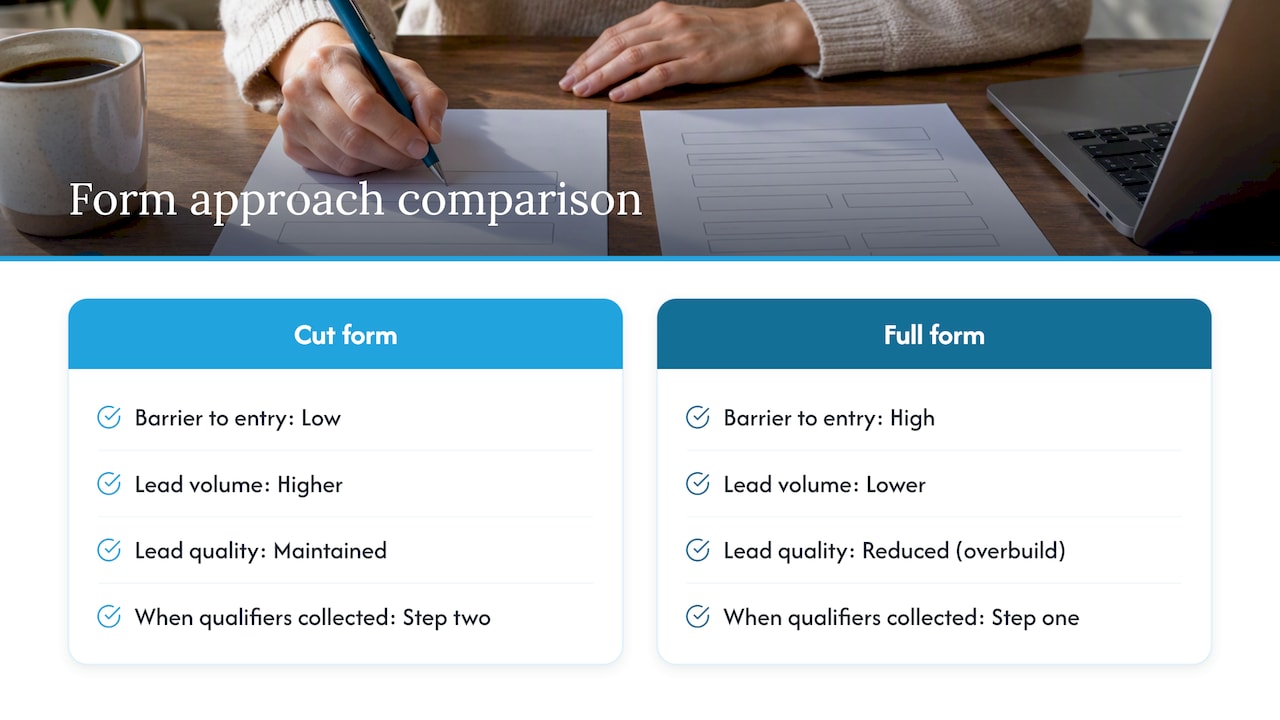
If I had to pick one test for a team with limited time, it would be cutting the form to its essential fields and adding a progressive second step for qualification. It’s the change most likely to move both volume and quality at once, because it lowers the barrier to entry while still collecting what sales actually needs, just later in the relationship. Most teams overbuild their first form out of a fear of unqualified leads, then wonder why submissions are low. The qualifiers still matter, they just belong on step two.
If you want a structured way to plan that test, our guide on building web forms that convert walks through the same prioritization we use with clients.
— Donovan Wells – Founder and CEO
How Depeche Code helps you turn form traffic into pipeline
Getting the form right is half the job. The other half is making sure it’s built on a fast site, connected to a CRM that routes leads without delay, and backed by tracking that actually tells you what’s working. Depeche Code handles all three under one roof, so you’re not stitching together a form tool, a CRM, and an analytics setup from three different vendors.

Website design and redesign work can build forms directly into a site’s layout and speed budget from the start, rather than bolting them on after launch. Lead routing and assignment rules can enable submissions to reach a representative quickly. Adding a conversational front door alongside forms through AI Chat Bot plans can give visitors a faster way to ask questions before they commit to filling anything out.
If your current form setup is costing you leads, view our full services overview and request a consult to see where the gaps are.
Sources
- Best practices for lead form assets – Google Ads Help
- Lead form best practices for capturing high-quality prospects — HubSpot
- U.S. Web Design System — form controls
FAQ
What is the ideal number of fields for a lead form?
There’s no single ideal count, since the right number depends on the offer. A top-of-funnel form should ask for name and email only, while a request for a custom quote can justify several qualifying questions, especially when progressive profiling spreads them across more than one step.
Should I use a modal popup or an inline form?
Use an inline form above the fold for high-intent traffic that arrives already interested, and reserve modals for exit-intent or scroll-triggered moments on longer content pages. Defer popup scripts so they don’t slow down the initial page load, and make sure keyboard focus moves into the modal when it opens.
How do I verify that a lead is real and not spam?
Server-side validation combined with reCAPTCHA catches most automated submissions, and double opt-in adds a second layer for lists you plan to email regularly. Google Ads recommends these same methods specifically to confirm lead authenticity before a sales team spends time on follow-up.
What should I track to know if my form is working?
Set a primary conversion goal tied to a business outcome, such as a qualified lead or booked appointment, rather than measuring raw submissions alone. Pairing GA4 with enhanced conversions and frequent offline conversion imports, ideally daily, keeps that data fresh enough for automated bidding to use effectively.
How fast should sales follow up with a new lead?
The faster the better, since interest tends to fade quickly after someone submits a form. Routing leads through a webhook or CRM API instead of manual exports, paired with a defined first-contact SLA and automated assignment rules, is the most reliable way to keep response times short.