
TL;DR:
- Mobile apps are essential as over 60% of web traffic comes from mobile devices.
- Successful app development involves seven stages: ideation, planning, design, development, testing, deployment, and maintenance.
- Ongoing post-launch efforts require strategic planning, regular updates, user feedback, and a dedicated budget.
Businesses without a mobile app are handing customers to competitors every single day. Research shows that mobile devices account for over 60% of global web traffic, meaning your audience is already living on their phones. The challenge is that most small and medium-sized business owners see app development as something reserved for tech companies with massive budgets. That belief is outdated and costly. With the right process in place, building a mobile app is structured, affordable, and absolutely achievable. This guide walks you through every major phase: planning, design, development, testing, and ongoing maintenance, so you can move forward with confidence.
Table of Contents
- Understanding the mobile app development lifecycle
- Setting your project up for success
- Designing a user-centered mobile experience
- Development, testing, and launching your app
- Maintaining and improving your app post-launch
- What most guides miss about mobile app development
- Get expert help for your mobile app journey
- Frequently asked questions
Key Takeaways
| Point | Details |
|---|---|
| Plan at every stage | Deliberate planning from concept to maintenance is essential for mobile app success. |
| Prioritize user experience | A streamlined, intuitive UI drives user satisfaction and business results. |
| Think beyond launch | Ongoing support, analytics, and updates are crucial for long-term impact. |
| Partner with experts | Expert guidance can prevent costly mistakes and ensure the app supports business growth. |
Understanding the mobile app development lifecycle
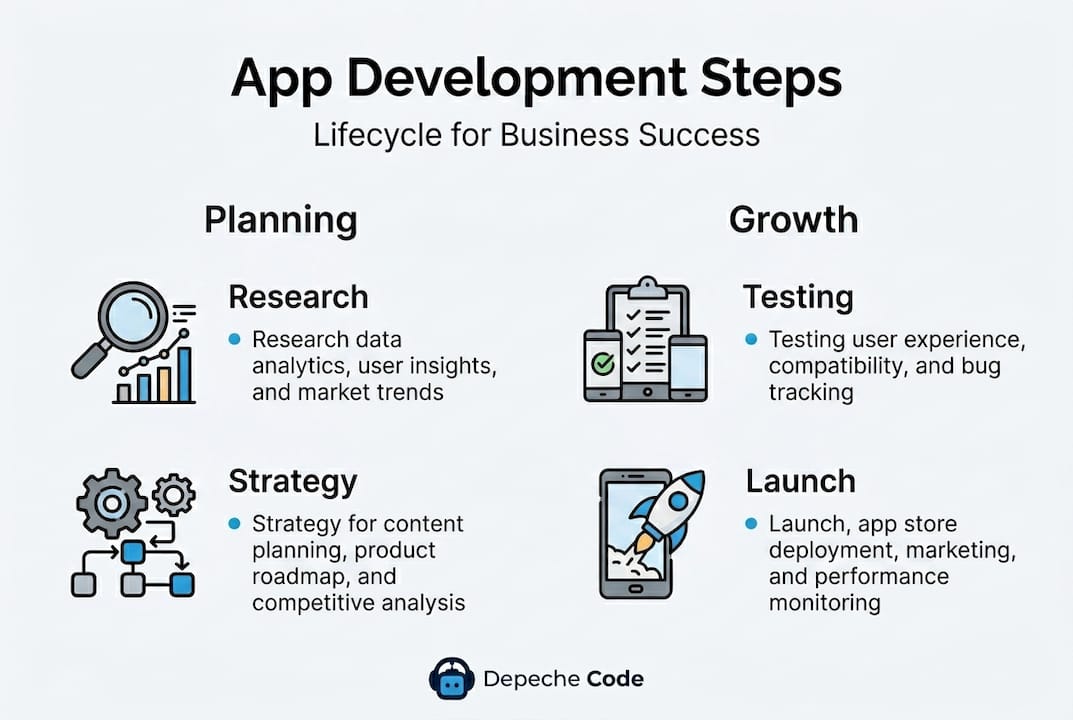
With the importance of mobile apps established, let’s break down the complete development lifecycle. Think of it like constructing a building. You wouldn’t pour concrete before drawing blueprints, and you wouldn’t move in before an inspection. The same logic applies here.
The seven core stages are:
- Ideation: Define the problem your app solves and who it serves
- Planning: Map out scope, budget, timeline, and technology choices
- Design: Build wireframes, prototypes, and finalize the visual experience
- Development: Write and integrate the actual code
- Testing: Identify bugs, usability issues, and performance gaps
- Deployment: Submit to app stores and release to users
- Maintenance: Update, optimize, and evolve the app over time
Each stage builds on the one before it. Skipping ideation means developers build features nobody wants. Skipping testing means you launch a broken product. Both errors are expensive to fix after the fact, and both are preventable with discipline upfront.
Timelines vary based on complexity. A simple informational app may take three months from start to launch. A feature-rich e-commerce or booking app often takes six to nine months. The roles involved shift across phases too. Business analysts and strategists lead ideation and planning. UI/UX designers own the design phase. Frontend and backend developers drive the build. QA engineers manage testing, and a dedicated project manager (the person coordinating all moving parts) is essential throughout.
Partnering with an experienced app development company from the start ensures these roles are covered and coordinated. Gaps in coverage are one of the most common reasons app projects stall or go over budget. Understanding how each development lifecycle phase connects to the others also helps you ask better questions when working with vendors, so you’re never left guessing about where your project stands.
Setting your project up for success
Now that you understand the overall process, it’s time to get your project off the ground with careful planning. This stage is where most business owners either set themselves up to win or unknowingly plant the seeds of failure.
Here’s how the planning phase typically breaks down in terms of key deliverables:
| Planning deliverable | Purpose | Who leads it |
|---|---|---|
| Market research report | Validates demand and identifies competitors | Business owner + strategist |
| User personas | Defines your target audience in detail | UX designer + business owner |
| Feature list | Outlines what the app will and won’t do | Product manager |
| Project brief | Summarizes goals, budget, and timeline | Project manager |
| Requirements document | Technical specs for developers | Business analyst |
The steps to complete solid planning look like this:
- Conduct market research. Study your competitors’ apps. Read user reviews. Identify what’s working and what gaps exist in your niche.
- Define clear business goals. Are you trying to increase bookings? Reduce customer support calls? Drive repeat purchases? Your goals must be specific and measurable.
- Build user personas. A persona is a detailed profile of your ideal user, including their age, job, tech comfort level, and the problem they need solved.
- Decide your core feature set. List the must-have features for launch (called MVP, or minimum viable product) and separate them from “nice to have” additions for later.
- Write a project brief. This document is your north star. It captures your goals, budget ceiling, timeline, and success metrics in one place.
- Choose your development partner. Evaluate agencies or freelancers based on portfolio quality, communication style, and their experience in your industry.
Pro Tip: Resist the urge to launch with every feature you can imagine. Apps that try to do too much confuse users and cost more to build. Launch lean, gather real user data, then add features strategically.
Investing time in planning also protects business growth with custom apps because it ensures that what you build is actually aligned with what your customers need and what your business model can sustain.
Designing a user-centered mobile experience
Solid planning leads naturally into the visual and functional design of your app. This phase is where your ideas start looking like a real product, and it’s also where many businesses make their first major misstep: prioritizing looks over usability.
Core principles of effective mobile UI/UX design:
- Simplicity first. Mobile screens are small. Every element you add competes for attention. Strip away anything that doesn’t serve the user’s primary task.
- Accessibility matters. Design for users with visual impairments, color blindness, or limited tech experience. Larger tap targets, high contrast text, and readable font sizes are baseline requirements.
- Consistency builds trust. Use the same button styles, color palette, and navigation patterns throughout. Inconsistency signals poor quality to users instantly.
- Fast onboarding. A user should understand your app’s value and know how to use it within the first 60 seconds. If they don’t, most will delete it and never return.
The design process typically begins with wireframes, which are basic black-and-white sketches of each screen layout. Wireframes let you organize information and user flows without the distraction of color or imagery. Once wireframes are approved, designers create prototypes, which are clickable mockups that simulate how the real app will feel. Prototypes are invaluable because they let you test ideas with real users before writing a single line of code.
“The best designs are invisible. Users shouldn’t notice the design; they should just find what they’re looking for without effort.” This principle should guide every decision in your design phase.
Incorporate user feedback early and often. Show your prototype to five to ten actual target users before you approve the final design. Their confusion points and questions will reveal blind spots you’d never catch internally. Applying responsive design strategies across screen sizes and thinking about improving user experience at every touchpoint are non-negotiable standards in 2026.
Pro Tip: Review UX design best practices before your first design meeting with your agency. Even a basic familiarity with these principles helps you give smarter feedback and catch problems earlier.
Development, testing, and launching your app
Design approval is the green light to start development, but build and testing require careful management. This is the longest and most technical phase, and staying informed as a business owner makes a real difference in the outcome.
Your first major technical decision is choosing the development approach:
- Native development means building separate apps for iOS and Android using each platform’s dedicated programming language. You get the best performance and access to all device features, but you pay for two codebases.
- Hybrid development uses a single codebase that runs on both platforms inside a browser-like shell. It’s faster and cheaper but may sacrifice some performance.
- Cross-platform development uses frameworks like React Native or Flutter to write one codebase that compiles into near-native apps for both platforms. This is the most popular choice for SMBs because it balances cost and quality well.
Once your team starts building, they’ll typically work in agile sprints, which are short two-week development cycles focused on completing specific features. At the end of each sprint, you review progress, give feedback, and the team adjusts for the next cycle. This iterative approach means problems get caught early rather than discovered at the end of a six-month build.
Testing is not optional and should never be treated as an afterthought. Mobile performance issues directly drive user churn. Your testing strategy should include:
- Manual testing: QA testers navigate the app like a real user to find bugs
- Automated testing: Scripts run hundreds of functional checks quickly and repeatedly
- Usability testing: Real target users complete tasks while you observe their behavior
- Performance testing: Simulate heavy traffic to ensure the app doesn’t crash under load
- Security testing: Check for vulnerabilities that could expose user data
Pro Tip: Don’t skip beta testing with a small group of real users before your public launch. Platforms like TestFlight for iOS and Google Play’s internal testing track make this process easy and free.
Before submitting to the App Store or Google Play, prepare your submission checklist: app icon in all required sizes, screenshots for each screen size, a compelling app description with relevant keywords, a privacy policy URL, and your support contact information. App store review times average one to three days for Google Play and up to seven days for Apple, so build that into your launch timeline.
Maintaining and improving your app post-launch
Success doesn’t end at launch. Maintenance and growth are critical for lasting impact, yet this is the phase most business owners underestimate during initial budgeting.
What ongoing app maintenance actually covers:
- Bug fixes: No app launches without issues. Users will find edge cases your testers missed, and those need fast resolution.
- OS updates: Apple and Google update their operating systems regularly. Your app must be updated to stay compatible and continue passing store reviews.
- Security patches: Cyber threats evolve constantly. Regular security updates protect your users’ data and your business’s reputation.
- Feature enhancements: User behavior data and customer feedback will reveal new features worth adding and old ones worth removing.
- Performance optimization: As your user base grows, the app’s infrastructure must scale to handle increased traffic without slowing down.
Collecting and acting on user analytics is where smart businesses separate themselves from the competition. Tools like Firebase Analytics, Mixpanel, or Amplitude let you see exactly how users move through your app: where they drop off, which features they love, and where friction causes abandonment. This data is more valuable than any internal opinion about what users want.

Customer support post-launch is also critical. Users who encounter a problem and can’t reach anyone will leave a one-star review and never return. Building a simple in-app feedback mechanism and responding to reviews publicly shows users and prospects that you’re actively invested in quality.
Pro Tip: Review your mobile app maintenance options with your development partner before launch, not after. Knowing what’s covered and what costs extra prevents budget surprises six months down the road.
A realistic maintenance budget typically runs between 15% and 25% of your original development cost per year. If your app cost $50,000 to build, expect to invest $7,500 to $12,500 annually to keep it secure, functional, and competitive.
What most guides miss about mobile app development
Most app development guides focus heavily on the build phase and treat launch as the finish line. That framing is a trap. In our experience working with small and medium-sized businesses, the post-launch period is where the real work begins and where underprepared teams most often fail.
The uncomfortable truth is that building the app is the easy part. Sustaining it, improving it, and growing it into a business asset requires a level of strategic commitment that many owners simply don’t plan for when they start the project. Budgets get exhausted. Teams get disbanded. And the app slowly becomes outdated until it’s a liability rather than an advantage.
The businesses that win with mobile apps are the ones that build with scale in mind from day one. That means choosing technology that can grow with your user base, designing a feature roadmap that extends 12 to 18 months past launch, and establishing a feedback loop between users and your product team that never stops running.
It also means treating real-world expert insights as a resource throughout the entire lifecycle, not just during the sales process. The most successful app projects we’ve seen involve clients who stayed engaged, asked hard questions, and treated their app as a living product rather than a one-time project.
Planning for lifecycle costs upfront, building for flexibility from the start, and committing to proactive updates are what separate apps that generate real ROI from apps that collect digital dust.
Get expert help for your mobile app journey
If you’re ready to move forward confidently, partnering with experts can streamline your path and help you avoid the costly mistakes that derail most first-time app projects.

At Depeche Code, we provide end-to-end mobile app development services designed specifically for small and medium-sized businesses that need professional results without enterprise-level budgets. From the initial discovery session to ongoing app hosting and maintenance, our team handles every phase of the process so you can stay focused on running your business. We work across industries, move quickly, and build apps that are built to scale. Schedule a discovery call with our team today and let’s map out the right approach for your goals.
Frequently asked questions
How long does the average mobile app development process take?
Typically, a business mobile app takes between three to nine months from planning to deployment, depending on the complexity of features required and the size of the development team involved.
What are the most common mistakes in mobile app development?
The most common mistakes include skipping user research, writing vague requirements, neglecting UX design quality, and failing to budget adequately for post-launch maintenance and updates.
How do I ensure my mobile app supports business goals?
Map every feature directly to a specific business objective before development begins, and set up analytics from day one so you can use real user behavior to guide continuous improvement.
What should I budget for ongoing maintenance after launch?
Most businesses allocate between 15% and 25% of their initial development cost per year to cover updates, security patches, bug fixes, and hosting as their app continues to grow.
Recommended
Related Articles

Depeche Code
April 11, 2026