

TL;DR:
- Over 59% of small businesses experienced a cyber attack last year, often without realizing it.
- Website security involves technical safeguards and human practices, requiring ongoing discipline.
- Small businesses are prime targets due to weak defenses, with most breaches costing around $140,000.
More than 59% of small businesses reported a cyber attack in the past year alone, and the majority had no idea they were even targeted until the damage was done. Website security is no longer a back-office IT concern reserved for Fortune 500 companies. If your business has a website, which means you have a customer database, a payment gateway, or even just a contact form, you are a target. This guide cuts through the technical noise and gives you a clear, honest picture of what website security actually means, why smaller businesses carry the highest risk, and what practical steps you can take starting today.
Table of Contents
- What is website security, really?
- Why do SMBs face higher website security risks?
- The building blocks of a secure website
- Common mistakes and blind spots in website security
- A smarter approach: Balancing tech, people, and process
- How Depeche Code helps you build and secure your online presence
- Frequently asked questions
Key Takeaways
| Point | Details |
|---|---|
| SMBs are prime targets | Small and medium businesses face more frequent and costly website attacks than many expect. |
| Security is more than tech | Effective website security includes technical tools plus ongoing training and process improvements. |
| Focus on basics first | Strong passwords, MFA, regular updates, and backups offer major protection at low cost. |
| Oversight is essential | Outsourcing security helps, but you must remain involved and accountable for your website’s safety. |
What is website security, really?
Website security means protecting your website, its data, and its users from unauthorized access, theft, or damage. That sounds simple, but the reality is far more layered. It covers both technical safeguards and the human behaviors that either reinforce or undermine them.
On the technical side, website security includes:
- Encryption: Scrambling data so intercepted information is unreadable.
- Access controls: Limiting who can view or edit sensitive areas of your site.
- Input validation: Filtering what users submit to prevent malicious commands from running.
- Secure coding: Writing website code in ways that don’t leave openings for attackers.
- Regular patching: Updating software, plugins, and systems to close known vulnerabilities.
On the human side, it includes staff training, vendor oversight, clear password policies, and the organizational discipline to follow through on these practices consistently.
Understanding what makes a good website goes hand in hand with security. A well-built site isn’t just visually clean and fast. It is built with security baked into its architecture from the beginning, not bolted on as an afterthought.
“Security is not a product, but a process.” This widely cited principle in cybersecurity rings especially true for SMBs. No single tool makes your website fully secure. What matters is the ongoing discipline of testing, monitoring, and improving.
The gold standard framework for identifying web vulnerabilities is the OWASP Top 10, which lists the most critical risks including Broken Access Control, Cryptographic Failures, Injection attacks, Insecure Design, and Security Misconfiguration. These aren’t theoretical concerns. They show up every single day in attacks against real businesses. Understanding each one gives you a meaningful map of where attackers look first.
Why do SMBs face higher website security risks?
Here’s the uncomfortable truth: attackers love small and medium businesses. Not because they’re rich targets with huge payouts, but because they’re easy targets with weak defenses. The math is simple. You get more return attacking 100 small businesses with light security than spending months trying to crack one major corporation with a dedicated security team.
The data backs this up. According to the Verizon 2025 DBIR Small Business Snapshot, 88% of ransomware attacks against businesses succeed at the SMB level, and a staggering 96% of all breaches trace back to just three vectors.
| Attack vector | Percentage of breaches |
|---|---|
| System intrusion | ~37% |
| Social engineering | ~35% |
| Basic web app attacks | ~24% |
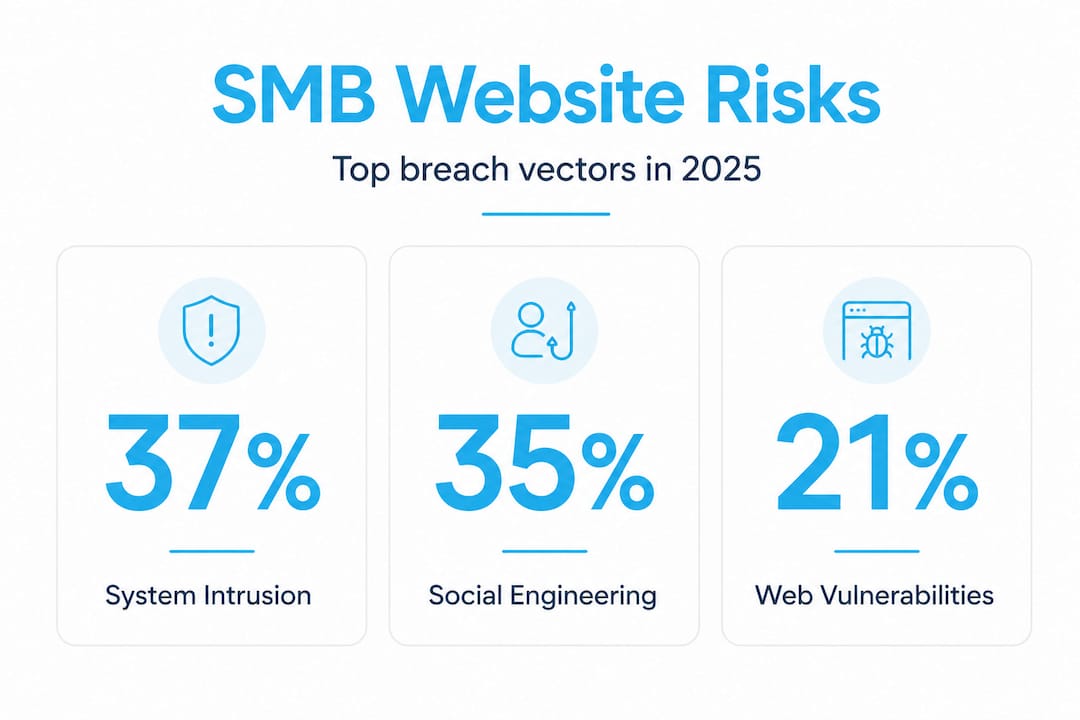
That concentration is important. It means attackers aren’t using exotic, nation-state-level tools against your business. They’re using the same three well-worn methods that have worked for years because most SMBs still haven’t closed those doors.
The financial stakes are devastating. A breach costs the average small business around $140,000 in direct expenses, including forensic investigation, legal counsel, customer notification, and potential regulatory fines. That doesn’t count lost revenue from downtime or the long-term brand damage that follows a public breach. For a business running on tight margins, a single incident can be existential.
SMBs also face specific organizational vulnerabilities that larger firms don’t:
- No dedicated IT security staff. Most rely on a generalist IT person or an outside vendor.
- Shared credentials. Employees reuse passwords across systems, creating chain-reaction failures.
- Outdated software. Plugins and CMS platforms go unpatched for months because no one is watching.
- Trust-based culture. Smaller teams tend to skip formal processes, which creates exploitable gaps.
This is exactly why resources like these practical security tips and a clear understanding of website maintenance for security matter so much more for SMBs than for larger organizations with specialized teams.
The building blocks of a secure website
Recognizing the risks, let’s zero in on the foundational elements every SMB can put in place, no matter their budget or technical expertise. The NIST Cybersecurity Framework gives us a structured and proven approach with six core functions: Govern, Identify, Protect, Detect, Respond, and Recover. Think of these as the lifecycle of a security posture, not just a one-time checklist.
Here’s how to translate that framework into practical action:
- Govern: Define who owns security decisions in your organization. Even if that’s you, the business owner, make it explicit.
- Identify: Audit every piece of software, every user account, and every data flow on your website. You can’t protect what you don’t know about.
- Protect: Implement multi-factor authentication (MFA), encrypt all data in transit and at rest, apply the principle of least privilege (users only access what they absolutely need), and patch all software on a regular schedule.
- Detect: Set up monitoring tools to alert you when unusual activity occurs. Many web hosts and content management systems have basic monitoring built in.
- Respond: Write a simple incident response plan. What do you do when something goes wrong? Who do you call? What systems do you isolate first?
- Recover: Test your backups. Offsite, encrypted backups that are actually tested are your most powerful recovery tool. Untested backups are just hope dressed up as a plan.
| Security step | Cost | Impact | Difficulty |
|---|---|---|---|
| Multi-factor authentication | Free to low | Very high | Low |
| Regular software patching | Low | High | Low |
| Offsite encrypted backups | Low to moderate | Very high | Low to medium |
| Incident response plan | Free (internal effort) | High | Medium |
| Staff security training | Low to moderate | High | Medium |
| Third-party security audit | Moderate to high | Very high | Low (outsourced) |
Pro Tip: Don’t wait until you have a perfect plan to start. Enable MFA across all admin accounts today. That single step blocks the vast majority of credential-based attacks, and it costs nothing but five minutes per account.
Building a secure site from day one makes everything else easier. Resources like this guide to building a secure business website walk through the development decisions that determine your long-term security posture, from the platform you choose to the hosting environment you run on. And maintaining that security over time requires scheduled attention, which is why consistent website maintenance isn’t optional for any business that cares about protecting its customers.
Common mistakes and blind spots in website security
Even with solid fundamentals, it’s easy to fall into common traps. Here’s what too many SMBs get wrong, and how you can do better.
The single biggest blind spot right now is automated threats. Bots outnumber human attackers by more than 12.6 to 1 online. These automated tools probe websites around the clock, testing thousands of username and password combinations (credential stuffing), scraping data, exploiting unpatched plugins, and triggering fake form submissions. You will never manually detect these attacks in real time. You need rate limiting, CAPTCHA where appropriate, and monitoring tools that flag suspicious traffic patterns automatically.
The most common mistakes SMBs make include:
- Chasing shiny tools instead of fixing root causes. Buying an expensive security product doesn’t fix a weak password policy or an untrained employee who clicks phishing links. Technology amplifies good processes. It doesn’t replace them.
- Skipping vendor security reviews. If your website uses third-party plugins, integrations, payment processors, or email services, each one is a potential entry point. Vendors should be reviewed for their own security practices.
- Neglecting the non-technical stuff. Social engineering succeeds because it targets people, not software. A sophisticated firewall doesn’t stop an employee from giving out login credentials over a spoofed email.
- Assuming outsourcing means off the hook. Many SMBs hire an agency or managed service provider and assume security is now someone else’s problem. Legally and operationally, that’s not accurate.
Pro Tip: Run a phishing simulation with your team once a quarter. Services for this are affordable, and the results will show you exactly where your human vulnerabilities are before a real attacker does.
Regular updates address far more than features and design. Each update cycle patches known security vulnerabilities, and skipping updates is one of the most reliable ways to invite a breach. Pair that with the importance of ongoing maintenance and you create a discipline of security rather than a one-time event.

A smarter approach: Balancing tech, people, and process
Here’s a perspective that most security vendors won’t share with you, because it doesn’t sell more products: technology is the smallest piece of the website security puzzle.
We’ve worked with businesses that spent significant money on security software but still experienced breaches. Why? Because the misconfiguration of a basic access control, the shared admin password sitting in an email thread, or the outdated plugin no one remembered to update opened the door. In almost every real-world incident, the failure point was a process or a person, not a missing tool.
The OWASP Top 10 framework consistently shows that the most critical vulnerabilities aren’t exotic. They’re predictable, preventable, and rooted in decisions that organizations make (or fail to make) about policies and training. The practical guidance is to invest roughly 80% of your security effort into process and people, and 20% into technology. For SMBs, that ratio is even more important because resources are limited.
The most secure small businesses we’ve seen share a few common behaviors. They test their backups every quarter, not just set them up. They run drills. They audit their vendors annually. They treat custom website security strategy as an ongoing business function, not a project that ends at launch.
There’s also a misconception worth addressing directly: outsourcing security to a developer or digital agency transfers the work, but not the responsibility. You remain accountable to your customers, to regulators, and to your own reputation. That means you need to understand what your partners are doing on your behalf, ask the right questions, and stay actively involved. Informed oversight is not optional when your brand is on the line.
The businesses that get this right are the ones that treat security like customer service: something you continuously improve, measure, and take ownership of at the leadership level.
How Depeche Code helps you build and secure your online presence
Website security isn’t a solo effort, and you shouldn’t have to figure it out alone.

At Depeche Code, we design and build websites with security integrated from the ground up, not layered on as an afterthought. Our web design and development service ensures your site is built on a secure foundation with clean code, proper access controls, and configurations that follow industry best practices. Beyond the build, our ongoing website maintenance keeps your platform updated, monitored, and performing at its best so vulnerabilities don’t quietly accumulate between launches. If you’re ready to stop guessing about your security posture and want a website that actively protects your business and your customers, let’s talk about what that looks like for your specific situation.
Frequently asked questions
What are the simplest steps to improve website security for a small business?
Start with strong passwords, enable multi-factor authentication on all admin accounts, keep all software updated, and back up your website to an offsite location regularly. These NIST-recommended practices are low cost and dramatically reduce your attack surface.
How much does a typical website breach cost an SMB?
On average, a website security breach costs an SMB around $140,000 in direct expenses, not including long-term brand damage or lost customers. For most small businesses, a single breach of that scale is financially crippling.
Does using a managed service provider eliminate my security responsibility?
No. Even when you outsource your website to a managed service provider or agency, you retain liability for data breaches and compliance failures. The OWASP guidance is clear that businesses must actively oversee the security practices of any partner handling their systems.
What are the top entry points for attackers against SMB websites?
The three most common vectors are system intrusion, social engineering, and basic web app vulnerabilities. Supply chain risks and cloud misconfigurations are increasingly common entry points within those categories.
How often should website security training be run for employees?
NIST and security experts recommend training at least quarterly, and additional sessions whenever you introduce new software, third-party tools, or significant process changes. Frequency matters because threats evolve faster than annual training cycles can keep up with.
Recommended
- 5 Ways To Ensure Your Website Stays Secure And Protected • Depeche Code
- SEO For Business: 748% ROI And Lasting Growth
- Website Maintenance Explained: Keep Your Site Secure • Depeche Code
- Unlock Business Growth With Custom Web Solutions Explained
- Cyberrisico’s voor kleine bedrijven – onderschat het niet! – Zakelijkeverzekering
- Why fast hosting is critical for business website success