

Your web presence is every location on the internet where your business exists as an owned asset: your website, social profiles, business listings, and any other digital property tied to your brand’s URL or name. According to Wikipedia’s definition of web presence, each point of presence is associated with a unique web address that distinguishes it from every other.
TL;DR:
- Your web presence = owned assets you control (website, profiles, listings, email, analytics)
- Your immediate next step: spend five minutes listing every URL or profile your business currently owns. That inventory is your starting audit.
Table of Contents
- What makes up a web presence?
- Web presence vs. online presence: what is the difference?
- Why does web presence matter for your business?
- How do you build a web presence step by step?
- How do you measure and maintain your web presence?
- Common web presence mistakes and how to fix them fast
- How a digital agency approaches web presence work
- Key Takeaways
- The part most business owners get wrong about web presence
- Depechecode builds and maintains web presences for businesses that want results
- Useful sources and further reading
- FAQ
What makes up a web presence?
A web presence is not one thing. It is a collection of discrete, owned assets, and most businesses have more of them than they realize, and fewer in good shape than they think.
Marketing.gl’s web presence glossary describes it as the collective online footprint a business holds across websites, social pages, and listings. Here is what that footprint actually contains:
- Website: — Your primary owned asset. Every page, blog post, and landing page lives here. Example:
yourbusiness.com/services
| Component | Typical Asset / URL Type | Who Usually Owns It |
|---|---|---|
| Website | yourdomain.com |
Marketing / IT |
| Blog / content | yourdomain.com/blog |
Marketing |
| Social profiles | facebook.com/yourbrand |
Marketing |
| Business listings | Google Business Profile, Yelp | Operations / Marketing |
| Email list | ESP platform (e.g., Mailchimp) | Marketing |
| Analytics | GA4 dashboard | Marketing / IT |
| Paid ad accounts | Google Ads, Meta Ads | Marketing |
| Chatbot / integrations | Embedded on site | IT / Agency |
Consistent brand values across all of these assets directly shape how customers interpret what they find. A mismatched logo on a Yelp listing or a different tagline on LinkedIn creates friction that erodes trust before a visitor even reaches your site.
Pro Tip: Before adding any new asset, check whether you already own a dormant version of it. Orphaned profiles from old campaigns are one of the most common security and reputation hazards in web presence management.
Web presence vs. online presence: what is the difference?
These two terms get used interchangeably, but they describe different things, and confusing them leads to wasted effort.
Study.com’s lesson on web presence draws a clear line: web presence refers to owned, structural assets you build and control. Online presence is broader. It includes your reputation, earned media, reviews others write about you, and the engagement your brand generates across channels you do not own.
| Dimension | Web Presence | Online Presence |
|---|---|---|
| Ownership | Fully owned by the business | Mix of owned, earned, and shared |
| Control | High — you publish and update | Low to medium — others contribute |
| Typical metrics | Traffic, page speed, uptime, rankings | Sentiment, share of voice, review ratings |
| Maintenance cadence | Weekly to monthly | Daily to weekly |
| Who manages it | Marketing, IT, or agency | Marketing, PR, customer service |
A business that has both aligned sees the clearest results. Consider a local service company that builds a fast, well-structured website (web presence), then actively responds to Google reviews and earns press mentions (online presence). The owned site gives search engines something to index. The earned signals give those rankings credibility. Neither works as well without the other.
Why does web presence matter for your business?
A strong web presence drives three outcomes that directly affect revenue: visibility, credibility, and conversions. Without it, potential customers cannot find you, and those who do find you may not trust what they see.
Qualtrics’ research on brand image shows that consistent brand presentation across digital touchpoints improves customer perception and conversion rates. When every asset looks and sounds like the same business, trust accumulates faster.
The business case breaks down into three clear areas:
- Customer trust: — Buyers research before they buy. A professional, up-to-date web presence signals that your business is legitimate and active.
Statistic: According to Google’s SEO Starter Guide, search engines prioritize sites that are mobile-friendly, technically sound, and regularly updated with relevant content. Businesses that meet these criteria consistently outperform those that do not in organic search rankings.
The importance of web presence is not abstract. It shows up in whether a prospect calls you or the competitor whose site loaded faster and answered the question first.
How do you build a web presence step by step?
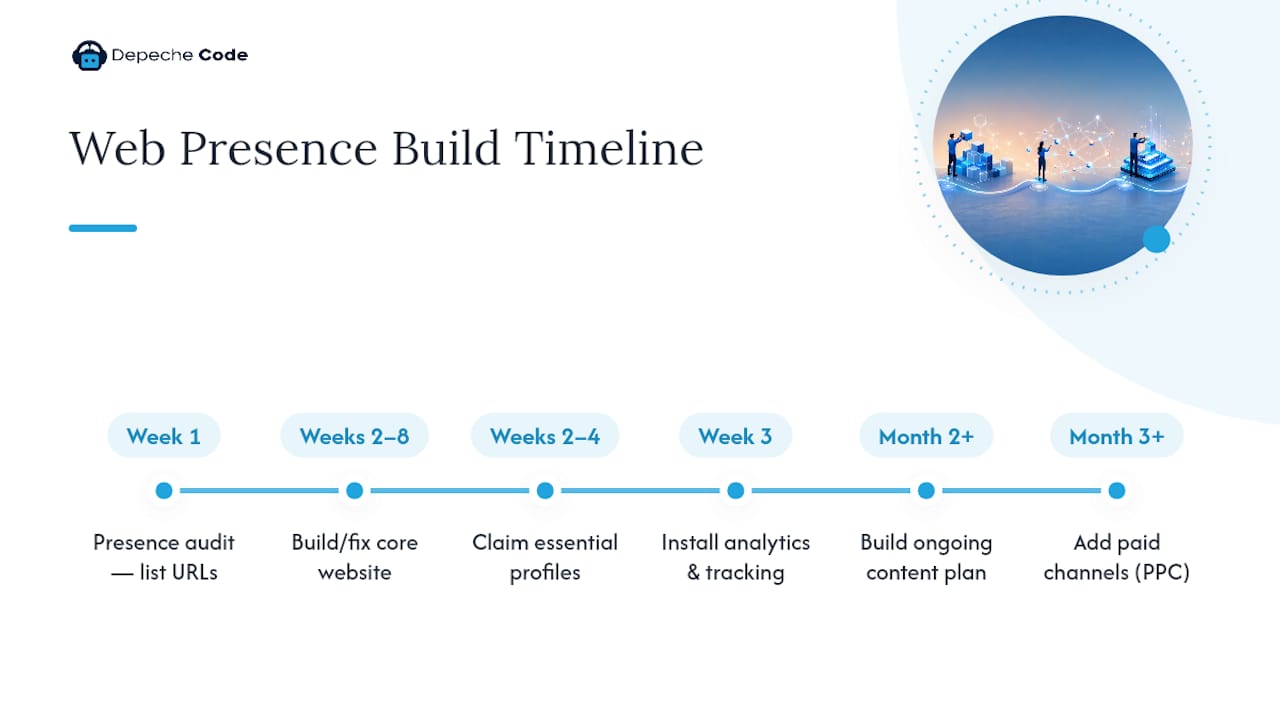
Building a web presence is a phased process. Trying to do everything at once produces mediocre results across the board. Prioritize in this order:
Step 1: Run a presence audit (Week 1)
List every URL and profile your business owns. Check each for accuracy, branding consistency, and whether you still have login access. This takes one to two hours and reveals gaps immediately.
Step 2: Build or fix your core website (Weeks 2–8)
Your website is the foundation everything else points to. It needs to be mobile-first, load quickly, use HTTPS, and have clear calls to action. A professional website build for a small business typically runs from a few hundred dollars for a template-based site to several thousand for a custom build. DIY platforms like WordPress or Squarespace work for tight budgets; a digital agency delivers faster results with less technical risk.
Step 3: Claim and complete essential profiles and listings (Weeks 2–4)
Google Business Profile, Yelp, and any industry-specific directories. Complete every field. Use the same business name, address, and phone number across all of them.
Step 4: Set up analytics and tracking (Week 3)
Install Google Analytics 4 and Google Search Console before you do anything else with content. You cannot measure what you do not track.
Step 5: Build a content plan (Month 2 onward)
Consistent blog posts, updated service pages, and fresh landing pages signal to search engines that your site is active. Aim for quality over volume.
Step 6: Add paid channels if needed (Month 3+)
Pay-per-click advertising via platforms like Google Ads can drive visibility quickly while organic rankings build. PPC works best as a complement to owned assets, not a substitute for them.
Pro Tip: Mobile-first is not optional. Google indexes the mobile version of your site first. If your site looks broken on a phone, your rankings will reflect that regardless of how good your desktop version is.
Hootsuite’s guidance on social strategy makes a point worth repeating: fewer, well-maintained profiles outperform a scattered presence across every platform. Pick two or three channels where your customers actually spend time, and do those well.
How do you measure and maintain your web presence?
A web presence is not a launch. It is an ongoing process. Search engines favor fresh content and technical health, which means the work continues after the site goes live.
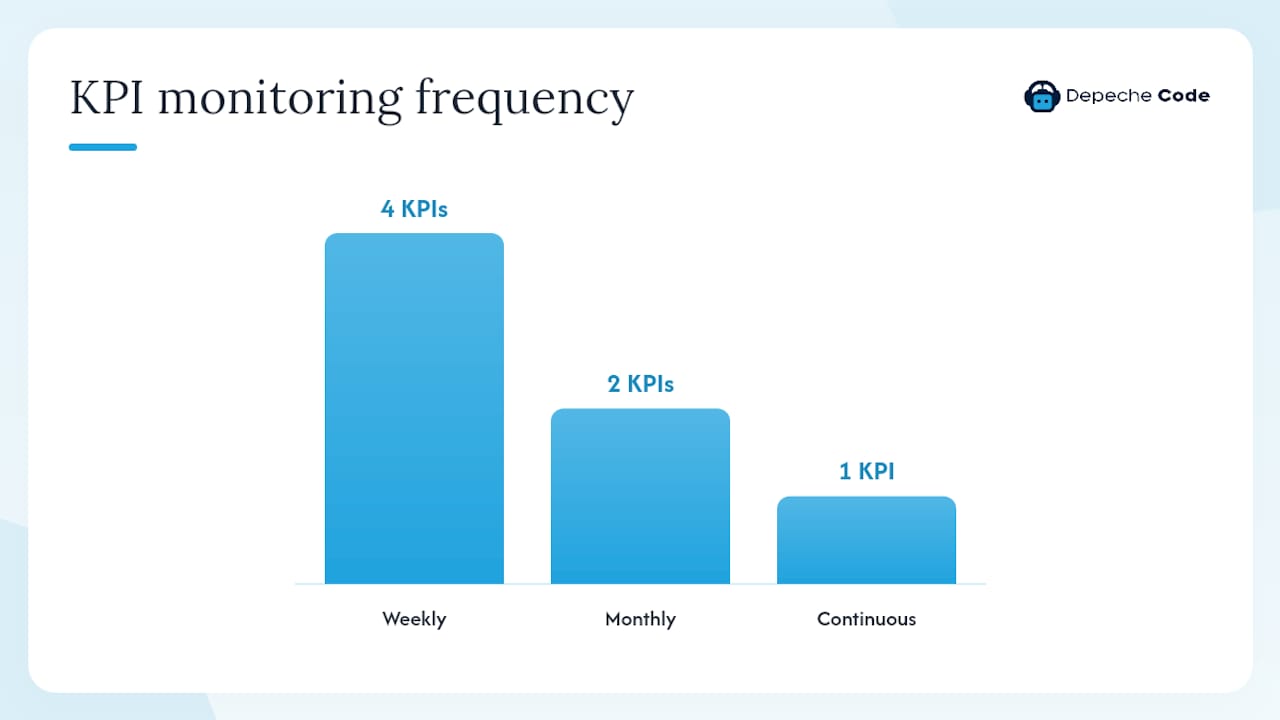
| KPI | What It Measures | How to Track | Frequency |
|---|---|---|---|
| Organic search traffic | Visitors arriving from search engines | Google Analytics 4 | Weekly |
| Keyword rankings | Position for target search terms | Google Search Console, rank tracker | Weekly |
| Page load speed | Technical performance | Google PageSpeed Insights | Monthly |
| Uptime | Site availability | Uptime monitoring tool | Continuous |
| Bounce rate | Engagement quality | Google Analytics 4 | Monthly |
| Review ratings | Reputation across listings | Google Business Profile, Yelp | Weekly |
| Social engagement | Profile activity and reach | Native platform analytics | Weekly |
Maintenance checklist (recurring tasks):
- Update plugins, themes, and CMS core (weekly)
- Run a security scan and confirm SSL certificate is active (monthly)
- Back up the full site (weekly or automated daily)
- Refresh or add at least one piece of content (monthly)
- Audit business listing accuracy (quarterly)
- Review and respond to new customer reviews (weekly)
- Check for broken links and 404 errors (monthly)
Tools that make this manageable: Google Search Console and GA4 for organic performance, technical support and hosting services for uptime and security, and a social scheduler like Hootsuite or Buffer for profile cadence.
Pro Tip: Assign a named owner to each maintenance task. Shared responsibility usually means no one does it. A simple spreadsheet with task, owner, and last-completed date is enough to keep a small team accountable.
Common web presence mistakes and how to fix them fast
Most web presence problems fall into a short list of recurring errors. The good news is that most of them are fixable in a day or less.
- Orphaned profiles: — Old social accounts or microsites you forgot about. They still show up in search results and often contain outdated contact info. Fix: search your business name, claim or delete every result you find.
Pro Tip: Run your business name through Google once a month. You will catch orphaned assets, fake listings, and reputation issues before they compound. Set a calendar reminder and treat it like a utility bill.
How a digital agency approaches web presence work
Agencies do not start by building. They start by auditing. That distinction separates professional web presence work from the DIY approach that often produces fragmented, inconsistent results.
A phased agency workflow typically looks like this: inventory audit and technical assessment in week one, followed by a prioritized roadmap, then phased execution across site architecture, SEO setup, analytics, and content. Ongoing maintenance and monitoring run as a retainer after launch.
A typical agency deliverables checklist includes:
- Full inventory audit of existing assets and access credentials
- Technical audit covering speed, mobile performance, security, and broken links
- Site architecture and responsive design build or redesign
- On-page SEO setup: title tags, meta descriptions, schema markup, sitemap
- Analytics and tracking configuration (GA4, Search Console, conversion goals)
- Hosting, SSL, and backup setup
- Content plan and initial content production
- Social profile setup or optimization
- AI chatbot integration where appropriate for lead capture or support
- Monthly reporting and maintenance retainer
The client typically owns brand decisions, content approvals, and login credentials. The agency owns execution, technical health, and reporting cadence. That division of responsibility is what makes the relationship work.
Top digital agency services for small businesses follow this same phased model, scaling the scope based on budget and timeline rather than skipping steps.
Key Takeaways
A strong web presence requires owned assets, consistent branding, and ongoing maintenance — not a one-time setup.
| Point | Details |
|---|---|
| Web presence definition | Every owned digital asset your business controls: website, profiles, listings, and analytics. |
| First action to take | Run a five-minute inventory audit listing every URL and profile your business owns. |
| Quality over quantity | Fewer, well-maintained assets outperform a scattered presence across every platform. |
| Top KPI to track | Organic search traffic via Google Analytics 4, reviewed weekly. |
| When to hire an agency | When technical gaps, time constraints, or inconsistent results exceed what your team can manage in-house. Depechecode offers phased, full-service web presence builds for businesses at any stage. |
The part most business owners get wrong about web presence
Most of the business owners who come to an agency for help have the same problem: they built something and then stopped. A website launched three years ago with no updates, a Google Business Profile with an old phone number, and a Facebook page that last posted in 2023. They assume the presence is “handled” because it exists.
Web presence management is not a project with a completion date. Search engines treat freshness and technical health as ongoing signals. A site that was fast and well-structured in 2022 may now be outranked by a competitor who simply kept up with updates. The businesses that win in search are not always the ones with the biggest budgets. They are the ones that treat their web presence like a living asset rather than a finished product.
The other mistake is trying to be everywhere. Spreading effort across eight social platforms and three review sites with no real maintenance on any of them is worse than owning two profiles and keeping them sharp. Quality of presence consistently outperforms quantity of presence, and that principle holds whether you are a solo consultant or a 50-person company.
If you are starting from scratch, a retainer engagement with a digital agency is usually the faster path to a functional, measurable presence than a DIY build that stalls at the technical hurdles. If you already have assets in place, a one-time audit and roadmap project can identify exactly where the gaps are before you spend another dollar.
Depechecode builds and maintains web presences for businesses that want results
Depechecode is a full-service digital agency based in Orlando that handles the entire web presence build so you do not have to piece it together yourself. Where a DIY approach leaves you managing hosting, SEO, content, and social separately, Depechecode delivers a coordinated system from a single team.

Services include custom website design and development, SEO plans built for organic growth, social media management, AI chatbot integration, and ongoing hosting and maintenance. Every engagement starts with an audit, moves through a phased build, and transitions into a maintenance retainer that keeps your presence current and technically healthy.
If you are ready to stop guessing about what your web presence needs, request a free website or reach out to Depechecode directly to discuss a build or audit package that fits your business.
Useful sources and further reading
The resources below support the claims and frameworks in this article and are worth bookmarking for deeper implementation work.
- Web presence – Wikipedia
- Web Presence | Blogs, Emails & Social Media – Lesson
- SEO Starter Guide — Google Developers
- Hootsuite
- PPC — WordStream
- Brand image — Qualtrics
- Brand values — Bynder
- 15 Ways to Build a Spectacular Online Presence — Business.com
- Web Presence — Marketing.gl
“Maintaining a web presence is an ongoing process of presence management, not a one-time setup. Search engines favor fresh content and technical health.” — Wikipedia on Web Presence
FAQ
What is the web presence definition in simple terms?
A web presence is every digital location your business owns and controls on the internet, including your website, social profiles, and business listings. Each asset is tied to a unique web address that represents your brand online.
What is the difference between web presence and online presence?
Web presence refers to owned, structural assets you build and control. Online presence is broader and includes earned reputation, reviews, and engagement across channels you do not own.
How do you build a web presence from scratch?
Start with a presence audit, then build or fix your core website, claim essential business listings, set up analytics, and develop a consistent content plan. Prioritize quality over the number of platforms you use.
How do you fix a weak or broken online presence?
Audit every asset you own, reclaim or delete orphaned profiles, standardize your business name and contact details across all listings, update outdated content, and confirm your site is mobile-friendly and secured with HTTPS.
How do you delete or remove your web presence?
To remove specific assets, delete or deactivate each profile individually through its platform settings, submit removal requests to Google Search Console for indexed pages you own, and contact directory sites directly to delist your business. Full removal is rarely complete, so consolidating and correcting assets is usually more effective than attempting total deletion.