

TL;DR:
- Website accessibility expands market reach, legal protection, and improves user experience for all visitors.
- Following WCAG standards, especially Level AA, ensures practical compliance across perceivable, operable, understandable, and robust principles.
- Accessibility requires ongoing testing, prioritizing high-traffic pages, and integrating updates into regular website maintenance.
Most business owners think website accessibility is a niche concern for a small group of users. That assumption is costing companies real money. An inaccessible website turns away over 1 billion people with disabilities worldwide, and that’s before you factor in the growing wave of ADA Title III lawsuits targeting businesses of every size. Accessibility also affects how search engines crawl your site, how fast pages load, and how every visitor experiences your content. This guide breaks down what website accessibility actually means, what standards apply to your business, and what practical steps you can take right now to fix the most impactful issues.
Table of Contents
- Website accessibility explained: What it is and why it matters
- Core principles and standards: Understanding WCAG and POUR
- Key mechanics: Practical techniques for accessible design
- Testing and evaluation: Ensuring ongoing accessibility
- Our take: What most business owners miss about accessibility
- Enhance your website’s accessibility with Depeche Code
- Frequently asked questions
Key Takeaways
| Point | Details |
|---|---|
| Expand audience | Accessible websites reach over 1 billion people with disabilities and improve SEO for all visitors. |
| Reduce legal risk | Compliance with WCAG AA helps avoid ADA lawsuits and regulatory penalties. |
| Improve user experience | Accessible design benefits everyone, making websites easier to use and more engaging. |
| Focus on practical steps | Prioritize common failures—like alt text and color contrast—on your site’s most important pages. |
| Accessibility is ongoing | Regular testing and updates ensure your website stays accessible as standards evolve. |
Website accessibility explained: What it is and why it matters
Website accessibility refers to designing and developing websites so that people with disabilities can perceive, understand, navigate, and interact with them effectively, following standards like WCAG (Web Content Accessibility Guidelines). But here’s what most business owners get wrong: accessibility is not just about screen readers and wheelchair ramps for the internet. It covers a wide spectrum of conditions including low vision, color blindness, hearing impairments, motor limitations, and cognitive differences.
Think about your own business website design needs for a moment. If your navigation is confusing, your fonts are tiny, or your videos have no captions, you are not just failing users with disabilities. You are failing anyone browsing on a small screen in bright sunlight, anyone watching a video in a quiet office without headphones, and anyone who simply prefers clear, well-structured content.
Did you know? Over 1 billion people globally live with some form of disability. Under ADA Title III, businesses operating public websites can face federal lawsuits for failing to provide equal access, and ADA legal implications are growing more serious every year.
There are also meaningful SEO ROI benefits tied directly to accessibility. Search engines reward sites that are well-structured, fast, and easy to navigate. Many accessibility improvements, like adding descriptive alt text to images and using proper heading hierarchies, directly boost your search rankings.
Business benefits of prioritizing accessibility:
- Expand your market reach to over 1 billion users with disabilities
- Reduce legal exposure under ADA Title III and similar regulations
- Improve SEO performance through cleaner code and better structure
- Enhance user experience for all visitors, including mobile users
- Build brand trust and demonstrate social responsibility
Accessibility is not a charity project. It is a business strategy that improves your site for every single visitor.
Core principles and standards: Understanding WCAG and POUR
Having established what accessibility is and why it matters, let’s demystify the frameworks and standards behind it.
WCAG is organized around four POUR principles: Perceivable, Operable, Understandable, and Robust. Each principle contains specific success criteria, and those criteria are rated at three levels: A (minimum), AA (standard for compliance), and AAA (enhanced). For most businesses, Level AA is the practical and legal target.
Here is what to check for each POUR principle:
- Perceivable: Can users receive all information through at least one sense? Check for alt text on images, captions on videos, and sufficient color contrast.
- Operable: Can users navigate and interact using different input methods? Check keyboard navigation, skip links, and adequate time limits on timed content.
- Understandable: Is the content clear and predictable? Check for plain language, consistent navigation, and helpful error messages in forms.
- Robust: Does your site work across different browsers and assistive technologies? Check for valid HTML, proper ARIA (Accessible Rich Internet Applications) labels, and compatibility with screen readers.
The standards themselves have evolved. WCAG 2.x versions are backwards compatible, meaning 2.2 builds on 2.1 without breaking existing compliance. WCAG 2.2 adds new criteria focused on mobile usability and cognitive accessibility, while the WCAG 3.0 draft shifts to an outcome-based model using a bronze, silver, and gold rating system.
| Version | Key focus | Compliance level | Status |
|---|---|---|---|
| WCAG 2.1 | Core accessibility + mobile basics | A, AA, AAA | Current standard |
| WCAG 2.2 | Mobile, cognitive, authentication | A, AA, AAA | Current, updated 2023 |
| WCAG 3.0 | Outcome-based, flexible scoring | Bronze, Silver, Gold | Draft only |
For professional web design teams, targeting WCAG 2.2 Level AA is the right benchmark in 2026. It covers the broadest range of user needs and aligns with current legal expectations in the United States. Understanding these website design principles helps you ask the right questions when working with any development partner.
Key mechanics: Practical techniques for accessible design
Now that you understand the principles, let’s dig into the nuts and bolts of accessible website design.

Accessibility improvements are not all equally difficult or equally impactful. The key mechanics include text alternatives for images, keyboard navigation, sufficient color contrast at a minimum ratio of 4.5:1, captions for media, and resizable text up to 200% without loss of content. These five areas cover the majority of real-world failures found on business websites.
Core accessibility techniques and their impact:
| Technique | Who it helps | Implementation effort |
|---|---|---|
| Alt text for images | Screen reader users, SEO | Low |
| Keyboard navigation | Motor-impaired users, power users | Medium |
| Color contrast 4.5:1 | Low vision, color blindness | Low |
| Video captions | Deaf users, silent viewers | Medium |
| Resizable text to 200% | Low vision, aging users | Low |
| Descriptive form labels | All users, screen readers | Low |
Pro Tip: Don’t try to fix your entire site at once. Audit your priority pages first, starting with your homepage, contact page, and top-traffic landing pages. Fixing the most-visited pages delivers the fastest return on your investment.
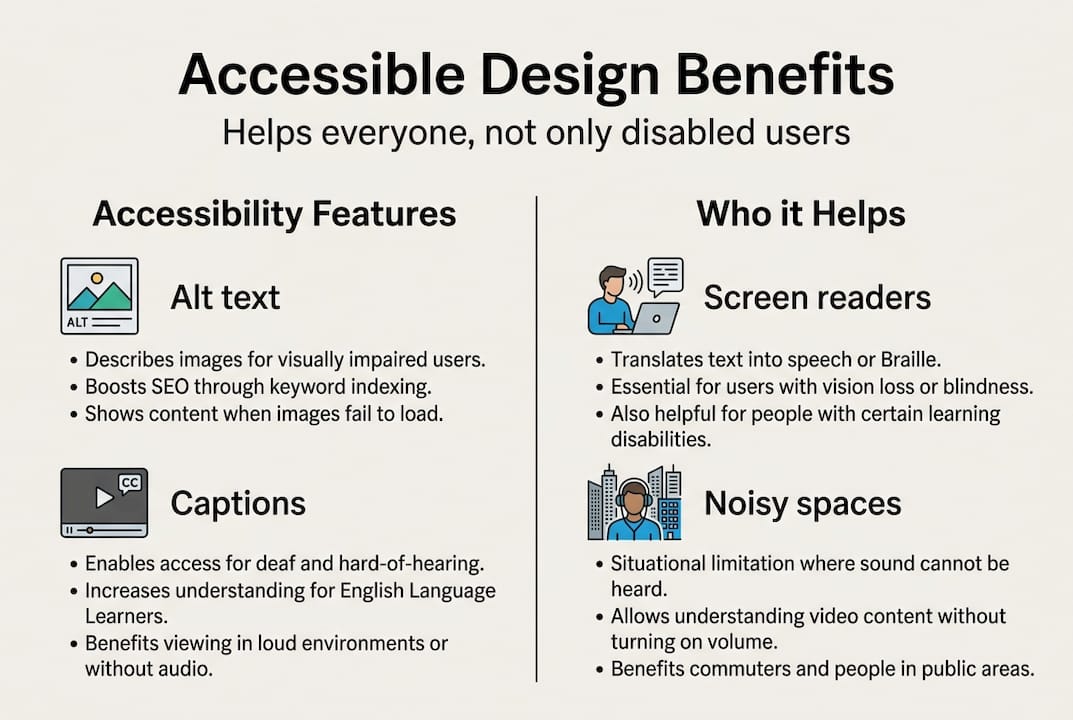
These improvements also benefit visitors who have no disability at all. Captions help anyone watching in a noisy environment. High contrast text is easier to read on any screen. Keyboard navigation helps power users who prefer not to use a mouse. Responsive design and accessibility overlap heavily, meaning a mobile-friendly site is often already partway to being accessible.
Once the top failures are fixed, publish an accessibility statement on your website. This signals to users and regulators that you take the issue seriously and are actively working toward improvement. Website development best practices in 2026 treat accessibility statements as a standard deliverable, not an optional extra.
Testing and evaluation: Ensuring ongoing accessibility
Once accessible features are in place, businesses must ensure those features are consistently working for all users.
The gold standard for evaluation is the WCAG-EM methodology, which stands for Website Accessibility Conformance Evaluation Methodology. It involves five steps: define the scope of your evaluation, explore the site to understand its structure, select a representative sample of pages, audit each page against WCAG criteria, and produce a detailed report. Automated tools alone cover only 30 to 50 percent of accessibility issues, so human testing is not optional.
Steps for a thorough accessibility audit:
- Define your scope: which pages, user flows, and content types are included
- Run automated scans using tools like Axe, WAVE, or Lighthouse
- Conduct manual keyboard navigation testing on all interactive elements
- Test with at least one screen reader, such as NVDA or VoiceOver
- Review results, prioritize fixes by severity and traffic impact
- Publish your findings and your remediation plan
Pro Tip: Automated tools are fast but blind to context. A human tester will catch issues like confusing link labels, illogical reading order, and form error messages that technically pass automated checks but completely fail real users.
WCAG 2.2 also introduced several edge cases that older audits often miss. Watch for these common overlooked failures:
- Focus indicators obscured by sticky headers or overlay elements
- Interactive content triggered by motion without a non-motion alternative
- Help mechanisms that are inconsistent across pages
- Forms that ask users to re-enter information they already provided
- Authentication steps that require solving puzzles or cognitive tests without an accessible alternative
Post-launch monitoring matters just as much as the initial audit. Schedule a review whenever you add new pages, update your CMS (content management system), or redesign any section. Reviewing your UX and site structure regularly keeps accessibility from drifting as your site grows. Knowing when to redesign is part of keeping your site both accessible and competitive.
Our take: What most business owners miss about accessibility
After working with businesses across industries, we’ve noticed a pattern: most owners treat accessibility as a one-time checkbox, something to fix once and forget. That mindset leads to real problems down the road.
Accessibility is an ongoing process. Your site changes constantly, new content gets added, plugins get updated, and what was compliant six months ago may not be today. The businesses that benefit most are the ones that build accessibility into their regular workflow rather than treating it as a crisis response to a legal complaint.
Here’s the contrarian truth: perfect compliance is not the goal. Pursuing AAA perfection on every page is expensive and often impractical. What matters is substantial conformance, meaning your site works well for the vast majority of users with disabilities. Fixing the top 20 percent of issues typically solves 80 percent of real-world barriers.
The ROI of accessibility is real. Sites that invest in effective web design with accessibility built in see lower bounce rates, better search rankings, and broader audience reach. It is a competitive advantage that most of your competitors are ignoring.
Start with what matters most. Fix your homepage. Fix your contact form. Fix your most-visited product or service pages. Then build from there.
Enhance your website’s accessibility with Depeche Code
Ready to make your site accessible to all and future-proof your business? At Depeche Code, we specialize in building and redesigning websites that meet modern accessibility standards without sacrificing design or performance.

Our team can audit your current site, identify priority failures, and implement fixes that move the needle fast. Whether you need a full website development overhaul, want to explore our free development offer, or need a targeted SEO plan that pairs with your accessibility improvements, we have options designed for businesses at every stage. Let’s build a site that works for everyone and ranks for the right reasons.
Frequently asked questions
What is website accessibility and why is it important for my business?
Website accessibility means designing your site so everyone, including people with disabilities can use it, expanding your market and reducing legal liability under ADA Title III.
How do I know if my website meets accessibility standards?
Check for WCAG AA compliance and run both automated and manual accessibility tests using the WCAG-EM methodology to identify and address issues systematically.
What are common accessibility failures on business websites?
Missing alt text, poor color contrast below 4.5:1, inaccessible forms, and lack of keyboard navigation are the most frequent issues found during audits.
What are the latest changes in accessibility standards?
WCAG 2.2 now addresses mobile and cognitive challenges, while WCAG 3.0 will offer more flexible, outcome-based guidelines using a bronze, silver, and gold rating model.
How often should accessibility audits be done?
Conduct an audit whenever your site changes significantly, and use the WCAG-EM approach to review accessibility at least once per year for consistent compliance.