

TL;DR:
- A website prototype is an interactive model used to test and refine design and usability before development. Prototypes help identify issues early, saving time and reducing risk during website creation. Building and testing prototypes with real users improves outcomes and stakeholder agreement, leading to more successful websites.
A website prototype is an interactive, testable model of a website built before development begins, allowing you to visualize, test, and refine design and functionality without writing a single line of code. In UX design, the formal term is “interactive prototype,” and it sits between a static wireframe and a finished product. Understanding what is a website prototype gives you a concrete way to validate ideas early and catch expensive mistakes before they reach your development budget. For entrepreneurs and business owners, prototyping is the difference between launching a site that works and paying to rebuild one that doesn’t.
What is a website prototype, and how does it differ from a wireframe?
A website prototype is a clickable, interactive model that simulates how a real website will look and behave. A wireframe is a static sketch showing layout and structure. A mockup adds visual design but still lacks interactivity. The prototype is the first version you can actually click through, test with real users, and use to gather feedback.

The distinction matters because each artifact answers a different question. Wireframes answer “Where does content go?” Mockups answer “What will it look like?” Prototypes answer “Does this actually work for users?” Skipping directly from wireframe to development is one of the most common and costly mistakes business owners make.
Prototypes also serve as a communication tool. When you show a clickable model to a developer, a stakeholder, or an investor, everyone sees the same thing. Misunderstandings that would surface as expensive change requests during development get resolved in a 30-minute review session instead.
What are the main types and fidelity levels of website prototypes?
Fidelity refers to how closely a prototype resembles the final product. The two primary categories are low-fidelity and high-fidelity, and each serves a specific purpose in the design process.
Low-fidelity prototypes are quick sketches or basic wireframes that test structure and navigation. They lack color, real content, and polished visuals. Their value is speed. You can sketch a lo-fi prototype on paper in an hour, test it with five users, and learn whether your navigation makes sense before investing a week in design work.
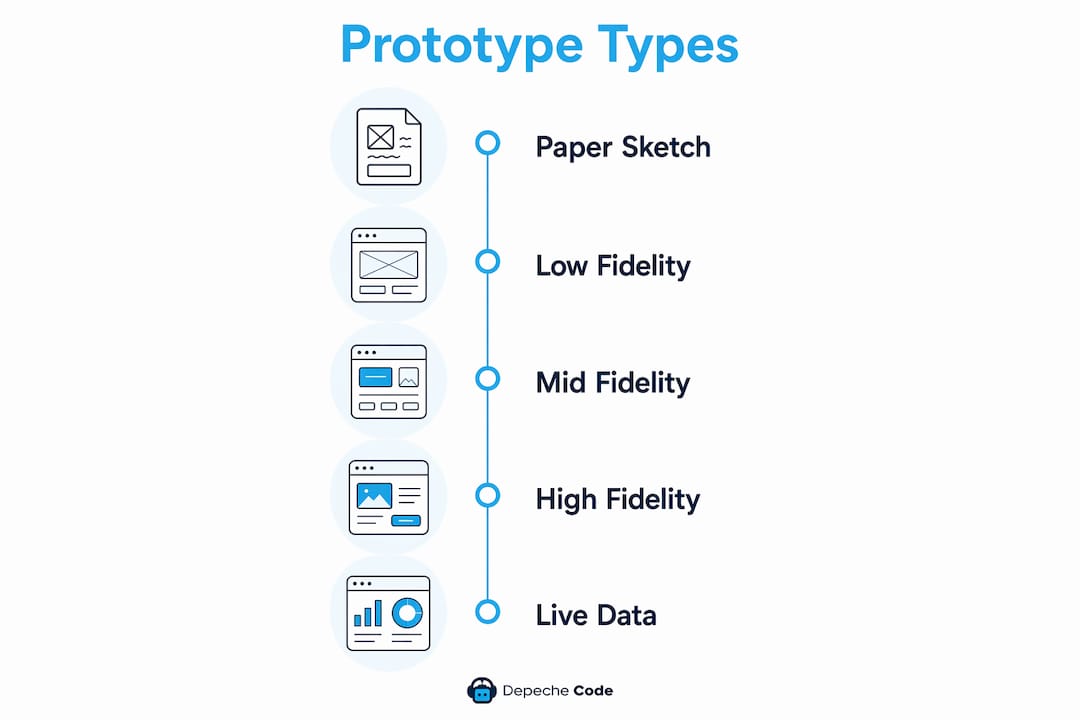
High-fidelity prototypes include real colors, typography, animations, and full interactivity. They closely simulate the finished product and are used for usability testing and stakeholder presentations. Hi-fi prototypes take longer to build but produce feedback that is far more specific and reliable.
| Prototype type | Fidelity level | Best used for | Time to build |
|---|---|---|---|
| Paper sketch | Very low | Early concept validation | Under 1 hour |
| Wireframe prototype | Low | Navigation and layout testing | 2–8 hours |
| Mid-fidelity prototype | Medium | Flow and interaction testing | 1–3 days |
| High-fidelity prototype | High | Usability testing, investor demos | 3–10 days |
| Live-data prototype | Very high | Performance and real-content testing | 1–2 weeks |
Mid-fidelity prototypes sit between the two extremes. They include basic visual styling and real content but skip animations and final polish. Many teams use mid-fidelity prototypes when they need faster feedback than a hi-fi allows but more realism than a lo-fi provides.
A less common but powerful option is the live-data prototype. This version pulls real content from a database or API to test how the site performs under actual conditions. It is most useful when content volume or data structure could affect the user experience in ways a static prototype cannot reveal.
Why are website prototypes important for entrepreneurs and business owners?
Prototyping reduces risk by surfacing problems before development begins, when changes are cheap. Once a developer has built a feature, changing it costs time and money. Catching the same problem in a prototype costs a conversation.
The business case for prototyping is direct:
- Risk reduction. Testing a prototype with five users before development reveals the majority of critical usability issues. Fixing them at the prototype stage costs a fraction of fixing them post-launch.
- Stakeholder alignment. A clickable model gives every decision-maker, from your marketing lead to your CFO, a shared reference point. Disagreements get resolved before they become development conflicts.
- User validation. Prototypes let you test whether real users can complete key tasks, like finding a product, filling out a form, or making a purchase, before you spend money building those flows.
- Investor credibility. A polished interactive prototype signals that you have done the work. Investors and partners respond to a demo they can click through far more than a slide deck with screenshots.
- Faster iteration. Because prototypes are not real code, you can change them quickly. A design direction that fails in testing can be revised and retested within days, not weeks.
Pro Tip: Show your prototype to users who match your actual customer profile, not just colleagues or friends. Feedback from someone who has never seen your product is worth ten times more than feedback from someone who already understands your business.
Prototyping also supports the website design process by creating a clear handoff document for developers. Instead of interpreting a static design file, developers work from a prototype that shows exactly how interactions should behave.
How to create an effective website prototype: step-by-step process
Building a prototype that produces useful results requires a structured approach. Skipping steps produces a prototype that looks good but teaches you nothing.
-
Define a clear research question. SMART prototyping questions focus your effort and prevent scope creep. Instead of “Does the site look good?” ask “Can a first-time visitor find our pricing page within 30 seconds?” Specific questions produce specific answers.
-
Conduct user research. User interviews and personas are the foundation of effective prototyping. Talk to five to eight people who represent your target customers. Understand their goals, frustrations, and mental models before you sketch a single screen.
-
Sketch core functionality. Start with paper or a basic digital tool. Map the critical user paths, the sequences of steps a user must complete to achieve their goal. For an e-commerce site, that path might be: land on homepage, find product, add to cart, check out.
-
Build the prototype at the right fidelity. Match fidelity to your goal. If you are testing navigation, a lo-fi prototype is enough. If you are presenting to investors or testing visual design, build hi-fi. Spending three days on a hi-fi prototype to answer a navigation question is wasted effort.
-
Test with real users. Observe users silently as they attempt tasks. Do not guide them or explain the interface. The moments where they hesitate, click the wrong element, or express confusion are your most valuable data points.
-
Iterate based on findings. Revise the prototype to address the problems you observed, then test again. This iterative cycle continues until users can complete critical tasks without friction. Most projects require two to four rounds of testing before a prototype is ready for development handoff.
Pro Tip: Record your testing sessions with permission. Watching a 10-minute clip of a user struggling with your checkout flow is more persuasive to stakeholders than any written report.
For business owners who want to move faster, no-code and low-code platforms now allow startups to build production-ready applications directly. This approach works when requirements are already well-defined and can compress the timeline between prototype and live product significantly.
Depechecode works with business owners through this exact process, translating research and wireframes into professional website designs that are built to convert.
Common mistakes and best practices in website prototyping
Most prototyping failures trace back to a small set of repeatable mistakes. Knowing them in advance saves you weeks of wasted effort.
Common mistakes to avoid:
- Starting without a clear question. Unfocused prototyping produces unfocused results. If you cannot state what you are trying to learn, you are not ready to build.
- Building too much. Prototypes are hypotheses, not products. The critical path rule says to build only the screens needed to answer your specific research question. Every extra screen adds time without adding learning.
- Ignoring user feedback. Business owners sometimes dismiss feedback that contradicts their vision. User struggles are data, not opinions. If three out of five users cannot find your contact page, the problem is the design, not the users.
- Treating the prototype as the final product. Teams that fall in love with their prototype resist changing it. A prototype exists to be broken, revised, and replaced.
Best practices that produce results:
- Keep prototypes minimal but functional enough to test the specific task you care about.
- Test with users who have never seen the product before, and rotate participants between rounds.
- Document every session with notes or recordings so the full team can review findings.
- Separate the roles of designer and test facilitator to reduce unconscious bias during sessions.
Pro Tip: If you are a solo founder without a design team, start with a paper prototype and test it with five people before spending any money on digital tools. The insights you get from a $0 paper test often reshape the entire product direction.
For a deeper look at building the structural foundation before prototyping, the guide on creating website wireframes covers the step before you add interactivity. Professional service firms, including those using platforms like ClickCoach for client management, follow this same sequence to build digital products that actually serve their users.
Key takeaways
A website prototype is the single most effective tool for reducing digital project risk before development begins.
| Point | Details |
|---|---|
| Prototype vs. wireframe | A prototype is interactive and testable; a wireframe is a static layout sketch. |
| Fidelity levels matter | Match prototype fidelity to your goal: lo-fi for navigation, hi-fi for usability testing. |
| Business case is clear | Prototyping catches design flaws early, saving time and money compared to post-launch fixes. |
| Iteration is the method | Test with real users, observe silently, revise, and repeat until critical paths work without friction. |
| SMART questions drive results | Define a specific, measurable research question before building any prototype screen. |
Why I think most business owners prototype too late
After working on digital projects across dozens of industries, the pattern I see most often is this: a business owner commissions a full website build, launches it, and then discovers that users cannot find the most important page. The fix costs more than the original prototype would have.
The conventional advice is to prototype early. My observation is that most business owners prototype once, if at all, and treat it as a formality rather than a genuine learning exercise. The value of prototyping is not in the artifact. It is in the conversations it forces and the assumptions it breaks.
The business owners who get the most from prototyping treat every round of testing as a chance to be wrong. They go in expecting to discover that their assumptions were off. That mindset shift is what separates a prototype that produces real insight from one that just confirms what the team already believed.
Modern rapid development tools are changing the calculus slightly. When requirements are clear and the team is experienced, building a live product directly can be faster than building a throwaway prototype. But that shortcut only works when you have already done the user research. Skipping research and skipping prototyping together is how you end up rebuilding a site six months after launch.
Start small. Test with five users. Revise once. Then build.
— Donovan
Depechecode builds websites the right way from the start
Depechecode is a full-service digital agency based in Orlando that applies prototyping and iterative design principles to every website project it takes on. Business owners who work with Depechecode skip the guesswork that comes from jumping straight into development without a tested design foundation.
Whether you need a custom website design built around your users’ actual behavior, or you want to explore a free website development option to get started without a large upfront investment, Depechecode has a path for your business. The team handles everything from initial research and wireframing through to launch and ongoing maintenance, so you get a site that works the first time.
FAQ
What is a website prototype in simple terms?
A website prototype is a clickable, interactive model of a website that lets you test design and navigation before any real development begins. It is built to gather feedback and validate ideas, not to serve as a finished product.
How is a prototype different from a mockup?
A mockup is a static visual showing how a website will look, while a prototype adds interactivity so users can click through pages and complete tasks. Prototypes reveal usability problems that mockups cannot.
What are the main types of website prototypes?
The main types are low-fidelity prototypes, which are simple sketches or wireframes, and high-fidelity prototypes, which include real visuals, animations, and full interactivity. Mid-fidelity and live-data prototypes sit between these two extremes.
How many users do I need to test a prototype?
Testing with five users is enough to identify the majority of critical usability issues in a prototype. Rotating participants between testing rounds gives you fresh perspectives as you iterate.
Do I need a designer to build a website prototype?
No. Paper sketches and basic digital tools allow anyone to build a lo-fi prototype without design experience. For high-fidelity prototypes intended for investor presentations or formal usability testing, working with a professional designer produces more reliable results.