TL;DR:
- On-page SEO involves optimizing all webpage elements like content, tags, URLs, and technical signals to enhance search engine understanding and ranking. It provides faster, more controllable results than off-page strategies and requires a systematic approach considering intent, usability, and relevance. Consistent implementation of best practices, including proper internal linking and technical markup, builds a strong foundation for long-term SEO success.
Most people hear “on-page SEO” and immediately think keywords. Stuff your target phrase into a page a dozen times, and you’re done, right? Not even close. What is on-page SEO really? It’s the practice of optimizing every element directly on your webpages, from your content and HTML tags to your URL structure and internal links, so both search engines and real users can understand, trust, and rank your pages. On-page SEO gives you direct control over your rankings faster than almost any other SEO tactic. This guide covers every layer of it.
Table of Contents
- Key Takeaways
- What is on-page SEO and why it matters
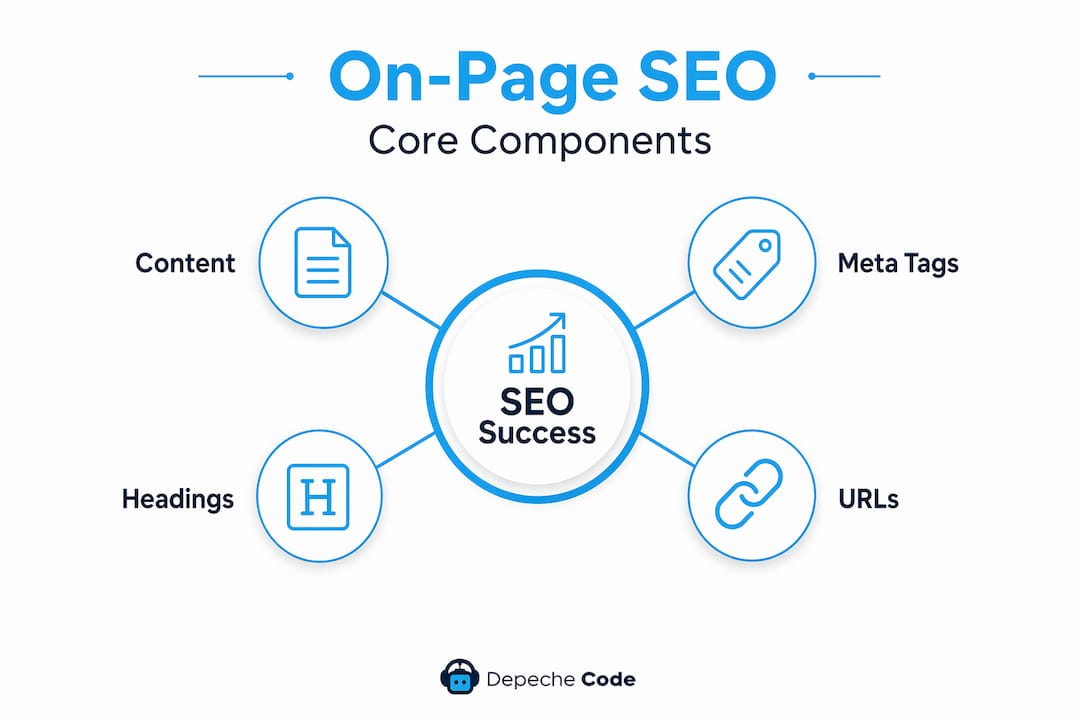
- Core components: content, meta tags, headings, and URLs
- Technical on-page elements that influence rankings
- Internal linking strategies that actually work
- How to improve on-page SEO through usability and relevance
- My take on what most on-page SEO advice gets wrong
- How Depechecode helps you put on-page SEO into practice
- FAQ
Key Takeaways
| Point | Details |
|---|---|
| On-page SEO goes beyond keywords | It covers content, HTML tags, URLs, internal links, and technical signals that signal relevance to search engines. |
| Metadata should come last | Write your title tags and meta descriptions after finishing your content to prevent mismatches and snippet rewrites. |
| Technical elements matter too | Canonical tags, schema markup, and page speed are on-page factors that affect indexing and rich result eligibility. |
| Internal links distribute authority | Place descriptive internal links early in your content to help crawlers and users navigate related pages. |
| Intent drives page design | Build pages around what users actually want to accomplish, not around a single keyword in isolation. |
What is on-page SEO and why it matters
Understanding on-page optimization means recognizing that it operates on two levels at once. The first level is what users see: your content, headings, and formatting. The second level is what search engines read: your HTML structure, metadata, and technical signals embedded in the page’s code. When both levels work together, your pages communicate relevance clearly to Google while delivering a genuinely useful experience to visitors.
On-page SEO includes title tags, meta descriptions, header tags, body content, URL structure, internal links, and image alt text. Each of these elements sends a signal. None of them works in isolation. A perfectly written article with a vague title tag will lose clicks in search results. A well-optimized title tag pointing to thin content will fail to hold rankings once Google measures user behavior.
The importance of on-page SEO also comes down to speed. Off-page tactics like link building take months to show results. Fixing a title tag, tightening your headings, or adding a canonical tag can produce measurable changes in weeks. That speed of iteration is one reason experienced SEOs treat on-page work as the foundation before anything else.
Core components: content, meta tags, headings, and URLs
These are the building blocks every on-page SEO checklist should cover. Get these right before worrying about anything more advanced.
Content quality and search intent
Your content must match what the person searching actually wants to find. A page targeting “how to file an LLC” should answer that question directly with steps, not bury the answer under paragraphs of background history. Usability, clarity, and relevance are the three content necessities that Search Engine Land identifies as central to effective on-page SEO.
Title tags and meta descriptions
Title tags around 60 characters and meta descriptions around 155 characters are the recommended lengths for optimizing click-through rates in search results. Think of your title tag as a headline ad for your page. The meta description is the supporting copy. Both must be specific, include your target keyword naturally, and give users a clear reason to click.
Headings (H1 through H6)
Your H1 should appear once, contain your primary keyword, and describe exactly what the page covers. Subheadings (H2, H3) break your content into scannable sections that help both users and crawlers understand the page’s structure and topic hierarchy.
URL structure
Keep URLs short, descriptive, and lowercase. A URL like "/on-page-seo-guidecommunicates topic immediately. A URL like/p?id=4938` tells nobody anything. Avoid stop words and unnecessary folders.
Here is a quick summary of the core elements every on-page SEO checklist should include:
- Target keyword in title tag, H1, and first 100 words of body content
- Meta description under 155 characters with a clear value proposition
- Logical heading hierarchy from H1 down through subheadings
- Short, keyword-rich, descriptive URLs
- Image alt text describing what each image shows
- Body content that directly answers the search query
Pro Tip: Write your metadata last. Once your content is finalized, you know exactly what the page says, which means your title tag and meta description will accurately reflect it. Writing metadata first often leads to mismatches that cause Google to rewrite your snippets entirely.
Technical on-page elements that influence rankings
Most discussions of on-page optimization stop at content and meta tags. That’s a mistake. Technical on-page elements like canonical links, meta robots, schema markup, and page speed are all on-page SEO factors that directly affect how your pages are crawled, indexed, and displayed.
| Technical Element | What It Does | SEO Impact |
|---|---|---|
| Canonical tag | Tells search engines which version of a URL is the primary one | Prevents duplicate content from splitting ranking signals |
| Meta robots tag | Controls whether crawlers index a page or follow its links | Keeps low-value pages out of the index |
| Schema markup | Adds structured data that describes page content | Enables rich results like star ratings, FAQs, and event details |
| Page speed | Measures how fast a page loads for real users | Affects both rankings and user engagement rates |
Schema markup deserves special attention. Schema enables rich snippets, increases your visibility in search results, and can significantly lift click-through rates. A local business that adds review schema might show star ratings in the search result, which immediately looks more trustworthy than a plain blue link. A recipe page with schema can display cooking time and calorie counts directly in Google.
Canonical tags come into play whenever you have multiple URLs serving similar or identical content. E-commerce sites are particularly vulnerable here: the same product might be accessible through six different filtered URLs. Without a canonical tag pointing to the primary URL, you split your authority across all six versions, and none of them rank as well as the consolidated page would.
Pro Tip: Check your SEO best practices checklist to confirm that meta robots tags on key pages are set to index, follow. Accidentally leaving a noindex tag on a page you want ranked is more common than you’d think, and it’s an invisible problem until you audit for it.
Internal linking strategies that actually work
Internal links are the connective tissue of your website. They tell search engines how your content relates to itself, where authority should flow, and which pages you consider most important. Done well, they also guide users to exactly the next piece of content they need.

Positioning internal links early in page content helps crawlers discover related pages faster and distributes link equity more effectively. A link buried in your footer carries less weight than the same link placed in the second paragraph of a well-trafficked article. Both crawlers and users reach the early link first.
Here are the best practices for internal linking that experienced SEOs follow:
- Use descriptive anchor text that reflects the topic of the destination page, not generic phrases like “click here.”
- Link from your highest-traffic pages to the pages you most want to rank.
- Place your most important internal links in the body content, not just the navigation or footer.
- Aim for 3 to 5 internal links per 1,000 words as a baseline, adjusting for content depth and site size.
- Audit your site quarterly to find and fix orphan pages (pages with no internal links pointing to them).
- Avoid linking too many pages from a single article, which dilutes the value sent to each destination.
The most common mistake is treating internal linking as an afterthought. Marketers write the article, publish it, and never think about which existing pages should link to it or which new pages it should link out to. That’s leaving real SEO value on the table. When you publish a new page, spend five minutes finding two or three relevant older pages on your site that can naturally link to it. That small habit compounds significantly over time.
Understanding on-page optimization at a deeper level means recognizing that your internal link structure is essentially a map you draw for Google. The pages you link to most often signal importance. The anchor text you use signals topic. Both feed directly into how Google interprets your site’s authority distribution.
How to improve on-page SEO through usability and relevance
You can have technically perfect metadata and still rank poorly if your page fails the user. This is where balancing keyword relevance with user experience becomes the defining factor in sustained rankings.
The best practices for on-page SEO in this area fall into three categories:
Usability
- Make every page mobile-friendly with responsive design and tap-friendly buttons
- Compress images and use modern formats like WebP to cut load times
- Avoid intrusive popups that block content immediately on page load
- Use accessible media: add captions to videos and alt text to every image
Clarity
- Use short paragraphs, subheadings, and white space to make content easy to scan
- Lead with the answer, then explain the reasoning
- Use numbered lists for steps and bullet points for features, not the reverse
- Bold key terms the first time they appear to help skimmers catch the main points
Relevance
- Match your content depth to the complexity of the query. A question like “what is canonical tag” needs a clear two-paragraph answer, not a 3,000-word guide
- Update older pages when the information becomes stale, because freshness is a signal Google weighs
- Design pages around intent by building informational pages as educational resources and transactional pages as conversion tools, never mixing the two
A real-world example: a service company rewrote its “Contact Us” page to include the city name, a one-line description of what they do, and a map embed. That page began ranking for “[city] + service” queries it never ranked for before, simply because the content finally matched what local searchers wanted to find.
My take on what most on-page SEO advice gets wrong
I’ve audited dozens of websites over the years, and the pattern is always the same. Business owners and even experienced marketers treat each page like a standalone keyword experiment. They pick a phrase, stuff it into the title, add it to the first paragraph, and call the page “optimized.” But on-page SEO works best when you design pages around intent-appropriate templates, not individual keywords.
What I mean is this: an informational page and a product page are fundamentally different templates. They serve different user goals, need different structures, and should be optimized differently. When someone treats a product page like a blog post because they’re targeting the same keyword, both pages suffer.
The metadata-first habit is the other mistake I see constantly. Someone writes the title tag before the content exists, and then the actual content drifts in a different direction during writing. Now the title promises something the page only partially delivers, Google rewrites the snippet, and the click-through rate drops. The fix is embarrassingly simple: finalize your metadata only after you know exactly what the page says.
My honest take is that on-page SEO rewards the people who think about it systematically rather than tactically. Build a consistent structure for each page type you publish. Apply it every time. The compounding effect over a full site is far greater than the one-off impact of any single “perfectly optimized” page.
— Donovan
How Depechecode helps you put on-page SEO into practice
Understanding on-page SEO is the first step. Executing it consistently across an entire website is where most businesses get stuck.

Depechecode is a full-service digital agency based in Orlando that specializes in exactly this. Their website design and development service builds sites from the ground up with on-page SEO baked into every template, from URL structure and heading hierarchy to schema markup and page speed. For businesses that already have a site and need a clear path to better rankings, their SEO options and plans deliver structured, thorough on-page optimization alongside technical audits and ongoing content support. Whether you’re starting fresh or fixing an existing site, Depechecode builds the foundation that makes your SEO work.
FAQ
What does on-page SEO include?
On-page SEO includes title tags, meta descriptions, header tags, body content, URL structure, internal links, image alt text, canonical tags, schema markup, and page speed optimizations. These are all elements you control directly on your webpages.
How is on-page SEO different from off-page SEO?
On-page SEO covers everything you optimize on your own website, while off-page SEO refers to external signals like backlinks and brand mentions. On-page changes produce faster, more controllable results.
What factors affect on-page SEO the most?
Content relevance to search intent, title tag and meta description quality, heading structure, internal linking, and technical elements like canonical tags and schema markup all significantly affect on-page SEO performance.
How long should a title tag be for SEO?
Title tags around 60 characters are optimal for click-through rates in search results. Longer titles get cut off in the SERP, which reduces clarity and can hurt clicks.
How often should I update on-page SEO?
Review your most important pages at least once per quarter. Update content for freshness, check that metadata still matches page content, and look for new internal linking opportunities as your site grows.