

TL;DR:
- Mobile app development involves planning, designing, building, testing, and launching an application to achieve specific business goals. Success depends more on problem validation and user experience design than on the choice of technology or platform. Ongoing post-launch management and user feedback are crucial for long-term app growth and retention.
Mobile app development is far more than writing code. It is the end-to-end process of planning, designing, building, testing, and launching an application that runs on a smartphone or tablet. If you are an entrepreneur trying to figure out whether your business needs an app, or how to get one built without wasting money, understanding this process at a foundational level changes everything. This guide walks you through every stage, from the idea in your head to a live product in the app store, with a focus on business outcomes rather than technical details.
Table of Contents
- Key takeaways
- What mobile app development actually means
- Steps in mobile app development
- Designing an app experience users actually want
- Choosing your tech stack and development approach
- Managing your app after launch
- My honest take on what actually determines success
- Build your app the right way with Depeche Code
- FAQ
Key takeaways
| Point | Details |
|---|---|
| More than just coding | Mobile app development covers strategy, design, development, testing, and post-launch management as a full process. |
| Validation comes first | Defining the problem your app solves before writing a single line of code prevents the most expensive mistakes. |
| Design drives retention | User experience design determines whether people keep using your app or delete it within a week. |
| Cross-platform saves money | Frameworks like Flutter and React Native cut development costs by 30 to 50% versus building two separate apps. |
| Post-launch work is ongoing | Monitoring, updating, and iterating after launch is what separates thriving apps from abandoned ones. |
What mobile app development actually means
At its core, mobile app development is the structured process of turning a business idea into a functional application that users can download and interact with on their phones. That process includes everything from defining your goals and researching your users, to writing the code, running tests, submitting to the Apple App Store or Google Play, and managing the app after it goes live.
There are three main types of apps you can build:
- Native apps are built specifically for one platform, either iOS using Swift or Android using Kotlin. They deliver the best performance and the deepest integration with device hardware, like the camera or GPS.
- Hybrid apps combine web technologies with a native shell, making them faster to build but sometimes limited in performance compared to fully native solutions.
- Cross-platform apps use frameworks like Flutter or React Native to write one codebase that runs on both iOS and Android. In 2026, cross-platform frameworks dominate the market because they reduce development time and costs by 30 to 50% without sacrificing user experience for most business applications.
One thing that trips up many business owners is assuming any app will do. The platform you choose and how strictly you follow its design standards matters enormously. App quality perception is determined within seconds, which is why Apple’s Human Interface Guidelines and Google’s Material Design exist. Ignoring them signals low quality to your users before they even try a single feature.
| App type | Best for | Cost level | Performance |
|---|---|---|---|
| Native | Performance-critical apps, complex hardware use | High | Highest |
| Cross-platform | Most business apps, budget-conscious builds | Medium | High |
| Hybrid | Simple content or info-based apps | Low | Moderate |
Steps in mobile app development
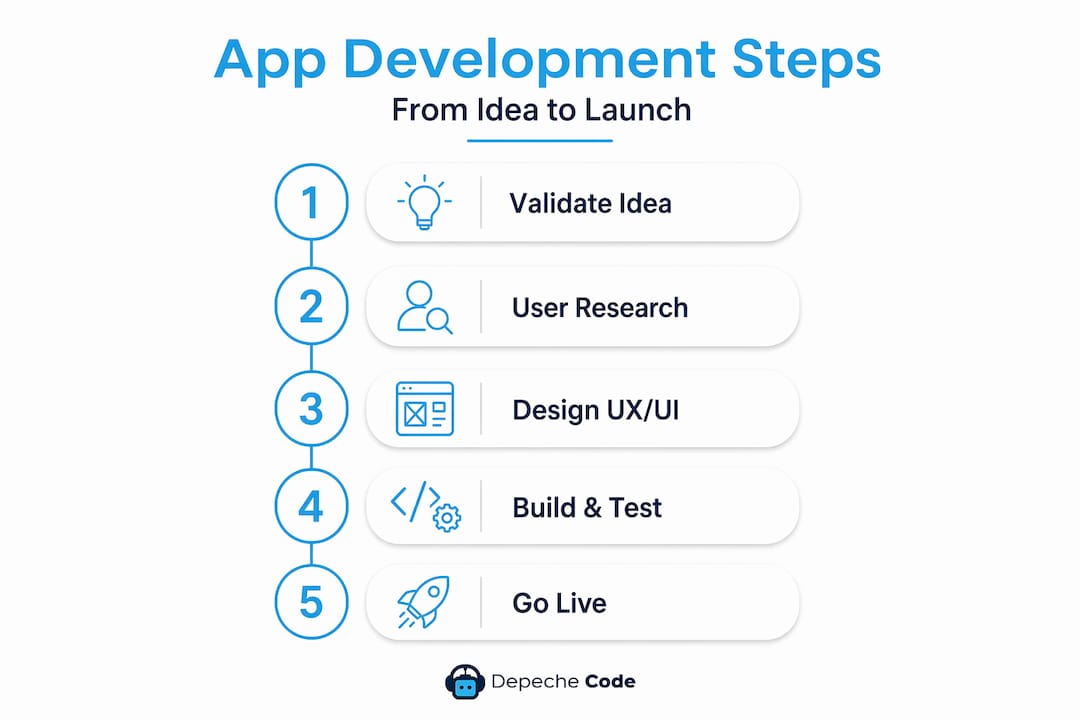
The steps in mobile app development follow a logical sequence. Skipping early stages to get to coding faster is one of the most reliable ways to waste your budget.
-
Define the problem. Before anything else, get specific about what your app solves and for whom. Skipping early validation is the leading cause of app failure. Most failed apps were not badly built. They solved problems users did not actually have.
-
Research your market and users. Interview potential users. Study how competitors have approached similar problems. Understand what frustrates your audience about existing solutions.
-
Plan your MVP. The Minimum Viable Product approach focuses your first release on the smallest set of features that solves the core problem. The MVP method reduces costs and speeds time to market by letting real user feedback guide every build after the first one.
-
Design the user experience. Map out user flows and create wireframes before any visual design work begins. This stage is about logic, not aesthetics.
-
Build and test in sprints. Development should run in short cycles with testing built in throughout. Automated testing during sprints improves reliability and catches bugs far earlier than testing everything at the end.
-
Submit to app stores. Both Apple and Google have review processes with specific technical and content requirements. Budget time for this, especially with Apple, whose review can take several days.
-
Launch and monitor. Publishing is not the finish line. It is the starting gun for the next phase of work.
Pro Tip: Before you write a single feature requirement, ask five potential users to describe the problem you think you are solving. If their description does not match yours, your planning needs to go back to step one.
Understanding the mobile app development process in this structured way helps you budget more accurately, set realistic timelines, and know exactly where to put your attention at each stage.
Designing an app experience users actually want
Mobile application design is where many business owners underestimate the scope of work involved. Design is not about making something look attractive. It is about making something work so intuitively that users never have to stop and think about how to use it.
User experience design determines whether someone keeps your app or deletes it. A well-designed user experience that prioritizes clear user flows over decorative elements drives significantly better adoption and retention. The order of operations matters: map out the flows first, validate them with real users, then add the visual layer.
The tools that make this possible at the planning stage include:
- Figma for wireframing and high-fidelity mockups that designers and developers share in one place
- ProtoPie for creating interactive prototypes that simulate real app behavior without any coding
- Maze for remote usability testing that collects user behavior data on your prototype before development begins
Interactive prototyping tools like Figma and ProtoPie allow you to test user flows long before a single line of code is written, which reduces redesign time significantly and improves the final product. This is not optional. It is the single highest-return activity in the entire development process.
Pro Tip: Run usability tests with five users on your prototype. Research consistently shows that five testers uncover around 85% of usability problems. You do not need a large sample to find the issues that matter.
For more depth on what separates good design from great design in a business context, the UX tips for business apps resource from Depeche Code is worth your time.
Choosing your tech stack and development approach
Once your design is validated, you face a decision that shapes your budget, your timeline, and your maintenance burden for years to come. That decision is your technology stack.
For most business apps in 2026, cross-platform development is the right starting point. Cross-platform development cuts costs by 30 to 40% compared to building separate native apps for iOS and Android. Flutter, backed by Google, and React Native, backed by Meta, are the two leading frameworks. Both allow a single team to maintain one codebase that serves both platforms, which also reduces your long-term maintenance costs.
Native development still makes sense in specific scenarios, most commonly when your app needs deep integration with device hardware, real-time processing, or platform-specific features that cross-platform tools cannot replicate well.
| Factor | Cross-platform | Native |
|---|---|---|
| Initial cost | Lower (one codebase) | Higher (two builds) |
| Maintenance | Simpler | More complex |
| Performance | High for most apps | Highest |
| Time to market | Faster | Slower |
| Best use case | Business, ecommerce, services | Games, AR, hardware-heavy apps |
Beyond the front-end framework, your app almost certainly needs a backend. This is the server, database, and API layer that stores data and connects your app to your business systems. Custom mobile apps give businesses with unique workflows the ability to integrate directly with their operational systems, whether that is a CRM, inventory platform, or booking engine. Off-the-shelf solutions rarely accommodate that level of specificity.
If your business is weighing whether to hire a full in-house team or work with an outside partner, understanding offshore staffing benefits can help you make a more informed cost and quality comparison.
Managing your app after launch
Launching your app is a milestone, not a conclusion. The apps that grow are the ones with an active post-launch strategy built into the original plan.
Post-launch management covers several areas that directly affect your business results:
- Analytics and user behavior tracking. Tools like Firebase, Mixpanel, and Amplitude show you exactly how users move through your app, where they drop off, and which features they ignore. Post-launch monitoring tools like these are what make data-driven iteration possible rather than guesswork.
- Security and OS updates. Both Apple and Google release major OS updates annually. Each one can break features or create security vulnerabilities in apps that are not actively maintained.
- User feedback loops. In-app feedback prompts, app store reviews, and direct user interviews give you a constant stream of information about what to build next.
- Feature roadmap planning. Your MVP was the starting point. Version 2 and beyond should be shaped by real usage data, not what you originally assumed users would want.
The importance of mobile app development for a business is not fully realized at launch. It compounds over time as you iterate based on what users actually do, not what you expected them to do.
For businesses that do not have an internal team handling ongoing maintenance, partnering with an agency that provides app hosting and maintenance removes the operational burden entirely and keeps the app stable and current.

My honest take on what actually determines success
I have watched a lot of app projects play out, from ones that built real businesses around them to ones that burned through budgets and launched to crickets. The pattern is almost always the same.
The apps that fail were built by people who fell in love with the idea of an app before they understood the problem they were solving. They hired developers without doing user research, built feature lists based on what competitors had rather than what users needed, and treated launch as the end goal. The apps that succeed started with an uncomfortable amount of time in the validation stage, and the founders were willing to hear “no, that feature doesn’t matter” from real users before spending money on development.
The MVP mindset is not just a cost-saving trick. Aligning development with actual market needs through early user feedback is how you build something people actually use. I have seen businesses spend a fraction of a typical budget and build apps that drove genuine revenue, simply because they validated before they built.
My contrarian take on the technology conversation: most entrepreneurs spend too much time debating native versus cross-platform and not nearly enough time on what the app needs to do for users. The tech choice matters, but it rarely determines success or failure. The problem definition and the design do.
If you are a business owner reading this, the single most valuable thing you can do before your first meeting with a development partner is write one sentence: “My app helps [specific user] do [specific thing] in [specific situation].” If you cannot write that sentence clearly, you are not ready to build yet.
— Donovan
Build your app the right way with Depeche Code
If you have read this far, you understand that building a mobile app is a process that demands strategy, design expertise, and ongoing commitment. Doing it right from the start saves you from the costly rebuilds and low-retention launches that derail too many good business ideas.
Depeche Code is a top-rated digital agency based in Orlando that handles every stage of mobile app development for businesses, from idea validation and UX design to development, testing, app store submission, and post-launch maintenance. The team also offers website design and development services that complement your app strategy and create a consistent digital presence across every channel. Whether you are building your first app or scaling an existing one, Depeche Code delivers professional results without the enterprise price tag.
FAQ
What is mobile app development in simple terms?
Mobile app development is the full process of creating an application for smartphones or tablets, covering planning, design, coding, testing, and launch. It is not just about writing code. It includes the business strategy and user research that determine whether the app succeeds.
What are the main steps in mobile app development?
The core steps are idea validation, market research, MVP planning, UX/UI design, development, testing, app store submission, and post-launch iteration. Skipping the early validation steps is the most common cause of app failure.
What mobile app development tools are most used in 2026?
Flutter and React Native are the leading frameworks for building cross-platform apps, while Figma and ProtoPie are standard for design and prototyping. Post-launch, Firebase, Mixpanel, and Amplitude are widely used for analytics and user behavior tracking.
What is the importance of mobile app development for businesses?
A well-built app gives your business a direct, always-on channel to your customers, supports operational efficiency, and creates loyalty through better user experiences. Custom apps integrate with your specific workflows in ways that generic software simply cannot match.
How much does it cost to develop a mobile app?
Costs vary widely based on complexity, platform choice, and the development team. Choosing a cross-platform approach with Flutter or React Native can reduce costs by 30 to 50% compared to building separate native apps for iOS and Android, making it the practical choice for most business use cases.