

Building a simple app usually takes 8 to 14 weeks, a medium app runs 14 to 22 weeks, and a complex or enterprise build stretches 22 to 40 weeks or more. Development eats the largest share of that time in every tier. The real variable isn’t the code. It’s approvals, integrations, and how disciplined your team stays about scope once the project starts.
TL;DR:
- Timelines are driven by project complexity and organizational discipline, with simple apps taking 8 to 14 weeks and enterprise apps often exceeding 22 weeks.
- Delays mostly stem from approval bottlenecks, feature creep, and dependency wait times, not technical issues or team size alone.
- A thorough discovery and scoping process is essential to set realistic, phase-by-phase schedules that prevent schedule slippage.
- Cross-platform frameworks can reduce delivery time when platform-specific features are minimal, but native development offers more control for complex needs.
- Automating testing, instrumenting analytics early, and planning store submissions in advance significantly cut launch delays.
Table of Contents
- How Long Does App Development Take by Complexity?
- What Are the Phases of App Development?
- What Causes App Development Delays?
- What Does a Real App Development Schedule Look Like?
- How Can You Shorten an App Development Timeline?
- How Depechecode Plans and Delivers on Timeline
- Why Most App Timelines Fail Before Development Even Starts
- Get a Realistic Timeline for Your App
- Sources
- FAQ
How Long Does App Development Take by Complexity?
The single biggest mistake founders make is picking a timeline before they’ve defined what “done” actually means. A simple loyalty app and a telehealth platform with insurance verification are not the same species of project, even though both fit under the umbrella of “app development.” Complexity, not size of ambition, drives your calendar.
Here’s how the tiers typically break down in practice.
Simple apps are single-purpose tools: a booking form, a basic content app, a utility with one or two core screens. They usually have one user role, minimal backend logic, and few or no third-party integrations beyond authentication and maybe payments. Industry estimates put these MVPs at 8 to 14 weeks, though tightly scoped versions have shipped in as little as 8 to 12 weeks when the team keeps sprints disciplined and reviews frequent.
Medium apps add real complexity: multiple user roles, an admin panel, push notifications, a handful of API integrations (payment processors, mapping, calendar sync), and often a content management layer. Expect 14 to 22 weeks for this tier, with 12 to 16 weeks achievable only when scope stays locked and the team avoids mid-build feature additions.
Complex and enterprise apps involve things like real-time data sync, multi-role permission systems, regulatory compliance (HIPAA, financial reporting, accessibility mandates), custom backend architecture, or integration with legacy enterprise systems. These projects run 22 to 40-plus weeks. Some agency benchmarks land the higher end of “complex” closer to 16 to 22 weeks, but that assumes a mature team and no compliance overhead, which most enterprise builds don’t get to assume.
| Complexity Tier | Typical Week Range | What “Launch” Means |
|---|---|---|
| Simple | 8–14 weeks | MVP with core feature set, limited roles |
| Medium | 14–22 weeks | v1 with admin panel, integrations, notifications |
| Complex/Enterprise | 22–40+ weeks | Production-ready build with compliance sign-off and support plan |
A full, comprehensive mobile app project, factoring in everything from strategy through ongoing maintenance, often lands in the broader 20 to 40 week window that industry-wide benchmarks report. That range holds up well as a planning anchor regardless of which tier you fall into, because it accounts for the phases most teams underestimate: discovery and deployment buffer.
What changes between “MVP” and “production-ready” isn’t just polish. It’s whether you have monitoring, a support plan, and a realistic patch cadence in place before real users show up.
What Are the Phases of App Development?
Every app development timeline moves through the same six phases, regardless of complexity. What changes is how long each one takes and how much iteration happens inside it. Skipping or rushing any of these phases is where most schedule slippage begins.
-
Discovery (1 to 3 weeks). This is where you define goals, map user personas, set success metrics, and build the initial backlog with acceptance criteria for each feature. Teams that invest heavily here see measurably less rework later, because locking acceptance criteria before development starts prevents the most expensive kind of change: the kind that happens after code is already written.
-
Design (2 to 6 weeks). Wireframes come first, then a clickable prototype, then high-fidelity screens. The real driver of this phase’s length isn’t the design work itself. It’s how fast stakeholders approve each round. Set a fixed sign-off cadence (weekly, biweekly) and name exactly who has final say. Design phases balloon when three different executives each want a say in button color.
-
Development (varies widely, typically 6 weeks to 6 months). This is the longest and least predictable phase, and it’s where industry averages show the widest range. Sprint cadence matters here. Two-week sprints with a working build at the end of each one catch integration problems early instead of at the finish line. Set a code freeze date before development starts, not after you realize you’re behind.
-
QA, UAT, and Beta (2 to 4 weeks). This covers device coverage testing, real user accounts running through actual workflows, crash monitoring setup, and a structured bug bash before anything ships. Automated testing shortens this window considerably. Teams that invest in test automation and CI/CD pipelines cut manual regression testing dramatically, because the machine checks the boring, repetitive paths while humans focus on edge cases and usability friction.
-
Deployment and store review (1 to 2 weeks typical). Apple’s App Store review generally takes 2 to 4 days, but rejections happen often enough that you should budget for at least one resubmission cycle, adding another 2 to 4 days. Google Play tends to move faster but isn’t immune to policy holds either. Have your privacy policy links, demo credentials, and marketing screenshots ready well before feature freeze, not the night before submission.
-
Post-launch (ongoing). Budget a dedicated hotfix window for the first one to two weeks after launch. Real users find things beta testers never will. A staged rollout (releasing to a small percentage of users first) catches critical bugs before they hit everyone. Monitoring and your first update cycle should already be scheduled, not improvised.
Pro Tip: Treat analytics as a feature with acceptance criteria, not an afterthought. Instrumenting and testing core events like signup, purchase, and key conversions before launch is the only way your first-week data will actually mean anything.
What Causes App Development Delays?
Most delays aren’t technical. They’re organizational, and they’re predictable enough that you can plan around them before they happen.
- Feature creep is the single biggest killer of realistic schedules. Every new “quick add” mid-sprint pushes the whole calendar back. A formal change-control process, where new requests get logged, prioritized, and scheduled for a future release rather than jammed into the current one, protects your timeline.
- Third-party integrations (payment processors, mapping APIs, CRM sync, SSO providers) often take longer than expected because you’re waiting on someone else’s sandbox access or documentation. Inventory every dependency during discovery and request test credentials in week one, not week eight.
- Platform strategy creates real tradeoffs. Cross-platform frameworks can genuinely speed up cross-device delivery by sharing one codebase, but they trade some native performance and require extra testing for platform-specific quirks like camera behavior or push notification handling. Native development gives you tighter control but effectively doubles your build effort across two platforms.
- Compliance and regulatory work (HIPAA, PCI DSS, accessibility audits, app store policy reviews for sensitive categories) needs to surface during discovery, not during QA. Formal sign-offs from legal or compliance teams should be scheduled as calendar milestones, with buffer time built in, because these reviews rarely move on your timeline.
What Does a Real App Development Schedule Look Like?
Templates only help if they’re honest about tradeoffs. Here’s how the three complexity tiers actually play out week by week, along with what happens to your calendar if you cut the team down.
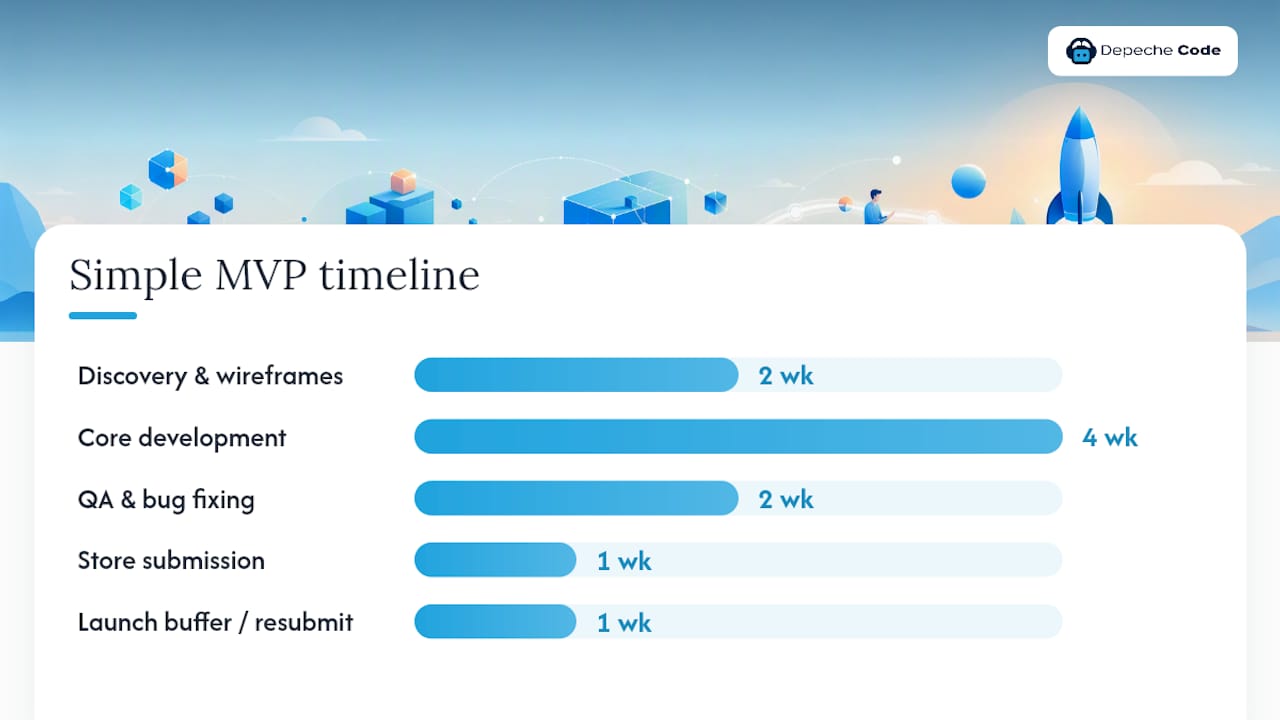
A simple MVP (roughly 10 weeks) might run: weeks 1 to 2 discovery and wireframes in parallel, weeks 3 to 6 core development with weekly demos, weeks 7 to 8 QA and bug fixing, week 9 store submission, week 10 buffer for resubmission and launch. Design and backend setup happen simultaneously here, which is only possible because scope is small enough that one team can hold the whole picture in their heads.
A medium app (roughly 18 weeks) needs more sequencing: weeks 1 to 3 discovery, weeks 4 to 7 design with two review checkpoints, weeks 8 to 14 development across three or four two-week sprints, weeks 15 to 17 UAT with real test accounts and a structured bug bash, week 18 deployment with resubmission buffer. Integrations get scheduled early, usually starting in sprint one, because payment and mapping APIs tend to surface surprises.
A complex app (28-plus weeks) generally needs a phased launch: an internal alpha, a limited external beta, then general availability, rather than one big bang release. Compliance checkpoints get scheduled as hard calendar dates tied to legal or audit sign-off, not “whenever development finishes.” Budget a two-week hotfix runway after each phase, not just after final launch.
| Project Type | Team Size | Realistic Timeline | What Shrinks the Team Costs You |
|---|---|---|---|
| Simple MVP | 2–3 people | 8–14 weeks | Slower QA, fewer parallel workstreams |
| Medium app | 3–5 people | 14–22 weeks | Integrations queue up sequentially instead of in parallel |
| Complex app | 5–8+ people | 22–40+ weeks | Compliance and QA compete for the same reviewers, stalling both |
The math is consistent across tiers: team size and timeline trade against each other in a fairly predictable way. Cut the team in half and you don’t cut the timeline in half. You often extend it, because a smaller team can’t run design, development, and QA in parallel.
How Can You Shorten an App Development Timeline?
Speed without sacrificing quality comes down to five decisions made early, not shortcuts taken late.
- Define a strict MVP and push non-essential features to a phased release plan. Every feature you defer to “v1.1” is time you get back now.
- Use cross-platform frameworks selectively. Flutter or React Native can meaningfully compress cross-device delivery, but they’re the wrong call when your app depends heavily on platform-specific hardware features or animation-heavy native UI.
- Run design and infrastructure setup in parallel, not sequentially. There’s no reason your backend and DevOps environment can’t be provisioned while designers are still finalizing screens.
- Automate what can be automated. CI/CD pipelines, automated end-to-end tests, and prebuilt integrations for common services (auth, payments, push) cut manual validation time substantially.
- Instrument analytics before launch, not after. Waiting until post-launch to add event tracking means your first weeks of real user data are essentially unusable.
Pro Tip: Prepare your store listing assets, privacy policy links, and demo credentials before feature freeze. Last-minute submission scrambles are one of the most avoidable causes of a blown launch date, and they’re entirely within your control.
For teams weighing cross-platform speed against native control, an AI-assisted prototyping workflow during discovery can help validate flows before a single line of production code gets written, which shaves real time off the design-to-development handoff.
How Depechecode Plans and Delivers on Timeline
Predictable timelines start with a scoping process that refuses to let assumptions slide into the backlog unchecked. A structured discovery phase with locked acceptance criteria before a single sprint begins is crucial, as this approach clearly separates fast projects from those that drift for months.
- Discovery and scoping sessions that define user roles, integrations, and success metrics before quoting a final timeline
- Transparent cost discussions are presented upfront and are aligned with the complexity tier the project falls into
- A documented development process built around sprint cadence, staged QA, and deployment readiness
- Post-launch support planning is included from the start rather than added after launch issues appear
Author: Donovan Wells, Founder and CEO of Depechecode. The firm’s approach centers on treating discovery as the phase that determines everything downstream, a lesson learned across projects where skipping it cost clients far more time than the phase itself ever would have taken.
Why Most App Timelines Fail Before Development Even Starts
Most timeline disasters aren’t caused by bad developers. They’re caused by decision-makers who commit to a launch date before anyone has defined what’s actually being built. I’ve watched projects lose entire months not to bugs, but to a founder who kept saying “just one more thing” three weeks before launch. Discipline here isn’t bureaucracy. It’s the difference between a schedule that holds and one that quietly slides by a week every Friday until nobody remembers the original date. Name one decision-maker, set a fixed review cadence, and budget real time for the unglamorous work: hotfixes, monitoring, and the update nobody thought they’d need in week one.
— Donovan Wells – Founder and CEO
Get a Realistic Timeline for Your App
The alternative to guessing at a launch date is a discovery-driven scoping process that maps your actual feature set, integrations, and compliance needs to a week-by-week plan before any contract is signed.

An initial scoping call covers target platforms, core user flows, and existing third-party services, allowing the project to be mapped to one of the complexity tiers covered above with real numbers instead of guesswork. From there, the mobile app development team builds a phase-by-phase schedule, and once you’re live, hosting and maintenance plans keep monitoring, updates, and hotfixes running without you having to staff that internally. If you’re ready to see what your specific project actually costs and takes, request a scoping consultation and get a real week-by-week plan instead of a rough guess.
Sources
- How long does a mobile app development project take? | Clutch
- Everything you need to know about mobile app analytics | AppsFlyer blog
FAQ
How Long Does It Take to Build a Simple App?
A simple app with limited features and one user role typically takes 8 to 14 weeks from discovery through launch.
How Long Does a Medium-Complexity App Take?
Medium apps with an admin panel, multiple integrations, and several user roles generally run 14 to 22 weeks.
What’s the Longest Phase in App Development?
Development is almost always the longest phase, typically lasting several weeks to several months depending on feature scope and integration complexity.
How Long Does App Store Review Take?
Apple’s App Store review typically takes 2 to 4 days, but budget for at least one resubmission cycle adding another 2 to 4 days if issues come up.
Can Depechecode Help Estimate My App’s Timeline?
Yes. Depechecode runs a structured discovery and scoping process to map your specific feature set and integrations to a realistic, week-by-week development schedule.
Does a Smaller Team Always Mean a Faster Timeline?
No. A smaller team, especially a solo engineer, often doubles the expected timeline because there’s no one to unblock problems or run parallel workstreams.