

If your business meets the California Consumer Privacy Act’s thresholds, your website needs a notice at collection, a privacy policy, working opt-out controls and a way to handle consumer requests within set deadlines. A footer link and a cookie banner are not enough. This guide explains who has to comply, what regulators expect to see on the site itself, and how to work through it in order.
We build and maintain business websites, so we see the same gaps again and again: a privacy policy that was pasted in years ago, tracking scripts that fire before anyone has a choice, and an opt-out link that leads nowhere useful. Each one is fixable. None of this is legal advice, so have a privacy attorney review your final setup, especially if you sell or share data.
TL;DR
- The CCPA applies to for-profit businesses that do business in California and meet a revenue or data-volume threshold, wherever the business is headquartered.
- Your site needs a notice at collection and a privacy policy, plus opt-out links if you sell or share personal information.
- A cookie banner does not replace the opt-out link, and opting out must not take more effort than opting in.
- Honor browser-level Global Privacy Control signals automatically, and plan to answer consumer requests within 45 days.
- Accessibility is a separate legal track, but your privacy controls should be usable by everyone, so test them against WCAG 2.1 AA or newer.
Table of Contents
- Does the CCPA apply to your business?
- What your website must show visitors
- Cookie banners are not the opt-out
- Honoring Global Privacy Control
- Handling consumer requests
- Accessibility: a separate law that touches the same pages
- Our perspective: compliance is a build quality issue
- A CCPA website checklist you can work through
- When to bring in a web team
- FAQ
- Sources
Does the CCPA apply to your business?
The law is about the people you collect data from, not where your office is. According to the California Privacy Protection Agency’s guidance on who must comply, a for-profit business generally has to comply if it does business in California and meets at least one of three thresholds as of 2026:
| Threshold | Figure |
|---|---|
| Gross annual revenue in the previous calendar year | More than $26,625,000 |
| Buys, sells or shares personal information of California consumers or households | 100,000 or more |
| Share of annual revenue from selling or sharing personal information | 50% or more |
A few things follow from that table.
First, a small company is not automatically exempt. A regional retailer with a modest revenue figure can still cross the 100,000 mark if its site, ad pixels and email tools handle enough California visitors’ data. Check the data-volume test honestly, including what your advertising and analytics vendors collect on your behalf.
Second, “sharing” has a specific meaning. Under the CCPA it includes sharing personal information for cross-context behavioral advertising, which is what many retargeting pixels do. You may not think of yourself as a data seller, yet still be in scope.
Third, businesses under every threshold should still treat privacy as good practice. Customers do not read thresholds. If you are unsure, the California Attorney General’s CCPA page is the official starting point, and the agency’s regulations page tracks the current rules.
What your website must show visitors
The CCPA is mostly about transparency and control. On the site, that becomes a short list of visible elements.
A notice at collection
The agency explains that the CCPA requires a Notice at Collection and a privacy policy, with additional notices depending on what your business does. The notice at collection appears at or before the moment you gather personal information: a contact form, a newsletter signup, a checkout, a chat widget, even a cookie-setting analytics script.
According to MDN’s summary of the law, when or before a business requests personal information it must tell consumers the categories collected, the purposes, and whether the information is sold or shared. In practice that means a short notice near every form, linking to the full policy, not a wall of text.
A privacy policy that matches reality
The policy must describe what your site actually does. That sounds obvious, but we regularly find policies that list data practices the business never had, and omit the live chat tool, the heatmap script or the ad pixel that was added last quarter. Audit before you write: list every form, plugin, embedded video, analytics tool and ad tag, and note what each collects and who receives it.
The agency’s own cost notes describe a requirement that a business allowing third parties to control collection on its site names those third parties in its notice. Treat that as a reason to keep a current vendor inventory, because you cannot name what you have not tracked.
Opt-out links, if you sell or share
If your business sells or shares personal information, visitors need a clear way to opt out. The regulators’ draft language says a conspicuous link should appear in a manner similar to other links on your homepage, and should be set apart with font size and color like other links the business uses. That draft was a proposal, so confirm the final wording in the current regulations. The principle is stable: do not hide it.
The common placement is the site footer, with a label such as “Do Not Sell or Share My Personal Information.” Make sure it works on mobile, because a link that is technically present but cannot be tapped is not much of a control.
Cookie banners are not the opt-out
This is the mistake we see most. A banner appears, the visitor clicks accept, and the business assumes it has complied. According to the agency’s enforcement advisory on dark patterns, a cookie banner is not an acceptable substitute for the required opt-out link, and the path to opt out must be symmetrical to the path to opt in.
The same advisory frames “symmetry in choice” as the test. If agreeing takes one click and declining takes three screens, you have a problem. Some concrete ways sites fail it:
- A bright “Accept all” button next to a faint grey text link for declining.
- An opt-out that requires emailing a request while opting in takes a click.
- Confusing wording, such as double negatives, that makes the consumer’s choice unclear.
- Extra steps, pop-ups or “are you sure?” screens that appear only on the privacy-protective choice.
The agency advises presenting choices with equal prominence and ease of use. Put your two buttons side by side, same size, same style, same number of clicks.
For the technical side of consent, including blocking scripts until a choice is made, see our guide to cookie consent requirements for US sites.
Honoring Global Privacy Control
Global Privacy Control (GPC) is a browser-level setting that tells every site a visitor opens that they do not want their data sold or shared. Under the California rules, your site must treat that signal as a valid opt-out request. The agency’s regulatory notes describe the requirement as detecting and honoring the signal as an opt-out, as covered in its economic impact notes.
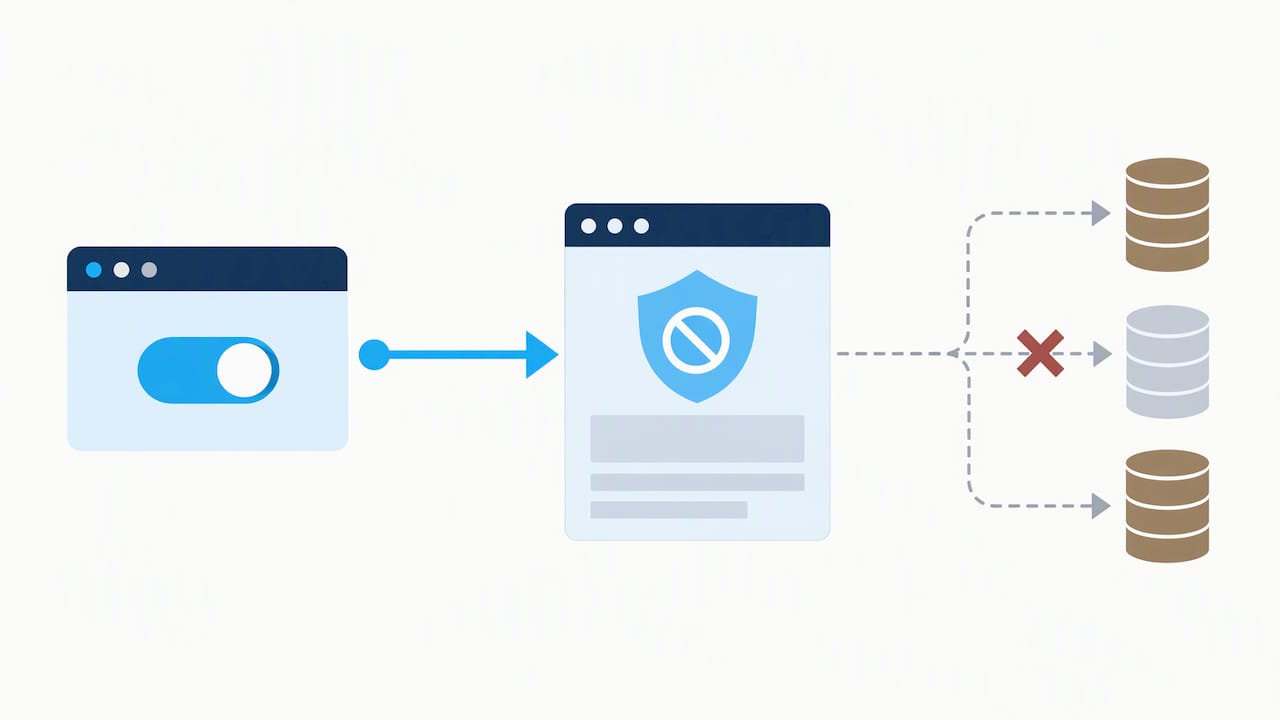
The point that trips up site owners: the visitor should not have to click anything on your banner for it to count. If a GPC-enabled browser loads your page, your ad and analytics tags that count as selling or sharing should not fire for that visitor.
Here is a practical way to test:
- Open a browser or extension that sends the GPC signal.
- Load your homepage in a clean session.
- Open the developer tools network tab and watch for requests to advertising and tracking domains.
- If those requests fire before any interaction, your tag setup is ignoring the signal.
- Fix it in your tag manager by conditioning those tags on the signal, then retest.
This is a place where your developer and your privacy counsel need to talk, because what counts as “sharing” depends on how each vendor uses the data.
Handling consumer requests
Consumers can ask to know what you hold, delete it, or correct it. According to MDN, businesses generally have 45 days to respond to a valid request. They can extend by another 45 days, 90 in total, if they notify the consumer of the extension within the first 45 days.
Your website is the intake point, so build it deliberately:
- Offer a web form for requests, not only an email address that someone might forget to check.
- Route submissions to a named person or shared inbox with a tracked ticket.
- Record the date each request arrives, so the 45-day clock is visible.
- Decide how you verify identity before releasing or deleting anything.
- Keep a log of requests and responses.
The agency stresses that compliance is about the site’s functional capability to process requests, not just having a policy page. A form that sends mail to an unmonitored address fails that test in spirit, whatever the policy says.
Accessibility: a separate law that touches the same pages
Accessibility is not part of the CCPA’s text in the way a privacy policy is, but the two overlap in practice. Your privacy notice, opt-out link and request form are pages every visitor must be able to use. If a screen-reader user cannot find or operate your opt-out control, you have a usability problem at best.
The Americans with Disabilities Act does not spell out a technical web standard, but US Department of Justice settlements have used one. The settlement with CVS Pharmacy is an example, and such agreements consistently use WCAG 2.1 Level AA as the benchmark. The same agreements show the value of combining automated scanning with manual testing by people who use assistive technology, since scanners miss real-world barriers.
For the privacy pages specifically, check that:
- Every button and link can be reached and activated by keyboard.
- Form fields have labels a screen reader announces.
- Error messages are described in text, not color alone.
- Banners and modals trap focus correctly and can be closed.
Our ADA website compliance playbook covers the broader legal picture and the fixes that matter most.
Our perspective: compliance is a build quality issue
Most privacy problems we find are not legal mysteries. They are engineering leftovers. A marketing plugin was installed years ago and nobody removed it. A form was cloned and the notice was not. A site migration dropped the footer link. When a site is built with a clean inventory of scripts, forms and vendors, compliance becomes a maintenance routine, not a scramble.
That is why we treat privacy as part of how we design, build and maintain websites, not as an add-on. We keep deliverables transparent and owned by the client, so you can always see what is running on your own site. When we redesign a site, we check the privacy elements alongside speed and SEO scores, because a redesign that quietly breaks the opt-out link creates risk you did not have before.
Our advice to owners: do not buy a banner and call it finished. Start with the inventory, make the notices accurate, make the choices symmetrical, and test the signals. Then keep the site maintained so it stays that way. For a shorter walk-through, see our piece on five fixes for CCPA website compliance.
— Donovan Wells – Founder and CEO
A CCPA website checklist you can work through
Use this order. It moves from facts to fixes.
- Confirm scope. Check revenue, California consumer volume and the share of revenue from selling or sharing data against the agency’s thresholds.
- Inventory your data flows. List every form, plugin, analytics tool, ad pixel, chat widget and embedded service, with what each collects and where it sends it.
- Write or update the privacy policy so it matches the inventory exactly.
- Add a notice at collection beside every place the site gathers personal information.
- Decide whether you sell or share. If any tag supports advertising across sites, assume you do until counsel says otherwise.
- Add the opt-out link in a conspicuous place, usually the footer, and make it work on mobile.
- Make choices symmetrical. Equal buttons, equal clicks, plain wording.
- Honor GPC. Test with a signal-sending browser and fix tags that fire anyway.
- Build the request workflow. A web form, a named owner, a log and a 45-day tracker.
- Test accessibility of every privacy page and control, with automated tools and a manual pass.
- Schedule a review. Re-run the inventory after any redesign, plugin change or new marketing tool.
- Get legal review from a privacy attorney before you publish, and again when regulations change.
The agency’s regulations page is the place to watch for rule updates, since requirements have been revised more than once since the law took effect.
When to bring in a web team
If your site runs on WordPress or a custom build, much of the checklist above is development work: conditioning tags on a signal, adding request forms, restructuring footers, fixing keyboard access. Doing it once during a rebuild is cheaper than patching it repeatedly.
We design and redesign business websites with privacy, accessibility and performance in mind, and we offer ongoing maintenance so the controls keep working after updates. If you are planning a rebuild or want an existing site brought up to standard, take a look at our website design and redesign service. Pricing for design work is not published, so tell us about your site and we will scope it with you.
If you are a small business, our list of website essentials for 2026 shows where privacy pages fit among the other basics.
FAQ
Does the CCPA apply to my small business?
Possibly. It applies to for-profit businesses that do business in California and meet at least one threshold: revenue above $26,625,000, handling personal information of 100,000 or more California consumers or households, or earning 50% or more of revenue from selling or sharing personal information. Check each test, especially the data-volume one, and ask a privacy attorney if you are close.
Is a cookie banner enough to comply?
No. The California Privacy Protection Agency says a cookie banner does not replace the required opt-out link. Opting out also must not be harder than opting in, or it can be treated as a dark pattern.
How long do I have to answer a consumer request?
Generally 45 days for a valid request to know, delete or correct personal information. You can extend by up to 45 more days, for 90 total, if you tell the consumer about the extension within the first 45 days.
Do I need to honor Global Privacy Control?
Yes, if you sell or share personal information. Your site should detect the browser signal and treat it as an opt-out without requiring the visitor to interact with a banner. Test it by loading your site with the signal on and checking whether advertising tags still fire.
Do accessibility rules apply to my privacy pages?
Yes, in practice. The ADA is a separate law, but DOJ settlements use WCAG 2.1 Level AA as the benchmark. Your privacy notice, opt-out link and request form should work with a keyboard and a screen reader, and be tested both automatically and manually.
Sources
- Does My Business Need To Comply With The CCPA (CPPA)
- California Consumer Privacy Act Regulations (CPPA)
- California Consumer Privacy Act (California Attorney General)
- What General Notices Are Required By The CCPA? (CPPA)
- CCPA – Privacy on the web (MDN)
- Notes on Economic Impact Estimates for Form 399 (CPPA)
- Proposed Revisions to CCPA Regulations (CPPA)
- Enforcement Advisory No. 2024-02 (CPPA)
- Settlement Agreement between the United States and CVS Pharmacy, Inc.