

TL;DR:
- Proper planning and SEO audits are critical to avoid significant traffic loss during website redesigns.
- Choosing the right development methodology (Agile, Waterfall, or Hybrid) impacts project flexibility and predictability.
- Continuous post-launch optimization and cross-team collaboration are essential for long-term website success.
A poorly planned website can quietly drain your business. Visitors leave in seconds, leads dry up, and organic traffic collapses after a redesign that nobody audited properly. The stakes are real: businesses that skip structured planning risk losing a significant share of their search visibility almost overnight. Website development for businesses follows phased methodologies covering strategy, sitemap planning, design, SEO integration, content creation, launch, and 90-day optimization. This guide walks you through each phase, helps you choose the right platform and development model, and shows you how to protect your rankings while building a site that actually grows your business.
Table of Contents
- Defining your website goals and requirements
- Choosing the right development approach
- Planning for SEO and content from the start
- Launching and optimizing your website for success
- What most website development guides miss
- Get expert help: Launch and optimize your website
- Frequently asked questions
Key Takeaways
| Point | Details |
|---|---|
| Phased methodology | Following clear steps from strategy to launch minimizes risks and maximizes ROI. |
| SEO integration | Planning for SEO and content early protects traffic and enhances future search visibility. |
| Development approach | Choosing Agile, Waterfall, or hybrid models depends on project needs and scope. |
| Continuous optimization | Post-launch analytics and ongoing improvements ensure your website delivers results. |
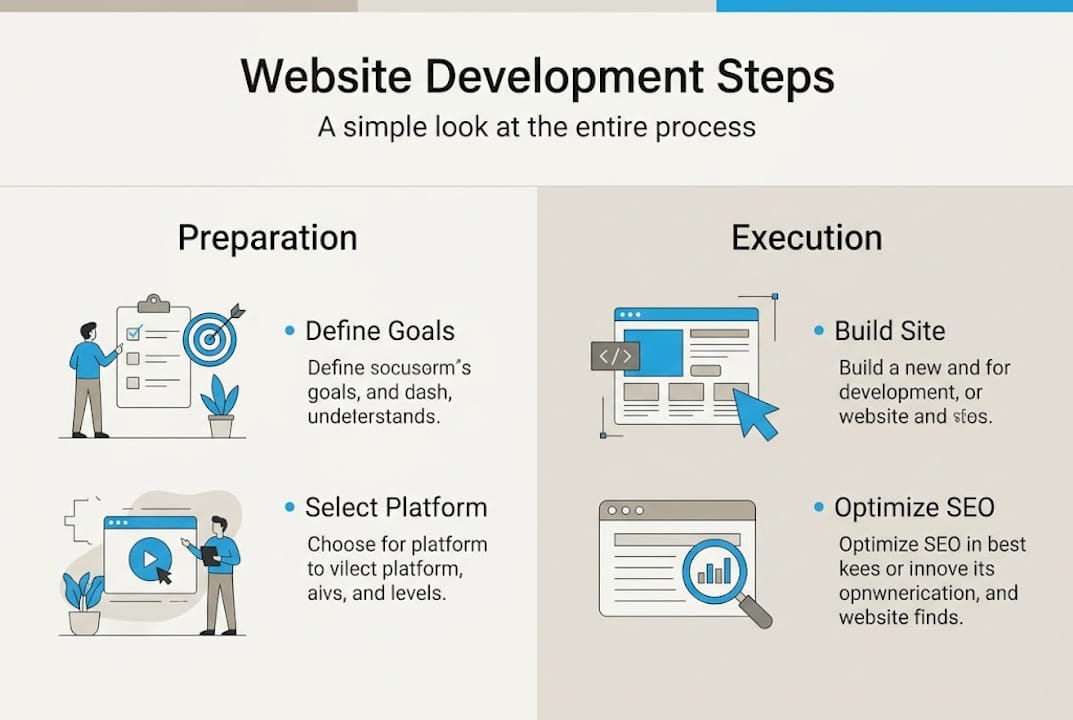
Defining your website goals and requirements
With the framework set, the first necessary step is to define exactly what you need your website to achieve. Skipping this phase is the single most expensive mistake businesses make. You end up building the wrong thing, for the wrong audience, on the wrong platform.
Start by asking a simple question: what should this website do for your business? The answer shapes every decision that follows.
Common business website objectives include:
- Generating qualified leads through contact forms or landing pages
- Selling products or services directly via ecommerce
- Building brand authority and trust with educational content
- Booking appointments or consultations online
- Supporting existing customers with resources or portals
Once your primary goal is clear, list the features that support it. A service business might need a booking system and CRM integration. A retailer needs inventory management and payment gateways. A SaaS company needs a product demo flow and a knowledge base. Be specific. Vague requirements produce vague results.
Budget and timeline need to match reality. A fully custom enterprise site and a WordPress business site are completely different investments. Your web design methodology should align with your resources, not the other way around.
Platform comparison: which fits your business?
| Platform | Best for | Typical cost | Build time | Flexibility |
|---|---|---|---|---|
| WordPress | SMBs, content-heavy sites | $3K–$20K | 6–14 weeks | High |
| Custom build | Enterprises, unique workflows | $20K+ | 4–9 months | Maximum |
| Shopify | Ecommerce-first businesses | $2K–$15K | 4–10 weeks | Medium |
| Webflow | Design-driven, no-code teams | $2K–$10K | 4–8 weeks | Medium-High |
WordPress remains the dominant choice for small to mid-sized businesses because it balances cost, flexibility, and ecosystem support. Custom builds make sense when your business has workflows no off-the-shelf platform can handle.
Pro Tip: Before committing to a platform, document every third-party tool your business uses (CRM, email marketing, analytics, scheduling). Confirm native integrations exist before you sign a contract.
This planning phase, when done properly, saves weeks of rework and thousands of dollars. Treat it as the foundation everything else is built on.
Choosing the right development approach
Once clear goals and requirements are established, the next major decision is the project’s development methodology. Most businesses never think about this, but the model your team uses determines how quickly you can adapt, how predictable your costs are, and whether the final product matches what you originally envisioned.
Agile vs Waterfall web projects represent two fundamentally different philosophies. Agile works in short sprints, delivering working pieces of the site every one to two weeks. Waterfall moves in sequential phases: requirements, design, development, testing, launch. Each phase must be complete before the next begins.
When each model works best:
- Agile: Startups, SaaS products, and businesses with evolving requirements. Great when you expect scope to change.
- Waterfall: Fixed-scope redesigns with a locked budget and defined deliverables. Works well for corporate sites with strict approval processes.
- Hybrid (Water-Scrum-Fall): Structured planning upfront, then Agile sprints for development. The most common approach for professional redesign approaches at mid-to-large scale.
Methodology comparison at a glance:
| Factor | Agile | Waterfall | Hybrid |
|---|---|---|---|
| Flexibility | High | Low | Medium |
| Predictability | Low | High | Medium-High |
| Best project type | Evolving scope | Fixed scope | Mixed requirements |
| Client involvement | Continuous | Milestone-based | Both |
| Risk of scope creep | High | Low | Managed |
The hybrid model has become popular because most real-world projects don’t fit neatly into either camp. You need structured discovery and planning (Waterfall thinking), but you also need the ability to adjust design and content decisions mid-build (Agile thinking).
Pro Tip: If your stakeholders need frequent visibility and approval checkpoints, lean toward Waterfall or Hybrid. If your team is small and fast-moving, Agile sprints keep momentum high and reduce decision bottlenecks.
Choosing the wrong model doesn’t just slow the project down. It creates friction between your team and your agency, leads to scope disputes, and often results in a product that feels rushed or incomplete.
Planning for SEO and content from the start
After choosing your development approach, careful SEO and content planning prevents digital disasters. This is the phase most businesses underestimate, and it’s where the most damaging mistakes happen.
Redesigning a website without an SEO plan is like renovating a store and forgetting to put the address back on the door. Traffic loss without planning can reach 30 to 70 percent after a redesign if redirects and audits are skipped.
“Preserving your top-performing pages and mapping every URL before launch is not optional. It’s the difference between a redesign that grows your business and one that sets it back by a year.”
Step-by-step SEO and content planning process:
- Audit your current site. Identify your top-traffic pages, highest-ranking keywords, and existing backlinks. These are your assets. Protect them.
- Map all URLs. Every old URL that changes needs a 301 redirect pointing to the new equivalent. No exceptions.
- Benchmark competitors. Identify content gaps and keyword opportunities your redesign can target from day one.
- Plan content with intent. Each page should target a specific keyword cluster and serve a clear user intent: informational, navigational, or transactional.
- Build your sitemap around SEO. Structure your navigation and internal linking to distribute authority to your most important pages.
Review our SEO checklist for redesign and explore enhancing redesign SEO to see how these principles apply to real projects.
Key SEO risks and mitigation strategies:
| Risk | Impact | Mitigation |
|---|---|---|
| Missing 301 redirects | Broken links, lost rankings | Full URL mapping before launch |
| Removed high-traffic pages | Organic traffic drop | Preserve or consolidate with redirects |
| Slower page speed | Higher bounce rate | Performance testing pre-launch |
| Lost structured data | Rich snippet disappearance | Re-implement schema markup |
Pro Tip: Set up Google Search Console on your new site before launch, not after. Verify ownership, submit your new sitemap, and monitor for crawl errors starting on day one.
Launching and optimizing your website for success
With SEO and content prepared, the launch phase and what comes after defines your website’s business value. A clean launch is not the finish line. It’s the starting gun.
Pre-launch checklist (do not skip any of these):
- Test all forms, checkout flows, and CTA buttons across devices
- Confirm 301 redirects are live and working
- Verify Google Analytics and Search Console are tracking correctly
- Run a full site speed test using PageSpeed Insights or GTmetrix
- Check mobile responsiveness on at least three screen sizes
- Confirm SSL certificate is active and all pages load over HTTPS
- Submit your XML sitemap to Google Search Console
The phased 90-day optimization cycle is where most of the real performance gains happen. Your site is live, but the data you collect in the first three months tells you what to fix, what to amplify, and where users are dropping off.
90-day post-launch optimization roadmap:
| Phase | Weeks | Focus areas |
|---|---|---|
| Stabilize | 1–2 | Fix crawl errors, redirect issues, broken links |
| Monitor | 3–6 | Track rankings, traffic, bounce rate, conversions |
| Optimize | 7–10 | Improve page speed, update thin content, A/B test CTAs |
| Grow | 11–13 | Build backlinks, expand content, refine UX |
For WordPress sites, optimizing WordPress performance covers caching, image compression, and plugin audits that directly impact speed scores. If your business serves a local market, local SEO post-launch strategies help you capture nearby customers searching for your services.
Not sure if your current site needs a full rebuild or just a tune-up? These website redesign signals can help you make that call before you invest.
Pro Tip: Set up a monthly reporting cadence from day one. Track organic sessions, keyword rankings, conversion rate, and Core Web Vitals. Without a baseline, you can’t measure improvement.
What most website development guides miss
Having covered the practical process, it’s worth exploring what truly separates high-performing web projects from the rest. Most guides focus almost entirely on visual design. They treat the website as a creative output rather than a business system. That mindset is expensive.
The uncomfortable truth is that beautiful websites fail all the time. They fail because nobody audited the existing SEO before the redesign. They fail because the development team and the marketing team never talked to each other. They fail because the client approved a design that looked great in a mockup but confused real users.
Redesigns fail most often from visual-first thinking without proper audits, and pure Agile or pure Waterfall both create blind spots that hybrid approaches avoid. The businesses that get lasting results treat their website as a living product, not a one-time project.
Cross-team collaboration between designers, developers, SEO specialists, and content strategists is not a nice-to-have. It’s the operating model. When those groups work in silos, you get a site that looks polished but ranks poorly, or one that ranks well but converts nobody. Read our expert redesign tips to see how integrated teams approach this differently.
Continuous optimization after launch is where the real ROI lives. Most businesses celebrate the launch and move on. The ones that win keep iterating.
Get expert help: Launch and optimize your website
If you’re ready to take action and want professional support on your website project, Depeche Code provides tailor-made solutions for businesses of every size.

Whether you need full website design and development from scratch, a strategic redesign that protects your rankings, or an SEO company to drive sustainable organic growth, our Orlando-based team handles it all. We also offer local SEO growth programs built specifically for businesses competing in local search. Every engagement starts with a clear strategy, transparent timelines, and measurable goals. Reach out today to schedule a free consultation and find out exactly what your website needs to perform.
Frequently asked questions
How long does website development take for businesses?
Typical timelines run 6 to 14 weeks for SMB WordPress projects, while complex custom builds for enterprises can extend to four to nine months depending on scope and integrations.
What are the risks of a website redesign?
Without proper planning, businesses can experience 30 to 70 percent organic traffic loss, primarily when URL mapping, 301 redirects, and SEO audits are skipped before launch.
Which development approach is best for business website projects?
Agile suits evolving projects with changing requirements, Waterfall works for fixed-scope redesigns, and hybrid models balance structured planning with iterative flexibility for most real-world business websites.
How can I ensure my new website ranks well on Google?
Conduct a full SEO audit before redesigning, map every URL with 301 redirects, preserve your top-performing pages, and monitor organic traffic and keyword rankings in Google Search Console from day one.