

TL;DR:
- A structured UX design process involves seven iterative phases that improve a product from concept to launch. Teams that integrate research, testing, and continuous iteration build better products by maintaining discipline and clear criteria throughout each stage. Using the right tools, applying behavioral principles, and fostering a strong culture of research help deliver user-centered digital experiences effectively.
Step by step UX design is the structured sequence of phases that moves a product from a vague user problem to a refined, production-ready digital experience. The industry-standard framework follows a 7-step iterative cycle covering goal definition, research, synthesis, design, testing, iteration, and engineering handoff. This process is not a checklist you complete once. It is a repeating loop that tightens with every cycle. Modern teams layer in agile sprint structures and AI-powered prototyping tools to keep pace without cutting corners on user research. The result is a product that reduces friction, earns user trust, and ships with fewer surprises.
What are the essential phases of the step by step UX design process?
The UX design process is defined by applied behavioral principles, not just tools or visuals. UX design applies psychology and human-computer interaction principles to reduce friction across every touchpoint. Each phase builds on the last, and skipping one creates compounding problems downstream.
Phase 1: Define
Every project starts with scope, goals, and constraints. You document what success looks like before a single wireframe exists. This means writing a clear problem statement, identifying business objectives, and listing technical limitations. Teams that skip this step spend weeks designing the wrong thing.

Phase 2: Research
Research splits into two tracks: qualitative and quantitative. Qualitative methods include user interviews, contextual observation, and diary studies. Quantitative methods include surveys, analytics review, and heatmap analysis. Both tracks run together whenever possible. The goal is to understand actual user behavior, not assumed behavior.
Phase 3: Synthesis
Raw research data becomes actionable insight through synthesis. Affinity mapping groups observations into themes. User journey maps show where friction concentrates. Information architecture defines how content and features organize into a navigable structure. The Double Diamond framework structures this phase well. Its first diamond focuses on understanding the problem space before the second diamond explores and refines solutions.
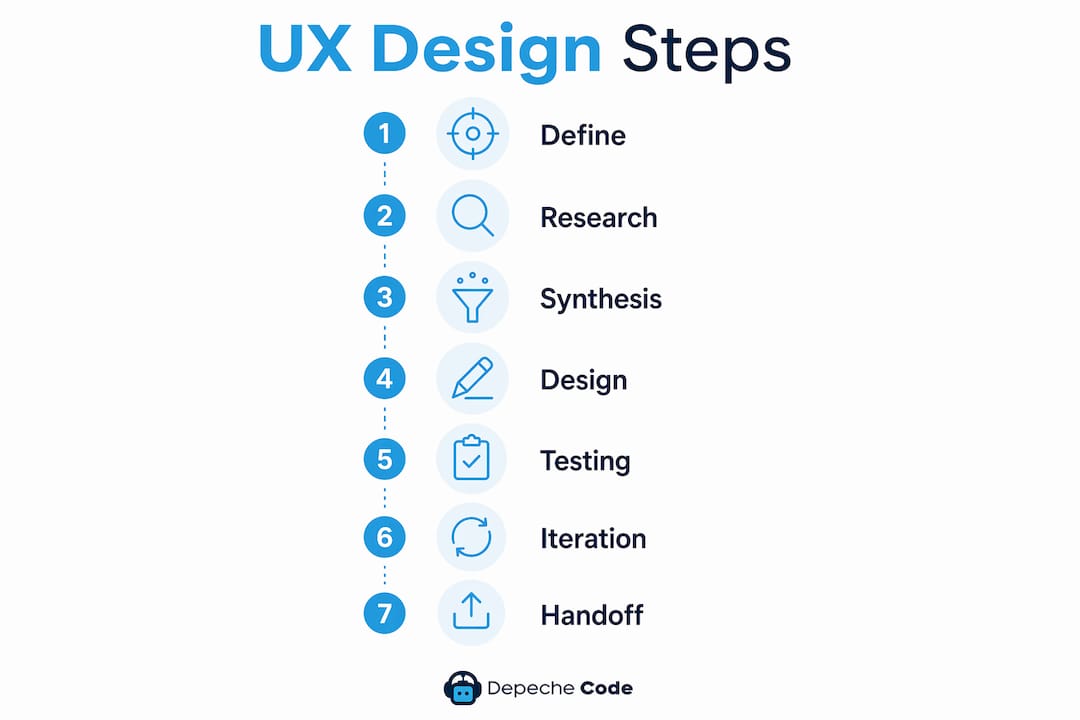
Phase 4: Design
Design moves from low-fidelity sketches to high-fidelity interactive prototypes. Low-fidelity wireframes test layout logic quickly. High-fidelity prototypes test visual hierarchy, interaction patterns, and micro-copy. Code-backed prototypes are now the industry preference because they minimize the gap between design and production.
Phase 5: Testing
Usability testing with 5 to 8 participants surfaces the main patterns of friction. Observing users complete tasks reveals problems that preference questions never would. Moderated sessions give you follow-up depth. Unmoderated remote testing gives you volume and speed.
Phase 6: Iteration
Findings from testing feed directly back into design. This is not a failure state. It is the mechanism that makes the process work. Teams that treat iteration as optional ship products that frustrate users. Teams that build iteration into their schedule ship products that earn loyalty.
Phase 7: Handoff and launch
A clean handoff requires annotated prototypes, design specifications, and component documentation. Engineers need to know not just what a screen looks like, but why specific decisions were made. Tools like Figma support this with built-in spec views and comment threads.
Pro Tip: Write a “definition of done” for each phase before you start it. If you cannot articulate what completion looks like, you will keep moving the goalposts.
How does the UX design process adapt for agile environments?
Agile teams compress the design-to-handoff cycle into two-week sprints. The dual-track agile approach keeps discovery and design one to two sprints ahead of engineering. This prevents the common bottleneck where developers sit idle waiting for finalized screens. It also prevents the opposite problem: designers handing off screens that engineering immediately questions.
The practical reality of dual-track agile looks like this:
- Discovery track runs user interviews and synthesis while engineering builds the previous sprint’s designs.
- Design track produces wireframes and prototypes for the sprint after next.
- Testing happens continuously, not as a gate at the end of a project.
- Research findings feed back into the discovery track in real time.
Iterative web design within sprint cycles requires a “definition of ready” for design work. A screen is ready for engineering only when it has passed at least one round of user validation and carries complete annotations. Without this gate, teams hand off unfinished work and create rework cycles that cost more time than the sprint saved.
Linear thinking is the most common failure mode in agile UX. Teams treat the seven phases as a waterfall sequence, completing each one before starting the next. Real-world agile workflows overlap phases constantly. Discovery and delivery run in parallel. Synthesis happens while design continues. Testing informs both tracks simultaneously.
Pro Tip: Schedule a 30-minute weekly sync between your discovery and delivery tracks. Without it, the two streams drift apart and you end up designing solutions for problems that no longer match your latest research.
Which tools and techniques optimize each UX design step in 2026?
The right tool depends on the phase and the team’s workflow. Popular UX tools in 2026 include Figma for design and prototyping, Maze for unmoderated usability testing, and AI assistants that accelerate documentation and generate interactive prototype states. The table below maps tool categories to their primary function in the design process.
| Phase | Tool category | Primary function |
|---|---|---|
| Research | Survey and interview platforms | Collect qualitative and quantitative user data |
| Synthesis | Whiteboard and mapping tools | Organize findings into themes and flows |
| Design | Prototyping platforms (e.g., Figma) | Build wireframes and high-fidelity prototypes |
| Testing | Unmoderated testing tools (e.g., Maze) | Run task-based sessions at scale |
| Handoff | Spec and annotation tools | Deliver annotated designs to engineering |
AI assistants now handle tasks that once consumed hours of manual work. They generate first-draft user flows from research notes, suggest component variations, and write annotation copy from design decisions. AI-assisted design workflows cut the time between synthesis and first wireframe significantly. That speed advantage compounds across a multi-sprint project.
Key techniques that remain effective regardless of tooling:
- Affinity mapping groups raw observations into insight clusters without losing individual data points.
- User journey mapping exposes emotional highs and lows across a complete interaction sequence.
- Card sorting reveals how users mentally categorize content, which directly informs information architecture.
- Annotated prototypes give engineering the context they need to implement designs accurately.
Pro Tip: Use Maze for unmoderated testing early in a project when you need volume fast. Switch to moderated sessions when you need to understand the “why” behind a specific behavior.
Only 55% of companies conduct formal UX testing. That gap represents a direct competitive advantage for teams that test consistently. The cost of a usability session is a fraction of the cost of fixing a flawed feature after launch.
What common challenges arise in executing a UX design process?
The most damaging mistake in any UX process is treating it as linear. Real-world workflows are cyclical and overlapping, especially in agile teams. When designers finish a phase and mentally “close” it, they stop incorporating new information. That rigidity produces products that reflect early assumptions rather than current user reality.
Common challenges and how to address them:
- Skipping synthesis. Teams move from research directly to wireframes without processing what they learned. The result is design that reflects the loudest stakeholder opinion, not user data.
- Unclear done criteria. Without explicit criteria, phases never truly end. Done criteria require articulating both the business problem and the user need before advancing to the next stage.
- Handoff breakdowns. Designers deliver screens without context. Engineers implement them incorrectly. The fix is annotated prototypes and a structured handoff meeting, not just a shared file link.
- Speed-quality tradeoffs. Agile pressure pushes teams to skip research. The better approach is to run shorter, more frequent research sessions rather than eliminating research entirely.
“Effective teams prevent delivering unfinished designs by using clear ‘done criteria’ that articulate strategic alignment and user needs for each stage. Without this gate, teams hand off work that looks complete but lacks the reasoning engineers need to build it correctly.”
Building cross-functional alignment early prevents most of these problems. Product managers, engineers, and designers should review research findings together, not in separate briefings. Shared context produces shared ownership of decisions.
Pro Tip: Run a UX-focused website redesign using the Double Diamond model to separate problem framing from solution exploration. Teams that conflate the two phases almost always solve the wrong problem.
Key Takeaways
A structured, iterative UX design process is the single most reliable way to ship digital products that users actually want to use.
| Point | Details |
|---|---|
| Follow the 7-step cycle | Define, research, synthesize, design, test, iterate, and hand off. Never skip a phase. |
| Use dual-track agile | Keep discovery one to two sprints ahead of engineering to maintain velocity. |
| Apply done criteria | Articulate the business problem and user need before advancing between stages. |
| Test with 5–8 users | That sample size surfaces the main friction patterns without requiring large budgets. |
| Iterate continuously | Treat testing feedback as a design input, not a sign of failure. |
Where most UX processes quietly break down
The UX process looks clean on a diagram. In practice, the hardest part is not learning the steps. It is maintaining research discipline when deadlines compress and stakeholders push for visible output.
I have seen teams with strong process documentation abandon their synthesis phase the moment a sprint review approaches. They jump from raw interview notes to wireframes because wireframes look like progress. The problem is that unprocessed research is just noise. You cannot design for a user you have not yet understood.
The other pattern I see consistently is treating user experience as an aesthetic concern rather than a behavioral one. UX design applies psychology and human-computer interaction principles to reduce friction. When teams focus only on visual polish, they miss the structural problems that make users abandon a product entirely.
AI tools have genuinely changed the speed of prototyping. Code-backed prototypes that mirror production behavior let teams test realistic interactions earlier in the process. That is a real advantage. But AI does not replace the judgment required to interpret research findings or decide which problem to solve first. The process still requires human decision-making at every phase transition.
My strongest advice: build the UX process into your team’s culture, not your project plan. A process that only activates when a new project starts will always get cut when pressure arrives. A team that runs short research sessions every sprint, reviews findings together, and maintains a living component library treats UX as infrastructure. That team ships better products with less rework.
— Donovan
How Depechecode supports your UX design goals
Depechecode is a full-service digital agency based in Orlando that builds websites and digital products with UX principles at the foundation.
Their website design and development services cover the full production cycle, from initial research and wireframing through development, testing, and launch. Depechecode integrates AI tools and code-backed prototyping into client projects, which shortens the gap between design decisions and working code. For product managers who need a reliable external partner to execute a structured UX process without building an in-house team from scratch, Depechecode offers the technical depth and design experience to deliver. Contact their team to discuss your project requirements.
FAQ
What is the step by step UX design process?
The UX design process follows seven phases: define, research, synthesize, design, test, iterate, and hand off to engineering. Each phase feeds the next, and the cycle repeats until the product meets user and business goals.
How many users do you need for usability testing?
Testing with 5 to 8 participants typically surfaces the main patterns of friction and user challenges. Larger samples add volume but rarely reveal new categories of problems.
What is dual-track agile in UX design?
Dual-track agile runs discovery and design one to two sprints ahead of engineering. This keeps development moving while the design team validates the next set of screens with real users.
What does “done criteria” mean in a UX process?
Done criteria are explicit conditions a design phase must meet before the team advances. They require articulating both the business problem and the user need, which prevents premature handoff of unfinished work.
Which tools do UX designers use most in 2026?
Figma leads for design and prototyping, Maze handles unmoderated usability testing, and AI assistants accelerate documentation and prototype generation. The best tool combination depends on team size and project scope.