

What website migration planning actually involves
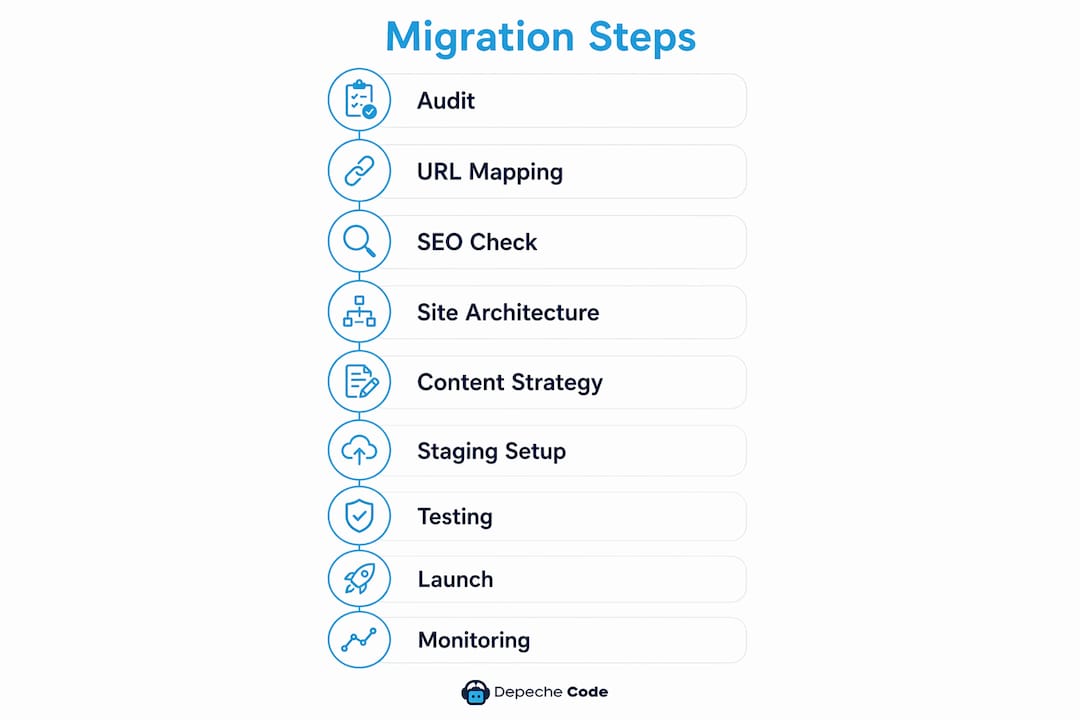
Website migration planning is the structured process of moving, redesigning, or replatforming a site while protecting your organic traffic and search rankings. Done right, it follows a clear sequence: content audit, URL and backlink mapping, technical SEO checks, new architecture planning, content migration, staging and freeze, testing, launch, and post-launch monitoring.
The stakes are real. Sites that skip structured planning risk losing 30–50% of organic search traffic immediately after launch. That is not a temporary dip you can sleep off. It can mean months of recovery work, lost revenue, and frustrated stakeholders asking why no one flagged the risk earlier.
Two things need to happen from day one: a risk assessment that translates technical concerns into business impact, and a communication plan that keeps every stakeholder informed. Everything else flows from those two anchors.
Key phases at a glance:
- Content audit and URL inventory
- Backlink mapping and redirect planning
- Technical SEO configuration review
- New site architecture and sitemap
- Content migration strategy and freeze
- Staging environment setup and testing
- Launch day execution
- Post-launch monitoring and SEO recovery
How to plan website migration: content audit and URL mapping
Your content audit is the foundation of the entire site migration. Without a complete picture of what you have, you cannot make sound decisions about what to keep, merge, or cut.
Start by crawling the old site with a tool like Screaming Frog or Sitebulb to export every URL with its status code, title tag, meta description, H1, and word count. Then pull your top pages by traffic from Google Analytics or Google Search Console, and your top pages by backlinks from Ahrefs or Semrush. These two lists represent the pages you absolutely cannot afford to break.

Once you have the data, build a URL mapping spreadsheet with three columns: old URL, new URL, and decision (keep, merge, redirect, or remove). Every URL gets a row. Every row gets a decision. Pages with strong backlink profiles or consistent traffic must redirect to a relevant destination. Low-traffic pages with no links can be removed, but redirect them to the nearest relevant page rather than letting them 404.
Pro Tip: Document every existing redirect on the old site before you build new ones. If you only redirect from current URLs without accounting for existing redirect chains, you create multi-hop chains that dilute link equity and slow crawling. Map every hop so nothing gets lost.
Key steps for this phase:
- Crawl the full site and export all URLs with status codes and metadata
- Export top 100 pages by traffic from analytics and Search Console
- Export top pages by backlinks from your preferred backlink tool
- Snapshot rankings for your top 50 keywords as a pre-migration benchmark
- Build the URL mapping spreadsheet with keep/merge/redirect/remove decisions
- Document all existing redirects to prevent chains on the new site
Auditing technical SEO before you touch the new site
Technical SEO configuration is where migrations quietly fall apart. A robots.txt file left with Disallow: / from staging, a canonical tag pointing to the wrong URL, or a missing XML sitemap can wipe out months of ranking progress before anyone notices.

Redirect chains dilute link equity and slow search engine crawling. Every changed URL needs a direct 301 permanent redirect from the old URL to the new destination, with no intermediate hops. A 302 temporary redirect does not pass link equity the same way, and Google may ignore it entirely.
Canonical tags must be audited and updated during migration to prevent duplicate content issues. Self-referencing canonicals are the default on most pages, but parameter URLs, print versions, and tracking parameters all need explicit canonical declarations pointing to the correct version.
Technical SEO checklist for migration:
- Implement 301 permanent redirects for every changed URL, direct from old to new
- Audit and update canonical tags across all page types, especially parameter URLs
- Verify robots.txt allows crawling of the new site and points to the updated sitemap
- Regenerate the XML sitemap to reflect the new URL structure and submit it to Google Search Console
- Add or update structured data including Organization, BreadcrumbList, Article, and FAQ schema in JSON-LD format
- Set up hreflang tags if the site serves multiple languages or regions
Planning new site architecture and your sitemap
Site architecture decisions made during migration have long-term SEO consequences. Reorganizing content hierarchy without a clear plan can quietly damage internal authority flow, break conversion funnels, and leave important pages stranded without internal links pointing to them.
Start by analyzing your new business priorities and mapping how they translate into content groupings. Related content should cluster together, both for user navigation and for topical authority signals. A product page, its supporting blog content, and its FAQ should all link to each other, not sit in isolated silos.
Build the sitemap before you build the site. It forces decisions about hierarchy and prevents the common mistake of recreating the old structure by default. If the old structure was not working, migrating it unchanged solves nothing.
Architecture planning steps:
- Analyze new business priorities and map them to content categories
- Create a sitemap that reflects both user navigation and SEO content groupings
- Group related content logically to support topical authority
- Implement hreflang tags for multilingual or multi-regional sites
- Update all internal links to point directly to new URLs, not through redirects
- Verify that important pages retain strong internal link equity after restructuring
For guidance on preserving SEO during redesign, the same architecture principles apply whether you are migrating platforms or rebuilding from scratch.
Developing a content migration strategy that holds rankings
Content migration is not a copy-paste job. Every page that moves needs a decision, a justification, and documentation. Pages that are kept should be reviewed for SEO quality before they go live on the new site. Pages that are merged need a clear redirect plan. Pages that are removed need to redirect somewhere relevant.
Plan content rewrites for high-traffic pages that are being retained. Preserving the H1 and primary keyword placement on pages that rank well is not optional. Changing those elements without a clear reason introduces ranking risk with no upside.
Timing the content freeze matters. Once the migration window opens, the live site should stop receiving new content edits. Unexpected changes during migration create version control problems and can introduce discrepancies between the live site and the staging environment.
Content migration checklist:
- Plan rewrites or updates for retained pages based on SEO priority
- Document every URL decision with justification for audits and rollback reference
- Communicate the content freeze timeline to all content contributors and stakeholders
- Audit third-party scripts, forms, and integrations to confirm they work on the new platform
- Handle pagination, faceted navigation, and filter parameters explicitly in the redirect map
- Keep migration decisions documented so any rollback can be executed cleanly
Setting up a staging environment and content freeze
A staging site is your safety net. Everything that could go wrong should go wrong there, not on the live site. Set it up with restricted access and block it from search engine indexing with a noindex directive or password protection. The last thing you want is Google indexing your staging environment and creating duplicate content issues before launch.
Once staging is live, run a comparison audit between the legacy site and the staging site. Check for content parity, functional parity, and technical parity. Forms should submit correctly. Scripts should fire. Integrations should connect. Any gap you find in staging is a gap you would have found in production at the worst possible time.
Lowering DNS TTL to around 300 seconds at least 24–48 hours before launch accelerates DNS propagation. Most DNS providers default to TTL values of 24–48 hours, which means a DNS change can take that long to propagate globally. Dropping it to 300 seconds before cutover means the switch happens in minutes, not hours.
Staging preparation steps:
- Set up the staging site with restricted access and noindex directives
- Implement content freeze on the live site during the migration window
- Test all forms, CTAs, scripts, and third-party integrations in staging
- Run a comparison audit between legacy and staging for content and functionality parity
- Lower DNS TTL to 300 seconds at least 24–48 hours before launch day
- Confirm SSL certificate is active and HTTPS is enforced on the new host
Testing and QA before you flip the switch
Quality assurance on staging is the last line of defense before launch. Treat it like a dress rehearsal where every failure is a gift, because finding a broken checkout flow in staging costs nothing. Finding it after DNS cutover costs real revenue.
Auditing three versions of the site — the old site, the staging site, and the post-launch site — is the technical QA standard that protects traffic and performance. The staging audit is the most critical because it tells you exactly what you are going live with.
Pre-launch QA checklist:
- Crawl the staging site for broken links, missing pages, and crawl errors before DNS cutover
- Test cross-browser compatibility across Chrome, Firefox, Safari, and Edge
- Verify responsiveness on mobile and tablet devices
- Test every form, CTA, and conversion path end to end
- Confirm SSL certificate is active and HTTPS redirects are working
- Check that redirect chains are resolved and all 301s point directly to final destinations
- Verify the XML sitemap is accessible and reflects the correct URL structure
- Confirm analytics tags, conversion events, and tag manager containers are firing correctly
Post-launch monitoring and SEO preservation
The first two weeks after launch are when problems surface. Monitoring 404 errors daily in Google Search Console during this window catches redirect failures and crawling issues before they compound into ranking drops. Set up a daily check as a non-negotiable task, not something to get to when you have time.
Track keyword rankings and organic traffic against the pre-migration benchmarks you captured before touching anything. Some traffic loss after migration is normal. What you are watching for is the shape of the recovery curve, not just the initial dip.
Post-launch monitoring checklist:
- Monitor Google Search Console daily for 404 errors during the first two weeks
- Track traffic and keyword rankings against pre-migration benchmarks
- Request indexing for your top 20 pages in Google Search Console
- Reach out to top backlink sources to update links pointing to old URLs
- Verify cookie consent, conversion events, and analytics tracking are functioning correctly
- Update Google Business Profile, social profiles, and directory listings with new URLs
- Keep the old hosting environment accessible for at least one week as a fallback
For a broader look at SEO best practices that apply beyond migration, the same monitoring discipline carries over into ongoing site management.
Mitigating financial risks through stakeholder alignment
The most common reason migrations go badly is not technical failure. It is that the SEO team was brought in too late, after decisions about URL structure, platform, and timeline were already locked. Getting involved early requires speaking the language stakeholders actually respond to.
Stakeholders respond best to migration risk when it is framed as potential revenue loss rather than abstract technical problems. A 30–50% drop in organic search traffic is common without a structured migration plan, and the revenue impact can be substantial. Run the numbers, then present the range.
Model a range of decline scenarios to realistically represent the potential traffic impact. Each scenario should map to a projected revenue impact based on your current conversion rate and average order value. That range gives stakeholders an honest picture of what is at stake and makes the case for proper resourcing.
Pro Tip: When presenting migration risk to non-technical stakeholders, lead with the revenue range, not the technical explanation. “We could lose $40,000 to $80,000 in monthly organic revenue without proper redirect planning” lands differently than “we need to implement 301 redirects.”
A good migration plan also defines clear ownership for every phase, a meeting cadence that matches the pace of the project, and documented milestones. Without those, accountability diffuses and critical tasks slip through the gaps.
A phased, staggered migration approach reduces risk by breaking changes into manageable parts rather than launching everything at once. For most migrations, this gives search engines smaller, more digestible changes to process and makes it easier to isolate problems when they appear.
Building a backup and rollback plan
Every migration needs an exit ramp. Before you touch anything on the live site, take a full backup of both the files and the database as a single dated archive. Store a copy outside both hosting accounts, on a local drive or cloud storage. This is the asset that lets you roll back in minutes instead of rebuilding from memory.
Define rollback triggers before launch day, not during a crisis. Decide in advance what conditions would prompt a rollback: a specific percentage of pages returning 404s, a complete checkout failure, or a critical integration going down. Having that threshold agreed on ahead of time removes the pressure of making that call under stress.
Keep the old site or CMS accessible on staging for at least 30 days after launch. DNS propagation can take time, and some visitors may still land on the old server during the transition window. The old environment needs to keep working correctly during that period.
Server and hosting environment considerations
Switching hosting environments introduces variables that have nothing to do with your content or SEO configuration. Server response time, geographic location of the data center, and SSL certificate setup all affect both user experience and search performance.
Before cutover, confirm that the SSL certificate is issued and active on the new host, that HTTPS redirects are enforced, and that HSTS is configured correctly. A site that loads over HTTP after migration will trigger browser warnings and lose trust signals immediately.
If your site runs on WordPress or another database-driven CMS, update the configuration file with the new database credentials before testing. Hardcoded URLs in the database, particularly if the old site used HTTP or a different domain structure, need a search-and-replace pass to prevent broken links and mixed-content warnings across the migrated content.
For large sites, a direct server-to-server file transfer is faster and more reliable than routing files through a local machine. Most hosts support this when you provide both sets of credentials.
CMS and platform compatibility checks
Platform migrations add a layer of complexity that URL migrations do not. Moving from one CMS to another means your content structure, permalink format, plugin dependencies, and template logic may all change simultaneously.
Check that your new platform supports the URL structure you have planned. Some CMS platforms enforce specific permalink patterns that can conflict with your redirect map. Resolve those conflicts in staging, not after launch.
Audit every third-party integration: payment processors, CRM connections, email marketing tools, live chat, and analytics tags. Each one needs to be tested in the staging environment before cutover. A payment processor that fails silently after migration is a revenue problem that may not surface until a customer complains.
If you are moving from a custom-built site to a platform like a standard CMS, document every custom function, redirect rule, and .htaccess configuration. These do not transfer automatically. They need to be deliberately recreated on the new platform or replaced with equivalent functionality.
Ready to migrate without the guesswork?

Website migration is one of the highest-risk technical projects a business can undertake, and the difference between a smooth transition and a traffic disaster usually comes down to planning depth and execution discipline. Depechecode’s team handles the full migration process, from pre-migration audits and redirect mapping to post-launch monitoring and SEO recovery, so you keep your rankings while the new site goes live.
Explore Depechecode’s website migration services or review professional website design and development options built for businesses that cannot afford downtime.
Key Takeaways
A structured website migration plan is the single most effective way to prevent significant organic traffic loss that unplanned migrations routinely cause.
| Point | Details |
|---|---|
| Audit before anything else | Crawl the full site and export all URLs, traffic data, and backlinks before touching the new environment. |
| Map every URL decision | Every old URL needs a documented decision: keep, merge, redirect, or remove, with a direct 301 to the final destination. |
| Stage and freeze together | Lock the live site from edits and run all testing in a restricted staging environment before DNS cutover. |
| Frame risk in revenue terms | Model 30–50% traffic decline scenarios to secure stakeholder buy-in and proper resourcing. |
| Monitor daily post-launch | Check Google Search Console for 404 errors every day during the first two weeks after launch. |
FAQ
How long does a website migration typically take?
The timeline depends on site size and complexity. Smaller sites may complete migration within weeks, while large enterprise sites typically require several months of planning and execution.
What is the biggest SEO risk in a website migration?
Missing or incorrect 301 redirects are the most common cause of traffic loss. Every changed URL that lacks a direct redirect to its new destination loses its accumulated link equity and may return a 404 to both users and search engines.
Should you freeze content during a website migration?
Yes. A content freeze on the live site during the migration window prevents version discrepancies between the live site and staging environment, which can cause redirect mapping errors and content gaps at launch.
How do you know if your migration succeeded?
Compare post-launch traffic, keyword rankings, and conversion rates against the pre-migration benchmarks you captured before the project started. A normal short-term dip is expected; sustained or worsening declines after the first few weeks signal a technical issue that needs investigation.
Do you need a professional agency for website migration?
For sites where downtime or traffic loss translates directly to revenue loss, such as e-commerce stores or lead-generation sites, professional support significantly reduces risk. Depechecode specializes in managed website migration with full SEO preservation built into the process.