

TL;DR:
- Testing in web development verifies that components function correctly, perform under load, and stay secure before and after release.
- Integrating automated tests from day one prevents technical debt, reduces incidents, and improves user trust and SEO.
Testing in web development is the practice of verifying that every component of a web application functions correctly, performs under load, and stays secure before and after release. The role of testing in web development has shifted from a final checkpoint to a continuous activity woven through every sprint and deployment cycle. Teams that skip or delay testing accumulate technical debt fast, and that debt shows up as production incidents, broken user flows, and lost revenue. This guide gives web developers and project managers a clear framework for integrating quality assurance from day one.
What are the key testing methodologies used in web development?
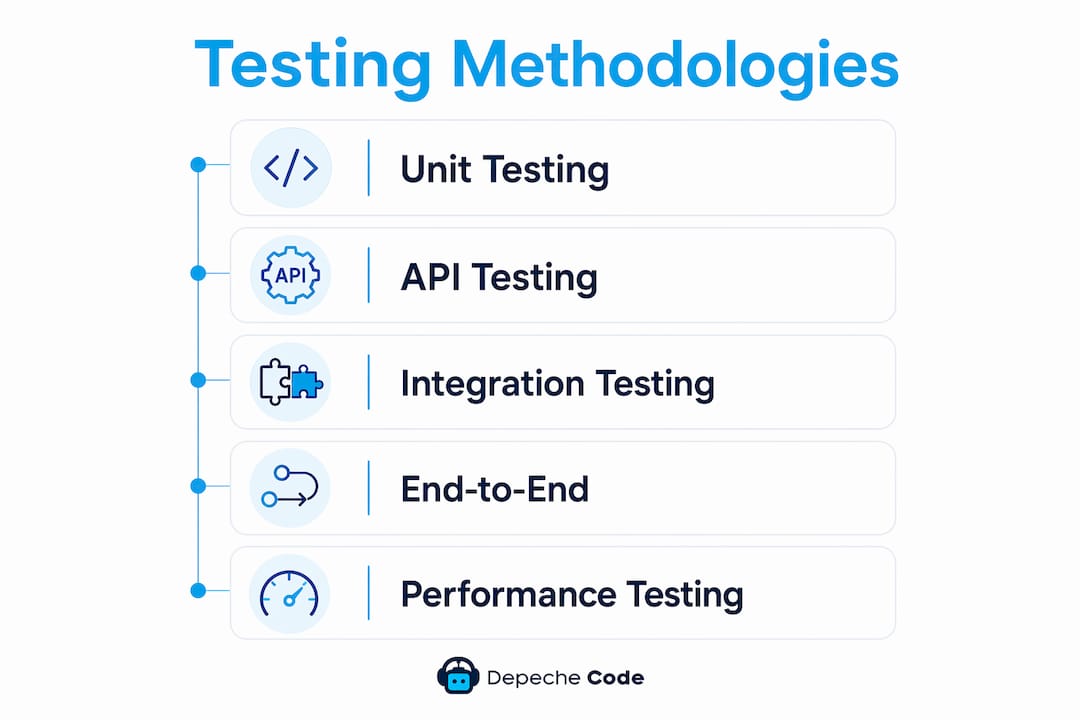
The testing pyramid is the most widely accepted model for structuring a web development QA process. It calls for many unit tests at the base, a moderate layer of API and integration tests in the middle, and a focused set of 20–50 end-to-end (E2E) user workflow tests at the top. This structure keeps test suites fast, maintainable, and meaningful.
Each layer serves a distinct purpose:
-
Unit tests verify individual functions or components in isolation. They run in milliseconds and catch logic errors before they compound into larger bugs. Frameworks like Jest and Vitest are standard choices for JavaScript projects.
-
API and integration tests confirm that services communicate correctly. They sit above unit tests because they require a running server or database connection, making them slower but more realistic. Tools like Supertest and Postman automate this layer effectively.
-
End-to-end tests simulate real user behavior across the full application stack. A well-designed E2E suite covers your top conversion journeys, such as checkout, login, and form submission. Playwright and Cypress are the most widely adopted frameworks for this layer in 2026.
-
Visual regression tests catch unintended UI changes by comparing screenshots before and after a code change. Percy and Chromatic are common tools for this. A single CSS update can break a layout across five browsers without visual regression catching it first.
-
Performance tests measure load times, memory usage, and Core Web Vitals scores. Google’s Lighthouse and WebPageTest provide baseline benchmarks. Continuous performance monitoring is necessary because Core Web Vitals thresholds evolve, and a one-time benchmark becomes outdated quickly.
-
Security tests scan for vulnerabilities like SQL injection, cross-site scripting (XSS), and broken authentication. OWASP ZAP is a widely used open-source tool for automated security scanning during development.
Development teams that integrate testing at every lifecycle stage ship features faster and reduce production incidents. The key is starting tests from the first feature, not after the codebase is already large.
Pro Tip: Automate your top three E2E user journeys from sprint 1. Waiting until the project is “stable enough” is the most common reason teams never build a reliable test suite.

How does testing improve website quality, performance, and user experience?
Effective testing is a business strategy, not just a technical exercise. It protects revenue by preventing broken user flows, improves SEO by maintaining Core Web Vitals scores, and builds user trust by keeping the application secure. Each of these outcomes has a direct impact on the bottom line.
The concrete benefits break down across four areas:
-
Bug prevention before production. Unit and integration tests catch errors at the code level, where fixes cost a fraction of what they cost after deployment. A broken checkout flow discovered in staging costs an hour to fix. The same bug discovered by a customer costs that hour plus lost sales, support tickets, and reputational damage.
-
Core Web Vitals and SEO protection. Google uses Largest Contentful Paint (LCP), Cumulative Layout Shift (CLS), and Interaction to Next Paint (INP) as ranking signals. Performance tests run in CI/CD pipelines flag regressions before they reach production and hurt search rankings. Teams that skip performance validation often discover SEO drops weeks after a deployment.
-
Security vulnerability detection. Security testing identifies weaknesses before attackers do. Proactive scanning with tools like OWASP ZAP or Snyk catches known vulnerabilities in dependencies and application logic. Reviewing compliance and security practices during development, not after launch, is the standard that mature teams follow.
-
Cross-browser and cross-device consistency. A layout that works perfectly in Chrome may break in Safari or on a 375px mobile screen. Cross-browser testing with tools like BrowserStack ensures the application reaches every user correctly, regardless of device or browser version.
A structured QA workflow can be executed in as little as 30 minutes for routine updates when automated checks handle the baseline and manual testing focuses on the top three conversion journeys. That efficiency is only possible when automation is already in place.
What are best practices for integrating testing into the development process?
The most effective web development QA process treats testing as a first-class deliverable, not an afterthought. Teams that build testing into their definition of “done” for every ticket avoid the firefighting that consumes engineering capacity in the final weeks before launch.
Building the testing workflow
Start unit and API tests at project onset, before any feature is considered complete. Automate critical E2E tests from sprint 1 so the suite grows alongside the codebase. Schedule performance and security scans to run automatically on every pull request. This parallel approach, where testing runs alongside development rather than after it, prevents technical debt from accumulating.
Formalizing QA with SOPs
Written, repeatable SOPs transform QA from an ad hoc activity into a delegatable, measurable product. A well-structured SOP covers three phases: pre-launch QA with defined pass/fail criteria, post-launch monitoring with automated alerts, and an incident response plan with clear escalation paths. Agencies that document their QA process report higher consistency, better client satisfaction, and faster onboarding for new team members.
Severity classification for defects
Every defect needs a severity level and documented evidence. The standard model uses three tiers:
| Severity | Label | Action |
|---|---|---|
| Critical | P0 | Blocks launch. Fix before release. |
| High | P1 | Ships with risk. Fix in next sprint. |
| Low | P2 | Backlog item. Schedule for future release. |
Formal severity models with documented proof, including screenshots, URLs, and environment settings, ensure accountability and reproducibility. Without this structure, the same bug gets rediscovered repeatedly and fixed inconsistently.
Pro Tip: Require every defect report to include a screenshot, the browser and OS version, and the exact steps to reproduce. A bug without evidence is just a rumor.
Post-launch monitoring
Testing does not stop at launch. Automated synthetic monitoring runs simulated user journeys every 5–15 minutes and alerts the team when a journey fails. Real user monitoring (RUM) tracks actual performance and error rates by geography and device type. These two layers together catch runtime issues that pre-launch testing cannot simulate.
What common testing pitfalls should web development teams avoid?
Most QA failures trace back to process problems, not tool problems. Recognizing these patterns early saves significant time and money.
-
Testing only at the end of the project. Waterfall-style testing, where QA begins after all features are built, guarantees a backlog of critical bugs right before launch. By that point, fixing a structural issue can require rewriting significant portions of the codebase.
-
Relying entirely on manual, checklist-based testing. Manual testing is valuable for exploratory work and usability checks, but it does not scale. A checklist without severity metrics and documented evidence produces inconsistent results across team members and releases.
-
Skipping visual regression testing. CSS and layout changes are the most common source of undetected regressions. A developer fixes a button alignment issue and unknowingly shifts a navigation menu on tablet screens. Visual regression tools catch this in seconds.
-
Ignoring performance budgets. Teams that do not set explicit performance thresholds, such as a maximum LCP of 2.5 seconds, have no objective way to know when a deployment has degraded the user experience. Performance budgets make regressions measurable and actionable.
-
No incident response plan post-launch. When a production issue occurs, teams without a documented response plan waste time deciding who owns the problem. A clear escalation path, with defined roles and communication channels, reduces mean time to resolution significantly.
The importance of web testing as a formal, written process cannot be overstated. Ad hoc approaches work for solo projects. They fail at team scale. For teams building accessible, reliable websites, documented QA processes are the foundation that makes consistency possible.
Key Takeaways
Testing integrated from the first sprint, not the last, is the single most effective way to reduce production incidents and protect business revenue in web development.
| Point | Details |
|---|---|
| Use the testing pyramid | Layer unit, API, and E2E tests to maximize coverage while keeping suites fast and maintainable. |
| Automate early and continuously | Start E2E automation from sprint 1 and run performance and security scans on every pull request. |
| Formalize QA with SOPs | Written procedures with pass/fail criteria make testing delegatable, consistent, and scalable. |
| Classify defects by severity | Use P0, P1, P2 labels with documented evidence to prioritize fixes and maintain accountability. |
| Monitor after launch | Synthetic monitoring every 5–15 minutes and real user monitoring catch runtime issues pre-launch testing misses. |
Why I think most teams still get testing backwards
After working on web projects across dozens of industries, the pattern I see most often is this: teams treat testing as a gate, not a practice. They build everything, then test everything, then panic when the bug count is higher than the time remaining before launch.
The teams that consistently ship clean, reliable products do the opposite. They write a unit test before they write the feature. They automate the checkout flow on day three of the project, not day 93. They treat a failing test as useful information, not a personal failure.
The other thing I have noticed is that automation does not replace judgment. It frees up judgment. When your regression suite runs automatically on every pull request, your manual testing time goes toward the things automation cannot catch: confusing UX, edge cases a real user would hit, and the kind of subtle performance degradation that only shows up on a slow 4G connection. That is where experienced developers and project managers add the most value.
Quality assurance is also a competitive differentiator in 2026, not just a cost center. Clients and users notice when a site is fast, consistent, and never broken. They also notice when it is not. A well-maintained, high-performance website is not an accident. It is the result of a team that treats testing as a core part of how they work, every single day.
— Donovan
How Depechecode builds quality into every web project
Depechecode’s website design and development process treats testing as a core deliverable, not a final step. Every project includes structured QA across functionality, performance, and cross-device compatibility before any site goes live.

The team at Depechecode runs automated checks alongside manual testing of critical user journeys, applies severity-based defect tracking, and provides ongoing maintenance to keep performance and security standards current after launch. If you are building a new site or improving an existing one, Depechecode’s development process gives you a reliable foundation backed by a documented QA workflow from day one.
FAQ
What is the role of testing in web development?
Testing in web development verifies that every component functions correctly, performs under load, and stays secure before and after release. It prevents production failures, protects revenue, and maintains user trust across browsers and devices.
What are the main types of web application testing?
The primary types are unit tests, API and integration tests, end-to-end tests, visual regression tests, performance tests, and security tests. Each layer catches a different category of defect and runs at a different stage of the development lifecycle.
How does testing improve SEO and Core Web Vitals?
Performance testing in CI/CD pipelines catches regressions in LCP, CLS, and INP scores before they reach production. Maintaining these Core Web Vitals thresholds directly supports Google search rankings and user experience.
When should testing start in a web development project?
Testing should start from the first feature, not after the codebase is complete. Unit and API tests begin at project onset, and critical E2E tests should be automated from sprint 1 to grow alongside the application.
What is a P0 defect in web development QA?
A P0 defect is a critical bug that blocks launch and must be fixed before the site goes live. The P0, P1, P2 severity model helps teams prioritize fixes and document accountability with evidence like screenshots and environment details.