

Security built into a website from day one reduces costs significantly compared to fixing issues later. Retrofitting security after development is more expensive and often leaves residual vulnerabilities that patching alone cannot close. If you are designing, developing, or managing a website in 2026, the decision to treat security as a design discipline rather than a final checklist item is the single most consequential call you will make.
Here is what embedding security from the start actually delivers:
- Protection against SQL injection and cross-site scripting (XSS) by validating input at the architecture level
- Reduced attack surface through least-privilege access and minimal third-party dependencies
- Regulatory compliance baked into data handling flows, not bolted on before launch
- Stronger uptime because segregated components limit the blast radius of any single breach
- SEO stability, since security incidents damage search rankings alongside operations and reputation
What website security is and why it matters
Website security covers every measure that prevents unauthorized access, data theft, and misuse of your web systems. It is not a single tool or a one-time scan. It is a set of controls protecting the confidentiality, integrity, and availability of everything your site touches.
The consequences of getting this wrong are concrete. A breach exposes customer data, triggers legal liability, and can take a site offline for hours or days. Your organization is legally responsible for protecting all customer data processed on your website, even when a third-party host handles the infrastructure.
Security goals every web team should own:
- Confidentiality: only authorized users access sensitive data
- Integrity: data cannot be altered without detection
- Availability: services stay online and responsive under attack
- Accountability: actions on the system are logged and traceable
The core truth: Security is a design discipline that shapes architecture, development, and operations. Treating it as a final feature gate is how breaches happen.
User trust lives or dies on this. A site that leaks credentials or goes dark under a denial-of-service attack does not recover its reputation quickly. Business continuity depends on getting the foundation right.
Common website security threats you need to know
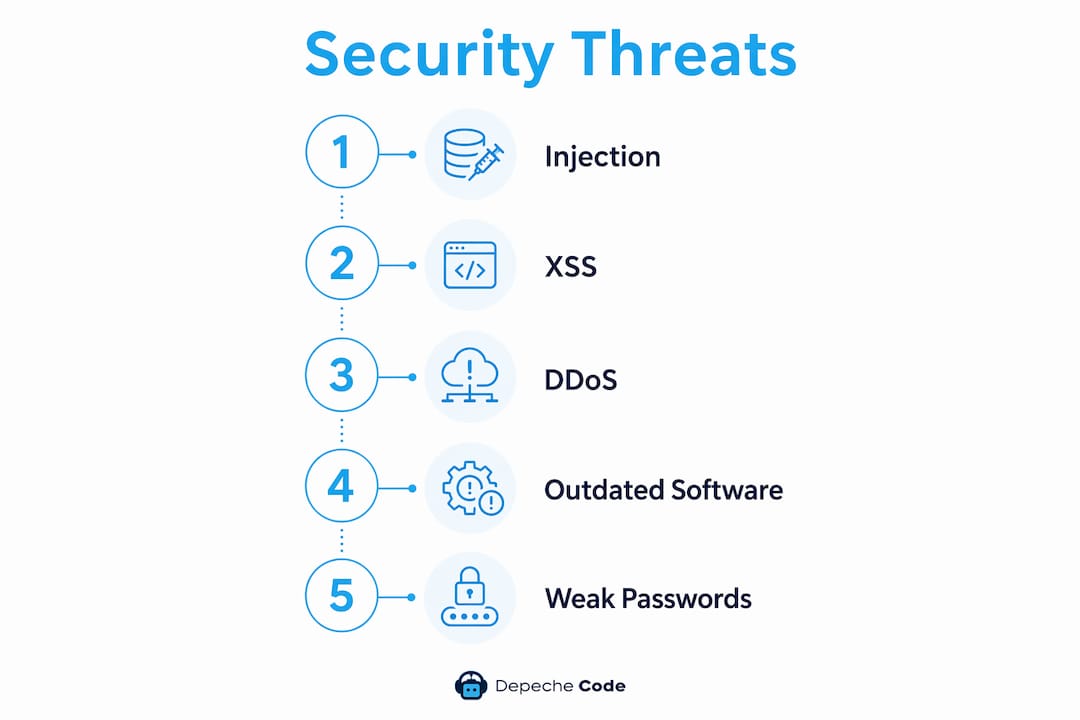
Most attacks exploit flaws introduced during the build phase, not discovered after. Understanding the threat catalog is the first step toward designing them out.
Threats that target build-phase weaknesses:
- SQL injection: unvalidated input lets attackers manipulate database queries directly
- Cross-site scripting (XSS): malicious scripts injected into pages run in other users’ browsers
- Credential stuffing: automated tools test stolen username/password pairs against your login pages
- Distributed denial-of-service (DDoS): traffic floods overwhelm web-facing components, taking services offline
- Malware injection: compromised plugins or unpatched components become entry points for malicious code
- Insecure direct object references: predictable URLs or IDs expose data that should require authorization
Injection attacks and XSS both stem from the same root cause: input that the application trusts without verifying. Building security in from the start protects against these attacks by treating all input as untrusted at the architecture level, not as an afterthought in a later sprint.
Neglecting these threats during build does not just create technical debt. It creates legal exposure, operational downtime, and the kind of headlines that cost clients.

How to embed security into every phase of development
Defining security requirements alongside functional specs at the planning stage is where the real work begins. A team that waits until QA to think about authentication flows will spend three times as long fixing what a ten-minute threat model would have caught in week one.
Practical steps for a security-first build:
- Write security requirements in the same document as functional requirements, before a single line of code
- Conduct threat modeling to identify trust boundaries and likely attack vectors for your specific architecture
- Implement the OWASP Top 10 Proactive Controls as a baseline coding standard
- Configure TLS, security headers, and least-privilege access from the first deployment, not the last
- Integrate automated security testing (static analysis, dependency scanning) into your CI/CD pipeline
- Segregate web server, application server, and database so a breach in one component does not cascade
- Validate and sanitize all input server-side, regardless of client-side controls already in place
- Use a security.txt file to give researchers a clear channel for responsible disclosure
Pro Tip: Security ownership should not sit with one person. Shared team responsibility for secure code embeds security into daily development culture rather than treating it as a gatekeeping function that slows releases.
Custom-built sites carry a structural advantage here. Fewer dependencies mean a smaller attack surface. Every third-party plugin or module you add is a potential entry point. Keeping the dependency list lean is itself a secure design choice.
No single layer suffices. TLS encrypts data in transit, but you also need web application firewalls, properly configured HTTP security headers, and session management controls working together. CISA calls this defense in depth: layered controls so that when one fails, the next one holds.
For a deeper look at how these principles apply to business websites specifically, the SMB security guide from Depechecode covers team-wide adoption in practical terms.
If you want to see how web design decisions translate directly into protection, Depechecode’s website design and development service integrates these controls from the first planning conversation, not the last review before launch.

Keeping your site secure after it goes live
Build-phase security is the foundation, but it is not the whole structure. Continuous monitoring, patching, and incident response are what keep that foundation from eroding over time.
The good news: a site built with security in mind is dramatically easier to maintain. Segregated components limit the scope of any patch. Clean input validation means fewer emergency fixes. Documented architecture means your team knows exactly what to update when a vulnerability surfaces.
Ongoing maintenance tasks that protect your site:
- Run automated vulnerability scans on a regular schedule, not just after incidents
- Review server and application logs for anomalous patterns like repeated failed logins or injection attempts
- Apply patches to your CMS, plugins, and underlying server software as soon as they are available
- Test and rotate backups so recovery is fast when something goes wrong
- Maintain an incident response plan with defined roles, so the team is not improvising during a breach
- Monitor for credential stuffing by tracking unusual login volumes and implementing rate limiting
- Revalidate third-party integrations after every major update, since vendor changes can introduce new exposure
The connection between build quality and maintenance burden is direct. Teams that integrate security into the SDLC from the start spend less time firefighting and more time building. That is not a soft benefit; it is a measurable reduction in remediation hours and incident response costs.
For Italian-market web projects, web agencies that prioritize early security integration follow the same principles: design the controls in, then maintain them systematically.
Key Takeaways
Security built into the initial website build prevents costly retrofits, reduces attack surface, and protects user data, compliance standing, and SEO rankings from day one.
| Point | Details |
|---|---|
| Build-phase security cuts costs | Retrofitting security after development is more expensive and leaves residual vulnerabilities. |
| Input validation is foundational | SQL injection and XSS both stem from unvalidated input; address this at the architecture level. |
| Defense in depth is required | TLS, security headers, WAFs, and session controls must work together, not in isolation. |
| Shared team ownership matters | Security embedded in daily development culture outperforms isolated gatekeeping every time. |
| Maintenance is easier with a secure build | Segregated components and documented architecture reduce the scope and cost of ongoing patching. |
FAQ
What is the most secure way to build a website?
Start with a threat model, define security requirements alongside functional specs, and implement controls like TLS, input validation, and least-privilege access from the first line of code. Automated security testing in your CI/CD pipeline catches vulnerabilities before they reach production.
What does a secure website always start with?
HTTPS is the baseline. Every secure website requires TLS encryption between the browser and server, which protects authentication data and sensitive information in transit.
What do hackers target most in website builds?
Unvalidated input is the most exploited weakness, enabling SQL injection and XSS attacks. Attackers also target outdated plugins, weak authentication flows, and misconfigured server components that were never hardened during the original build.
Why is retrofitting security after launch a problem?
Patching authentication flows and input validation after development costs significantly more time and money than building them in from the start, and it often leaves residual vulnerabilities that a clean build would have avoided entirely.