

TL;DR:
- Securing a business website involves implementing layered defenses such as SSL, MFA, and a web application firewall to prevent automated attacks. Regular updates, offsite backups, and quarterly audits are essential for maintaining ongoing protection against evolving threats. Many breaches occur due to assumptions that hosting providers or outdated plugins handle security, highlighting the need for proactive, comprehensive measures.
Website security is the practice of protecting your site’s data, code, and user information from unauthorized access, exploitation, and disruption. For business owners, a single breach can expose customer records, destroy search rankings, and trigger legal liability. The good news: five core actions block the majority of automated attacks that target business websites every day. This guide walks you through every step, from foundational prerequisites to ongoing monitoring, so you can protect your business website without needing a full-time security team.
How to secure a business website: prerequisites and tools
Before you apply any advanced protection, your site needs a solid foundation. These tools and settings are non-negotiable for any business operating online in 2026.
- SSL certificate and HTTPS. An SSL certificate encrypts data between your server and visitors. Without it, browsers flag your site as “Not Secure,” which kills both trust and conversions. Most hosting providers offer free SSL through Let’s Encrypt, and activation takes under ten minutes.
- CMS, plugin, and theme updates. WordPress, Joomla, and Drupal all release patches regularly. Outdated plugins are the most common entry point for attackers. Enable auto-updates for minor releases and review major updates within 48 hours of release.
- Security plugins. Tools like Wordfence and Sucuri add malware scanning, login protection, and firewall rules directly to your CMS. Wordfence blocks brute-force login attempts automatically; Sucuri offers a cloud-based firewall that filters traffic before it hits your server.
- Password managers. Reusing passwords across admin accounts is one of the fastest ways to lose control of your site. Tools like 1Password and Bitwarden generate and store unique, complex credentials for every account.
- Offsite backups. Automated backups with offsite storage protect your business even when a breach occurs. Services like BlogVault and UpdraftPlus push copies to Amazon S3 or Google Drive on a daily schedule.
Pro Tip: Set your backup schedule to run at least once every 24 hours and store a minimum of 30 days of restore points. If ransomware encrypts your site, you want a clean copy from before the infection.
Understanding how web design choices affect security from the start saves significant remediation costs later.

What steps actually strengthen your site against attacks?
Once your foundation is in place, these tactical steps close the most exploited attack vectors. Follow them in order, since each layer builds on the last.
-
Enable multi-factor authentication (MFA) on all admin accounts. Strong passwords combined with two-factor authentication reduce authentication-related breaches significantly. Use an authenticator app like Google Authenticator or Authy rather than SMS, which is vulnerable to SIM-swapping attacks.
-
Deploy a Web Application Firewall (WAF). WAFs like Cloudflare filter malicious traffic before it reaches your site, blocking injection attempts and distributed denial-of-service (DDoS) attacks. Cloudflare’s free tier handles most small business traffic volumes; their Pro plan adds advanced bot management.
-
Secure SSH access. Switch from password-based SSH login to key-based authentication. Disable root login entirely and restrict SSH access to specific IP addresses. This single change eliminates the most common server-level intrusion method.
-
Restrict admin access by IP and role. Whitelist only the IP addresses that need admin access. Assign the minimum necessary permissions to each user account. A content editor does not need database access, and a billing manager does not need plugin installation rights.
-
Sanitize and validate all user inputs. Strict input validation treating all user data as untrusted neutralizes common injection attacks, which remain a leading risk in 2026. Apply allow-list validation to every form field, URL parameter, and HTTP header your site accepts. Never rely on client-side validation alone.
-
Implement HTTP security headers. Content Security Policy (CSP) and HTTP Strict Transport Security (HSTS) prevent cross-site scripting (XSS) and force HTTPS connections respectively. Add these headers through your server configuration or a plugin like Headers & Footers by WPBeginner.
Pro Tip: Use Mozilla Observatory to scan your site’s security headers for free. It grades your configuration and lists exactly which headers are missing or misconfigured.
How to monitor and maintain your website security consistently
Deploying security tools once and forgetting them is not a strategy. Attackers update their methods constantly, and your defenses need to keep pace.
- Run regular vulnerability and malware scans. Wordfence and Sucuri both offer scheduled scans that check file integrity, detect injected code, and flag suspicious changes. Set scans to run daily and review alerts the same day they arrive.
- Apply critical patches within 24 to 48 hours. Critical security patches with CVE numbers should be applied within 24 to 48 hours to block automated bot exploitation. Bots scan for newly disclosed vulnerabilities within hours of a CVE publication, so speed matters more than convenience.
- Monitor server and application logs. Logs reveal failed login attempts, unusual file access patterns, and traffic spikes that signal an attack in progress. Tools like Loggly and Papertrail aggregate logs and send alerts when thresholds are exceeded.
- Schedule quarterly security audits. A quarterly review should cover user account permissions, installed plugins, exposed file directories, and SSL certificate expiration dates. Use automated tools like the SecureBin Exposure Checker to identify exposed sensitive files and configuration errors quickly.
The table below summarizes a practical maintenance schedule for business owners:
| Task | Frequency | Tool or Method |
|---|---|---|
| Malware and file integrity scan | Daily | Wordfence, Sucuri |
| Plugin and CMS updates | Within 48 hours of release | Auto-update or manual review |
| Offsite backup verification | Weekly | BlogVault, UpdraftPlus |
| Log review and alert check | Weekly | Loggly, Papertrail |
| Full security audit | Quarterly | SecureBin, manual checklist |
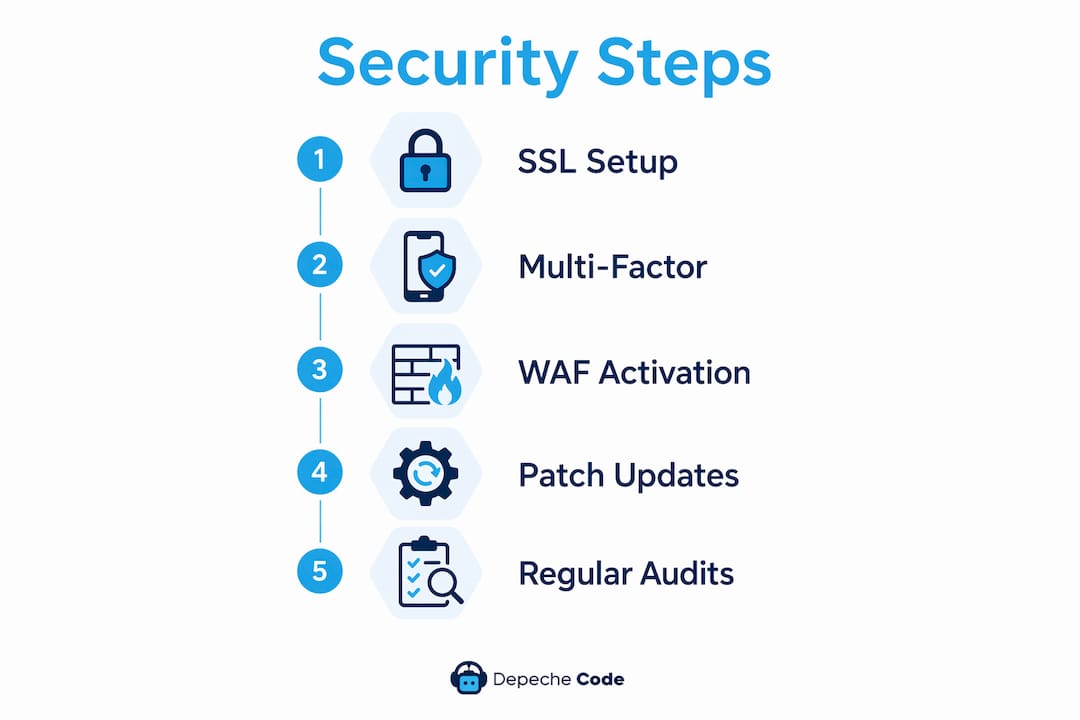
Pairing this schedule with a website maintenance plan removes the guesswork and keeps your defenses current without consuming your entire week.
Common website security mistakes that put businesses at risk
Most breaches are not the result of sophisticated attacks. They exploit predictable mistakes that business owners make repeatedly.
- Assuming your hosting provider handles everything. Hosting providers secure the infrastructure, but they cannot manage your plugins, admin accounts, or user permissions. Application-layer security is entirely your responsibility. This misunderstanding is the single most expensive assumption in small business web security.
- Weak or reused passwords without MFA. A password like “Admin2024!” is cracked in seconds by modern brute-force tools. Without MFA as a second layer, one compromised credential hands an attacker full control of your site.
- Neglecting plugin updates. Plugins with known vulnerabilities are cataloged in public databases like the WPScan Vulnerability Database. Attackers query these databases and target sites running outdated versions automatically.
- Exposing sensitive files. Leaving ".env
files,.gitdirectories, or database configuration files accessible via a browser URL is a critical error. A zero-trust mindset requires auditing for exposed sensitive files like.envor.git` directories, since they can reveal credentials and source code in seconds. - Ignoring security headers. Skipping CSP and HSTS leaves your site open to XSS attacks and protocol downgrade exploits. These headers take less than 30 minutes to configure and block entire categories of attacks at zero cost.
For a deeper look at how these principles apply to small business operations, the SMB security guide from Depechecode covers the leadership decisions that make or break a security program.
Key takeaways
Securing a business website requires layered defenses: SSL, MFA, a WAF, timely patching, and regular audits working together to block both automated and targeted attacks.
| Point | Details |
|---|---|
| Start with SSL and HTTPS | An SSL certificate is the minimum baseline; without it, every other measure is undermined. |
| MFA blocks most account takeovers | Adding an authenticator app to admin logins stops brute-force and credential-stuffing attacks. |
| WAFs filter attacks before they land | Cloudflare and similar tools block injection and DDoS traffic before it reaches your server. |
| Patch within 48 hours | Bots exploit newly disclosed CVEs within hours, so delayed updates are open invitations. |
| Audits catch what tools miss | Quarterly reviews of permissions, exposed files, and headers close gaps automated scans overlook. |
What I’ve learned from watching businesses get this wrong
I’ve reviewed dozens of compromised business websites over the years, and the pattern is almost always the same. The breach did not happen because the attacker was clever. It happened because the business owner assumed someone else was handling security, whether that was the hosting provider, the developer who built the site three years ago, or a plugin that hadn’t been updated since the last administration.
The shift that actually changes outcomes is moving from reactive to automated. Layering automated defenses against bot attacks reduces manual effort and vastly improves protection. When your WAF, auto-updates, and scheduled scans are running without your involvement, you stop being the weakest link in your own security chain.
What most guides skip is the zero-trust principle applied to your own team. I’ve seen breaches caused by a former employee’s admin account that was never deactivated, and by a contractor who was given full database access for a two-week project and never had it revoked. Quarterly permission audits are not paranoia. They are the most underrated item on any website security checklist.
The other thing I’d push back on is the idea that security and user experience are in conflict. A fast, well-configured WAF is invisible to legitimate users. MFA adds ten seconds to a login. HSTS makes your site load faster over HTTPS. The friction argument against security measures is almost always overstated, and the cost of a breach, in lost revenue, customer trust, and recovery time, is almost always understated.
— Donovan
Get a secure, professionally built website from Depechecode
Depechecode builds business websites in Orlando with security built into the architecture from day one, not bolted on afterward. Every project includes SSL configuration, security header setup, and a hardened CMS environment designed to resist the automated attacks that target small business sites daily. If your current site is running outdated plugins, missing critical headers, or lacks a reliable backup system, the risk compounds every week you wait. Explore Depechecode’s website design and development services to get a site that performs and protects. For businesses that need ongoing protection, the WordPress maintenance plans cover updates, monitoring, and backups on a managed schedule.
FAQ
What is the first step to secure a business website?
Installing an SSL certificate and enabling HTTPS is the foundational first step. It encrypts data in transit and is required by modern browsers before any other security measure makes sense.
How often should I update my website’s plugins and software?
Apply critical security patches within 24 to 48 hours of release. Automated bot attacks begin scanning for newly disclosed vulnerabilities within hours of a CVE publication.
Do I need a WAF if my hosting provider has a firewall?
Yes. Hosting firewalls protect server infrastructure, not your application layer. A WAF like Cloudflare filters malicious HTTP traffic targeting your specific site, including SQL injection and XSS attempts.
What is multi-factor authentication and why does it matter?
MFA requires a second verification step beyond a password, typically a time-based code from an app like Google Authenticator. It blocks the vast majority of credential-based attacks even when passwords are compromised.
How do I know if my website has been hacked?
Run a malware scan using Wordfence or Sucuri and check your server logs for unusual file changes or login attempts. Google Search Console also flags security issues and manual actions when it detects compromised content.